Facebook (Meta) SQL Interview Questions

Categories:
 Written by:
Tihomir Babic
Do you want to work at Meta? With the Meta interview questions and patterns we cover in this guide, your chances of landing that job look increasingly good.
Meta is in the data collection business. You and everybody else are on Meta’s social media products, with billions of interactions creating, ahem, quite a lot of data. Meta wants to analyze it, and this is where you come in.
They want analysts who can query user behavior, diagnose retention drops, and measure ad performance without hand-holding.
That’s why Meta’s SQL interviews go deeper than basic aggregations. That’s why the questions are always framed as product questions. Instead of syntax-testing exercises, the interviewers treat it as a product thinking signal.
In this guide, I’ll break down what Meta SQL interviews actually look like in 2026, explain the exact SQL concepts you need to master, and walk through five core question types with full solutions.
What SQL Interviews at Meta Look Like Today
Meta’s SQL interviews have evolved significantly in recent years. The days of “write a simple GROUP BY” questions are largely gone. (If there ever were such days. Maybe in the early, dorm-phase Facebook interviews.)
Today, it’s two to five SQL questions, depending on the role – data analyst, data scientist, or data engineer – each increasing in complexity.
What’s the Interview Format?
The coding round(s) are mainly conducted in a shared coding environment – CoderPad – or, sometimes, with a whiteboard component.
The goal is to watch you code live. In particular, whether you can walk the interviewer through your coding logic and explain the tradeoffs. You’ll also sometimes be asked to optimize a query you’ve written.
What They’re Actually Testing
Meta interviewers don’t care about perfect syntax that much, but rather about how you decompose a problem.
In other words, they simulate what the actual work will be all about: translating a vague product question – “are users becoming less engaged?” – into a concrete SQL query.
Typical Question Themes
Meta’s SQL questions almost always revolve around product analytics scenarios. These are the themes that come up repeatedly.
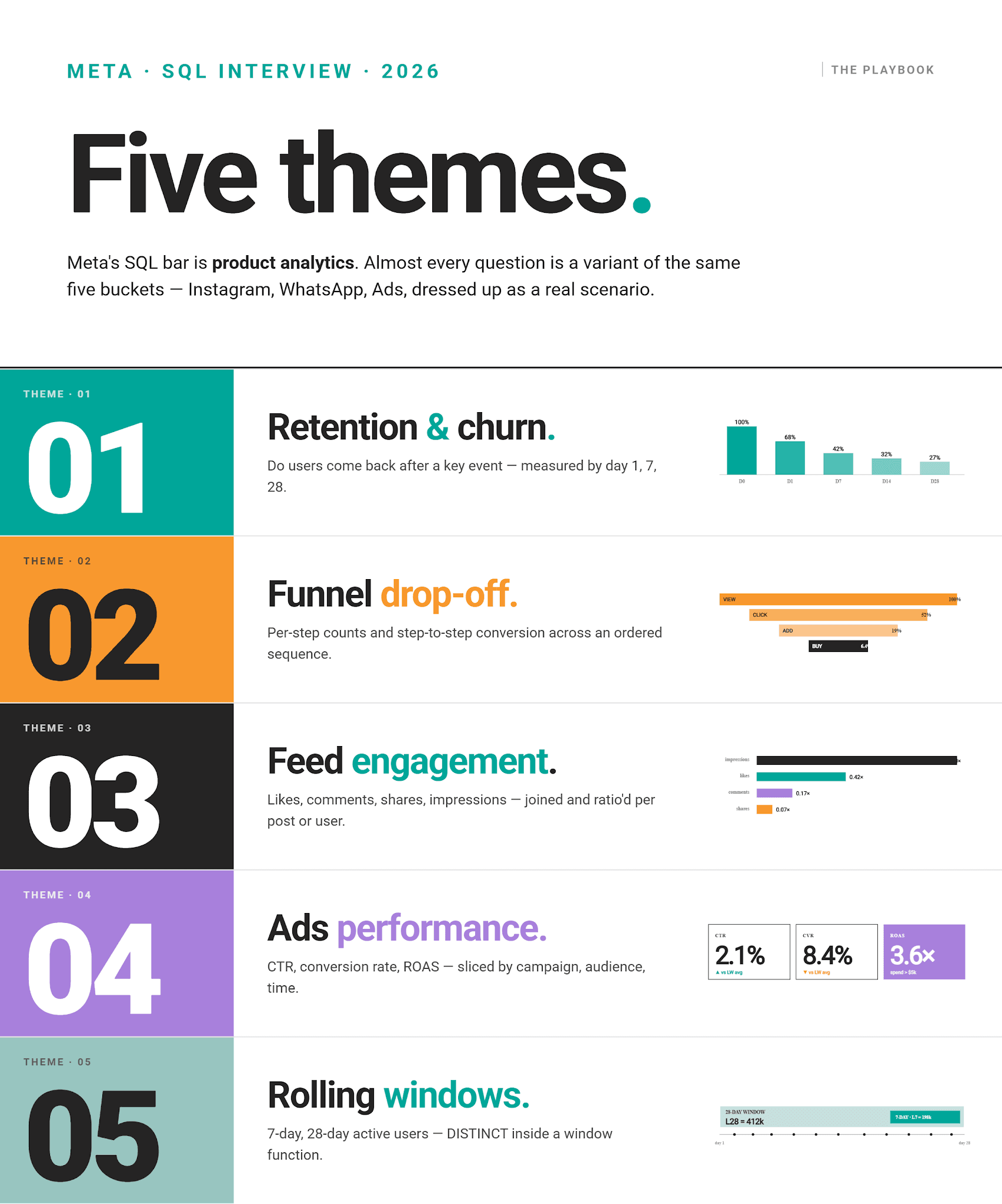
Difficulty Level
Don’t expect easy questions, except (maybe!) in the early screening round.
Beyond that, all questions will range from medium to hard.
Example Schema Used in Meta SQL Interviews
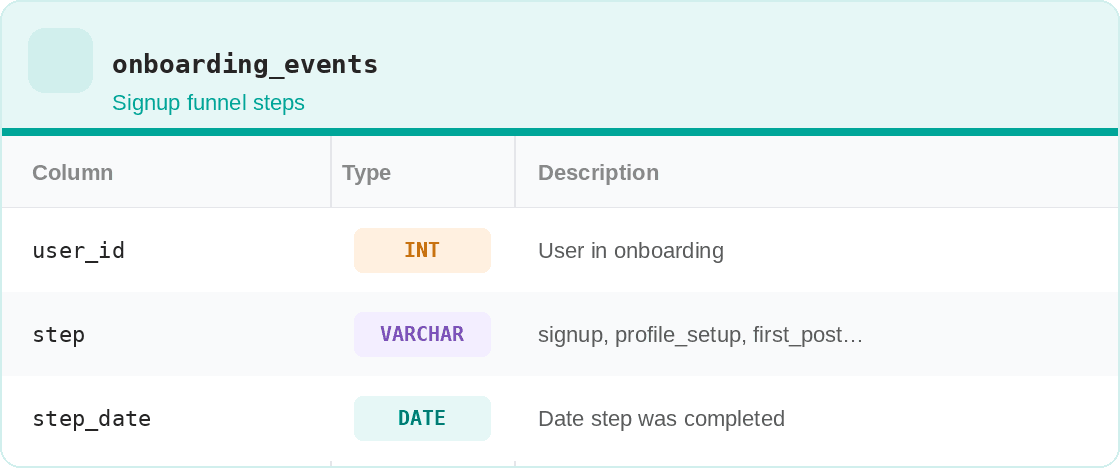
As Meta’s SQL questions revolve around user behavior data, there are common tables that you’ll encounter in the interviews.
Here are example tables for the five typical Meta questions. We’ll use those tables to explain commonly tested SQL concepts, then we’ll move on to actual interview questions and real data.
Table #1: user_events
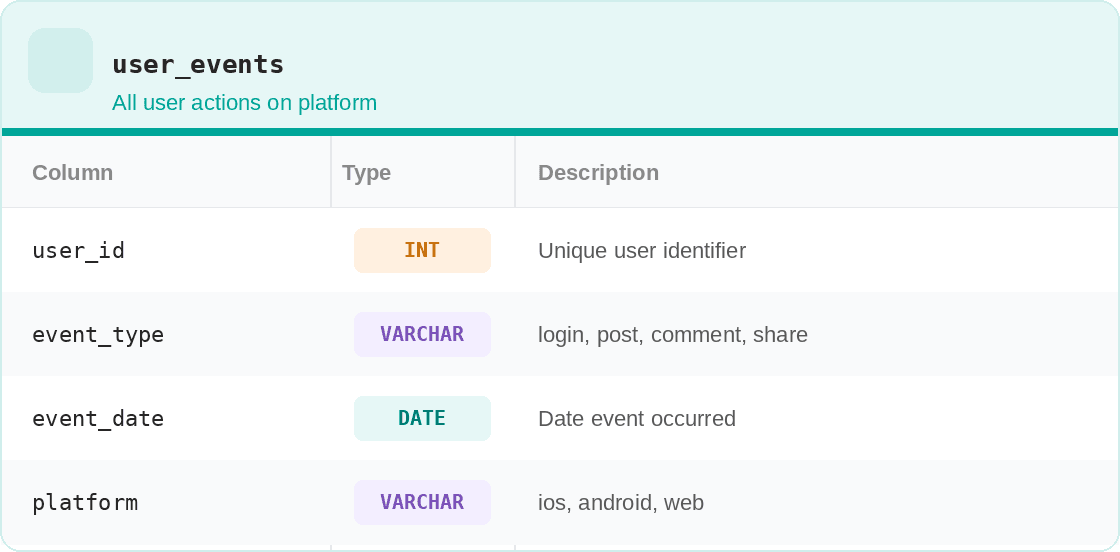
Table #2: feed_interactions
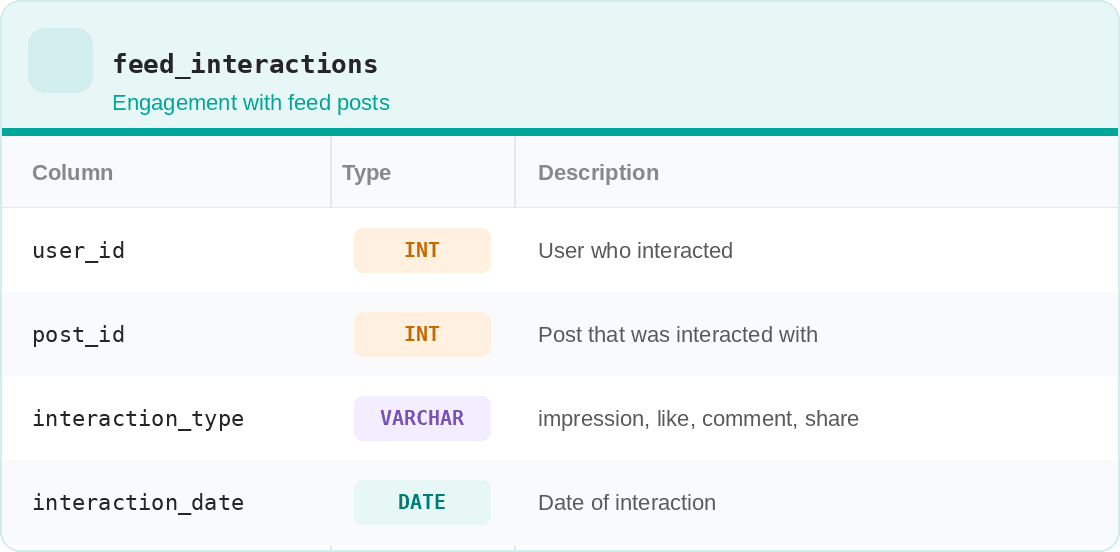
Table #3: ad_impressions
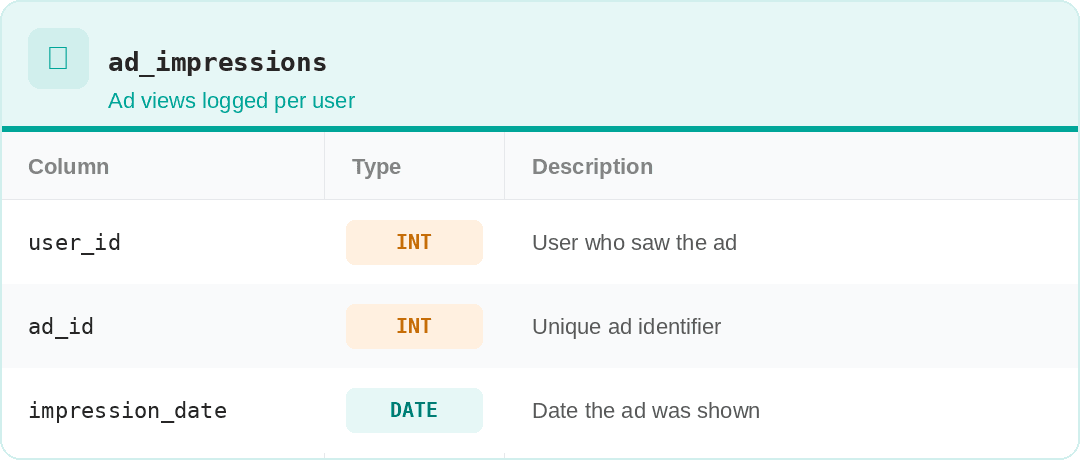
Table #4: ad_clicks
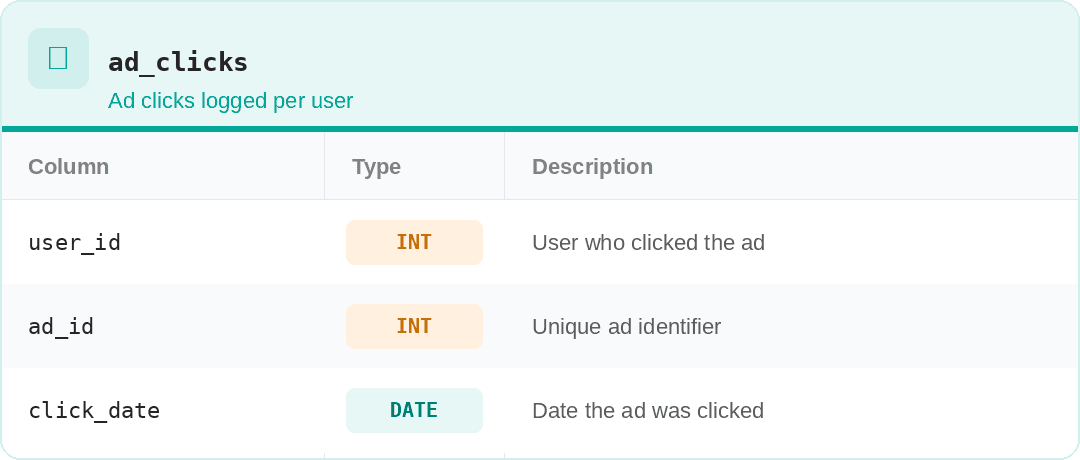
Table #5: onboarding_events
SQL Concepts Meta Tests
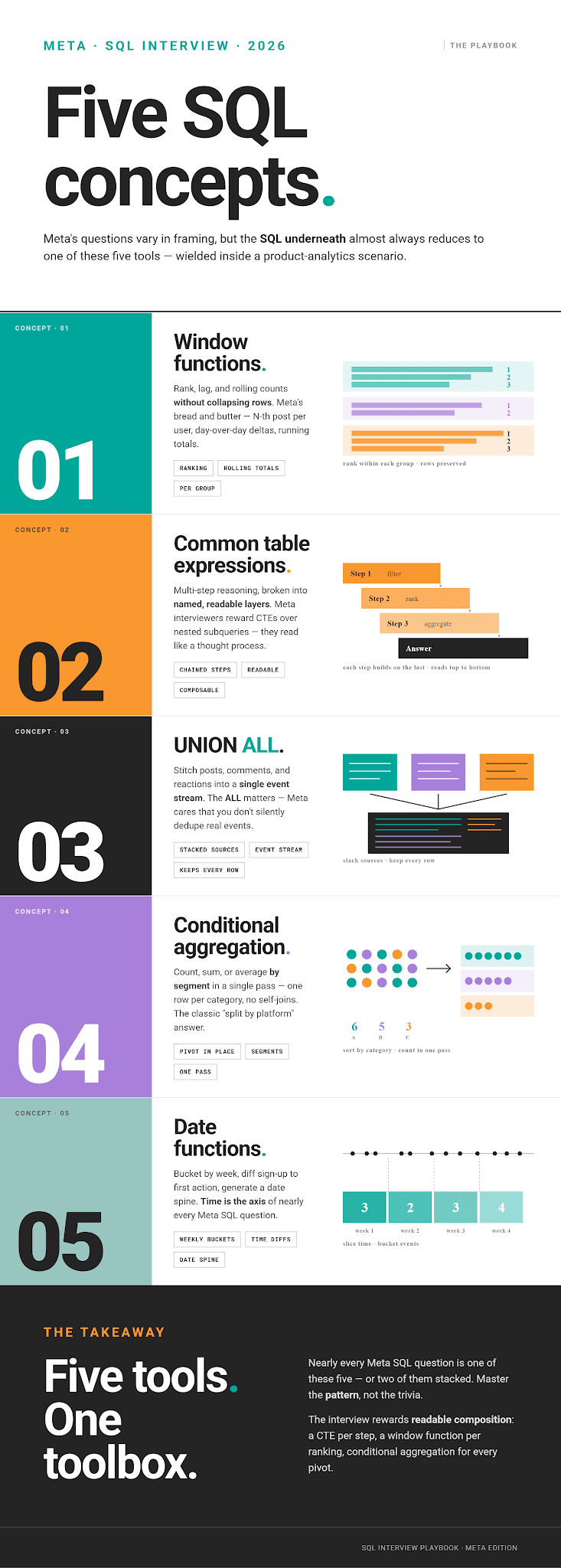
Meta’s interviews focus on specific SQL concepts, always within a product analytics context.
SQL Concept #1: Window Functions
SQL window functions perform calculations on a set of rows related to the current row, called a window (hence the name). They do so without collapsing the result set, unlike GROUP BY.
In Meta interviews, you’ll often find window functions required for:
- rankings
- running totals
- period-over-period comparisons
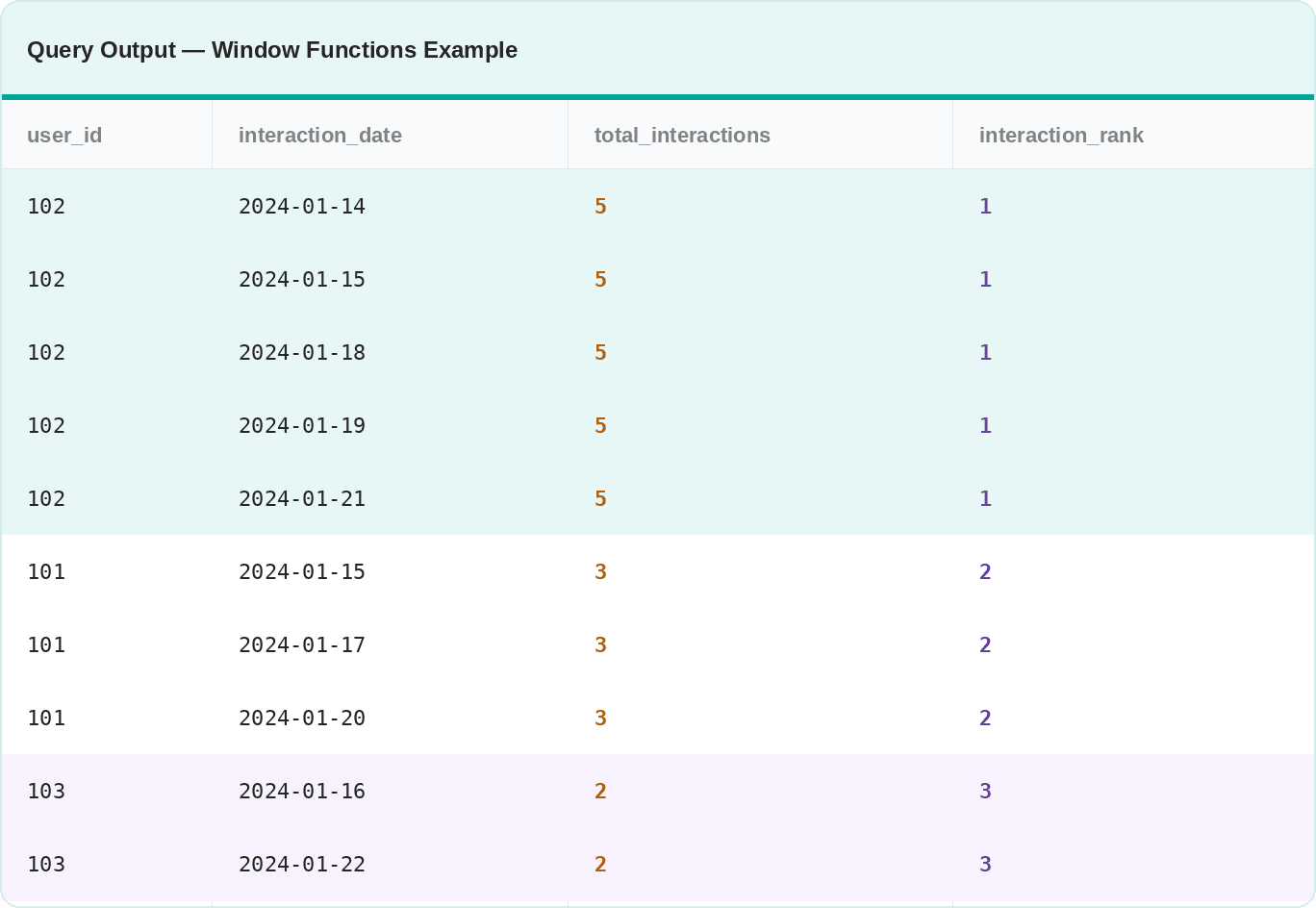
Example: The query below ranks users by the total number of interactions in their feeds while keeping the individual row detail level.
In COUNT() OVER(), the PARTITION BY clause splits the data by users. The ORDER BY clause inside RANK() sorts the data by total interactions; in this case, it’s in descending order.
SELECT user_id,
       interaction_date,
       COUNT(*) OVER (PARTITION BY user_id) AS total_interactions,
       RANK() OVER (ORDER BY COUNT(*) OVER (PARTITION BY user_id) DESC) AS interaction_rank
FROM feed_interactions;
Here’s an example output.
SQL Concept #2: Common Table Expressions (CTEs)
SQL CTEs are named temporary results that are used within a query. They are used primarily to keep complex queries neatly structured, easily readable, and testable in layers.
That’s exactly why Meta interviewers love seeing you use CTEs. It shows you can break down a multi-step problem systematically.
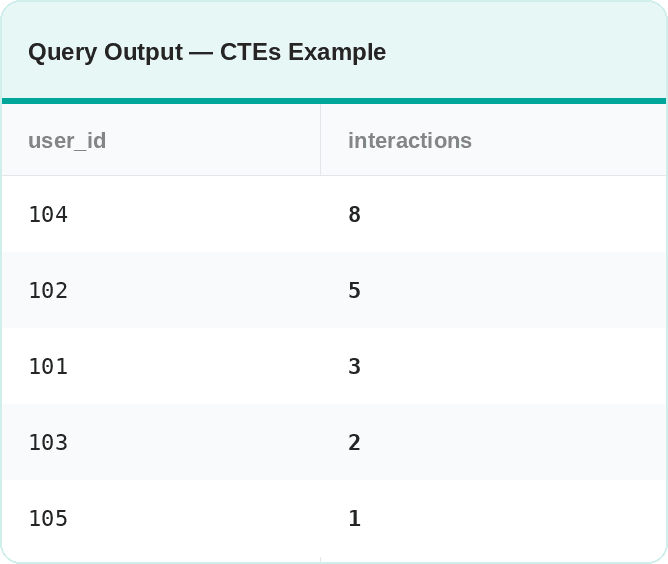
Example: The query first isolates users who logged in at least once. Then, it counts their downstream feed interactions.
WITH active_users AS (
    SELECT DISTINCT user_id
    FROM user_events
    WHERE event_type = 'login'
      AND event_date >= CURRENT_DATE - INTERVAL '30 days'
)

SELECT
    fi.user_id,
    COUNT(*) AS interactions
FROM feed_interactions fi
INNER JOIN active_users au ON fi.user_id = au.user_id
GROUP BY fi.user_id
Here’s an example output.
SQL Concept #3: UNION ALL
With UNION ALL, you can vertically combine outputs from multiple queries into a single result set, while keeping duplicate rows. It’s a go-to tool when the same event type shows in multiple tables or when you need to stack data from symmetric sources. You can think about it as a vertical JOIN.
This pattern is commonly tested in interviews, as Meta tends to store high-volume events, such as ad impressions, separately from lower-volume ones, such as clicks. That data sometimes needs to be combined. The easiest way to do so is to use UNION ALL and combine two tables into one. Without it, you’d need two separate queries and manual reconciliation.
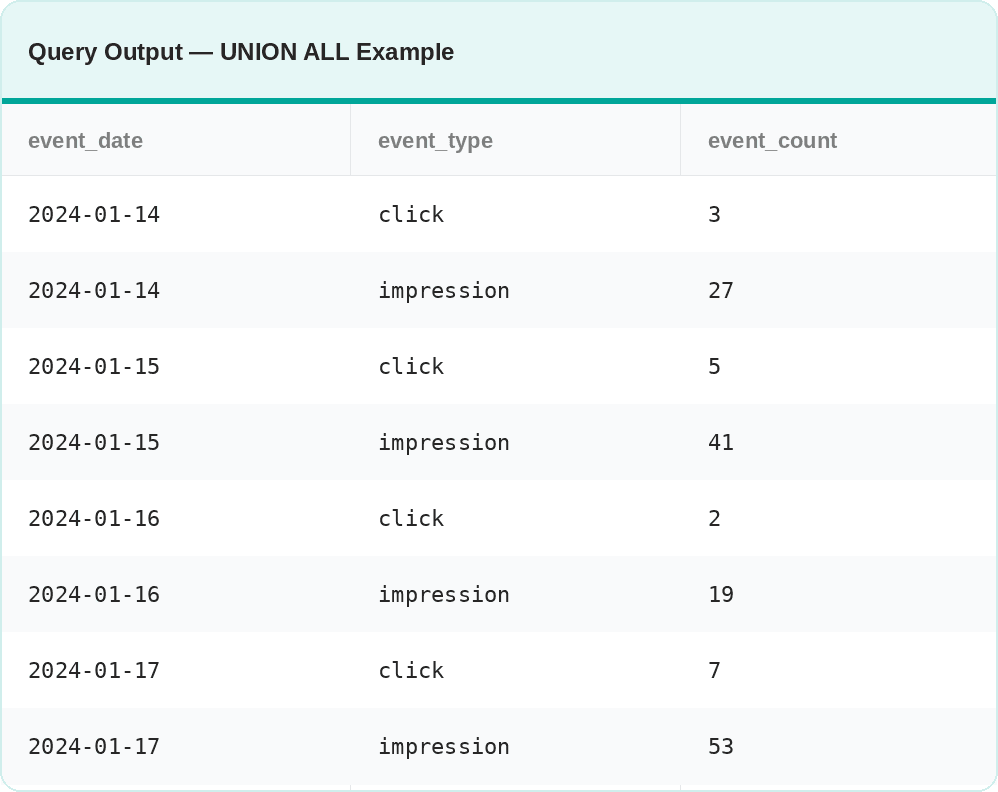
Example: The query uses UNION ALL to combine the data from ad_impressions and ad_clicks. In all queries you combine, there has to be an equal number of columns, and they have to be of the same data type.
SELECT event_date,
       event_type,
       COUNT(*) AS event_count
FROM (
    SELECT impression_date AS event_date, 'impression' AS event_type
    FROM ad_impressions
    UNION ALL
    SELECT click_date AS event_date, 'click' AS event_type
    FROM ad_clicks
) combined
GROUP BY event_date, event_type
ORDER BY event_date;
Here’s an example output.
SQL Concept #4: Conditional Aggregation
Conditional aggregation is when you use CASE WHEN inside aggregate functions to transform row-level data into column-level summaries. This is a simple alternative to multiple subqueries or joins.
This pattern is commonly used in Meta’s health dashboards, counting different event types in a single pass.
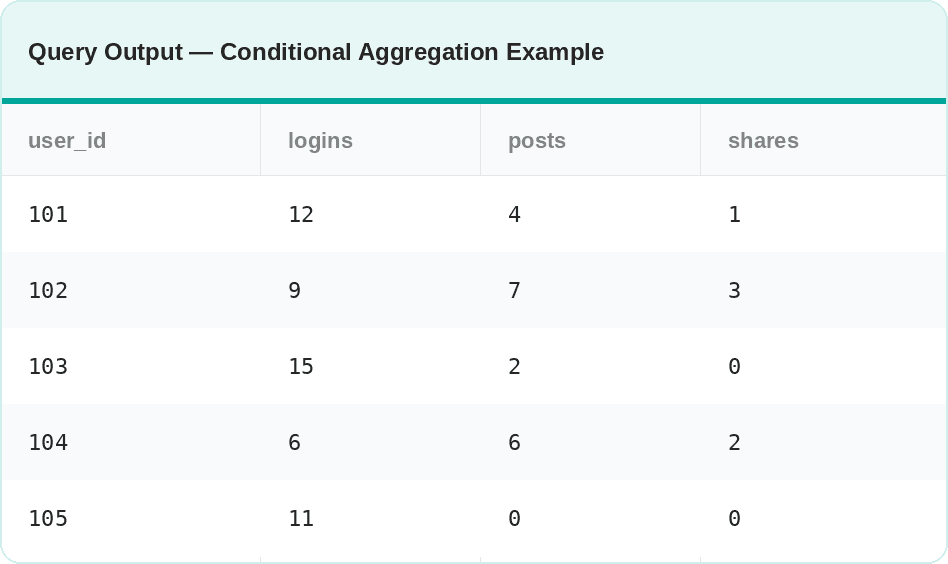
Example: This code counts logins, posts, and shares per user in one scan of a table, rather than three separate queries.
SELECT user_id,
       COUNT(CASE WHEN event_type = 'login' THEN 1 END)   AS logins,
       COUNT(CASE WHEN event_type = 'post' THEN 1 END)    AS posts,
       COUNT(CASE WHEN event_type = 'share' THEN 1 END)   AS shares
FROM user_events
GROUP BY user_id;
Here’s an example output.
SQL Concept #5: Date Functions
Date manipulation is unavoidable in Meta interviews.
Nearly every product analytics question involves at least one of these patterns:
- Truncating dates to a period
- Extracting a specific part
- Calculating the interval between two dates
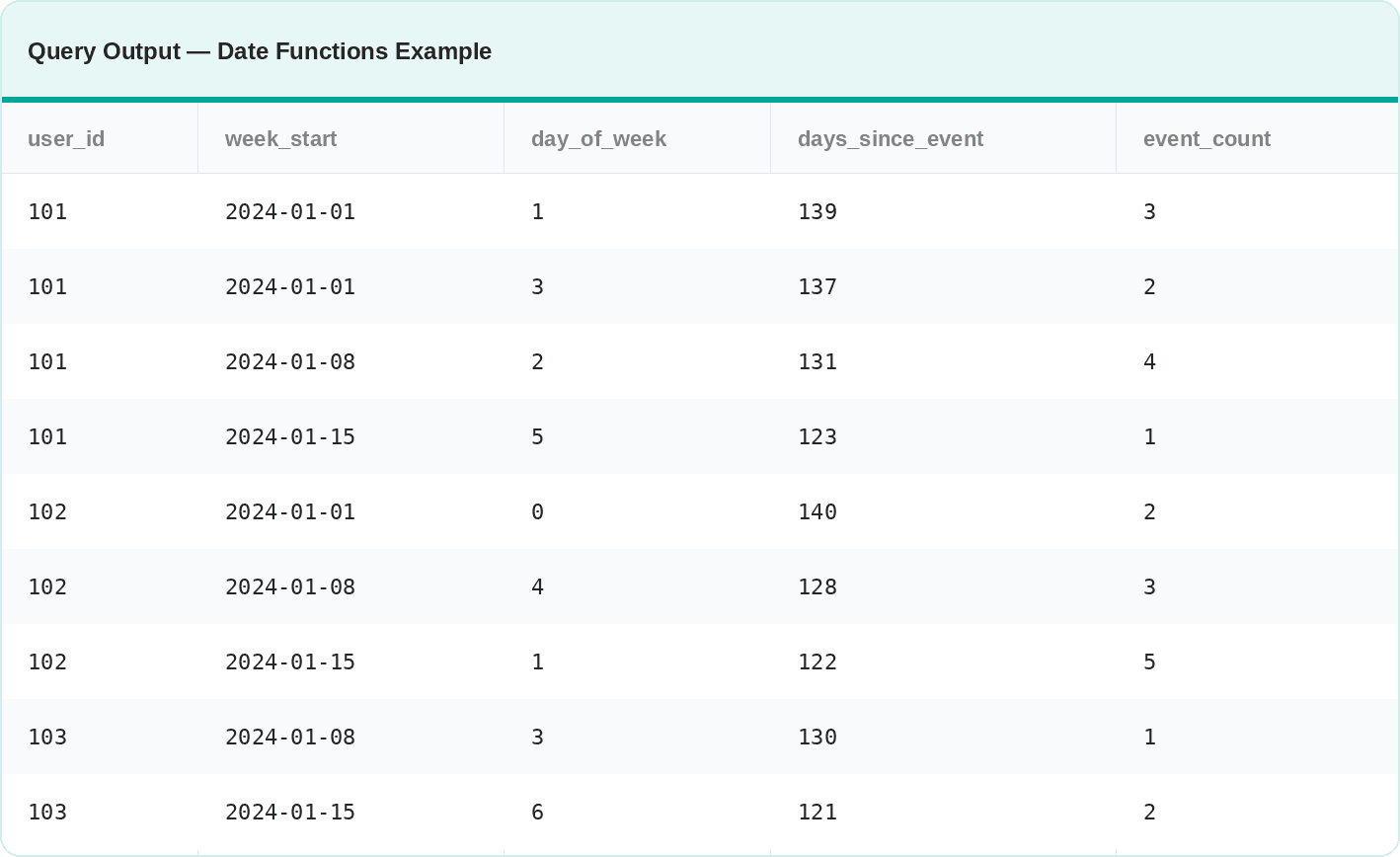
Example: I use all three of the above patterns in the query: truncating event_date to the week level to group activity by week (DATE_TRUNC), extracting the day of the week to spot usage patterns (EXTRACT(DOW…)), and computing the number of days between each event using CURRENT_DATE.
SELECT
    user_id,
    DATE_TRUNC('week', event_date)                        AS week_start,
    EXTRACT(DOW FROM event_date)                          AS day_of_week,
    CURRENT_DATE - event_date                             AS days_since_event,
    COUNT(*)                                              AS event_count
FROM user_events
WHERE event_type = 'login'
  AND event_date >= DATE_TRUNC('month', CURRENT_DATE) - INTERVAL '3 months'
GROUP BY user_id, DATE_TRUNC('week', event_date), EXTRACT(DOW FROM event_date), event_date
ORDER BY user_id, week_start;
Here’s an example output.
Meta SQL Interview Questions
Now, it’s time to get real. This section is all about consolidating the five Meta interview themes and the five SQL concepts into real interview skills, using actual Meta interview questions.
Interview Question #1: Retention Rate
In this interview question, your task is to calculate the monthly user retention rate for each account_id in December 2020 and January 2021. You should include the account_id and the retention rate. If no users are retained in December 2020, set the retention rate to 0.
Retention Rate
Last Updated: July 2021
A subscription platform wants to measure how well it retains users on each account from one month to the next. Each row in the dataset represents a user's activity on a specific date for a particular account.
Calculate the monthly retention rate for users for each account for December 2020 and January 2021. The retention rate is defined as the percentage of users active in a given month who have activity in any future month. A user is considered retained for December 2020 if they have activity in December 2020 and any subsequent month (e.g., January 2021 or later). Similarly, a user is retained for January 2021 if they have activity in January 2021 and any later month (e.g., February 2021 or later).
Output each account and the ratio of the retention rate in January 2021 to the retention rate in December 2020. If there are no users retained in December 2020, set the ratio to 0 for that account.
Dataset
How to Think About It
Before writing a single line of SQL, note what retention means in this context: a user is only retained if they came back in a future month. (In case the question is not clear on that, ask the interviewer what retention means or explicitly define it yourself.) In other words, the question is really “of the users active in December, how many showed up again?”
Thinking about the problem in product terms immediately tells you the structure of the query: identify each month’s active users, then check whether they have any future activity.
Solution Walkthrough
Let’s go through the solution one CTE at a time.
1. CTE: Finding users’ latest activity date
If the latest date is still in December, that means the user never came back. Use SQL MAX() to find that date.
WITH max_dates AS (
    SELECT user_id,
           account_id,
           MAX(record_date) AS max_date
    FROM sf_events
    GROUP BY user_id, account_id
),
2. CTE: Finding users who were active in December 2020
You should now identify unique users, then keep only those who were active in December 2020. Get the month from record_date by using DATE_TRUNC().
dec_2020 AS (
    SELECT DISTINCT account_id,
                    user_id
    FROM sf_events
    WHERE DATE_TRUNC('MONTH', record_date) = '2020-12-01'
),
3. CTE: Finding users who were active in January 2021
Now, do the same for the January 2021 users. The approach is the same as for the December 2020 users.
jan_2021 AS (
    SELECT DISTINCT account_id,
                    user_id
    FROM sf_events
    WHERE DATE_TRUNC('MONTH', record_date) = '2021-01-01'
),
4. CTE: Calculating the December 2020 cohort retention rate
The next step is to join the dec_2020 and max_dates CTEs and calculate the retention rate for the users active in December 2020.
How? Use conditional aggregation. In CASE WHEN, identify the users who were active after '2020-12-31', then count their number. Divide that by the total number of users in December 2020.
dec_cohort_retention AS (
    SELECT d.account_id,
           COUNT(DISTINCT CASE
            WHEN m.max_date > '2020-12-31' THEN d.user_id
           END) * 1.0 / COUNT(DISTINCT d.user_id) AS retention_dec
    FROM dec_2020 AS d
    INNER JOIN max_dates AS m
        ON d.user_id = m.user_id AND d.account_id = m.account_id
    GROUP BY d.account_id
),
5. CTE: Calculating the January 2021 cohort retention rate
Repeat the same calculation for the January 2021 cohort.
jan_cohort_retention AS (
    SELECT j.account_id,
           COUNT(DISTINCT CASE
            WHEN m.max_date > '2021-01-31' THEN j.user_id
        END) * 1.0 / COUNT(DISTINCT j.user_id) AS retention_jan
    FROM jan_2021 AS j
    INNER JOIN max_dates AS m
        ON j.user_id = m.user_id AND j.account_id = m.account_id
    GROUP BY j.account_id
)
6. Calculating the retention rate ratio
In the final SELECT, you need to divide the January 2021 retention rate by the December 2020 retention rate to get the required ratio.
Use COALESCE() to make sure that the ratio is 0 if there are no users retained from December 2020.
This is the full code when we put everything together.
Here’s the output.
| account_id | retention |
|---|---|
| A1 | 1 |
| A2 | 1 |
| A3 | 0 |
Mistakes to Watch Out For
If there are accounts with 0 active users, they won’t appear in dec_cohort_retention, so they’ll be omitted from the final output, too. This is not necessarily a mistake, but depends on the business questions.
When you’re in the actual interview, ask the interviewer what should be done for such an edge case.
Alternative Approach
You could use LAG() or LEAD() window functions instead of max_date to detect the month-over-month presence. That would actually be a recommended approach when you need to track retention across many consecutive months rather than just two.
For this specific example, where comparison is fixed at December vs January, the max_date CTE approach is simpler and more direct.
Interview Question #2: Funnel Analysis
Here, Meta wants you to calculate the average time it takes users to complete each feature's steps.
Average Time Between Steps
Facebook wants to understand the average time users take to perform certain activities in a feature. User activity is captured in the column step_reached.
Calculate the average time it takes for users to progress through the steps of each feature. Your approach should first calculate the average time it takes for each user to progress through their steps within the feature. Then, calculate the feature's average progression time by taking the average of these user-level averages. Ignore features where no user has more than one step.
Output the feature ID and the average progression time in seconds.
Dataset
How to Think About It
This is a funnel velocity question. Meta isn’t interested only in whether users complete steps, but also in how quickly they do so.
Slow progression between steps indicates friction, which could lead to product decisions, such as simplifying or reordering them.
The LAG() window function is a perfect fit for this problem, because you need to compare the step with the previous one.
Be aware that you need to partition data by both feature_id and user_id; otherwise, you’d bleed timestamps across different users or features.
Also, you need to drop each user’s first step, which has no previous step to compare with. Not doing so produces NULLs in the elapsed time calculation, which would distort the average.
The question asks you to first calculate each user's average progression time through the steps within a feature. Then, those averages will be used to calculate the feature-level average. What would happen if you calculate the average directly at the feature level? If there’s a user with many steps, they would have a disproportionate influence on the feature average.
Solution Walkthrough
Here’s how to pour that thinking into code.
1. lag_cte CTE: Get the time of the previous step
Use the LAG() window function to fetch the previous step, and partition by feature ID and user ID to get the time between each step for each user and feature. Make sure that you sort the data within partitions by step_reached in ascending order, so it’s sorted from the first to the last step reached. Otherwise, the calculation won’t make sense.
WITH lag_cte AS (
    SELECT feature_id,
           user_id,
           timestamp,
           LAG(timestamp, 1) OVER (PARTITION BY feature_id, user_id ORDER BY step_reached ASC
           ) AS prev_timestamp
    FROM facebook_product_features_realizations
),
2. time_difference CTE: Calculating the differences between steps
Calculate the difference between each step within a feature for each user by subtracting the previous step’s time from the current step’s time.
Then, use EXTRACT() and EPOCH to get that difference in seconds.
Include only steps where the previous step exists, i.e., IS NOT NULL.
time_difference AS (
    SELECT feature_id,
           user_id,
           EXTRACT(EPOCH FROM timestamp - prev_timestamp) AS elapsed_time
    FROM lag_cte
    WHERE prev_timestamp IS NOT NULL
),
3. avg_time_per_user CTE: Calculating the average time per user
Use the AVG() to get the average time between steps per user and each feature they used.
avg_time_per_user AS (
    SELECT feature_id,
           user_id,
           AVG(elapsed_time) AS avg_elapsed_time
    FROM time_difference
    GROUP BY feature_id, user_id
)
4. Calculating the average time between steps for every feature
Again, use AVG(), but this time on the feature level and reference the avg_elapsed_time column from the previous CTE.
Here’s the full code.
The output shows only feature 0 and its average time between steps.
| feature_id | avg_time |
|---|---|
| 0 | 200 |
Mistakes to Watch Out For
Please note that the EXTRACT() function is PostgreSQL-specific. MySQL uses TIMESTAMPDIFF, SQL Server uses DATEDIFF, BigQuery uses TIMESTAMP_DIFF, and Oracle uses (timestamp2 - timestamp1) * 86400 to get seconds.
Alternative Approach
You could try the inverted approach – looking at the next step, rather than previous – by using LEAD() instead of LAG().
Both approaches are valid, and both produce the same result.
Interview Question #3: Feed Engagement
Here’s the feed engagement question. You’re tasked to calculate the total number of likes from friends for each date that falls on a Friday.
A like should be counted only if the user who liked the post is a friend of the user who made the post, and the like occurred on or after the post was created.
Friday's Likes Count
Last Updated: January 2024
You have access to Facebook’s database, which contains tables related to user interactions. Your task is to calculate the total number of likes from friends for each date that falls on a Friday.
A like should only be counted if the user who liked the post is a friend of the user who made the post, and the like occurred on or after the post was created.
The output should contain two different columns: 'date' and 'likes'.
Dataset
How to Think About It
This is a social graph question. Meta’s feed is built on friendship connections, so this question aims to measure genuine engagement rather than passive reactions from strangers.
Friendships are bidirectional, e.g., A is a friend of B, but B is also a friend of A. In datasets, these relationships can be stored in two ways:
- bidirectionally – the table shows both (A, B) and (B, A)
- non-bidirectionally – the table shows either (A, B) or (B, A)
The friendships table we’re given is a mess; it’s inconsistently bidirectional.
In the actual interview, you have to pay attention to this and clarify with the interviewer how the dataset stores friendships.
With our dataset, you’ll have to first use DISTINCT to remove any duplicates, then use UNION ALL to expand friend pairs in both directions. That way you’ll capture every friendship.
Another thing worth noting is that there’s a possible data quality issue. The question specifies that a like must occur on or after the post's creation. That constraint exists because event logs can contain out-of-order records. Not excluding them would inflate the like count.
Solution Walkthrough
Here’s what each part of the code does. Again, I recommend using CTE to structure the code cleanly.
1. friendships_clean CTE: Deduplicating friendships
Use DISTINCT in the CTE to create a list of unique bidirectional friendships.
WITH friendships_clean AS
  (SELECT DISTINCT user_name1,
                   user_name2
   FROM friendships),
2. friendships_expanded CTE: Expanding friendships in both directions
Use UNION ALL to expand friendships, i.e., so both (A, B) and (B, A) exist.
friendships_expanded AS
  (SELECT user_name1,
          user_name2
   FROM friendships_clean
   UNION ALL SELECT user_name2 AS user_name1,
                    user_name1 AS user_name2
   FROM friendships_clean),
3. likes_posts_joined CTE: Joining likes and posts
In this CTE, join likes and user_posts, and keep only those likes that occurred on or after the post was created.
likes_posts_joined AS
  (SELECT l.user_name,
          l.post_id,
          l.date_liked,
          p.user_name AS poster_name,
          p.date_posted
   FROM likes l
   JOIN user_posts p ON l.post_id = p.post_id
   WHERE l.date_liked IS NOT NULL
     AND l.date_liked >= p.date_posted
),
4. friends_likes CTE: Keeping only likes from friends
Next, join the previous two CTEs to keep only likes from friends for each user.
friends_likes AS
  (SELECT lp.user_name,
          lp.post_id,
          lp.date_liked,
          lp.poster_name
   FROM likes_posts_joined lp
   JOIN friendships_expanded fe ON lp.user_name = fe.user_name1
   AND lp.poster_name = fe.user_name2),
5. friday_likes CTE: Filtering likes that happened on Friday
Use EXTRACT to get the day of the week (DOW), and keep only those likes that happened on the fifth day, i.e., Friday.
friday_likes AS
  (SELECT post_id,
          date_liked
   FROM friends_likes
   WHERE EXTRACT(DOW FROM date_liked) = 5)
6. Grouping by date and counting likes
In the final SELECT, select the required columns and use COUNT() to get the number of likes by date.
This is the final code.
Here’s the output.
| date | likes |
|---|---|
| 2024-01-05 | 1 |
| 2024-01-19 | 1 |
Mistakes to Watch Out For
Using UNION ALL without the prior DISTINCT step on an inconsistently bidirectional table would cause some friendships to appear twice. That, in turn, leads to double-counting likes for those friend pairs.
This is a silent error that is very hard to notice without knowing the underlying data distribution. You should clarify this with the interviewer and/or safeguard against duplicates, the way I showed you in the code above.
Alternative Approach
Since the table is incosistenly bidirectional, you could use UNION instead of UNION ALL. This deduplicates the data after stacking them vertically, so there’s no need for the prior deduplication CTE with DISTINCT.
WITH friendships_expanded AS (
    SELECT user_name1, user_name2
    FROM friendships
    UNION
    SELECT user_name2 AS user_name1,
           user_name1 AS user_name2
    FROM friendships
),
Interview Question #4: Ads Click-Through Rate (CTR)
To solve this question, you need to calculate two percentages.
The first one is the percentage of records for which a search result was clicked on in the top 3 positions; i.e., the clicked-on percentage.
The other one is the non-clicked-on percentage, which is about search results that were not clicked on in the top 3 positions.
Both percentages are calculated relative to the total number of search results and should be output in one row, side by side.
Clicked Vs Non-Clicked Search Results
Last Updated: December 2024
The question asks you to calculate two percentages based on search result records. For the first percentage, find the percentage of records where a search result was clicked on in the top 3 positions. Records that were clicked will have clicked = 1. Use the search_results_position to find the position of the search result. For the second percentage: find the percentage of records that were not clicked on in the top 3 positions. Both percentages are calculated with respect to the total number of search result records and should be output in the same row as two columns.
Dataset
How to Think About It
CTR questions are a crucial part of the interview. Not suprising, as ad revenue is Meta’s core business.
The point of this question is to find out whether users are clicking on the search results they get. If the click rate is low for the top-3 results, this could mean the ranking algorithm needs fine-tuning, as it doesn’t serve relevant results.
Solution Walkthrough
The calculation logic is outlined in the question: total search results -> clicked count -> not-clicked count -> ratio.
This clean structure again calls for the use of CTES.
1. total_count CTE: Calculating total records
Calculate the total number of search records with COUNT(*).
WITH total_count AS (
    SELECT COUNT(*) AS total_rows FROM fb_search_events
),
2. top_3_clicked_count CTE: Calculating clicked results in the top 3 positions
Now use the same approach, but limit the count to results in the top 3 positions that are clicked, i.e., WHERE clicked = 1 AND search_results_position <= 3.
top_3_clicked_count AS (
    SELECT COUNT(*) AS top_3_clicked_rows
    FROM fb_search_events
    WHERE clicked = 1 AND search_results_position <= 3
),
3. top_3_not_clicked_count CTE: Calculating non-clicked results in the top 3 positions
This CTE’s logic is exactly the same as in the previous one. The only change is in the WHERE clause, i.e., clicked = 0.
top_3_not_clicked_count AS (
    SELECT COUNT(*) AS top_3_not_clicked_rows
    FROM fb_search_events
    WHERE clicked = 0 AND search_results_position <= 3
)
4. Calculating percentages
Now, tie everything together with a SELECT that calculates the percentages. Do that by dividing the top_3_clicked_count and top_3_not_clicked_count outputs by the total_count output.
The output should be a percentage, so it should be multiplied by 100, right? But it’s also an integer division; you should convert it to a decimal number so as not to lose the calculation precision. You can perform those two small transformations as two separate steps if you want. Or you can use a simple trick: multiply by 100.0 to get both transformations in one go.
Here’s the final code.
This is the output.
| top_3_clicked | top_3_notclicked |
|---|---|
| 33.33 | 25.33 |
Alternative Approach
Another elegant way to solve this problem is to replace CTEs with conditional aggregations.
SELECT COUNT(CASE
                 WHEN clicked = 1 AND search_results_position <= 3
     THEN 1
             END) * 100.0 / COUNT(*) AS top_3_clicked,
       COUNT(CASE
                 WHEN clicked = 0 AND search_results_position <= 3 THEN 1
             END) * 100.0 / COUNT(*) AS top_3_notclicked
FROM fb_search_events;
This approach has fewer code lines. However, the CTE version is still more readable. It systematically lays out the calculation logic. I recommend you use it in interviews exactly for that reason.
However, the CASE WHEN is more suitable for production, as it scans the table only once, which is important at scale.
Interview Question #5: Rolling Active Users
This interview question asks you to find the top 3 users with the longest streak of platform visits up to 10 August 2022.
If there are ties, all users with the top three longest streaks should be output.
User Streaks
Last Updated: October 2022
Provided a table with user ID and the dates they visited the platform, find the top 3 users with the longest continuous streak of visiting the platform up to August 10, 2022. Output the user ID and the length of the streak.
In case of a tie, display all users with the top three longest streak lengths.
Dataset
How to Think About It
Daily streaks are used at Meta to understand usage patterns and to trigger engagement nudges when a streak is about to break.
The real challenge here is turning a flat list of visit dates into labeled groups of consecutive days. This requires a few structured steps before you can count anything. Rushing to COUNT() is what gets most candidates failing this interview question.
You should also pay attention to tie-handling. The question explicitly asks for all the top three users to be displayed, regardless of ties. Getting that right requires ranking streak length values, not individual users.
Solution Walkthrough
The most elegant way, as in most cases, is to structure the code by using CTEs.
1. unique_visits CTE: Finding visits and removing duplicates
Use DISTINCT to find unique visit dates per user and filter out all visits after 2022-08-10.
WITH unique_visits AS (
    SELECT DISTINCT user_id,
                    date_visited
    FROM user_streaks
    WHERE date_visited <= DATE '2022-08-10'
),
2. streak_flags CTE: Flagging new streaks
Use LAG() to access the previous date for every user (partition the data), then subtract that date from the current date in CASE WHEN. If the difference is 1, mark this as 0, as it’s a continuation of the current streak. If the difference is other than 0, i.e., larger, then you found a new streak, which will be marked as 1.
streak_flags AS (
    SELECT *,
           CASE
               WHEN date_visited - LAG(date_visited) OVER (PARTITION BY user_id ORDER BY date_visited) = 1
               THEN 0
               ELSE 1
           END AS new_streak
    FROM unique_visits
),
3. streak_ids CTE: Assigning streak IDs
Next, use the SUM() OVER() window function to cumulatively sum streak flags, the sum becoming a streak ID.
streak_ids AS (
    SELECT *,
           SUM(new_streak) OVER (PARTITION BY user_id ORDER BY date_visited) AS streak_id
    FROM streak_flags
),
4. streak_lengths CTE: Computing streak lengths
Now, you can use COUNT(*) to count every user’s streak lengths.
streak_lengths AS (
    SELECT user_id,
           streak_id,
           COUNT(*) AS streak_length
    FROM streak_ids
    GROUP BY user_id, streak_id
),
5. longest_per_user CTE: Finding the longest streak per user
Use MAX() to find the longest streak for each user.
longest_per_user AS (
    SELECT user_id,
           MAX(streak_length) AS streak_length
    FROM streak_lengths
    GROUP BY user_id
),
6. ranked_lengths CTE: Ranking streak lengths
Now, rank the individual streaks from the longest to the shortest streak using DENSE_RANK(). You must use that window function, because the question asks to output all ties.
ranked_lengths AS (
    SELECT DISTINCT streak_length,
                    DENSE_RANK() OVER (ORDER BY streak_length DESC) AS len_rank
    FROM longest_per_user
),
7. top_lengths CTE: Ranking the streaks
In this final CTE, you keep only the top three streaks by length.
top_lengths AS (
    SELECT streak_length
    FROM ranked_lengths
    WHERE len_rank <= 3
)
8. Joining data for the final output
Join the longest_per_user and top_lengths CTEs in SELECT and output the required columns.
Here’s the final solution.
Here’s the output.
| user_id | streak_length |
|---|---|
| u004 | 10 |
| u005 | 10 |
| u003 | 5 |
| u001 | 4 |
| u006 | 4 |
Alternative Approach
This problem (and gap-and-island problems in general) can also be solved using the ROW_NUMBER() subtraction trick.
It looks like this: date_visited - ROW_NUMBER() OVER (PARTITION BY user_id ORDER BY date_visited). This way you get the same value for all consecutive days in a streak, which can then be grouped on. This eliminates the need for the streak_flags and streak_ids CTEs, reducing the solution from six to five CTEs and making the logic more direct.
WITH unique_visits AS (
    SELECT DISTINCT user_id,
                    date_visited
    FROM user_streaks
    WHERE date_visited <= DATE '2022-08-10'
),

streak_groups AS (
    SELECT user_id,
           date_visited,
           date_visited - ROW_NUMBER() OVER (
               PARTITION BY user_id
               ORDER BY date_visited
           ) * INTERVAL '1 day' AS streak_group
    FROM unique_visits
),

streak_lengths AS (
    SELECT user_id,
           streak_group,
           COUNT(*) AS streak_length
    FROM streak_groups
    GROUP BY user_id, streak_group
),

longest_per_user AS (
    SELECT user_id,
           MAX(streak_length) AS streak_length
    FROM streak_lengths
    GROUP BY user_id
),

ranked_lengths AS (
    SELECT DISTINCT
           streak_length,
           DENSE_RANK() OVER (ORDER BY streak_length DESC) AS len_rank
    FROM longest_per_user
),

top_lengths AS (
    SELECT streak_length
    FROM ranked_lengths
    WHERE len_rank <= 3
)

SELECT u.user_id,
       u.streak_length
FROM longest_per_user u
JOIN top_lengths t USING (streak_length)
ORDER BY u.streak_length DESC, u.user_id;
Mistakes to Watch Out For
Be aware that DENSE_RANK() we used in ranked_lengths ranks distinct streaks’ lengths, not individual users. If you instead ranked users directly by their longest streak, a user with the 4th-longest streak could be excluded even if they share that length with someone ranked 3rd. The question explicitly asks to display all users with the top 3 streak lengths, so the ranking must be by length, not by user.
How Meta SQL Interviews Compare to Google, Amazon, and Microsoft
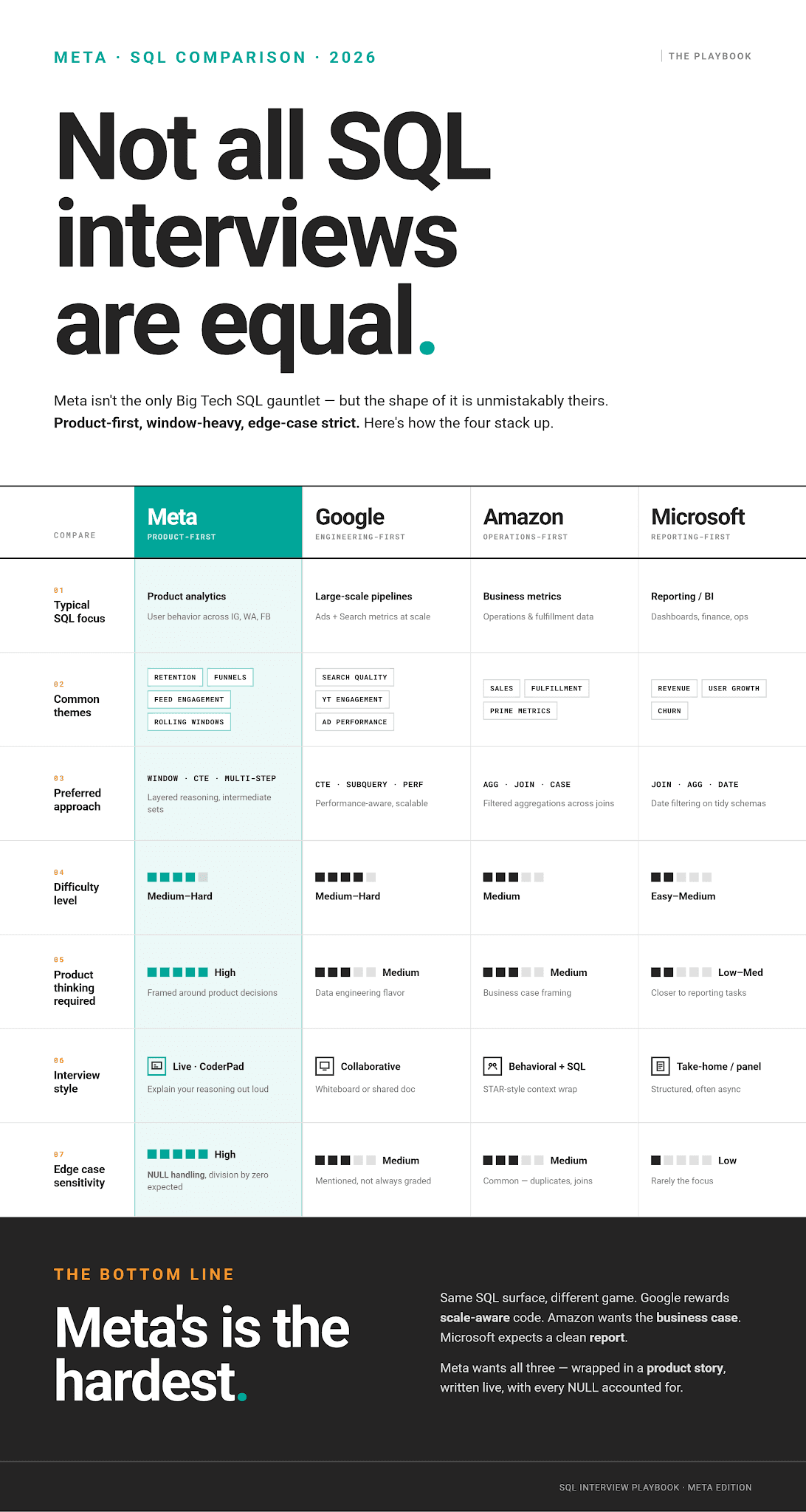
More (Big) Tech SQL Interview Guides
Speaking of Meta’s interview comparison, here are several guides that will help you prepare for other (big) tech companies’ interviews.
1. Google SQL Interview Questions
2. Amazon SQL Interview Questions
3. DoorDash SQL Interview Questions
4. Uber SQL Interview Questions
5. Microsoft SQL Interview Questions
6. SQL Interview Questions You Must Prepare: The Ultimate Guide
7. SQL Scenario Based Interview Questions and Answers
Conclusion
One of the things that makes Meta’s SQL interview questions demanding is that they’re not really about SQL. They’re about product reasoning, and SQL is there only as a tool.
So, don’t fixate on memorizing entire queries or SQL concept syntax. Practice product-focused analysis interview questions. They will teach you how to decompose a business problem – e.g., “are users becoming less engaged?” – into particulars (a retention curve, a funnel drop-off, a rolling active user count) and write them as a query.
Window functions, CTEs, UNION ALL, conditional aggregation, and date functions – the concepts we covered in this guide – appear in virtually every Meta SQL interview in some form.
Master those patterns against a realistic schema, understand them in a product context, and you’ll be ahead of most candidates.
FAQs
1. What SQL concepts are tested in Meta interviews?
There are five SQL concepts that appear in most Meta interviews:
- window functions
- CTEs
UNION ALL- conditional aggregation
- date functions
These concepts are not tested in isolation but within product analytics scenarios, such as retention, funnel analysis, feed engagement, ad CTR, and rolling activity windows.
2. Are Meta SQL interview questions hard?
Yes. To be precise, they range from medium to hard. Don’t expect easy questions.
3. Do Meta interviews ask product analytics SQL questions?
Yes, almost exclusively.
Questions are framed around real business metrics, such as user retention, feed engagement rates, and ad click-through rates, rather than generic SQL syntax exercises.
4. How should I prepare for a Meta SQL interview?
Practice product questions. They will teach you how to translate business requirements into SQL queries. When solving them, practice explaining your logic and thinking about data schema, output grain, and edge cases that could break your query.
5. What makes Meta SQL questions different from Amazon SQL questions?
Amazon SQL questions tend to focus on business metrics, such as revenue by category, fulfillment rates, and sales performance.
Meta questions are more user-behavior- and product-health-related, with more product context. They are also usually on the harder side, unlike Amazon, which tends to ask medium-difficulty questions.
6. What level of SQL is required for data interviews at Meta?
Advanced. Basic querying, aggregations, and JOINs are assumed knowledge. To pass Meta SQL interviews, you need to be very comfortable with window functions, multi-CTE queries, and complex filtering logic.
Share