Understanding NULL Semantics in SQL

Categories:
 Written by:
Tihomir Babic
NULL in SQL is often a source of confusion, leading to bug propagation. Learning how NULL behaves in different scenarios to keep your query outputs trustworthy.
NULL is one of the most misunderstood concepts in SQL. It isn’t a value; it’s the absence of a value.
Having that crucial distinction in mind will save you from wrong filtering, counting, and joining results.
To drive that single fact home, we’ll have a detailed look at NULL: what it is, its behavior in different contexts, and how to stop it from breaking your code logic.
What NULL Actually Means in SQL
NULL means information is unknown or missing. Once again: it isn’t a value, it isn’t zero, it isn’t false, it isn’t an empty string. NULL means we don’t know what the value is.
Understanding the NULL behavior depends on that single piece of information. If the value is unknown, you can’t say it equals or doesn’t equal something.
NULL was introduced in relational database theory to handle real-world scenarios where information is incomplete or has not yet been collected.
You might ask now, how is that different from a blank (empty string)? Isn’t that also “a real-world scenario where information is incomplete”?
No, it isn’t. If, for example, phone = ' ', that’s a value meaning we asked for the phone number and stored it as blank because, for example, the user doesn’t have a phone number. If phone = NULL, you don’t know whether they have a phone or not, and, if they do, what the number is.
In practice, NULLs appear wherever data collection is incomplete or asynchronous: a user who registered but never completed onboarding has a NULL last_login timestamp; an event logged from a mobile client with a dropped connection may arrive with a partial payload and NULL fields; an order created before payment confirmation has a NULL in completed_at. The SQL you write to analyze these systems has to account for that incompleteness deliberately.
Why = NULL Never Works in SQL
Let’s answer that by solving an interview question.
It requires you to simply select the required columns and filter out the “users who haven't provided their phone numbers yet.” This means filtering out the NULLs.
A phone number is a classic optional attribute in a user table – not everyone provides one, so the column is nullable by design.
Users Missing Phone Numbers
Last Updated: April 2025
The product team is launching a new WhatsApp notification feature and needs to identify users who haven't provided their phone numbers yet. These users will be shown a prompt to add their contact information.
Find all users who have not provided a phone number. Return the user ID and name.
It’s easy to slip up here. It’s even expected, after you’ve been writing query after query where you compare numeric, date, or string data in WHERE using the comparison operators (>, <, =, etc.). Then comes filtering by NULL, and many an inexperienced user (even some experienced ones) would automatically write the filtering condition this way.
If I told you this doesn’t work, what do you think the query would return? A syntax error? No, = NULL is perfectly valid SQL syntax. The query will run smoothly, no problem at all. (Run it yourself if you want the proof.)
However, that’s not the point. The point is that using = NULL is semantically wrong, not syntactically. The database perfectly understands what you’re asking. The thing is, you don’t understand, so the output surprises you.
The output shows zero rows. Why is that? Because SQL uses three-valued logic (3VL), which means conditions can evaluate to TRUE, FALSE, or NULL. Any comparison involving NULL produces NULL. Not FALSE, not an error, just NULL. The WHERE clause only returns rows where the condition evaluates to TRUE. As the result of the comparison in the code above is NULL, there are no rows to show. (This applies to all other comparison operators, including !=.)
| user_id | user_name |
|---|
How to Output the NULL Rows
The only correct syntax for getting the NULL rows is IS NULL.
Here’s the output.
| user_id | user_name |
|---|---|
| 4 | Liam Martinez |
| 5 | Ava Rodriguez |
| 6 | Oliver Lopez |
| 10 | Lucas Thomas |
| 11 | Mia Taylor |
| 17 | Ethan Thompson |
| 18 | Evelyn White |
| 20 | Abigail Sanchez |
| 22 | Emily Ramirez |
| 24 | Elizabeth Robinson |
| 27 | Alexander Allen |
| 31 | Henry Torres |
| 36 | Victoria Baker |
| 41 | David Roberts |
| 44 | Zoey Campbell |
| 47 | Jack Edwards |
| 51 | Ryan Morris |
| 53 | Isaac Rivera |
| 54 | Eleanor Cook |
| 55 | Gabriel Rogers |
| 56 | Hazel Reed |
| 58 | Stella Bell |
| 59 | Anthony Cooper |
Understanding NULL With AND / OR Logic
The existence of NULL and 3VL changes how the boolean (or logical) operators behave. That behavior can feel counterintuitive.
NULL With AND
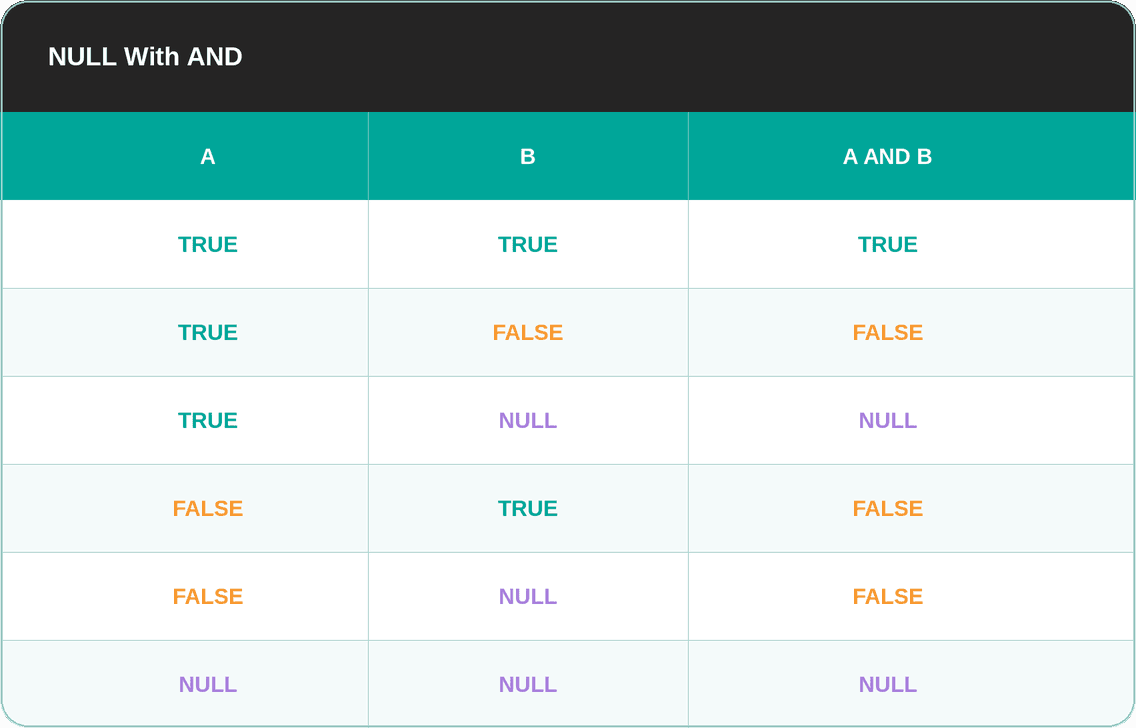
You’d expect most of those outcomes, except for two.
The first is TRUE AND NULL, which results in NULL. The reason is that we can’t determine the outcome without a known value.
As for FALSE AND NULL, it evaluates as FALSE. It doesn’t matter what the unknown value is; one operand is already FALSE, so the whole expression must be FALSE.
You can look at it this way: NULL is “stronger” than TRUE, but it’s not “stronger” than FALSE.
NULL With OR
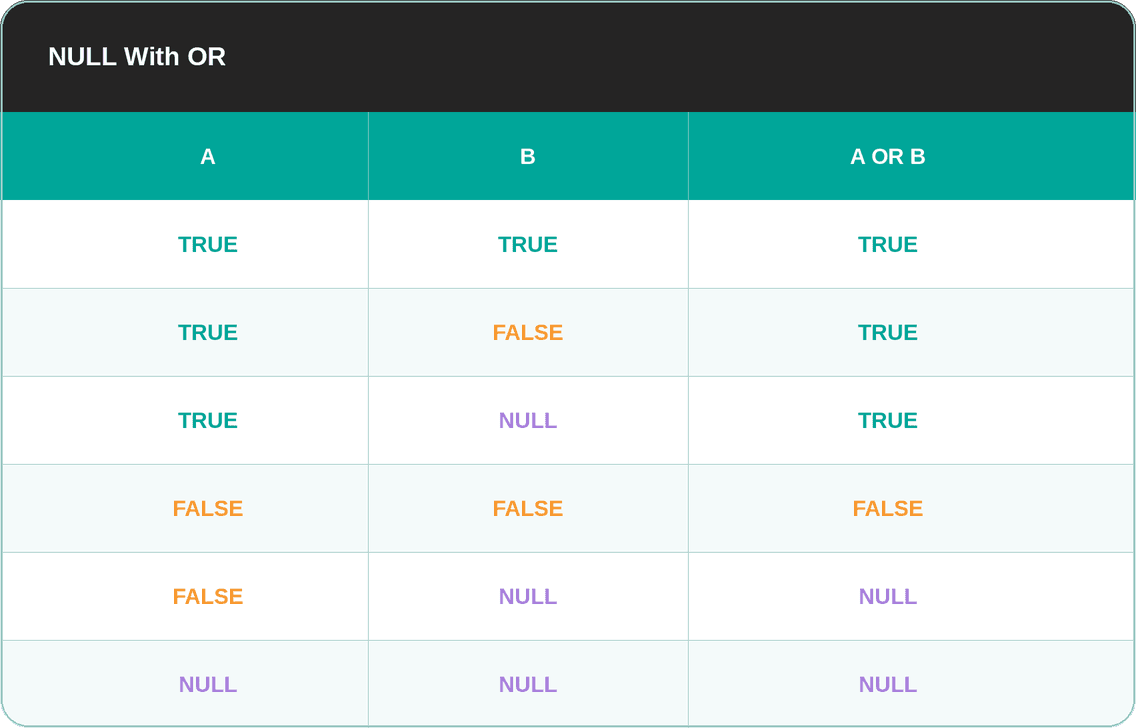
The situation with OR is different. TRUE OR NULL returns TRUE because one side is already true, regardless of the unknown value. FALSE OR NULL returns NULL because the result depends on the unknown value.
In other words, in OR, TRUE is “stronger” than NULL, while NULL is “stronger” than FALSE.
NOT With NULL
The NOT operand is a negation. The negation of an unknown is still unknown, so the result is NULL.
How NULL Breaks Filters
If you don’t know how NULL behaves in certain logical and comparison operators, your filters will silently break.
Let’s explore how and when this happens, so you can avoid it when it matters.
Inequality Filters Silently Exclude NULLs
I’ll use this question’s dataset.
Worst Businesses
Last Updated: May 2018
Identify the business with the most violations each year, based on records that include a violation ID. For each year, output the year, the name of the business with the most violations, and the corresponding number of violations. Note: If multiple businesses are tied for the highest number of violations in a given year, returning any one of them is acceptable.
However, I’ll change the requirements, so the new question is:
“Find all restaurant inspections that were not classified as low risk. Output the business name, inspection date, and risk category.”
This is a segmentation query – partitioning inspections by risk level to prioritize follow-up actions. In any segmentation workflow, silently dropping a segment (the NULL rows here) means your segments don't add up to the whole, and downstream decisions are made on incomplete data.
Dataset
The risk_category column can have these values: Low Risk, Moderate Risk, High Risk, and some rows with nothing in the column.
The Empty Cell That Isn’t Empty
If you got this question in the interview, you’d be happy. It’s soooooo easy! Just filter with WHERE risk_category != 'Low Risk', and that’s it.
Let’s run this code and inspect the output.
| business_name | inspection_date | risk_category |
|---|---|---|
| Sutter Pub and Restaurant | 2017-07-25 | Moderate Risk |
| Washington Bakery & Restaurant | 2016-07-28 | High Risk |
| Brothers Restaurant | 2016-07-18 | Moderate Risk |
| T & L FOOD MARKET | 2016-06-09 | High Risk |
| Jiang Ling Cuisine Restaurant | 2017-12-12 | High Risk |
| Big Fish Little Fish Poke | 2018-02-27 | Moderate Risk |
| Laguna Café | 2018-07-11 | Moderate Risk |
| Home Plate | 2016-10-17 | High Risk |
| SO | 2017-12-14 | High Risk |
| Allstars Cafe Inc | 2017-08-29 | Moderate Risk |
| Peet's Coffee & Tea | 2017-03-27 | Moderate Risk |
| Veraci Pizza | 2017-02-23 | Moderate Risk |
| Sharetea | 2016-03-31 | Moderate Risk |
| Let's Be Frank | 2016-05-13 | Moderate Risk |
| IL BORGO | 2018-03-28 | Moderate Risk |
| Boss Supermarket | 2017-10-03 | Moderate Risk |
| SAKANA BUNE RESTAURANT | 2018-02-22 | High Risk |
| Maggie Cafe | 2015-12-02 | Moderate Risk |
| Golden Wok | 2017-07-20 | High Risk |
| China Fun Express | 2016-03-03 | Moderate Risk |
| Taqueria Dos Charros | 2016-02-29 | High Risk |
| YUMMA'S MED GRILL | 2016-06-09 | Moderate Risk |
| West Coast Wine & Cheese | 2016-11-08 | Moderate Risk |
| SUBWAY #31419 | 2016-06-27 | Moderate Risk |
| Carbon Grill | 2017-03-28 | Moderate Risk |
| San Francisco Marriott Union Square - Main Kitchen | 2016-06-28 | Moderate Risk |
| Chinatown Restaurant | 2016-01-07 | Moderate Risk |
| HAMANO SUSHI | 2017-08-23 | Moderate Risk |
| Souvla | 2017-04-03 | Moderate Risk |
| MARTHA & BROS. COFFEE CO | 2017-07-07 | Moderate Risk |
| The Grove - Design District | 2018-04-27 | Moderate Risk |
| King of Thai Noodles Cafe | 2016-12-12 | Moderate Risk |
| Andersen Bakery | 2017-11-14 | Moderate Risk |
| IRVING PIZZA | 2016-05-31 | Moderate Risk |
| Bellissimo Pizza | 2016-07-14 | Moderate Risk |
| PEKING WOK RESTAURANT | 2015-09-28 | Moderate Risk |
| Bursa | 2018-02-22 | Moderate Risk |
| City Super | 2016-03-16 | Moderate Risk |
| Hot Pot Island | 2017-08-18 | High Risk |
| 95117 Premium Commissary Room | 2018-03-26 | Moderate Risk |
| Soo Fong Restaurant | 2017-06-20 | High Risk |
| Seal Rock Inn Restaurant | 2018-06-20 | Moderate Risk |
| Yummy Sticks | 2016-06-18 | Moderate Risk |
| Red Jade Restaurant | 2017-08-16 | High Risk |
| Buckhorn Grill | 2017-08-29 | Moderate Risk |
| Man Sung Company | 2016-08-01 | Moderate Risk |
| Rotee Express | 2016-08-26 | High Risk |
| Project Juice | 2017-10-19 | Moderate Risk |
| DONA TERE'S MARKET | 2017-11-27 | Moderate Risk |
| Cecilia's Pizza & Restaurant | 2018-05-29 | Moderate Risk |
| Cabin | 2015-10-01 | Moderate Risk |
| Mi Yucatan | 2015-11-17 | Moderate Risk |
| Fresca Gardens, Inc | 2018-01-17 | Moderate Risk |
| Modern Thai Inc. | 2016-10-24 | Moderate Risk |
| Pectopah LLC | 2018-02-09 | Moderate Risk |
| The Salvation Army | 2018-07-24 | Moderate Risk |
| Harvest Urban Market | 2016-03-16 | High Risk |
| Bubble Cafe | 2017-11-08 | Moderate Risk |
| LOS PANCHOS | 2015-12-07 | Moderate Risk |
| S. F. Gourmet Hot Dog Cart | 2016-10-31 | Moderate Risk |
| Cathead's BBQ | 2017-01-05 | High Risk |
| ITALIAN AMERICAN SOCIAL CLUB | 2016-09-07 | Moderate Risk |
| Gateway High/Kip Schools | 2017-04-19 | High Risk |
| Toy Boat Dessert Cafe | 2016-11-14 | Moderate Risk |
| Iza Ramen | 2018-05-29 | Moderate Risk |
| King of Thai Noodle House | 2018-05-08 | Moderate Risk |
| Urban Putt | 2018-05-09 | Moderate Risk |
| The AA Bakery & Cafe | 2016-05-24 | High Risk |
| CHA-AM RESTAURANT | 2016-09-01 | High Risk |
| Pica Pica | 2018-03-20 | High Risk |
| AK SUBS | 2017-07-24 | Moderate Risk |
| Heritage | 2018-06-05 | Moderate Risk |
| Castagnola's Restaurant | 2017-08-07 | High Risk |
| Park Gyros Castro | 2017-09-27 | High Risk |
| SF BAGEL CO. (KATZ BAGELS) | 2016-11-29 | High Risk |
| Luke's Local Inc. | 2017-11-27 | Moderate Risk |
| GOLDEN PRODUCE | 2018-06-05 | Moderate Risk |
| PANCHO'S | 2018-01-17 | Moderate Risk |
| India Clay Oven Restaurant and Bar | 2016-02-05 | Moderate Risk |
| Pabu | 2016-12-07 | Moderate Risk |
| Salem Grocery | 2017-12-21 | High Risk |
| Sam Rong Cafe | 2017-05-23 | High Risk |
| Dim Sum Bistro | 2017-11-30 | Moderate Risk |
| WING HING RESTAURANT | 2017-11-06 | High Risk |
| Rock Japanese Cuisine | 2016-02-02 | Moderate Risk |
| Chez Julien | 2016-05-10 | High Risk |
| Rico Pan Bakery | 2016-05-02 | Moderate Risk |
| Modern Thai Inc. | 2016-10-24 | High Risk |
| CLEMENT BBQ RESTAURANT | 2018-05-22 | Moderate Risk |
| Milkbomb Ice Cream | 2018-06-15 | Moderate Risk |
| Morning Brew Cafe | 2016-03-15 | Moderate Risk |
| MONGKOK DIM SUM & RESTAURANT | 2016-05-24 | High Risk |
| Azalina's | 2016-06-23 | High Risk |
| Little Vietnam Cafe | 2016-07-27 | Moderate Risk |
| 7-Eleven, Store 2366-21389F | 2016-12-17 | High Risk |
| Quickly | 2016-02-18 | Moderate Risk |
| Jackson Fillmore Trattoria | 2016-09-19 | Moderate Risk |
| Prospect | 2016-09-16 | Moderate Risk |
| TAWAN'S THAI FOOD | 2018-08-02 | Moderate Risk |
| Ninki Sushi Bar & Restaurant | 2017-08-24 | High Risk |
| Kate O'Brien's | 2017-08-10 | Moderate Risk |
| Elephant Sushi | 2016-07-27 | High Risk |
| Roma Pizzeria | 2016-08-09 | Moderate Risk |
| Lollipot | 2018-05-22 | Moderate Risk |
| Da Cafe | 2016-09-07 | High Risk |
| Lollipot | 2018-05-22 | High Risk |
| Lollipot | 2018-05-22 | High Risk |
| Lollipot | 2018-05-22 | Moderate Risk |
| Da Cafe | 2016-09-07 | High Risk |
| Da Cafe | 2016-09-07 | High Risk |
| Da Cafe | 2016-09-07 | High Risk |
| Roxanne Cafe | 2016-11-28 | Moderate Risk |
| Roxanne Cafe | 2015-09-30 | Moderate Risk |
| Roxanne Cafe | 2015-09-30 | Moderate Risk |
| Roxanne Cafe | 2018-04-03 | Moderate Risk |
| Roxanne Cafe | 2016-11-28 | High Risk |
It seems correct, as there really are no businesses with the Low Risk category. Well, ‘seems’ does a lot of heavy lifting here. The fact that there are no Low Risk businesses doesn’t mean that all the non-low-risk businesses are actually shown in the output. So, no, it’s not correct. The whole code and the output are wrong!
Your naive approach silently excluded several rows. You immediately jumped to the conclusion that empty fields in risk_category are just fields with no data and that != 'Low Risk' will catch everything that isn’t low risk, including blanks. It didn’t because blanks aren't actually blanks; they are NULL.
How to Tell That NULL Is NULL?
OK, if blanks are actually NULL, why are they shown as empty cells? Because NULL is a database concept, not a display value. Different engines display it differently: as NULL, or (null), or as N/A. Our IDE shows it as a blank field.
How can you then know if NULL is really NULL?
Applying Business Logic
One way to tell these are actually NULL is business thinking. You can see that risk_category is always empty when violation_id is empty. That way, you could assume that, since the table shows inspections, an empty field in violation_id means no violations were found, so there’s also no risk category.
However, this is just an assumption about the business logic; no violation_id value could also be categorized as low risk, for example. You should always clarify with the interviewer.
Explicitly Checking for NULLs
You could also check for any NULLs in the data before you solve the question.
COUNT(*) and GROUP BYare great little helpers. GROUP BY treats NULL as a distinct group. COUNT(*) then counts every row within a group, regardless of its value.
(If you, for example, used COUNT(risk_category), the count for the NULL group would be 0, as it omits NULLs from the count calculation. But more on that later.)
Run the code to see if there are any NULLs. Surprise, surprise, there are. Namely, 72. Since they appear in the output, you’d know these are NULLs, despite being shown as an empty field.
| risk_category | count |
|---|---|
| 72 | |
| Low Risk | 109 |
| Moderate Risk | 78 |
| High Risk | 38 |
Recommended Approach: Safeguarding From Possible NULLs
The first two approaches rely on your being able to see and query actual data in the interview. That won’t happen very often.
The safest approach – both in interviews and on the job – is to simply assume there could be NULLs and embed this assumption in your solution.
The output is now complete, as it includes NULLs, too.
| business_name | inspection_date | risk_category |
|---|---|---|
| Sutter Pub and Restaurant | 2017-07-25 | Moderate Risk |
| Washington Bakery & Restaurant | 2016-07-28 | High Risk |
| Brothers Restaurant | 2016-07-18 | Moderate Risk |
| T & L FOOD MARKET | 2016-06-09 | High Risk |
| Jiang Ling Cuisine Restaurant | 2017-12-12 | High Risk |
| Tenderloin Market & Deli | 2017-03-13 | |
| Big Fish Little Fish Poke | 2018-02-27 | Moderate Risk |
| Laguna Café | 2018-07-11 | Moderate Risk |
| SAFEWAY STORE #964 | 2016-06-24 | |
| Home Plate | 2016-10-17 | High Risk |
| Cafe Bakery | 2016-03-28 | |
| MARTIN L. KING MIDDLE SCHOOL | 2015-09-23 | |
| ROYAL GROUND COFFEE | 2017-12-22 | |
| Dolores Park Outpost | 2017-10-06 | |
| SO | 2017-12-14 | High Risk |
| Allstars Cafe Inc | 2017-08-29 | Moderate Risk |
| Peet's Coffee & Tea | 2017-03-27 | Moderate Risk |
| Veraci Pizza | 2017-02-23 | Moderate Risk |
| Sharetea | 2016-03-31 | Moderate Risk |
| Let's Be Frank | 2016-05-13 | Moderate Risk |
| IL BORGO | 2018-03-28 | Moderate Risk |
| Boss Supermarket | 2017-10-03 | Moderate Risk |
| Dragoneats | 2017-07-12 | |
| Nabe | 2016-10-19 | |
| Dragon Beaux | 2015-09-18 | |
| SAKANA BUNE RESTAURANT | 2018-02-22 | High Risk |
| Maggie Cafe | 2015-12-02 | Moderate Risk |
| Live Oak School | 2016-08-26 | |
| Southern Comfort Kitchen | 2018-03-05 | |
| Castro Street Chevron | 2015-12-24 | |
| Golden Wok | 2017-07-20 | High Risk |
| Pho Express | 2018-06-29 | |
| China Fun Express | 2016-03-03 | Moderate Risk |
| Taqueria Dos Charros | 2016-02-29 | High Risk |
| YUMMA'S MED GRILL | 2016-06-09 | Moderate Risk |
| Boos Voni | 2017-11-16 | |
| Duboce Park Cafe | 2018-07-20 | |
| West Coast Wine & Cheese | 2016-11-08 | Moderate Risk |
| SUBWAY #31419 | 2016-06-27 | Moderate Risk |
| Carbon Grill | 2017-03-28 | Moderate Risk |
| The Bindery | 2017-10-23 | |
| San Francisco Marriott Union Square - Main Kitchen | 2016-06-28 | Moderate Risk |
| Chinatown Restaurant | 2016-01-07 | Moderate Risk |
| HAMANO SUSHI | 2017-08-23 | Moderate Risk |
| PASITA'S BAKERY | 2016-08-04 | |
| MV Taurus | 2016-05-18 | |
| Tacos San Buena | 2017-01-27 | |
| Souvla | 2017-04-03 | Moderate Risk |
| Samiramis Imports | 2016-11-10 | |
| MARTHA & BROS. COFFEE CO | 2017-07-07 | Moderate Risk |
| The Grove - Design District | 2018-04-27 | Moderate Risk |
| Jay's Cheesesteak | 2017-07-21 | |
| King of Thai Noodles Cafe | 2016-12-12 | Moderate Risk |
| Andersen Bakery | 2017-11-14 | Moderate Risk |
| IRVING PIZZA | 2016-05-31 | Moderate Risk |
| Contrada | 2016-11-10 | |
| Bellissimo Pizza | 2016-07-14 | Moderate Risk |
| JIM'S RESTAURANT | 2018-05-04 | |
| PEKING WOK RESTAURANT | 2015-09-28 | Moderate Risk |
| Bursa | 2018-02-22 | Moderate Risk |
| City Super | 2016-03-16 | Moderate Risk |
| Hot Pot Island | 2017-08-18 | High Risk |
| 95117 Premium Commissary Room | 2018-03-26 | Moderate Risk |
| Koja Kitchen CA01 | 2016-07-06 | |
| Soo Fong Restaurant | 2017-06-20 | High Risk |
| Split Bread | 2018-03-23 | |
| Seal Rock Inn Restaurant | 2018-06-20 | Moderate Risk |
| Keep It, Inc. | 2017-10-26 | |
| Yummy Sticks | 2016-06-18 | Moderate Risk |
| Red Jade Restaurant | 2017-08-16 | High Risk |
| EL POLLO SUPREMO | 2018-07-12 | |
| Kuma Sushi + Sake | 2017-08-03 | |
| Buckhorn Grill | 2017-08-29 | Moderate Risk |
| La Quinta Restaurant | 2016-08-29 | |
| SENIORE'S PIZZA | 2016-03-24 | |
| Hook a Cook | 2015-09-15 | |
| Man Sung Company | 2016-08-01 | Moderate Risk |
| Rotee Express | 2016-08-26 | High Risk |
| Project Juice | 2017-10-19 | Moderate Risk |
| DONA TERE'S MARKET | 2017-11-27 | Moderate Risk |
| Jersey | 2017-03-02 | |
| Cecilia's Pizza & Restaurant | 2018-05-29 | Moderate Risk |
| Crepe and Brioche, Inc. | 2016-06-25 | |
| Cabin | 2015-10-01 | Moderate Risk |
| The Grove - Design District | 2017-06-30 | |
| Mi Yucatan | 2015-11-17 | Moderate Risk |
| Jane the Bakery | 2016-12-02 | |
| North Point Market | 2018-06-15 | |
| Wing Lum Cafe | 2017-10-25 | |
| Blue Bottle Coffee | 2016-07-20 | |
| Fresca Gardens, Inc | 2018-01-17 | Moderate Risk |
| Modern Thai Inc. | 2016-10-24 | Moderate Risk |
| Pectopah LLC | 2018-02-09 | Moderate Risk |
| The Salvation Army | 2018-07-24 | Moderate Risk |
| Harvest Urban Market | 2016-03-16 | High Risk |
| Roadside Rosy's | 2016-08-01 | |
| Tupelo | 2016-08-05 | |
| Del Popolo LLC | 2017-01-24 | |
| Bubble Cafe | 2017-11-08 | Moderate Risk |
| Cafe Fiore | 2016-02-11 | |
| LOS PANCHOS | 2015-12-07 | Moderate Risk |
| A La Turca | 2017-09-05 | |
| VIP Coffee & Cake Shop | 2018-05-21 | |
| S. F. Gourmet Hot Dog Cart | 2016-10-31 | Moderate Risk |
| Flores | 2016-11-16 | |
| Pho Huynh Sang | 2017-06-12 | |
| Cathead's BBQ | 2017-01-05 | High Risk |
| ITALIAN AMERICAN SOCIAL CLUB | 2016-09-07 | Moderate Risk |
| Poke Kana | 2016-07-22 | |
| AT&T Park - Coffee and Ice Cream (5A+5B) | 2016-08-14 | |
| Gateway High/Kip Schools | 2017-04-19 | High Risk |
| Taco Bell Cantina #31685 | 2016-09-19 | |
| House of Bagels | 2017-05-03 | |
| Toy Boat Dessert Cafe | 2016-11-14 | Moderate Risk |
| Iza Ramen | 2018-05-29 | Moderate Risk |
| King of Thai Noodle House | 2018-05-08 | Moderate Risk |
| Urban Putt | 2018-05-09 | Moderate Risk |
| Bebebar Juice & Sandwich | 2016-11-09 | |
| The AA Bakery & Cafe | 2016-05-24 | High Risk |
| Cream | 2016-01-06 | |
| CHA-AM RESTAURANT | 2016-09-01 | High Risk |
| Pica Pica | 2018-03-20 | High Risk |
| AK SUBS | 2017-07-24 | Moderate Risk |
| Heritage | 2018-06-05 | Moderate Risk |
| A Mano | 2017-05-05 | |
| Castagnola's Restaurant | 2017-08-07 | High Risk |
| Park Gyros Castro | 2017-09-27 | High Risk |
| SF BAGEL CO. (KATZ BAGELS) | 2016-11-29 | High Risk |
| Blue Bottle Coffee | 2018-01-17 | |
| Thai Cottage Restaurant | 2018-07-25 | |
| Luke's Local Inc. | 2017-11-27 | Moderate Risk |
| Fair Trade Cafe LLC | 2017-09-29 | |
| GOLDEN PRODUCE | 2018-06-05 | Moderate Risk |
| PANCHO'S | 2018-01-17 | Moderate Risk |
| Project Juice | 2016-02-01 | |
| India Clay Oven Restaurant and Bar | 2016-02-05 | Moderate Risk |
| Pabu | 2016-12-07 | Moderate Risk |
| My Ivy Corp. | 2016-09-14 | |
| Salem Grocery | 2017-12-21 | High Risk |
| Sam Rong Cafe | 2017-05-23 | High Risk |
| Dim Sum Bistro | 2017-11-30 | Moderate Risk |
| Bayshore Taqueria | 2018-05-01 | |
| WING HING RESTAURANT | 2017-11-06 | High Risk |
| Brendas Meat & Three | 2018-04-25 | |
| Rock Japanese Cuisine | 2016-02-02 | Moderate Risk |
| BLOWFISH SUSHI | 2015-09-30 | |
| Chez Julien | 2016-05-10 | High Risk |
| Rico Pan Bakery | 2016-05-02 | Moderate Risk |
| Modern Thai Inc. | 2016-10-24 | High Risk |
| CLEMENT BBQ RESTAURANT | 2018-05-22 | Moderate Risk |
| SEGAFREDO | 2018-02-12 | |
| Milkbomb Ice Cream | 2018-06-15 | Moderate Risk |
| Morning Brew Cafe | 2016-03-15 | Moderate Risk |
| Mixt Greens | 2018-05-29 | |
| MONGKOK DIM SUM & RESTAURANT | 2016-05-24 | High Risk |
| Mizutani Sushi Bar | 2016-06-09 | |
| Yerba Buena Tea Co (formerly Tea Smiths of SF) | 2016-10-09 | |
| Azalina's | 2016-06-23 | High Risk |
| Tropisueño | 2017-10-25 | |
| Little Vietnam Cafe | 2016-07-27 | Moderate Risk |
| 7-Eleven, Store 2366-21389F | 2016-12-17 | High Risk |
| Quickly | 2016-02-18 | Moderate Risk |
| Jackson Fillmore Trattoria | 2016-09-19 | Moderate Risk |
| Peet's Coffee & Tea | 2017-10-27 | |
| Prospect | 2016-09-16 | Moderate Risk |
| TAWAN'S THAI FOOD | 2018-08-02 | Moderate Risk |
| Stanford Court Hotel | 2017-10-27 | |
| Ninki Sushi Bar & Restaurant | 2017-08-24 | High Risk |
| Kate O'Brien's | 2017-08-10 | Moderate Risk |
| Elephant Sushi | 2016-07-27 | High Risk |
| 24th and Folsom Eatery | 2015-09-30 | |
| Hilton Financial District- Restaurant Seven Fifty | 2016-06-10 | |
| Sushi Hon | 2016-06-16 | |
| Roma Pizzeria | 2016-08-09 | Moderate Risk |
| Hans Coffee Shop | 2016-04-13 | |
| Lollipot | 2018-05-22 | Moderate Risk |
| Da Cafe | 2016-09-07 | High Risk |
| Lollipot | 2018-05-22 | High Risk |
| Lollipot | 2018-05-22 | High Risk |
| Lollipot | 2018-05-22 | Moderate Risk |
| Da Cafe | 2016-09-07 | High Risk |
| Da Cafe | 2016-09-07 | High Risk |
| Da Cafe | 2016-09-07 | High Risk |
| Roxanne Cafe | 2016-11-28 | Moderate Risk |
| Roxanne Cafe | 2015-09-30 | Moderate Risk |
| Roxanne Cafe | 2015-09-30 | Moderate Risk |
| Roxanne Cafe | 2018-04-03 | Moderate Risk |
| Roxanne Cafe | 2016-11-28 | High Risk |
NOT IN With NULLs Produces Empty Results
Imagine you get the following interview question.
“The security team flags suspicious customer activity in a security_events table. Retrieve all orders that are not linked to a flagged account.”
This is an eligibility check – a pattern common in payments, fraud prevention, and access control, where a flaglist determines which customers are cleared to transact. NULL handling here isn't just a SQL technicality; it determines whether legitimate customers actually receive what they're entitled to.
Dataset
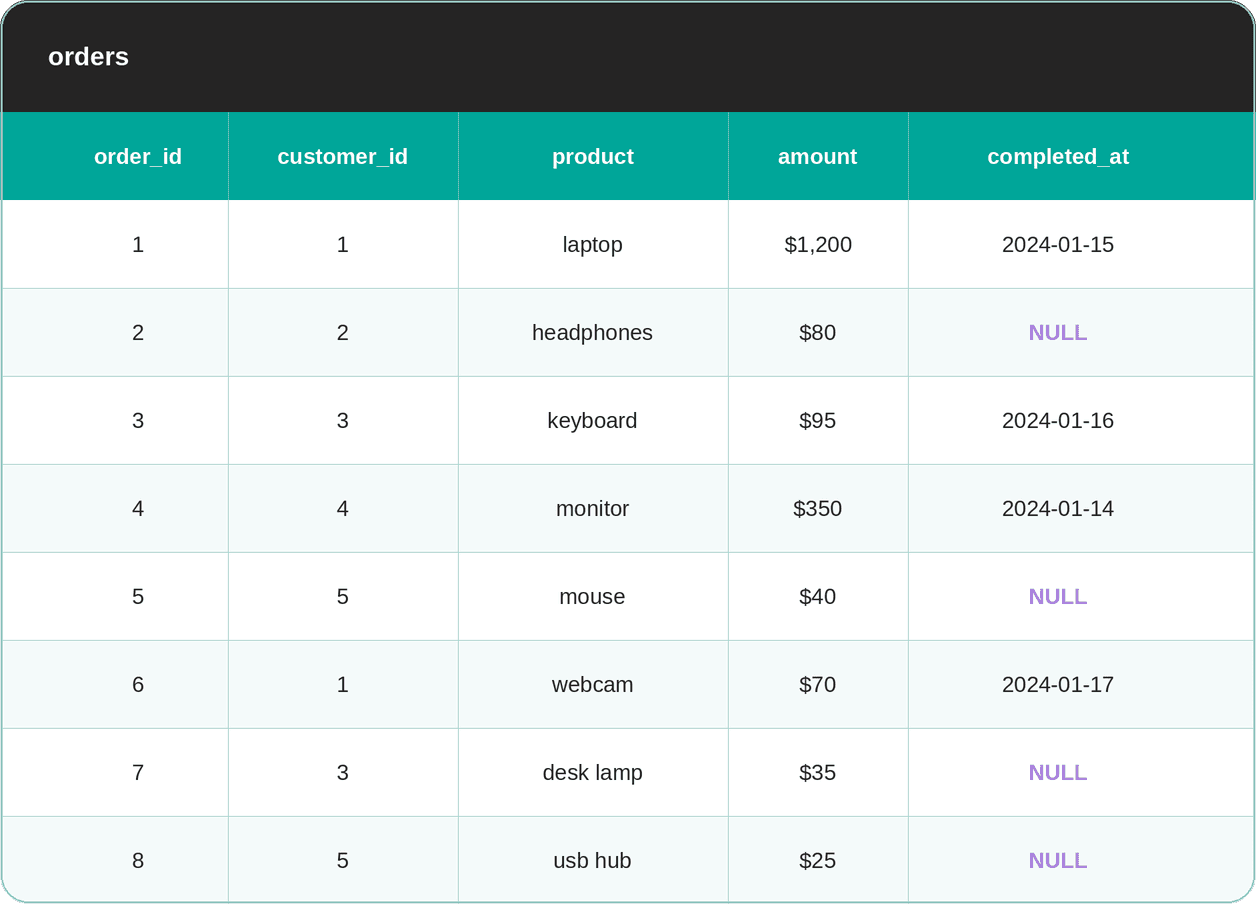
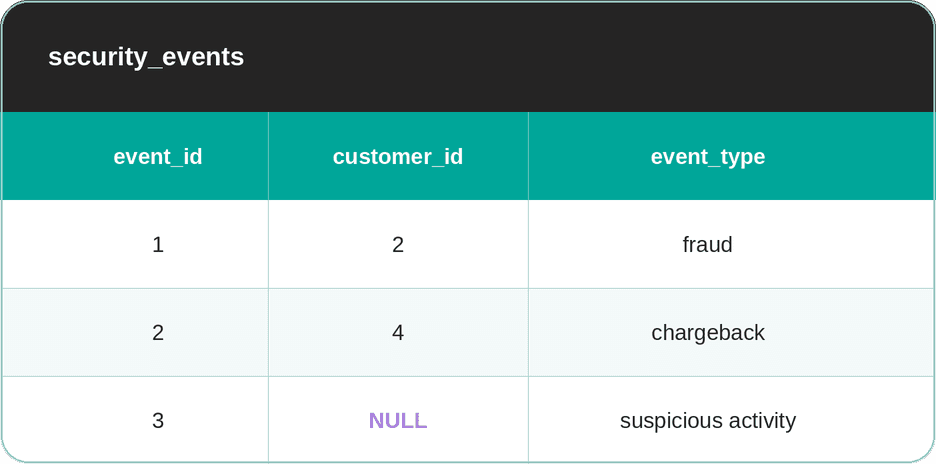
The dataset consists of the orders and security_events tables.
The Filter That Blocks Everyone
NOT IN sounds like a direct SQL translation of “give me everything in A that isn’t in B.”, so you’d likely write this as a solution.
SELECT *
FROM orders
WHERE customer_id NOT IN (SELECT customer_id FROM security_events);
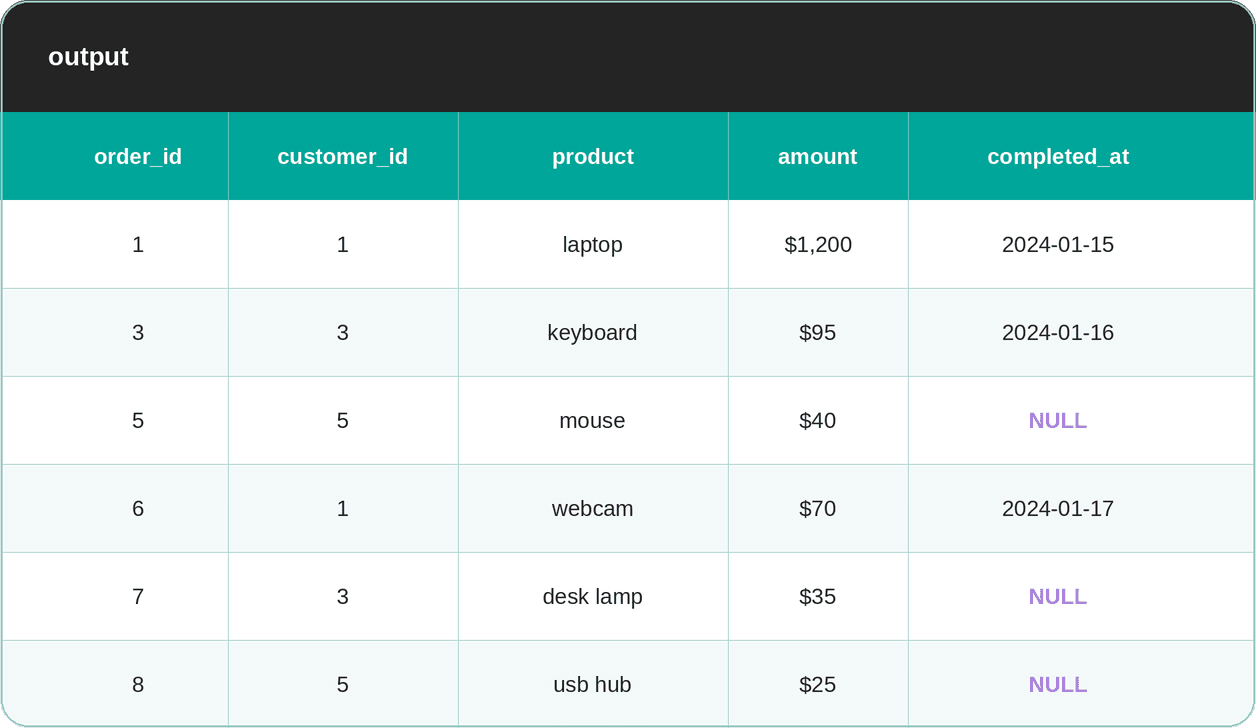
Run it, and you get zero rows. If you look at the security_events table, you see that the customers with the IDs 2 & 4 are flagged. But why doesn’t the query return orders placed by other customers, such as 1, 3, 5, who obviously placed orders, as you can find them in the orders table?
The reason is that the NULL row in the security_events table poisons all other data. Namely, NOT IN (SELECT customer_id FROM security_events) reads as NOT IN (2, 4, NULL), which expands to customer_id != 2 AND customer_id != 4 AND customer_id != NULL.
We already learned that the condition with NULL doesn’t produce FALSE, but NULL. Since the AND operator is used, every row in WHERE becomes NULL.
Using NOT EXISTS Instead of NOT IN (No, They’re Not the Same!)
Though they sound quite similar, NOT IN and NOT EXISTS are not the same thing, which surfaces when the NULL data is involved.
Let me explain the difference. NOT IN looks at the row value and the question it asks is: “Is this value definitely not in the list?” It can’t answer that definitively, since one of the list values is unknown.
On the other hand, NOT EXISTS asks: “Is there a row where this condition is TRUE?” We know that NULL conditions are never TRUE. As a result, the NULL rows are skipped, and the matching rows with the actual value in the customer_id column appear in the output.
In other words, NOT EXISTS handles NULLs because it checks for the existence of a matching row, rather than comparing values directly.
SELECT *
FROM orders o
WHERE NOT EXISTS (
    SELECT 1 FROM security_events se
    WHERE se.customer_id = o.customer_id
);
Here’s the output.
BETWEEN and NULL
Here’s an interesting interview question I’ll use to show you how BETWEEN behaves with NULLs.
Find Olympic Events Based On Height
Find events of any Winter Olympics in which there were athletes of height between 180 to 210 centimeters. Output unique events only.
There’s a simple requirement: find events at any Winter Olympics in which athletes with heights between 180 and 210 centimeters participated, and output the unique events.
Dataset
One of the filtering columns will be height. Just a quick look at the table shows that many rows in that column are empty. Learning from previous experience, we can safely conclude that those are NULLs.
BETWEEN Filters NULLs Out
The question asks us to filter out the NULL rows, as NULL surely is not “between 180 and 210 centimeters”.
In this case, using BETWEEN is the correct approach. It’s a shorthand for height >= 180 AND height <= 210.
Here’s the output.
| event |
|---|
| Alpine Skiing Men's Combined |
| Alpine Skiing Men's Downhill |
| Alpine Skiing Men's Super G |
| Speed Skating Women's 1000 metres |
| Speed Skating Women's 500 metres |
Taking Control Over Excluding NULLs
BETWEEN comes in handy when you want to exclude NULLs automatically, like in the above example.
However, if you want to decide for yourself whether you want to exclude them, include them, or surface them separately, you’d want to ditch BETWEEN and check for NULLs before filtering. Check “The COUNT(*) vs COUNT(column) Distinction” section to see how to do it.
How NULL Affects Aggregates
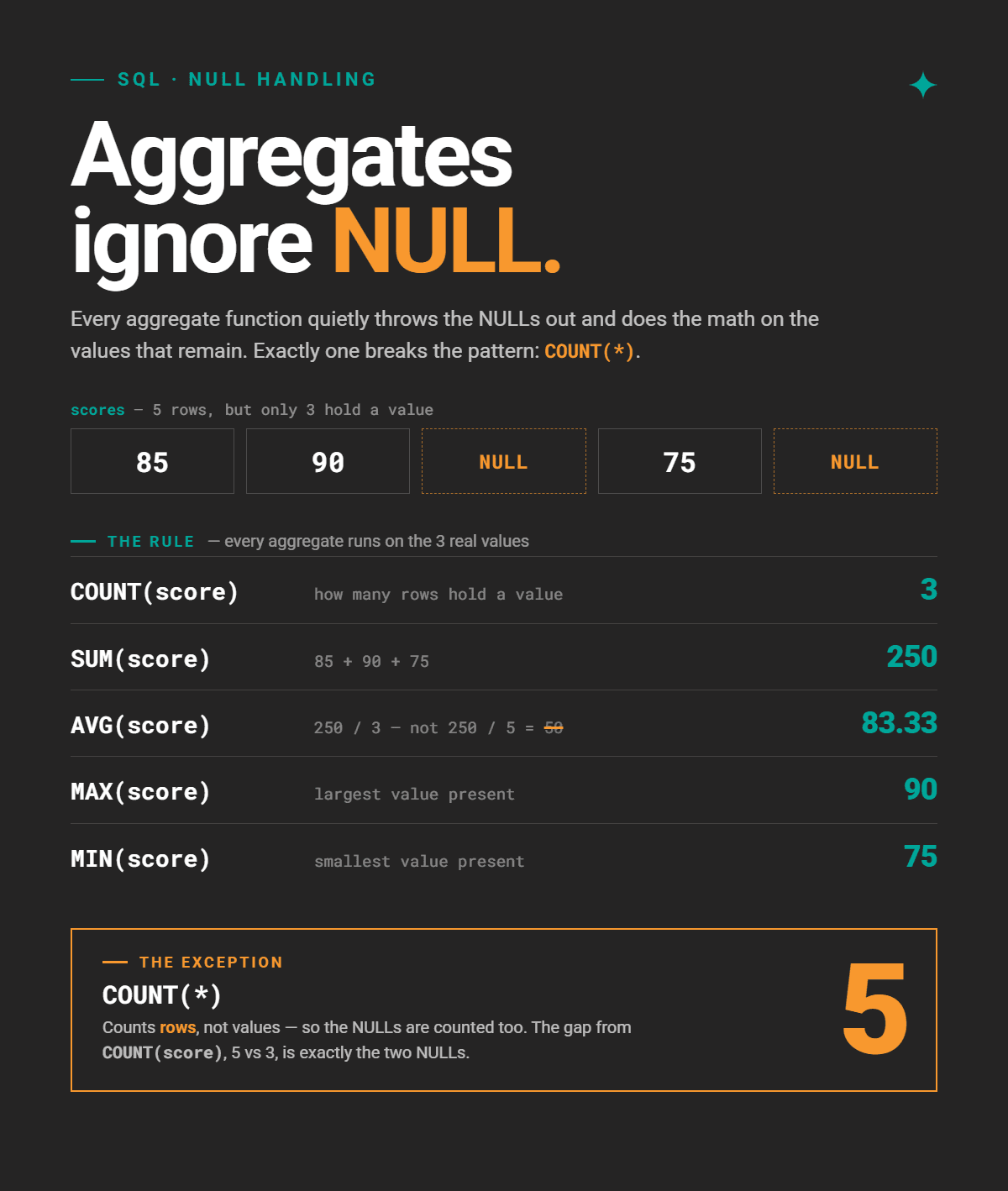
Aggregate functions in SQL ignore NULL values by design. There’s one important exception that you already saw in action: COUNT(*).
The COUNT(*) vs COUNT(column) Distinction
The main difference is how they treat NULLs. COUNT(*) counts rows no matter their value, which includes those with NULLs. COUNT(column) counts non-NULL values in that column.
Let’s solve this interview question to demonstrate that difference.
Contact Information Completeness
Last Updated: February 2025
The data quality team is auditing employee records to assess the completeness of contact information. Calculate and return the ratio of employees who have a NULL phone number.
We need to calculate the ratio of employees who have a NULL phone number.
Dataset
Counting What Isn’t There
The instinctive approach is to explicitly filter out NULLs and count them.
For example, you could do it by using CASE WHEN to flag the NULLs, then sum them.
SELECT CAST(SUM(CASE WHEN phone_number IS NULL THEN 1 ELSE 0 END) AS DECIMAL)
       / COUNT(*) AS null_phone_ratio
FROM techcorp_workforce;
Another, even more long-winded approach with two subqueries, is to find all the NULL phone numbers, then count them using COUNT(*).
SELECT CAST(
              (SELECT COUNT(*)
               FROM techcorp_workforce
               WHERE phone_number IS NULL) AS DECIMAL) /
  	 (SELECT COUNT(*)
FROM techcorp_workforce) AS null_phone_ratio;
However, if the second approach demonstrates that you know that COUNT(*) counts NULLs, why not use that knowledge to write a much shorter solution?
The Power of the COUNT(*) and COUNT(column) Alliance
If COUNT(*) counts all the rows, including NULLs, and COUNT(phone_number) counts only the non-NULL values, then their difference is the number of rows/employees with NULL phone numbers.
Here’s the output.
| null_phone_ratio |
|---|
| 0.31 |
AVG() and the Denominator Problem
AVG() ignores NULLs in the average calculation; it considers only known values. Whether this is the correct behavior depends on the business logic.
You should always ask: should NULLs be excluded from the calculation, or treated as a specific value (e.g., 0)?
Here’s the question we’ll use to show those two scenarios.
Homework Results
Last Updated: November 2021
Given the homework results of a group of students, calculate the average grade and the completion rate of each student. A homework is considered not completed if no grade has been assigned. Output first name of a student, their average grade, and completion rate in percentages. Note that it's possible for several students to have the same first name but their results should still be shown separately.
The task is to calculate the average grade and the competition rate for each student.
The question explicitly says that a homework is considered not completed if no grade has been assigned.
That’s valuable information for the completion ratio calculation, but also for the average grade: it implies that we’re calculating the average of each student’s completed homework.
Dataset
The first table in the dataset is allstate_homework. It has several NULL rows, which means these are not completed/not submitted homework assignments.
The second table is allstate_students.
Solution
The code consists of a subquery, which is then used in a quite straightforward calculation.
1. Flagging the completed and non-completed homeworks
In the subquery, use CASE WHEN to flag the homeworks. If the grade is NULL, it’s marked as 0. Otherwise, it’s marked as 1, i.e., the homework is completed.
SELECT *,
       CASE
           WHEN grade IS NULL THEN 0
           ELSE 1
       END is_completed
   FROM allstate_homework
2. Calculating average grades and completion rates by student
The main query calculates the average, with AVG() excluding not completed homeworks (NULLs) from the calculation.
In the following line, we use SUM() to count the number of completed homeworks (marked as 1 in CASE WHEN), then divide that by the total number of homeworks.
Take a good look at the output. We’ll see how it changes as the business logic changes.
| student_firstname | avg_grade | completion_rate |
|---|---|---|
| Joan | 8 | 33.33 |
| Marie | 6.33 | 100 |
| Hugo | 0 | |
| Marie | 5 | 66.67 |
How the Business Logic Makes the Average “Wrong”
If the question changes to “What is each student’s overall grade accounting for missed work?”, the previous (default) average calculation would be wrong.
The revised question suggests that NULLs should be treated as zero, since they should be included in the average calculation. In other words, use COALESCE() to turn NULLs into zeros.
The average grades are now significantly different for Joan (dropped from 8 to 2.67) and Marie (dropped from 5 to 3.33). Also, Hugo’s average grade is 0, not NULL.
| student_firstname | avg_grade | completion_rate |
|---|---|---|
| Joan | 2.67 | 33.33 |
| Marie | 6.33 | 100 |
| Hugo | 0 | 0 |
| Marie | 3.33 | 66.67 |
I’d recommend reading more about SQL COALESCE. The MySQL alternative is IFNULL.
How NULL Breaks JOINS
Joining data that contains NULL rows is another source of frustration due to silent data loss. Different types of SQL joins can cause different kinds of problems with NULLs.
NULLs Never Match in JOIN Conditions
To illustrate this problem, we’ll solve a classic task: outputting a list of all employees alongside their department name.
Dataset
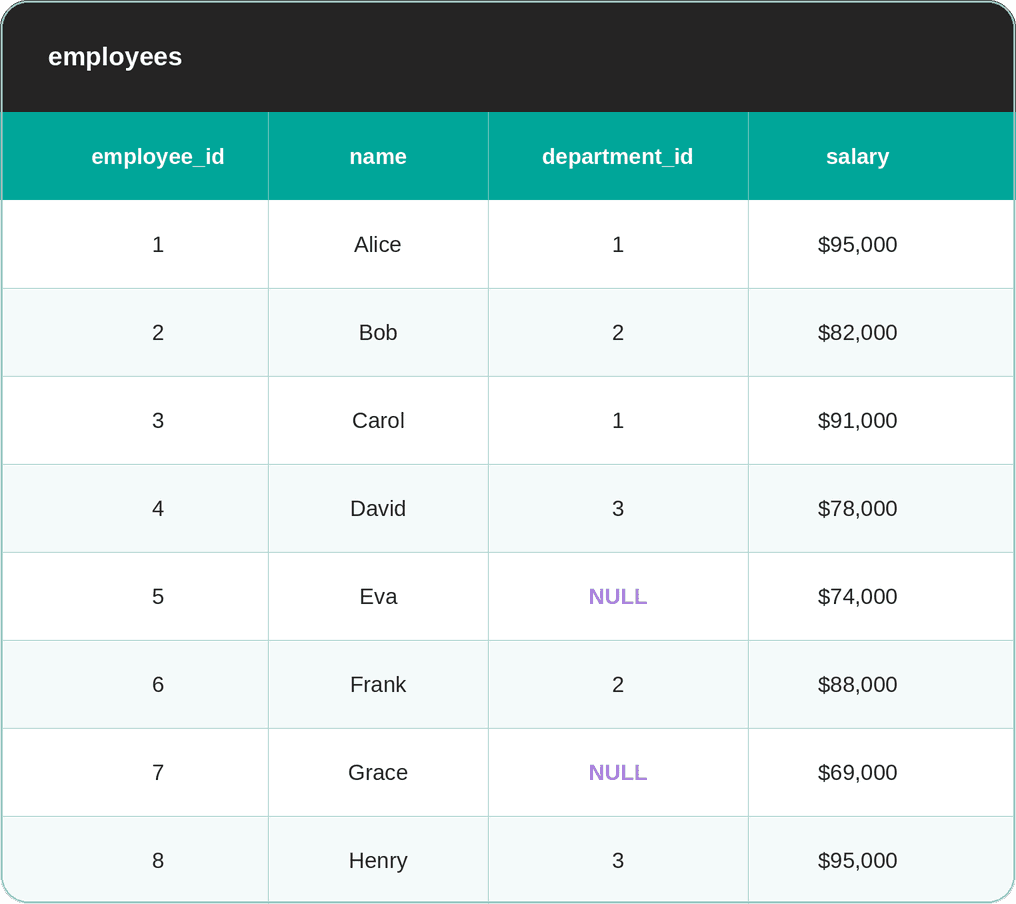
I’ve created an example dataset. The first table is employees. Two employees are new and still haven’t been assigned to a department.
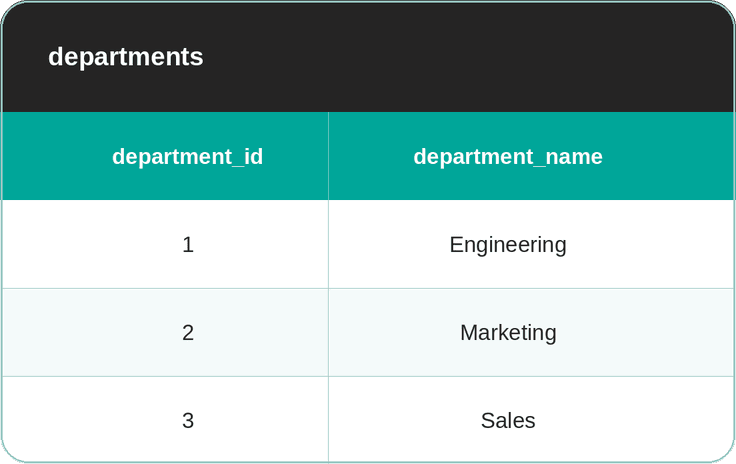
The second table is departments.
Silently Losing Data With JOIN
Unassumingly, you would probably write this code, thinking that it will return all employees and their departments, regardless of whether there are NULLs in the data.
SELECT e.name,
 d.department_name
FROM employees e
JOIN departments d ON e.department_id = d.department_id;
It won’t, because join conditions use equality comparisons under the hood. Since the comparison including NULLs evaluates to NULL, the two employees – Eva and Grace – don’t match any department, so they’re silently dropped from the output.
That behavior is expected, but it doesn’t answer the question; it asks you to find all employees and their departments.
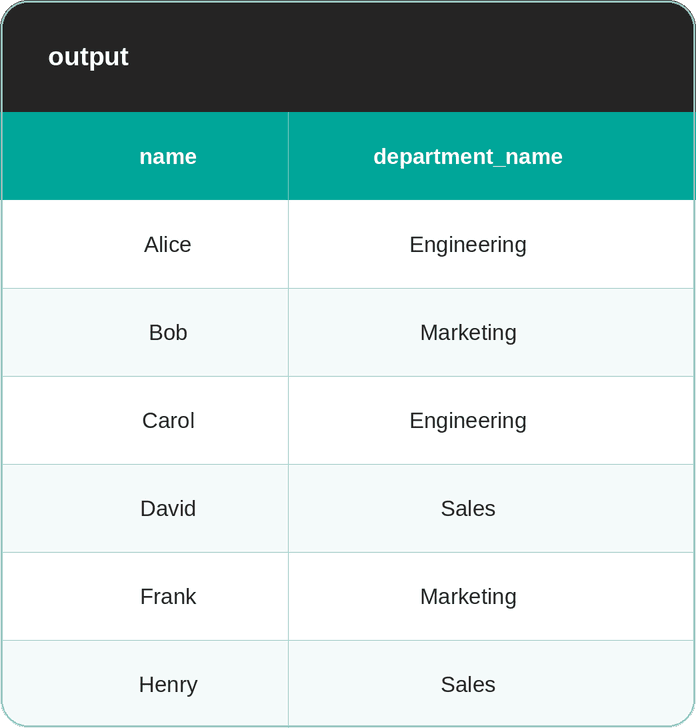
The output would have been correct if the question asked “show me employees and their departments”; employees without departments genuinely don’t belong here.
Use LEFT JOIN to Preserve NULLs
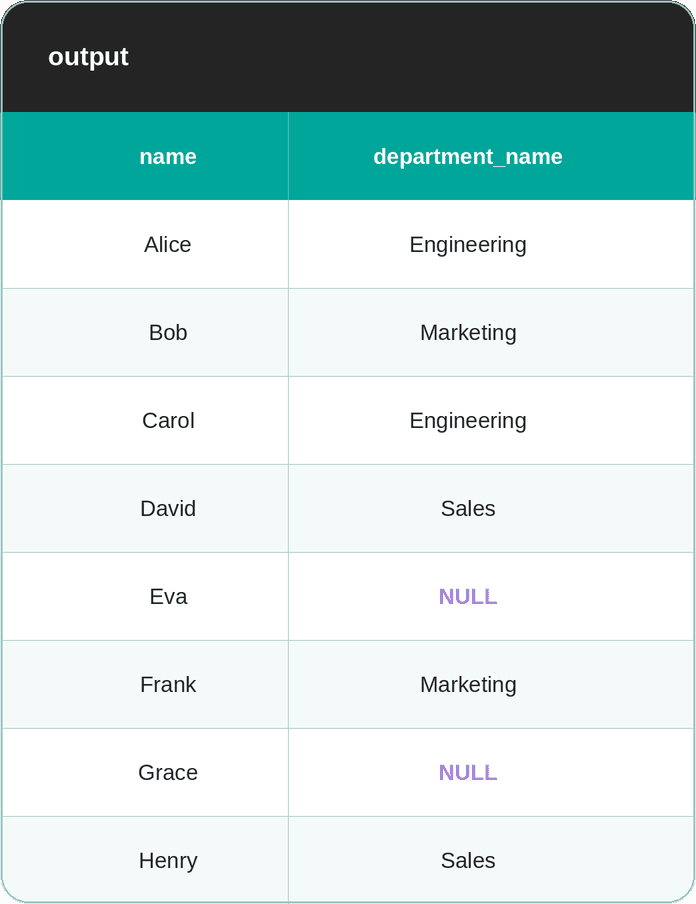
Since we want to show employees, even those with unknown departments, the correct approach is to use LEFT JOIN.
SELECT e.name, d.department_name
FROM employees e
LEFT JOIN departments d ON e.department_id = d.department_id;
Here’s the output.
Joining NULLs With NULLs
The previous example showed how Eva and Grace are silently dropped from a JOIN because their department_id is NULL.
What if you actually wanted to match them?
Imagine the departments table has been updated; it now includes an Unassigned department “name”. This is a placeholder department, with a NULL in department_id.
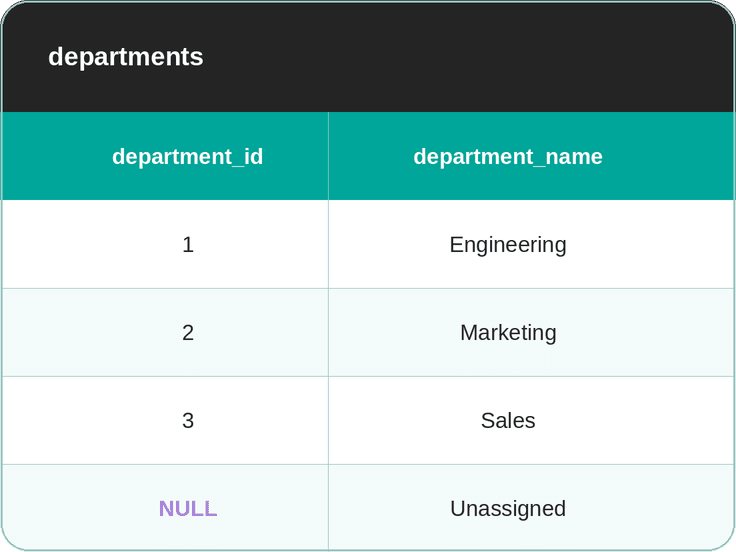
If you watched closely, you’d know that recycling the above JOIN code as in the previous example would again return the same result: Eva and Grace are still dropped because NULL = NULL is still NULL.
There are two ways to fix this problem.
Approach #1: IS NOT DISTINCT FROM
This is a NULL-safe equality operator in PostgreSQL. Unlike =, it treats NULL as equal to NULL.
SELECT e.name,
 d.department_name
FROM employees e
JOIN departments d
ON e.department_id IS NOT DISTINCT FROM d.department_id;
The output now shows all eight employees, with Eva and Grace now matched to the “Unassigned” row.
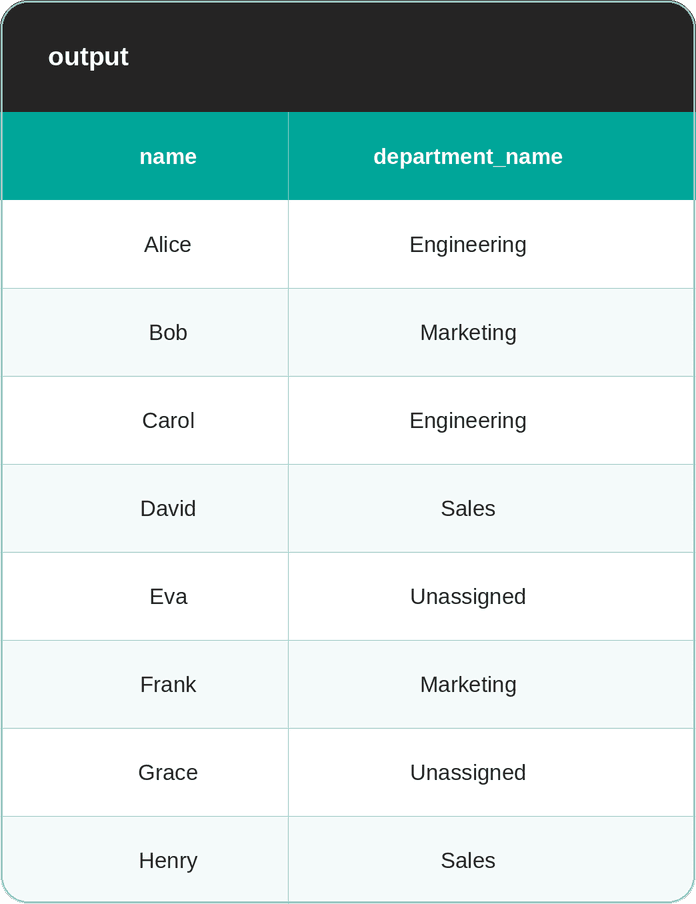
Approach #2: COALESCE() to Normalize NULLs Before Joining
An alternative approach is to replace NULLs before comparison with a value that can’t exist as a real value in the table. For example, NULLS in department_id are replaced with -1 by using COALESCE().
SELECT e.name, d.department_name
FROM employees e
JOIN departments d
ON COALESCE(e.department_id, -1) = COALESCE(d.department_id, -1);
Bear in mind that this can be risky. If -1 ever appears as a real department ID – for whatever reason – this will “unfix” your fix. IS NOT DISTINCT FROM is safer and more explicit.
A common mistake with COALESCE(): COALESCE() in SELECT is for display only, COALESCE() in the ON clause is for matching logic. Don’t mix up those two!
When LEFT JOIN Behaves Like JOIN
The question from Instacart and Amazon is perfect to demonstrate this issue.
No Order Customers
Last Updated: June 2020
Identify customers who did not place an order between 2019-02-01 and 2019-03-01.
Include:
• Customers who placed orders only outside this date range. • Customers who never placed any orders.
Output the customers' first names.
The task is to output customers who didn’t place an order between 2019-02-01 and 2019-03-01. In other words, those customers either placed orders only outside this data range or never placed any orders.
In practice, this is a retention query. Identifying customers who haven't ordered in a given window is the first step in any churn analysis or re-engagement campaign. A silent bug here – dropping customers due to a NULL filter – means your retention list is incomplete before you've even started.
Dataset
Reckless Filtering Turns LEFT JOIN Into JOIN
Your instinct tells you that, to answer the question, you should LEFT JOIN orders onto customers, all customers get preserved, then filter by date.
If you run the checker, you’ll see that your instinct and the solution are, unfortunately, incorrect. It seems several rows went missing somehow; the official solution returns ten rows, while this output has only six.
| first_name |
|---|
| Jill |
| William |
| Henry |
| Mia |
| Mia |
| Farida |
What happened here: For customers with no matching order, the LEFT JOIN fills o.order_date with NULL, so the filtering condition becomes NULL BETWEEN '2019-02-01' AND '2019-03-01'. You already know where this is going: the condition evaluates to NULL, and the WHERE filter fails. As a result, every unmatched customer is dropped – exactly the ones we were trying to find.
You accidentally turned LEFT JOIN into JOIN by filtering on a column from the right-side table.
Keep the Date Filter Out of the Where Clause
There are two ways to fix this.
Approach #1: Filter in the ON Clause
That way, filtering becomes a part of the matching logic, rather than a post-join row filter.
Approach #2: Filter Data Before Joining
This is an approach that the official solution uses. The orders table is filtered by order dates before it’s joined with customers. After joining, use filtering to keep only NULL customer IDs.
Both approaches result in the same, correct output.
| first_name |
|---|
| Frank |
| Eva |
| Lili |
| Mona |
| Emma |
| John |
| Jack |
| Mark |
| Liam |
| Justin |
NULL and Data Modeling
Your decisions on how to model NULLs at the schema level have significant downstream effects.
Ideal Approach: NOT NULL Constraints
The most direct way to eliminate NULL-related bugs is to not have NULLs in the data at all.
Wherever possible, prevent them from being stored in the first place by using the NOT NULL.
CREATE TABLE users (
    id          INT          NOT NULL,
    email       VARCHAR(255) NOT NULL,
    created_at  TIMESTAMP    NOT NULL DEFAULT CURRENT_TIMESTAMP,
    phone       VARCHAR(20)  -- nullable: phone is optional
);
When NULL Is Unavoidable
We know that we don’t live in an ideal world. Some columns must be allowed to be NULL. For example, a phone number is often non-mandatory data. Another example is that the delivery date is not recorded until the shipment is actually delivered.
If you can’t avoid NULLS, the solution is then to be clear about what NULL means in the column. That way, you’ll at least avoid the ambiguity, because a NULL column can represent three different things.
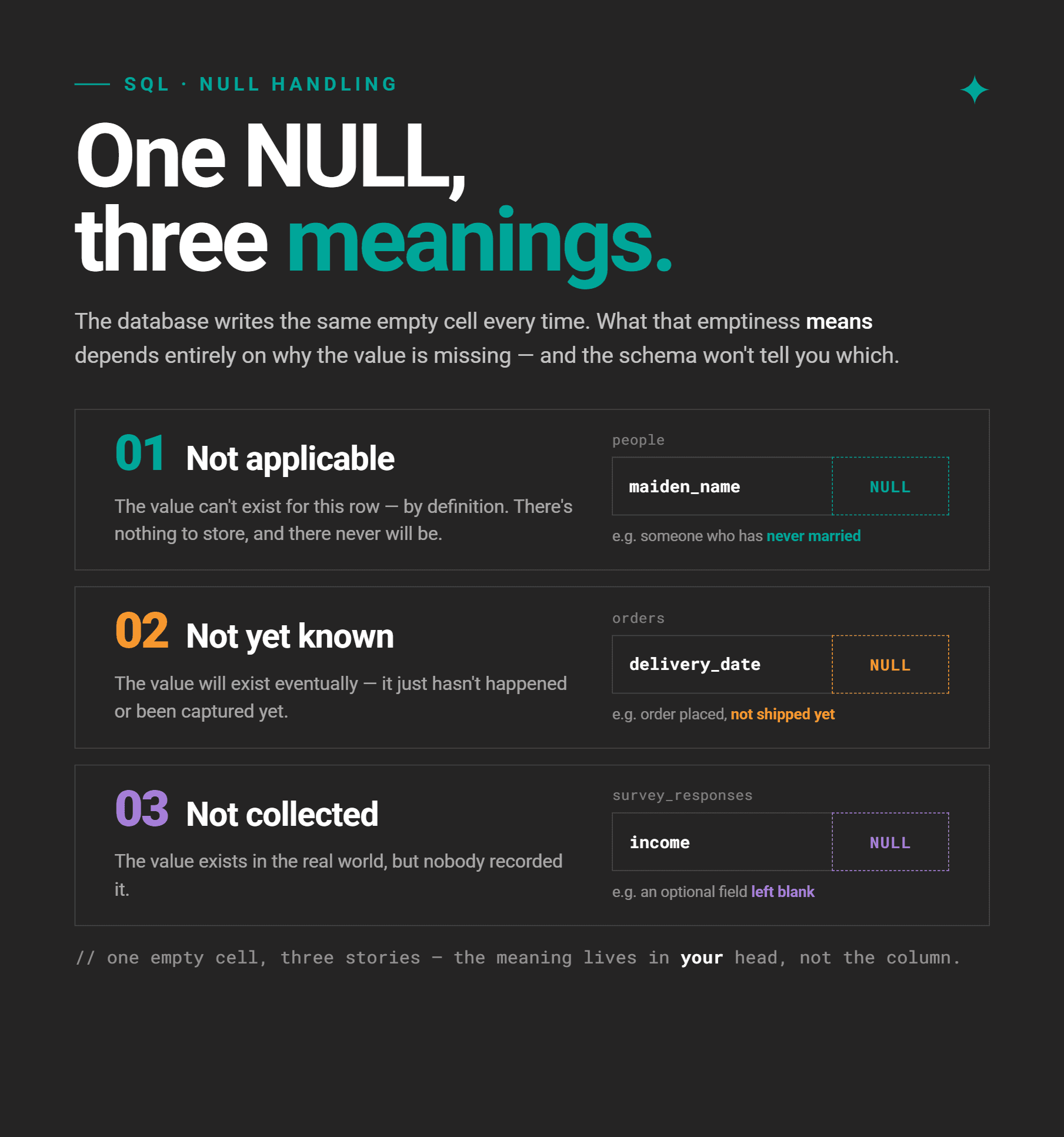
So, if you can’t avoid nullable columns, use one of these two approaches.
Approach #1: Documenting
If NULL has one clear meaning, write it in a schema comment or data dictionary. For example, “NULL in delivery_date means the order hasn’t been delivered yet”. Everyone querying that column now knows exactly what they’re dealing with, and can decide how to approach it.
Approach #2: Restructuring With DEFAULT
There are situations where NULL can mean different things, depending on the row. For example, delivery_date may be NULL because the delivery hasn’t been delivered yet, but also because it was canceled. The fix is to add a separate status column and assign a default value.
ALTER TABLE orders ADD COLUMN delivery_status VARCHAR(20) NOT NULL DEFAULT 'pending';
-- 'pending', 'delivered', 'cancelled'
Now, when a new row/order is added, delivery_date will still be NULL, but we’ll know this means the order is pending because that’s the default value for delivery_status.
If delivery_date is NULL because the order was canceled, the delivery status would change to reflect that.
How to Reason About Missingness
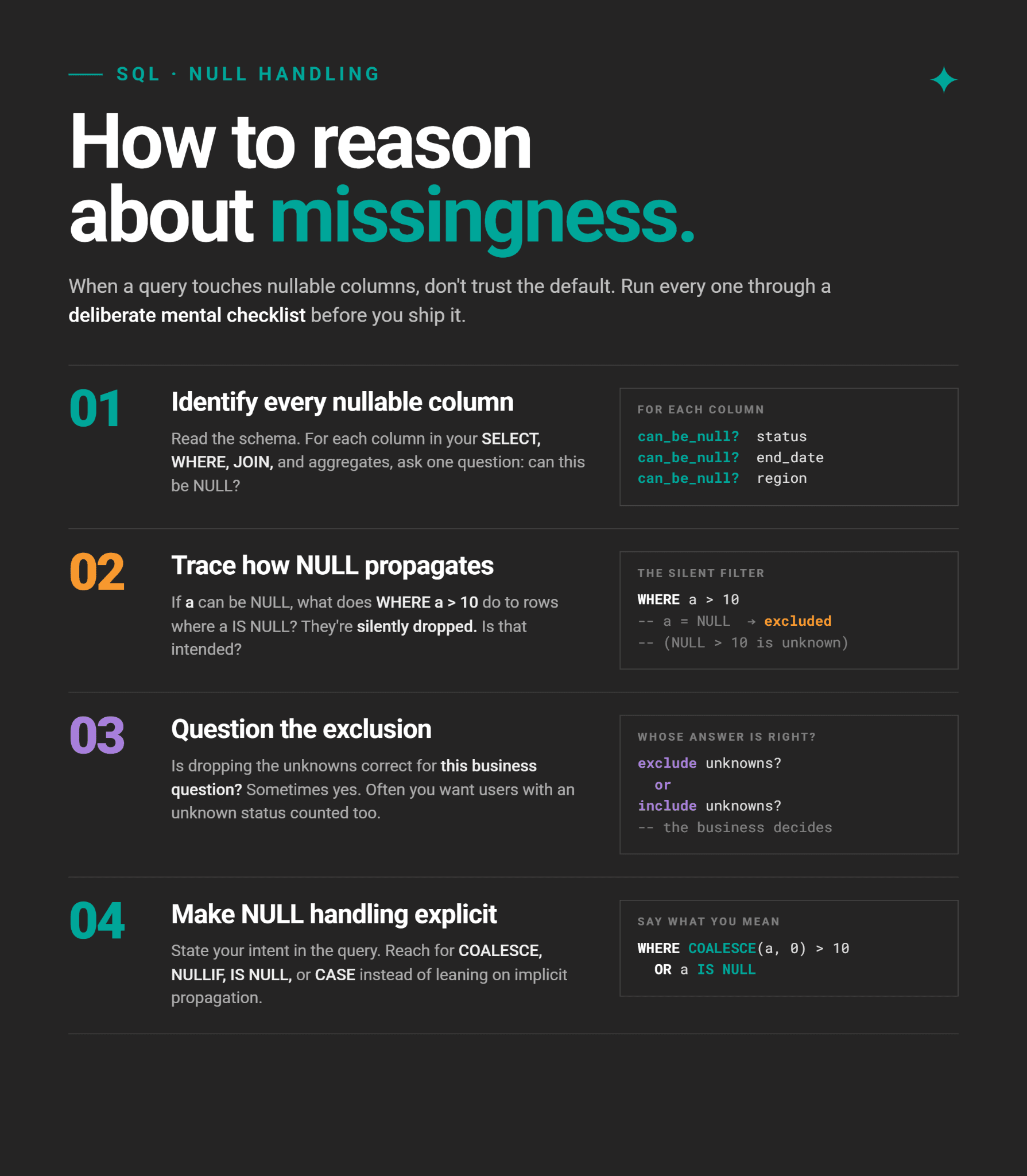
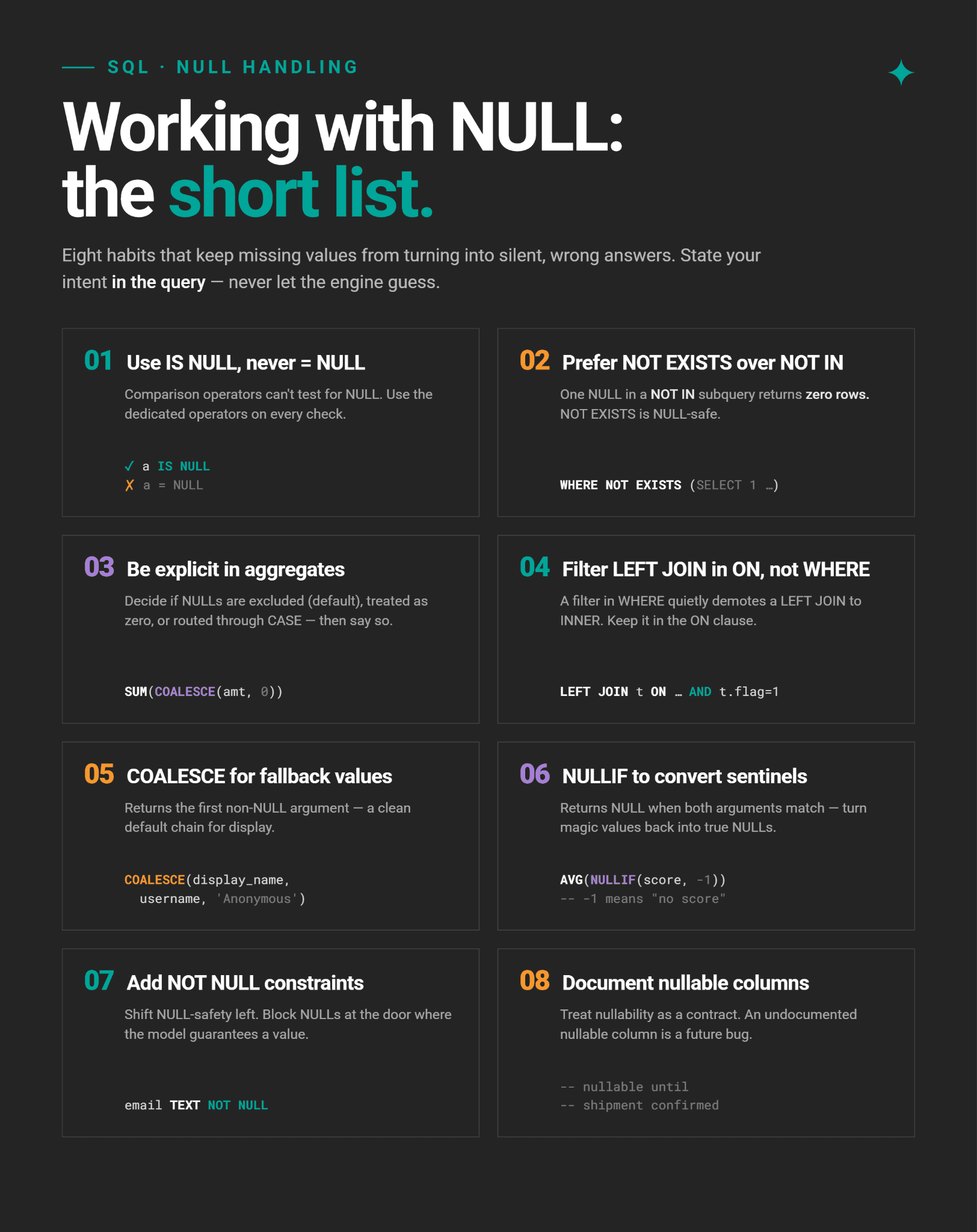
Best Practices for Working With NULL in SQL
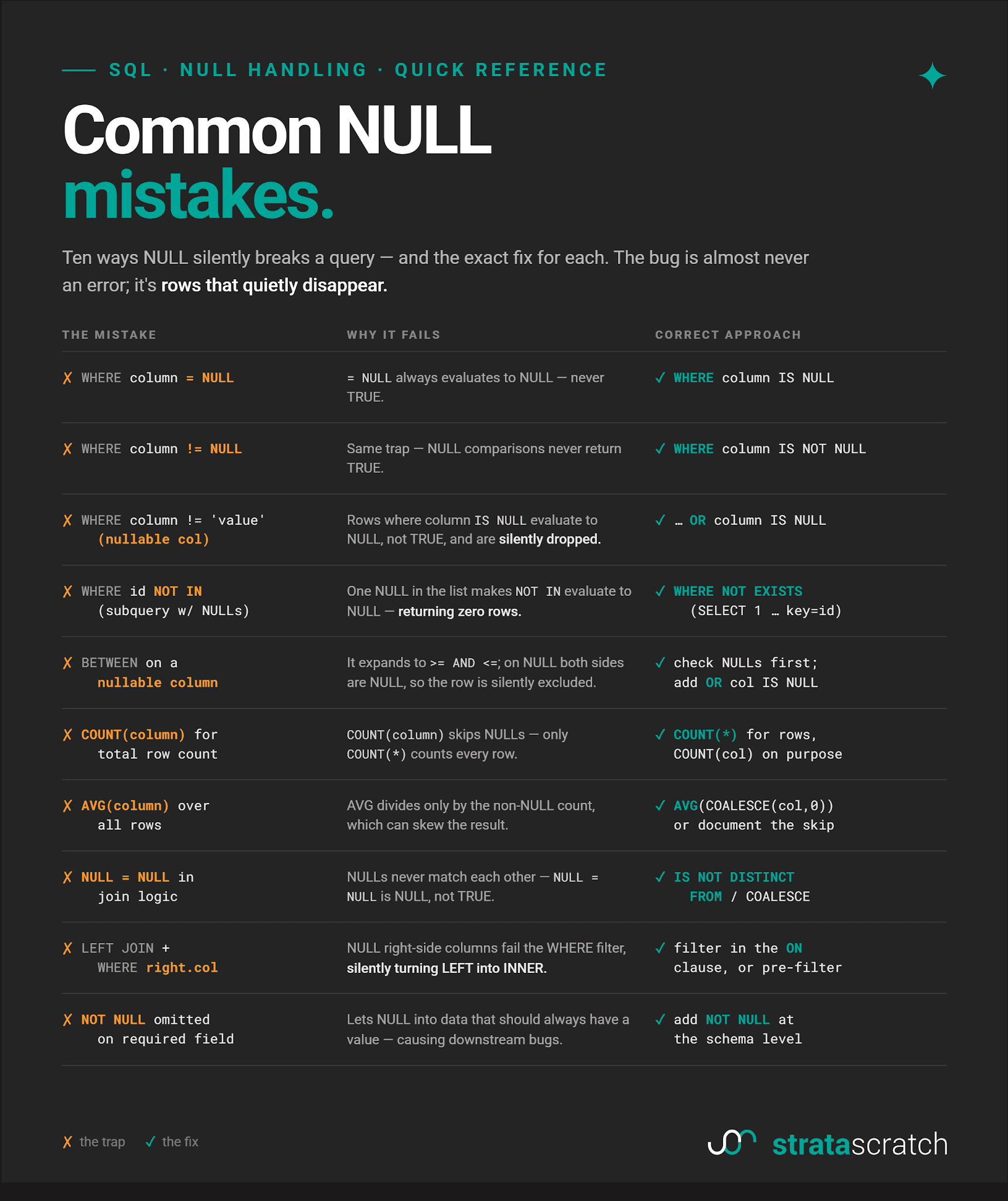
Common NULL Mistakes (Quick Reference)
Conclusion
NULL is not a bug in SQL, but a deliberate design choice for representing the unknown. The bugs come from treating it like a value. It isn’t a value.
The common thread that runs through all of the examples we showed: SQL making a choice about NULL that you didn’t notice, the output looks plausible enough, and you move on.
This article focused on internalizing three-valued logic; you will now know where the traps are and be able to catch them before they reach production.
FAQs
1. What is the difference between NULL and an empty string in SQL?
NULL is the absence of a value, as the data is unknown or missing. An empty string ('') is a value; a string with zero characters.
As an example, the NULL phone number means you don’t have a customer’s phone number. An empty string as a phone number means a customer doesn’t have a phone number, so you record that collected piece of information as an empty string.
2. How does NULL affect SQL WHERE clauses?
Comparisons with NULL always evaluate to NULL – not TRUE or FALSE – so the rows with NULLs will be filtered out.
If you want to find NULL rows explicitly, use IS NULL. If you want to include them alongside other results, add OR column IS NULL.
3. Does COUNT() include NULL values in SQL?
It depends on which COUNT() form you use. COUNT(*) does include NULLs; it counts every row, regardless of what’s in it.
COUNT(column_name) counts only the non-NULL values in that column.
4. Do SQL aggregate functions ignore NULL values?
Yes, they do. The only exception is COUNT(*), which counts every row regardless.
All other aggregate functions – COUNT(column), SUM(), AVG(), MIN(), MAX() – skip NULLs. Bear in mind that, as a consequence, AVG() divides by the count of non-NULL values. This can result in misleading calculations, depending on the business logic.
5. How does NULL affect SQL joins?
Rows with NULLs in a join key will never match any other rows, including rows that also have NULL.
The reason is that joins use equality comparisons to join the rows. And in equality comparisons, NULL = NULL results in NULL.
6. Why do LEFT JOINs sometimes behave like INNER JOINs?
This happens when you filter on a column from the right-side table in the WHERE clause. A LEFT JOIN fills right-side columns with NULL for unmatched rows. If you filter on one of those columns, those NULLs fail the filter and get dropped. Which is exactly the JOIN behavior; it drops the unmatched rows.
7. What is SQL three-valued logic?
Standard Boolean logic says that the condition is either TRUE or FALSE. The three-valued logic adds a third outcome: NULL, as in “unknown”.
WHERE treats it the same as FALSE, meaning the row is excluded. In other words, WHERE returns only rows where the condition is TRUE.
This logic underlies the behavior of the logical and comparison operators whenever a NULL value is involved.
8. What does IS NULL do in SQL?
IS NULL evaluates the NULL row as TRUE. For the non-NULL rows, it’s FALSE.
This predicate is the only reliable way to test for NULL. Its counterpart is IS NOT NULL.
9. What does COALESCE() do in SQL?
It evaluates each argument left to right and returns the first non-NULL value. This feature is useful for replacing NULLs with zeros, thus not excluding them from the output or calculation.
10. Is NULL the same across all SQL databases?
The core semantics are defined by the SQL standard, so NULL behaves consistently across databases.
However, there are some other differences. The first is that the way NULL is displayed varies. Some engines show the word NULL, others show (null), N/A, or a blank cell.
Another important difference is that Oracle treats empty strings as NULL. PostgreSQL, MySQL, and SQL Server don’t do that.
PostgreSQL has a NULL-safe equality operator (IS NOT DISTINCT FROM). Despite being defined by the SQL standard, it’s not supported in older versions of MySQL and SQL Server; they use <=> and a workaround with ISNULL() respectively.
11. When should a column allow NULL values?
When the absence of a value is a legitimate state in the data model. This happens in three situations:
- not applicable -> the value doesn’t exist for this row
- not yet known -> the value will exist eventually
- not collected -> the value exists in reality but wasn’t captured
Share