Python List Length: How to Find the Size of a List in Python

Categories:
 Written by:
Shivani Arun
One-stop shop for product data scientists to brush up on the size of the list in Python - a core fundamental that’s an element of many key interview patterns.
Working with basic Python data structures can have a surprising amount of depth. Finding the length of list objects occurs quite frequently for managing data on the job and also in the interview process.
Now that AI can write code while you assume the role of a reviewer in many workflows, it’s even more valuable to peel the layers of the onion and diagnose if edge cases are being handled appropriately.
This guide covers various practical approaches to finding the size of lists in a language as flexible as Python. It also goes beyond the obvious to explain the implications on performance and complexity, nested structures, edge cases, and real interview problems.
What is a List in Python?
A good precursor to this article is a comprehensive introduction to Python lists that explains the power of list objects in detail and what you can do with them. If you’re interested in other list-based data structures in Python, our guide on Python linked list is your go-to read.
As a quick reminder, here’s an example of a Python list.
mixed_list = [354, "hello", 0.97, [1, 2, 3], None]Lists primarily have three main properties.
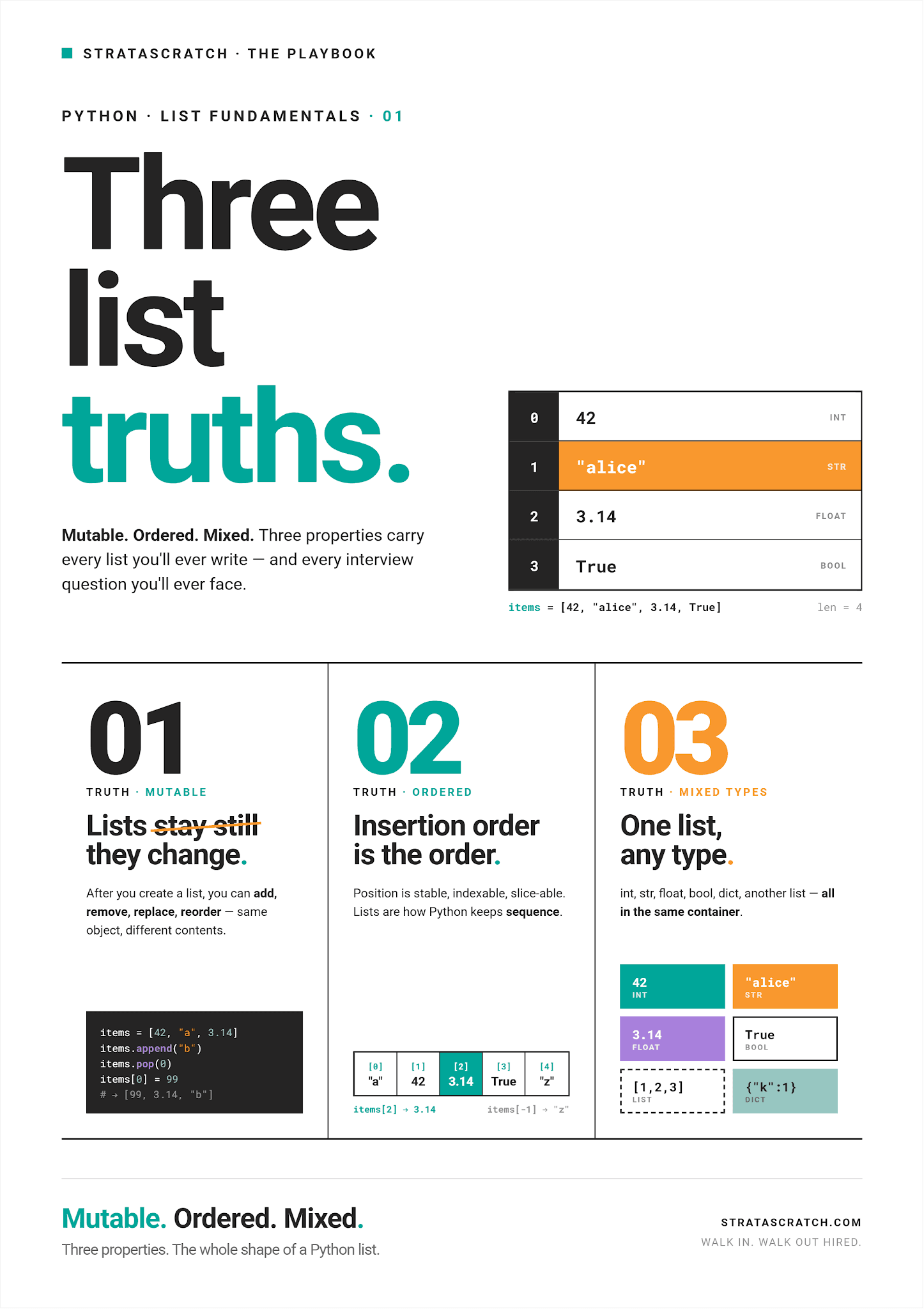
Due to those characteristics, you can find lists in these areas of data science: feature lists for feature engineering, label collections for supervised learning, and tokenized text for NLP.
Why List Size Matters
Finding the size of a list – the number of items within a list – seems like a simple enough exercise. Its application in real-world use cases is imperative for scale. Here are a few simple examples of lists you may often see in data science workflows.
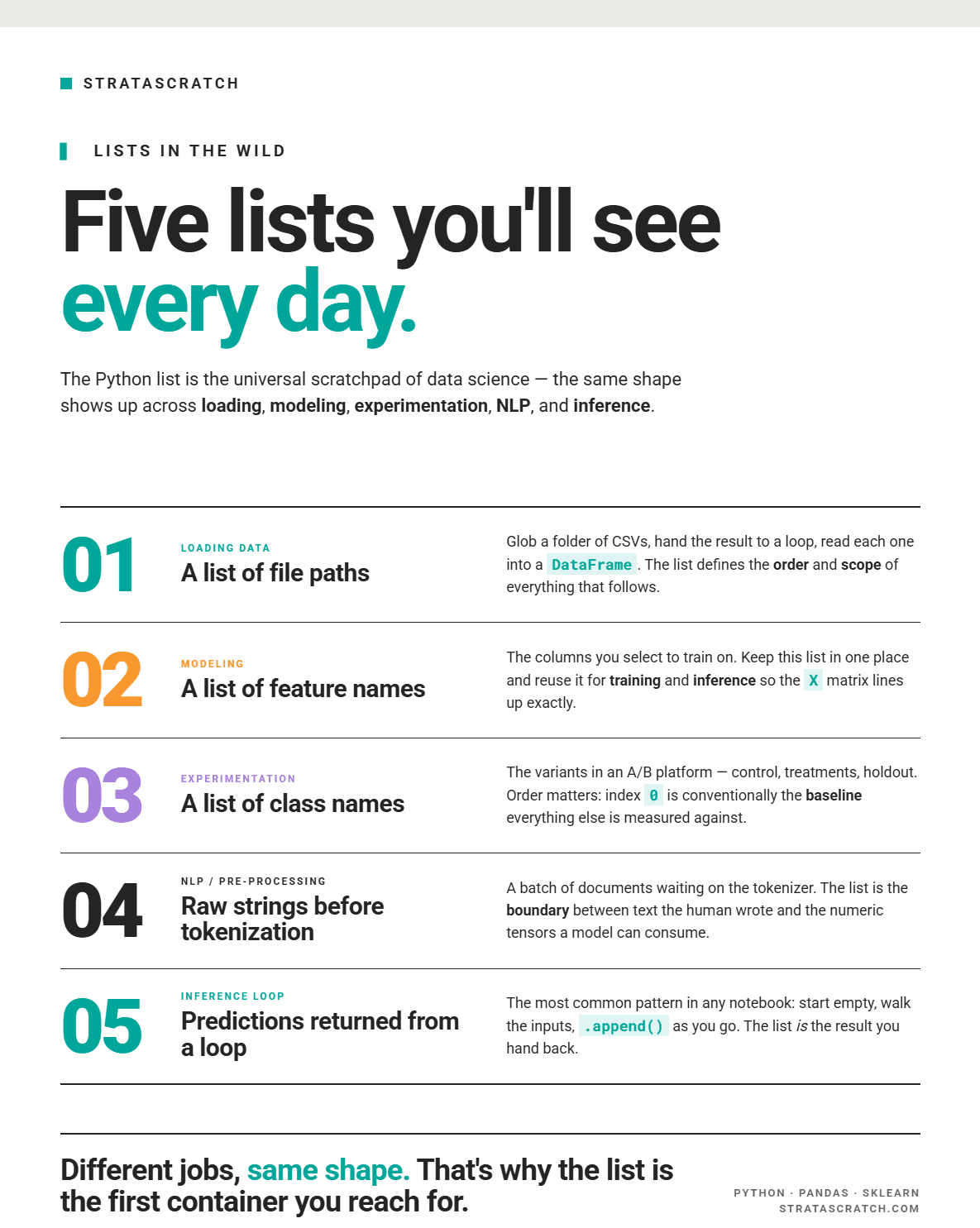
As an example, a simple unit test can verify that the lengths of the list of embeddings and the list of labels match, indicating that the embedding creation process didn’t accidentally introduce a bug that could skew your analysis.
Given two lists embeddings and labels:
assert len(embeddings) == len(labels)- The
len()function checks the size of both lists - The
assert()with the comparison operator checks whether the sizes of these lists are the same and returns a boolean value (True or False) depending on whether the condition is satisfied.
How to Find the Size of the List in Python (Most Common Method)
This brings me to introducing, in more detail, the most common method for finding the size of a list, i.e., using the len() function. Here’s a simple example of how it works.
scores = [100,98,94,78,50]
print(len(scores))
Here’s the output:
5
This method is the most popular because it is simple to use with many Python objects (not just lists) and is highly scalable. The len() function maintains a time complexity of O(1), meaning that if the list is super large, the len() function will still be very fast. This sets it apart from other approaches I will discuss throughout this guide.
The main reason a user may resort to using a function other than len() is in scenarios where the underlying data is not a simple list but rather a nested list, which represents one or more lists within a list.
Finding the Size of Nested Lists
Let’s take a look at an example of what would happen if we were to use len() on a nested list.
nested_list  = [ [5.1, 3.5, 1.4], [4.9, 3.0, 1.4], [6.2, 2.9, 4.3], [5.9, 3.0, 5.1], 100]
len(nested_list)
Here’s the output:
5
This isn’t the size of a nested list; it’s a count of the top-level elements of the list. In our example, the list has four inner lists and the integer 100, which is five top-level elements.
Now, if you wanted to count the number of elements in the first element of this list, i.e., [5.1, 3.5, 1.4], here’s how you would write the code:
nested_list  = [ [5.1, 3.5, 1.4], [4.9, 3.0, 1.4], [6.2, 2.9, 4.3], [5.9, 3.0, 5.1], 100]
len(nested_list[0])
Here’s the output:
3
You can do that for all other list elements by changing the index. However, you have to do that separately for each list element manually.
To count the total number of elements in the inner lists, you need to go deeper, and one useful approach is to use recursion for the same.
How to Count Total Elements in Nested Lists
In this section, we go deeper and explain the concept of recursive iteration to find the size of a nested list. A good reference for recursive algorithms is given in this article on Python data structures and algorithms.
Below is generally the most comprehensive approach to finding the length of a nested list with unknown depth.
nested_list  = [ [5.1, 3.5, 1.4], [4.9, 3.0, 1.4], [6.2, 2.9, 4.3], [5.9, 3.0, 5.1], 100]

def count_all_elements(nested_list):
    total = 0
    for item in nested_list:
        if isinstance(item, list):
            total += count_all_elements(item)
        else:
            total += 1
    return total

print(count_all_elements(nested_list))
Here’s the output:
13
There are three main steps involved in this code.
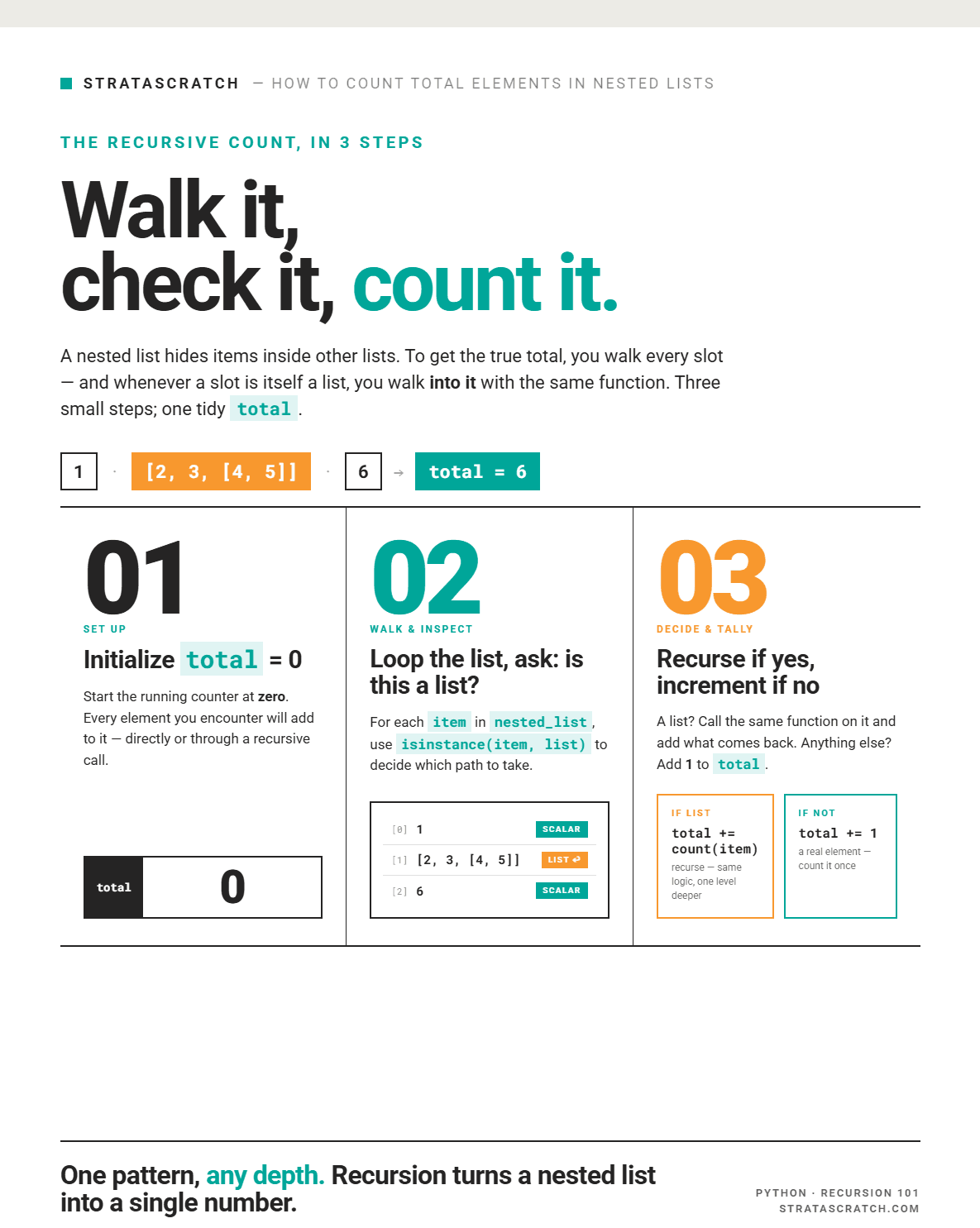
This works well for JSON-like structures, e.g., API responses, where fields can be lists of lists of records.
Alternative Ways to Get the Size of a List
There are many alternative ways to get the size of a list. Below is a summary of some of the main methods and their pros and cons.
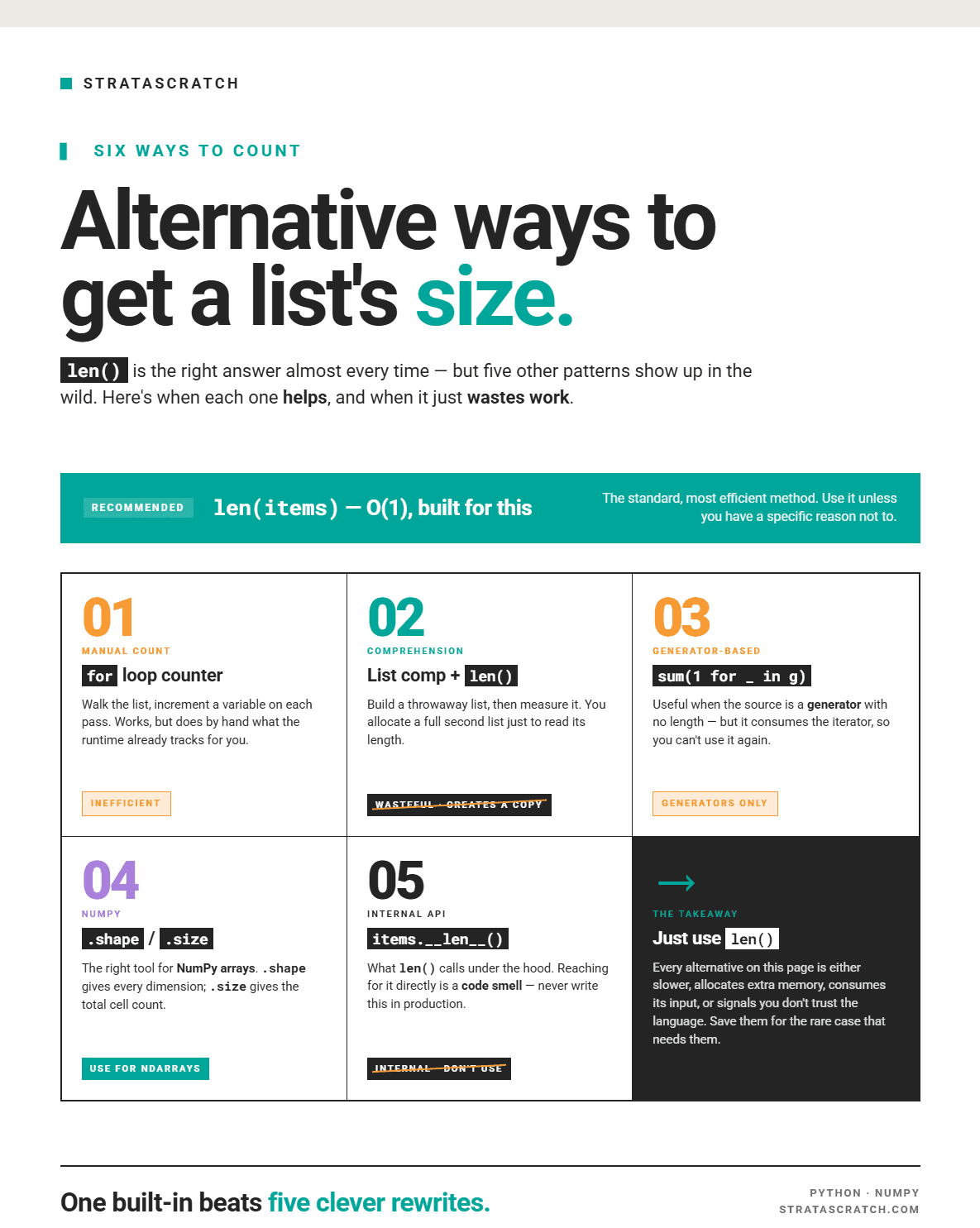
Alternative #1: For Loop
Looping through a list to get its length is a simple process. Using the example below, we first initialize a count variable, then loop through the list, incrementing the count each time. Once the list is fully traversed, we print the final count. To understand looping in more detail, check out this useful reference to loop through a list in Python.
Here’s some sample code:
data = [10, 20, 30, 40, 50]

count = 0
for _ in data:
    count += 1

print(count)
Here’s the output:
5
Unlike the len() function, we observe that the time complexity is O(n) since every element is visited once.
Alternative #2: List Comprehension & len()
This particular approach to finding the size of a list is used when the goal is to create a filtered list and then count the elements in that list. Let’s take a look at the code below:
predictions = [0.8, 0.91, 0.3, 0.2, 0.95, 0.99]

high_conf = [p for p in predictions if p > 0.9]
n = len(high_conf)

print(n)
Here’s the output:
3
This code first filters the list to predictions that have values > 0.90 and then counts the number of elements.
Alternative #3: Generator Expressions
In this approach, the goal is to convert the list object into a generator expression or iterator and then count the values in the list using sum().
Given the list of predictions that we defined above, we can count the number of elements using a generator expression by the following code:
predictions = [0.8, 0.91, 0.3, 0.2, 0.95, 0.99]

n = sum(1 for _ in predictions)
print(n)
Here’s the output:
6
This approach tends to be memory safe due to the benefit of lazy execution that comes with generator expressions. However, it is slower than using the len() function since it traverses every element once and has a time complexity of O(n). I recommend using this approach when the source is a generator, and you can’t directly call len() on it.
Another very similar approach is to use map() + sum(), where map() lazily applies a function to each element, and then yields 1 for each element of a list. I reference this approach in the generator section because, like the generator expression approach, it builds no intermediate list.
Here’s some code for reference:
data = [10, 20, 30, 40, 50]
n = sum(map(lambda _: 1, data))

print(n)
Here’s the output:
5
Alternative #4: Numpy Array
Converting a list to a NumPy array is not as efficient as directly using the len() function, but it’s worth introducing the concept of evaluating the size of an array. This can help you differentiate between finding the size of a list and the length of an array, and the situations where each is appropriate.
Let’s take an example of a nested list that we have converted into an array.
import numpy as np  # import the library
arr_2d = np.array([[1, 2, 3], [4, 5, 6]]) # convert the list into an array
print(len(arr_2d))
print(arr_2d.shape)
print(arr_2d.size)
Here’s the output.

len(arr_2d): Here,len()counts only the top level elements; 2 rows in this case.arr_2d.shape: The.shapeattribute returns the full dimensions of the array as a tuple, which is 2 rows and 3 columns, i.e., (2,3).arr_2d.size: The.sizeattribute returns the total number of elements across the entire array, which is 2 rows x 3 columns, i.e., 6 in total.
Alternative #5: __len__()
This is identical to using the len() function; rather than calling the function, this is the built-in dunder method. It’s not very common to use unless you are building a custom class in Python that needs to support finding the size of a list.
Time Complexity & Which Method to Choose?
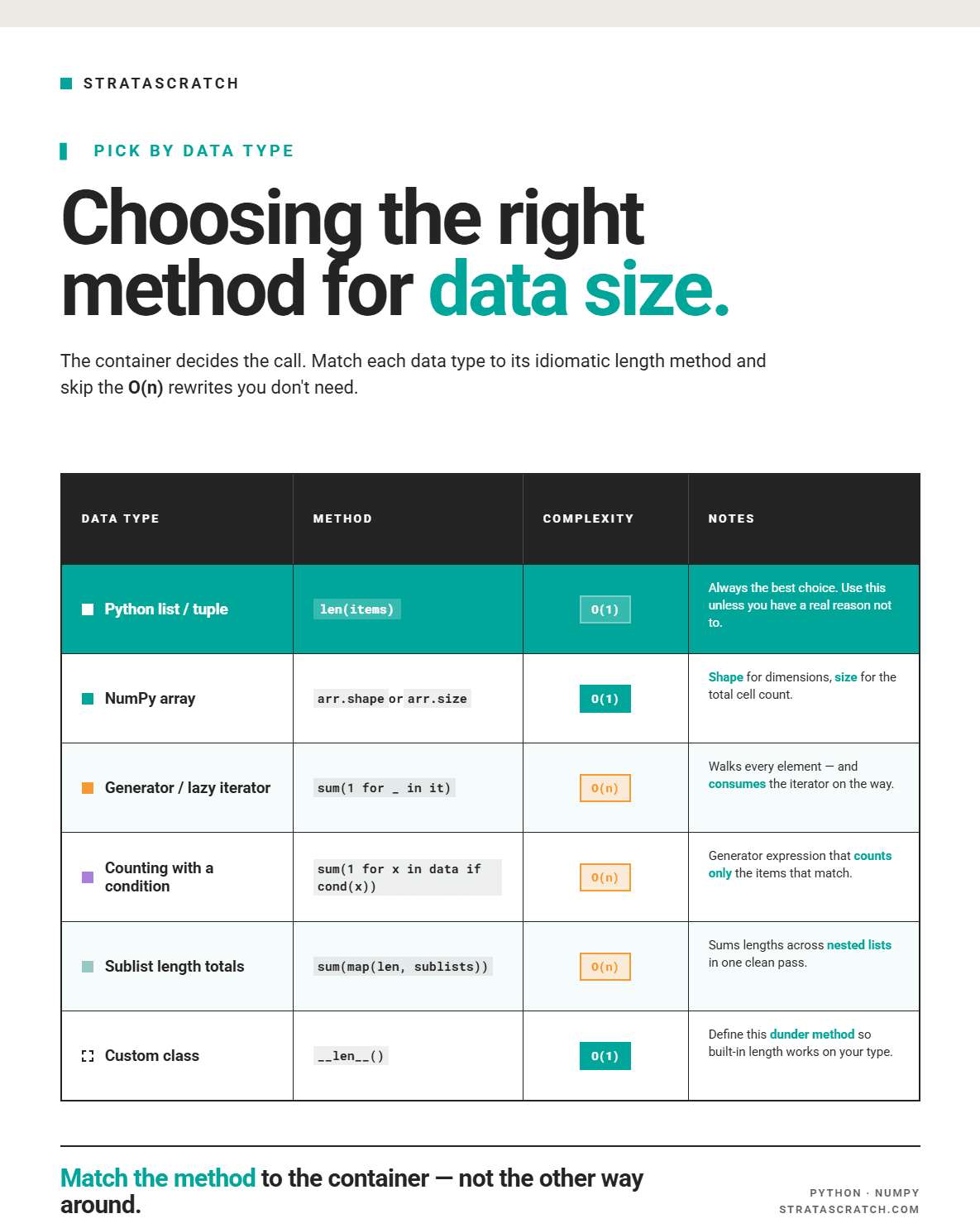
Ultimately, choosing the right method for your data involves careful consideration of the options available and the data size. I have explained some of the key tradeoffs in the visual below.
Checking if a List is Empty
Checking if a list is empty is also an important aspect of ensuring that we are writing complete and defensive code. Here are two main approaches to consider.
Approach #1: Consider an Empty List
data = []
if not data:
    print("List is empty")
Approach #2: Use the len() Function
data = []
if len(data) == 0:
    print("List is empty")
In both cases, the list is empty, so the output is this.

One important edge case to consider is that Python lists are falsy when empty or if they contain values like 0 and truthy when they contain at least one element. For this reason, if you're checking for an empty list in a context where element values might be falsy, len(data) == 0 is actually safer and more explicit.
Common Mistakes When Finding List Size & Best Practices
A few common examples of issues when finding the list size are given below.
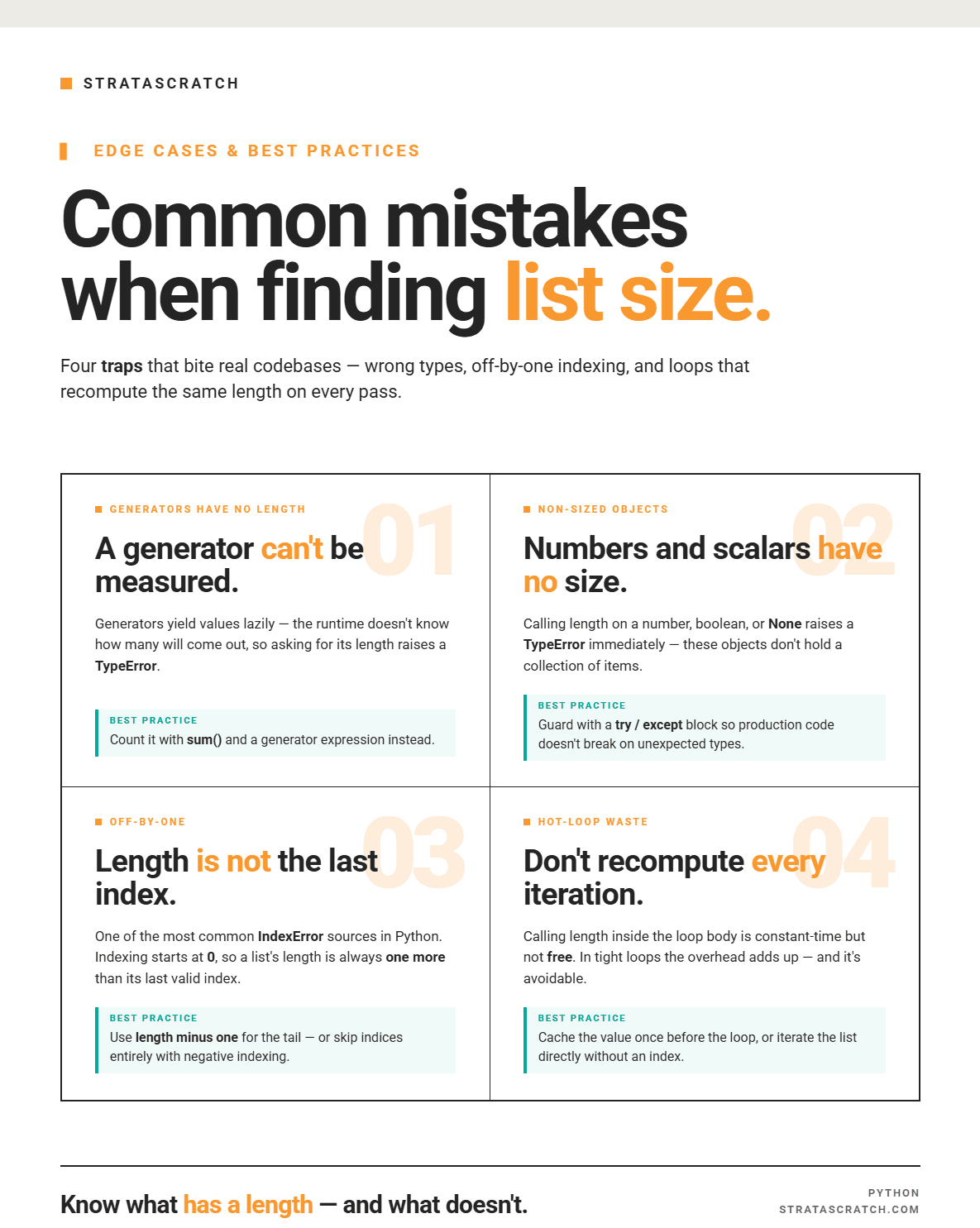
Mistake #1: Calling len() on a generator is incorrect and throws an error.
Here’s an example.
gen = (x for x in range(100))
print(len(gen))
This is an error it throws.

The best practice here is to use sum() with a generator expression.
gen = (x for x in range(100))
count = sum(1 for _ in gen)
print(count)
Here’s the output:
100
Mistake #2: Calling len() on a number or non-sized object.
Calling this function on a number, a boolean, or a None type object will raise a TypeError.
print(len(42))
print(len(3.14))
print(len(True))
Here are the errors for you to see.

To avoid your code from breaking in production, a good best practice is to guard against unexpected data types using try and except blocks.
Here’s the sample code to test a single value.
 try:
        return len(obj)
    except TypeError:
        raise TypeError(f"Expected a sized collection, got {type(obj).__name__}")
As you can see, it raises the TypeError we specified.
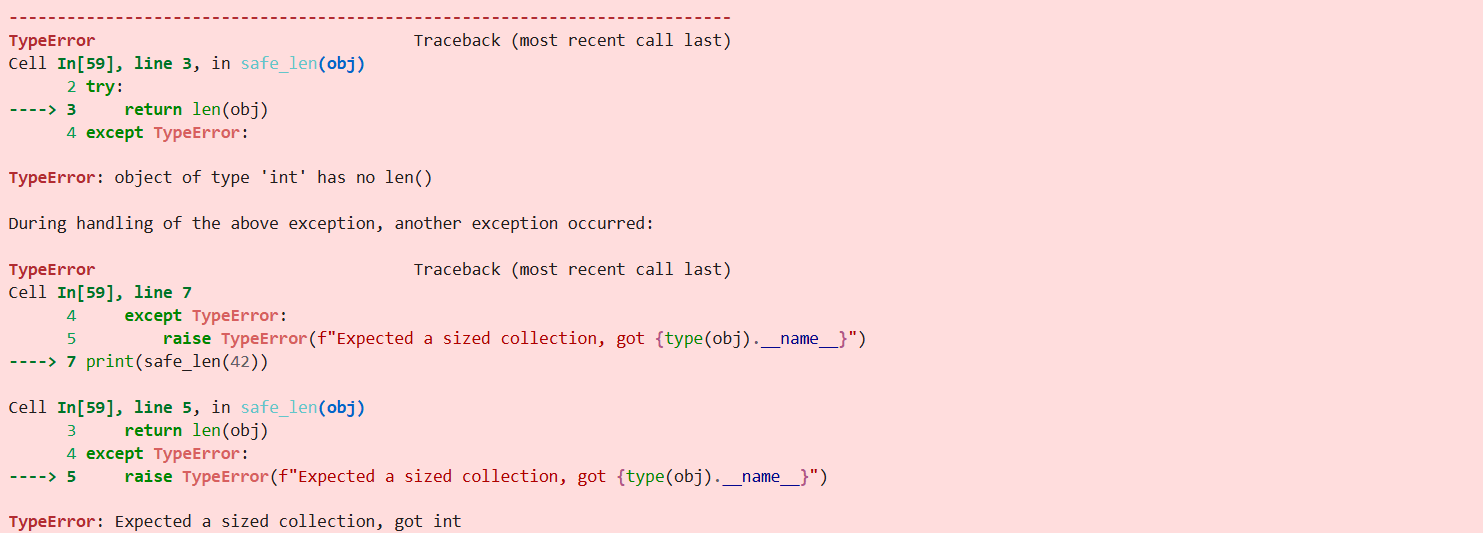
If you want to test all three problematic types above, you could do it like this.
def safe_len(obj):
    try:
        return len(obj)
    except TypeError:
        raise TypeError(f"Expected a sized collection, got {type(obj).__name__}")

for value in [42, 3.14, True]:
    try:
        print(safe_len(value))
    except TypeError as e:
        print(e)
Here’s the output.

Mistake #3: Confusing list length with the maximum valid index
This is one of the most common sources of IndexError in Python: using len() directly as an index in an attempt to return the last element of the list.
Here’s the incorrect code…
data = [10, 20, 30, 40, 50]
print(data[len(data)])
…that throws an IndexError.

The code is incorrect because the length of a list is always one more than its last valid index; indexing always starts at 0. A list of n elements has valid indices 0 through n - 1.
This is how it should be done.
data = [10, 20, 30, 40, 50]
print(data[len(data) - 1])
Here’s the output:
50
Mistake # 4: Using len() unnecessarily in a loop
Here’s an example of the unnecessary use of len(). This works, but it’s unnecessary because you don’t need the index if you’re just printing each element.
data = [10, 20, 30, 40, 50]

# Recomputes len on each iteration which is unnecessary
for i in range(len(data)):
      print(data[i])
A simple and more readable approach is this. The traversal will be handled by Python, so no need to involve len() or indices at all.
data = [10, 20, 30, 40, 50]

# Simple code for plain iteration
for i in data:
      print(i)
Here’s the output.

Real-World Examples
Now, I’ll get practical and demonstrate how to find the size of a list in Python in business cases. I’ll help myself with three actual interview questions.
Practical Example #1: Lo-Lo's 5-Star Reviews
Let’s start easy by finding the number of 5-star reviews earned by Lo-Lo’s Chicken & Waffles.
Find the number of 5-star reviews earned by Lo-Lo's Chicken & Waffles
Find the number of 5-star reviews earned by Lo-Lo's Chicken & Waffles.
Dataset
The dataset consists of one DataFrame named yelp_reviews.
Solution
The solution is really straightforward.
First, we create the lolo variable that contains all the 5-star reviews for Lo-Lo’s Chicken & Waffles.
Then, we simply apply len() directly to a filtered DataFrame to count the matching rows.
- The dataset has already been loaded as a pandas.DataFrame.
- print() functions and the last line of code will be displayed in the output.
- In order for your solution to be accepted, your solution should be located on the last line of the editor and match the expected output data type listed in the question.
Here’s the output.
| n_5star_reviews |
|---|
| 1 |
Practical Example #2: Actions More Than Once
This question from Meta asks you to find all actions that occurred more than once in the weblog.
Find all actions which occurred more than once in the weblog
Find all actions which occurred more than once in the weblog.
Dataset
In the dataset, there’s only the facebook_web_log table.
Solution
The solution uses len() inside groupby to measure the size of each group and keep only the ones with more than one occurrence. This showcases len() being used as a conditional filter, a more realistic data-manipulation scenario than simply using it as a counting tool, as in our earlier examples.
The Python lambda function returns True where group length is greater than 1, and False otherwise.
- The dataset has already been loaded as a pandas.DataFrame.
- print() functions and the last line of code will be displayed in the output.
- In order for your solution to be accepted, your solution should be located on the last line of the editor and match the expected output data type listed in the question.
Run the code above to see the output.
Practical Example #3: Merge Sorted Arrays
Unlike the previous two practical examples, this is an algorithmic interview question.
Here, Walmart asks you to combine two sorted arrays to form 1 sorted array.
Merge Sorted Arrays
Combine two sorted arrays to form 1 sorted array.
The constraint overview is shown below.
| Constraints |
|---|
| - `arr1` and `arr2` are both lists of integers. |
| - The input arrays `arr1` and `arr2` are already sorted in ascending order. |
| - The lengths of `arr1` and `arr2` can be different. |
| - The elements in `arr1` and `arr2` can be positive, negative, or zero. |
| - The elements in `arr1` and `arr2` can be repeated. |
| - The maximum length of `arr1` and `arr2` is not specified. |
Solution
Now let’s review the solution. Here are the three main things to keep in mind:
- Two-pointer traversal keeps everything sorted: The algorithm walks through both input arrays simultaneously using indices
iandj, always comparing the current elements and appending the smaller one. This guarantees the merged result remains sorted at every step. - Efficient linear-time merge: Each element from both arrays is visited exactly once, so the total time complexity is O(n+m)
- Clean handling of leftovers: Once one array is exhausted, the remaining elements from the other array are simply appended, since they are already in order.
Here’s the output.
Expected Output
Test 1
Test 2
Test 3
Conclusion
Finding the size of a list is a foundational technique that is the building block of many technical interview questions, as well as problems you will encounter in the day-to-day of data science workflows. Practicing these concepts at length will help you become comfortable with seemingly simple concepts that have wide-ranging applications and also help you through your interview journey.
Frequently Asked Questions
1. What does len() return for nested lists?
len() returns the number of top-level elements but doesn’t count the total elements that may be within sub-lists.
2. Is len() fast in Python?
Yes, it has O(1) time complexity and is faster than other approaches used to find the size of lists.
3. How do you get the length of an empty list in Python?
One simple approach is to check if the length of the list is 0, and if so, then the list is empty.
4. Can Python lists have an unlimited size?
It depends on the computer’s memory and architectural constraints. Lazy evaluation using generators is a good way to handle very large lists, as they use constant memory and evaluate elements one at a time.
5. How do you limit the size of a list in Python?
Slicing is the most straightforward approach. For example, data = data[:5] trims a list to the first five elements.
To enforce a maximum size when building a list, use len() before appending: if len(data) < max_size: data.append(item)
However, if you require a fixed-size buffer where old elements are automatically dropped as new ones are added, then we’re talking about deques, i.e., collections.deque with a maxlen argument.
6. Can you find the size of a list without using len()?
Yes, there are many alternative approaches like using NumPy arrays, generators, the map function, and list comprehension that are explained in this article as alternatives to using the len() function. The key is understanding the trade-offs and efficiency of your code for your data.
7. Does len() work with all Python data structures?
No, the len() function will not work with generators. An alternative approach is to assign a value of 1 to each element in a generator and then use sum() to get the length.
However, len() is generally very versatile and can be used with other data structures like strings, lists, tuples, range objects, dictionaries, sets, and dataframes.
Share