What Is the Role of SQL Substring in Queries?

Categories:
 Written by:
Shivani Arun
We explore the use of the SQL SUBSTRING() function to demonstrate its power in analyzing string formats, both for interview preparation and handling data.
When you encounter scenarios with semi-structured data, such as names, text fields, JSON objects stored as text, phone numbers, and timestamps stored as text, SUBSTRING() can help structure the queried data into a desired format.
Given the increasing availability of unstructured text, string functions in SQL can be leveraged to extract and structure data for further analysis and transformation.
While SQL string manipulation is powerful in unlocking another layer of data transformation, I have observed that a simple query using such functions can run for hours if not optimized for performance and scale. In a world of transparent compute costs and massive datasets, considerations for production are equally important.
In this article, we provide a detailed overview of the use of the SUBSTRING() function, common SQL errors to avoid, and performance optimization considerations for production.
The reason for focusing on this aspect is that while AI acceleration can produce a technically sound query within minutes, it is optimized for output. Ensuring that the output is technically sound AND optimized for performance is still an area that requires meaningful human judgment and strong fundamentals!
What is SQL Substring?
SQL SUBSTRING is a function that extracts a continuous sequence of characters – a specific string or part of a string – from a string, starting at a specified position and continuing for a specified length. Think of it as a way to extract characters from position X for a specific text field or value.
Why Is SQL Substring Important in Queries?
While the obvious uses of SUBSTRING() are parsing encoded values, extracting parts of strings, and transforming text into structured attributes, one use case I have found very valuable in my data science projects is extracting classification flags for feature engineering. Suppose I wanted to extract part of an encoded value and create a flag that is 1 for AMER and 0 otherwise; this function is best suited to handle such use cases.
In my experience, the value of SUBSTRING() can be further unlocked by using it in conjunction with other string functions, something that I will demonstrate as we proceed through examples in this article.
While SUBSTRING() has diverse use cases, there are also important considerations to keep in mind. Here’s a quick way to understand SQL substring at a 30,000 ft level.
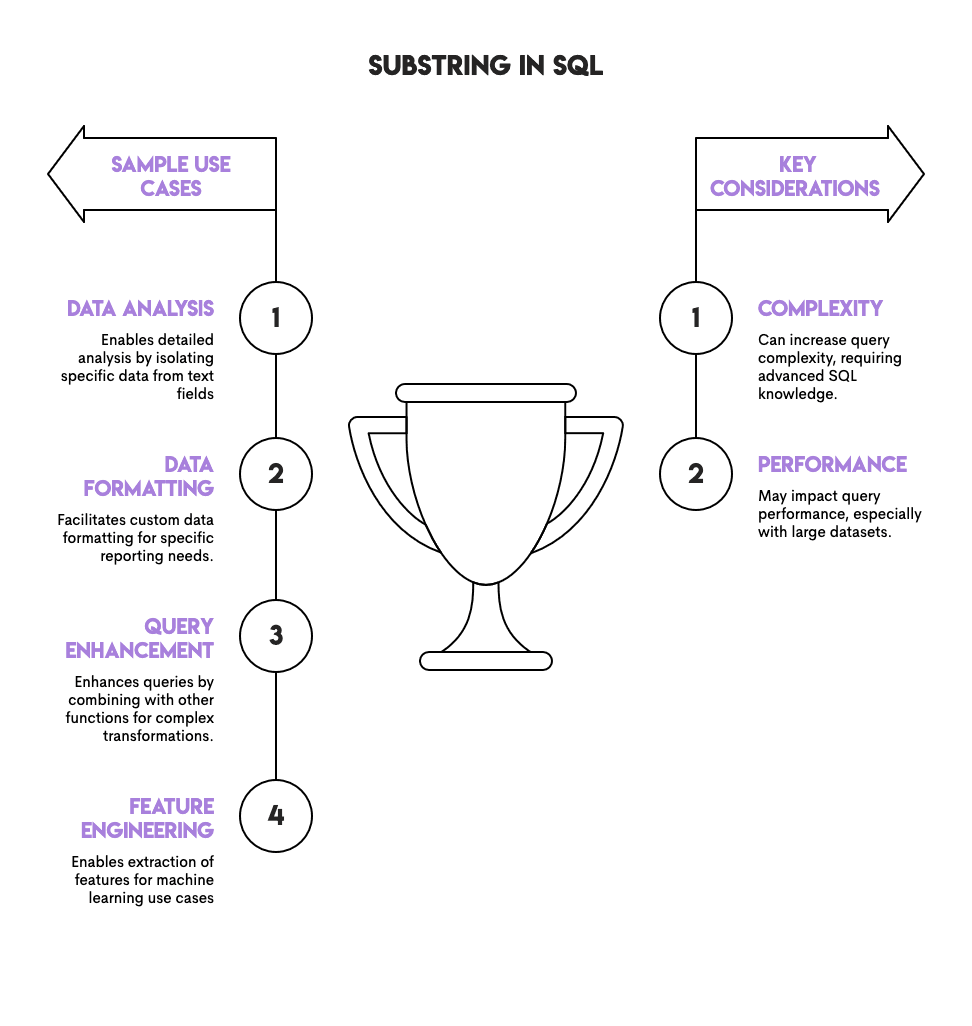
We know that string functions, including SUBSTRING(), are for working with text data. But what does that exactly mean on the job? What actual fields are commonly leveraged with SUBSTRING()?
Here are a few examples to better understand when to identify use cases for this function:
- Phone numbers where area codes refer to the region
- Product SKUs where characters refer to the category
- Filenames containing department or date identifiers
- URLs, paths, file extensions, or domains
SQL Substring Syntax Explained
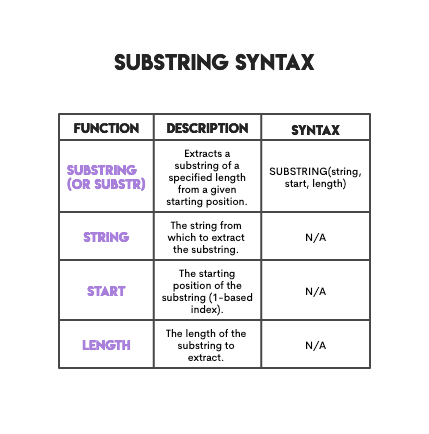
The syntax of SQL SUBSTRING is straightforward and can be visualized using a simple table below. For example, in the first row, I show the syntax, and the rows below it explain the meaning of each element.
Now, let’s try a practical example to ground our understanding of the syntax using one of the basic SQL interview questions with a slight twist.
Practical Use Case
Sorting By Second Character
Last Updated: May 2023
You've been asked to arrange a column of random IDs in ascending alphabetical order based on their second character.
Let’s take a quick look at the data itself to understand what is expected of us. Note that in the interview, you will probably not have the luxury to review the underlying data OR execute intermediate steps of the query, so it’s helpful to practice with and without looking at the underlying data when you are preparing for your technical coding rounds.
Dataset:
This table has only 1 column, random_id, and to arrange it by the second character, the only two steps are:
- Extract the second character using
SUBSTRING(). - Order by this extracted character
Now let’s review the solution.
Solution:
The last line of the solution shows that we are starting at the 2nd position to extract a string, and then the length of the characters we want to extract is 1.
Here’s the output.
| id |
|---|
| 2ABS5 |
| 3ASD1 |
| 4AOS9 |
| 2CBS6 |
| 3CGY1 |
| 3CUY1 |
| 3CYS1 |
| 2DQS4 |
| 2DYS7 |
| 3DUU1 |
| 4DSS1 |
| 5MQS2 |
| 5NES1 |
| 3NOS8 |
| 2POI9 |
| 2PTY1 |
| 2SUI8 |
| 5TLS2 |
| 3TQS1 |
| 5ZQS3 |
While this example was meant to be a foundational introduction, as we proceed through this article, we will encounter not just different flavors of applications of SUBSTRING() but also acknowledge that the syntax of this function can vary slightly across databases. This knowledge is often a plus, as it signals nimbleness and the ability to navigate different dialects of SQL confidently.
SQL Substring Across Different Databases
In this section, we quickly summarize the different syntax options that exist for SUBSTRING(). The same dialect sometimes supports multiple syntaxes, which reminded me of the flexibility of SQL.
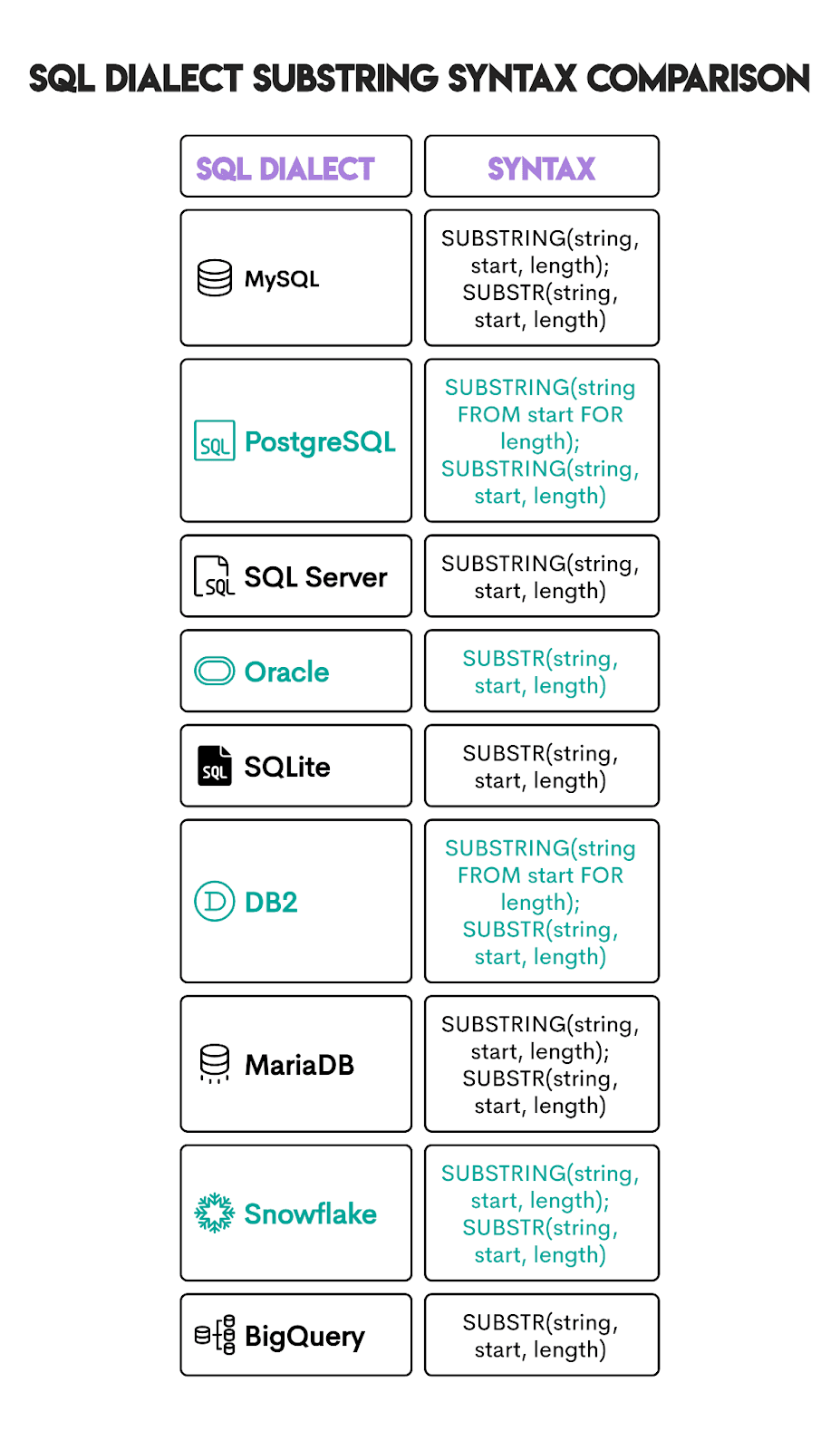
A key consideration when working with different dialects is understanding the commonalities and differences that exist across them. Here are a few very interesting nuances:
- All major dialects use 1-based indexing (the first character is position 1). If you are preparing for a tech screen that includes both SQL and Python, this is important to keep in mind since most Python slicing (which is very similar in principle) is based on 0-based indexing.
- Oracle, MySQL, SQLite, and BigQuery support negative indexing to count from the end of the string (PostgreSQL does NOT). We will address this pattern in the advanced SQL Substring Techniques section.
- The length parameter is optional. When the length parameter is not specified, all characters from the start position to the end are returned.
- PostgreSQL supports regex patterns with
SUBSTRING(), which is a force multiplier for most string manipulation queries.
SQL Substring vs Other String Functions
The SUBSTRING() function can be compared to many other SQL functions because the power of string manipulation often comes from combining different functions together. For example, you can combine string and array functions together to handle almost all kinds of data formats.
Let’s focus on understanding the key differences between SQL SUBSTRING() and other commonly related functions. The first set of functions is very similar and are commonly used interchangeably or with minor differences in functionality or syntax.
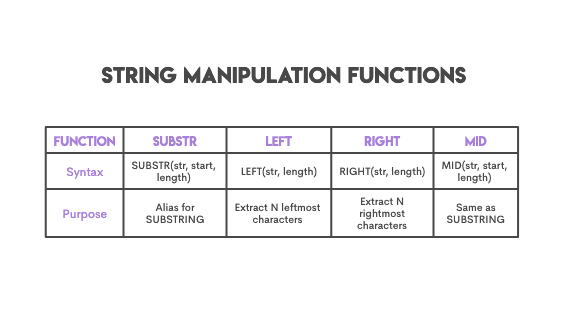
The next set of string functions is related to SUBSTRING() but has different applications than this function. Here’s a list of string functions that are used in closely related scenarios for string manipulation.
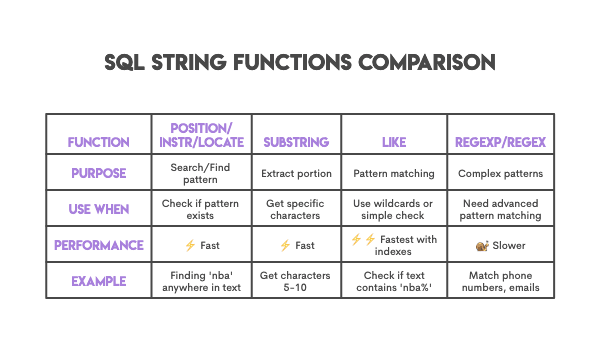
The key thing to keep in mind for these functions is when to use them, to ensure they are applied in the right context, and to understand performance considerations.
Practical Example
Posts with 'nba' substring in keyword
Find all posts with a keyword that contains 'nba' substring. For such rows output all columns.
Let’s take a quick look at the data itself to understand what is expected of us. The goal is to find all the posts that have the keyword ‘nba’ in them using the column post_keywords.
Dataset:
Solution:
The question mentions the ‘nba’ substring, so you might be tempted to use SUBSTRING() in your solution. Let’s try that.
The code below is one such attempt, very hopeful at that. It assumes that each post starts with ‘nba’. I also employed LOWER() to make the search case-insensitive.
Run the code in the widget to see if it returns the correct output. (Spoiler alert: It doesn’t.)
Actually, it doesn’t output any posts at all. Is it possible that there are no posts mentioning the NBA?
Yes, it’s possible, but it’s also not true. The code above is very naive, assuming that posts could only start with the substring. They could, but they could also be anywhere in the post. Because the positional index of ‘nba’ is unknown, it’s not appropriate to use SUBSTRING() here.
To account for that, we could write the solution with POSITION().
This returns correct output; run the code in the editor to see it yourself.
However, this code unnecessarily complicates things, and only because we’re intent on using SUBSTRING().
The simplest and most widely adopted approach would be to use the wildcard LIKE or ILIKE (the latter for the case-insensitive search).
Here’s the output.
| post_id | poster | post_text | post_keywords | post_date |
|---|---|---|---|---|
| 0 | 2 | The Lakers game from last night was great. | [basketball,lakers,nba] | 2019-01-01 |
| 1 | 1 | Lebron James is top class. | [basketball,lebron_james,nba] | 2019-01-02 |
The key takeaway from this exercise is to realize the pattern where SUBSTRING() is appropriate and where it is not. If the keyword ‘nba’ were always in the same position, then SUBSTRING() would have given much better performance gains over the use of the LIKE operator.
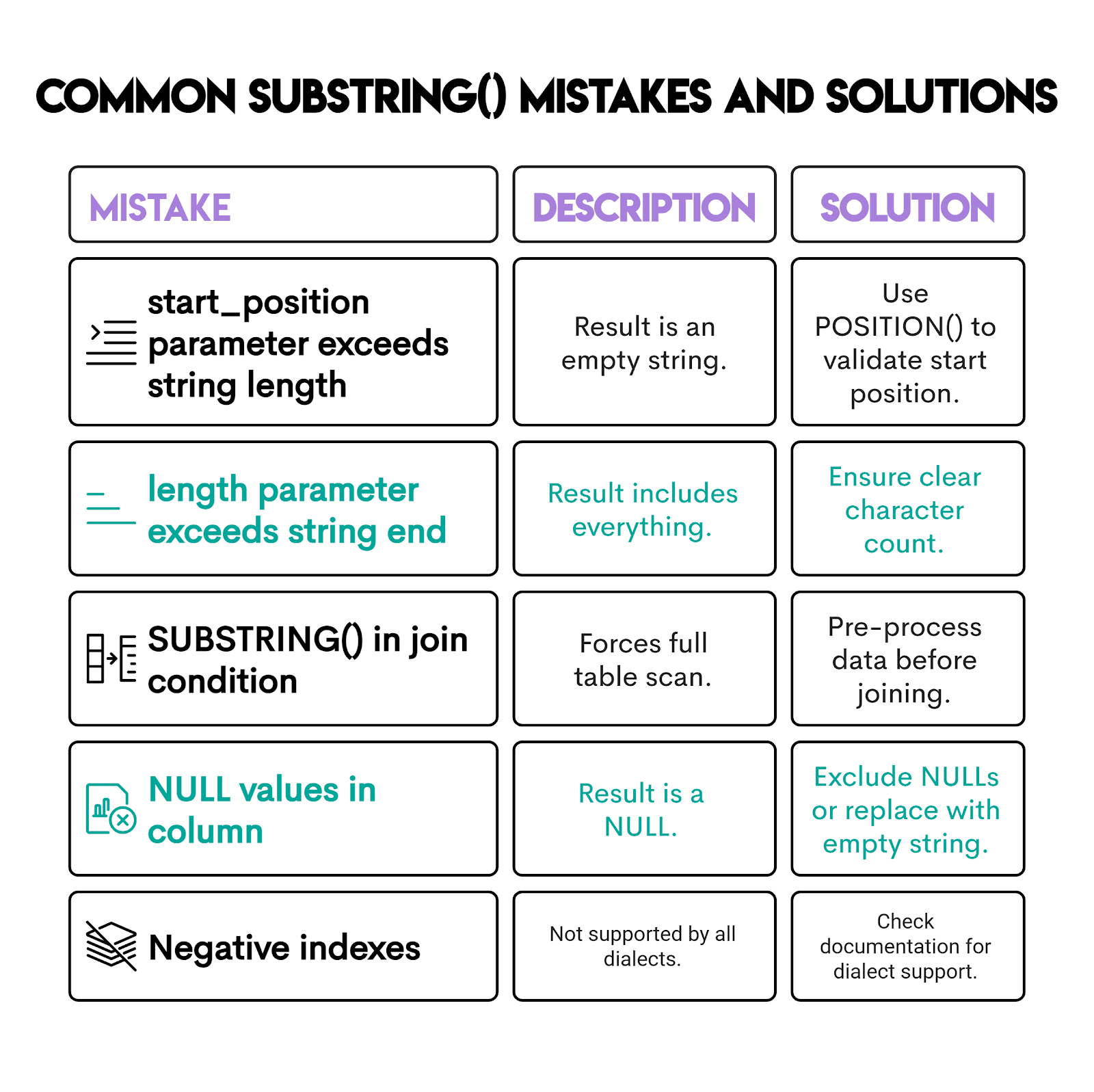
Common Mistakes When Using SQL Substring
After learning when not to use SUBSTRING(), it’s time you learn how to use it without messing it up.
Best Practices for Using SQL Substring in Queries
There aren’t many critical things to keep in mind when using this function, but one rule of thumb I keep at the top of my mind, aside from common mistakes, is knowing when to use it. Here are a few questions I would ask myself and plan accordingly:
- Want to know IF pattern exists? Use
LIKE '%pattern%'orPOSITION/INSTR. - Want to know WHERE pattern is? Use
POSITION/INSTR/LOCATE. - Want to GET specific characters with a known positional index? Use
SUBSTRING/LEFT/RIGHT. - Want complex pattern matching? Use
REGEXP/REGEX.
Advanced SQL Substring Techniques
For those who want to learn more, I’ll show you three advanced SUBSTRING() techniques:
- Combining it with regular expressions
- Dynamically determining length and positions
- Working with delimiters
Pattern 1: Combine with Regular Expressions
Combining SQL SUBSTRING() with regular expressions is an advanced technique that is often used to unlock the full power of the SUBSTRING() function.
Regular expressions are powerful, albeit complex to master. Many senior data scientists struggle with it if they aren’t working with text data on a regular basis. I have personally found it very useful to at least know fundamental regular expressions and be ready to address any SQL interview questions that surface the need to use these patterns. Furthermore, using these patterns can be more efficient than using LIKE operators in SQL queries.
While the goal of this article is not to go into details on the use cases of regular expressions, the idea is introduced to help you understand how to apply them.
We’ll use a hard interview question from ESPN to demonstrate this. The goal is to find the quarterback with the longest throw.
Quarterback With The Longest Throw
Find the quarterback who threw the longest throw in 2016. Output the quarterback name along with their corresponding longest throw.
The lg column shows the quarterback’s longest completion. If the value has a trailing t, ignore the t and use the numeric part when determining the longest throw.
Dataset:
Let’s take a quick look at the data itself to understand what is expected of us.
Here, we observe that the field of interest is lg and the SUBSTRING() function is a good candidate for us because the question explicitly states that the field is a string field, and if the value has a trailing t, it should be ignored.
Here’s the solution.
Let’s double click into the use of SUBSTRING() in this solution along with the regular expression '[0-9]+':
- The first part of the code selects two columns:
qb, which represents the quarterback's name, andSUBSTRING(lg FROM '[0-9]+')::NUMERIC AS lg_numextracts the numeric part of thelgcolumn and converts it to a numeric data type. - The
WHEREclause has another conditionSUBSTRING(lg FROM '[0-9]+')::NUMERIC = (SELECT MAX(SUBSTRING(lg FROM '[0-9]+')::NUMERIC) FROM qbstats_2015_2016 WHERE YEAR = 2016). This condition finds the longest throw by comparing the extracted numeric part of the lg column with the maximum extracted numeric value in the entire table for the year 2016.
Here’s the output.
| qb | lg_num |
|---|---|
| Drew BreesD. Brees | 98 |
Pattern 2: Dynamically Determine Length and Positions
Another pattern that is worth mentioning is the use of CHAR_LENGTH() to determine lengths and positions dynamically. This ensures that string operations are flexible, especially since most string data is unstructured and rarely standardized.
We’ll use this question (with adapted requirements) to show how to use- CHAR_LENGTH().
Host Response Rates With Cleaning Fees
Last Updated: February 2018
Find the average host response rate with a cleaning fee for each zipcode. Present the results as a percentage along with the zip code value. Convert the column 'host_response_rate' from TEXT to NUMERIC using type casts and string processing (take missing values as NULL). Order the result in ascending order based on the average host response rater after cleaning.
Let’s find all businesses and extract the last 4 digits of violation IDs. If the violation IDs were fixed, we could simply use SUBSTRING(); however, they’re not.
Dataset:
Here’s the data preview.
Solution:
The code for this is shown below.
Here are the steps involved in the process:
CHAR_LENGTH(violation_id)will give the total length of the string.- Subtract 3 to find where the last 4 digits begin.
- Extract 4 characters from that position.
Here’s the output.
| business_name | violation_last_four |
|---|---|
| John Chin Elementary School | 3149 |
| Sutter Pub and Restaurant | 3133 |
| SRI THAI CUISINE | 3139 |
| Washington Bakery & Restaurant | 3108 |
| Brothers Restaurant | 3133 |
Does this remind you of string slicing in Python?
Pattern 3: Working with Delimiters
A variation of SUBSTRING() is to consider SUBSTRING_INDEX() in MySQL and SPLIT_PART() in PostgreSQL. This is primarily used when working with delimiters in strings to extract substrings based on a specified delimiter count.
Let’s use this question’s data.
Duplicate Emails
Last Updated: April 2019
Find all emails with duplicates.
We’ll change its requirements to: Find all employee ID and their email usernames.
Dataset:
Here’s the data we’ll be working with.
Solution:
The syntax is SPLIT_PART(string_text, delimiter text, field int).
In the solution, the delimiter is @, and the field int argument is 1, which means it will return the first part, i.e., the one before the delimiter.
Here’s the output.
| id | username |
|---|---|
| 5 | Max |
| 13 | Katty |
| 11 | Richerd |
| 10 | Jennifer |
| 19 | George |
Conclusion
SUBSTRING() is a handy function to have in your SQL toolkit. In this article, you have learned to recognize the patterns that define effective use of this function and how to unlock the full value in conjunction with other string functions.
With string manipulation in your arsenal, many of the natural language processing data science use cases become much more accessible on the job! Moreover, while preparing for interviews, this knowledge is considered foundational in SQL and heavily tested by many large tech companies.
FAQs
What is SQL substring used for?
To extract a subset from a defined positional value. There are many use cases of the SUBSTRING() function for string manipulation that are listed in this article. A few examples include:
- Phone numbers where area codes refer to the region
- Product SKUs where characters refer to the category
- Filenames containing department or date identifiers
- URLs, paths, file extensions, or domains
Is SQL substring zero-based or one-based?
SUBSTRING() is one-based, although there are some nuances at the dialect level. This is something to keep in mind, especially if you are preparing for both SQL and Python interviews and practicing string manipulation.
Can SQL substring return
NULL?
There are two interesting cases to consider here.
- If the
stringisNULL,SUBSTRING()will returnNULL. Consider usingCASEor IFNULL to handle potential nulls. - A closely related scenario is if
start_positionexceeds the string length, the result is an empty string.
Which SQL databases support substring?
Most SQL dialects support SUBSTRING(). A detailed list of the dialects that support SUBSTRING() and nuances is given in the SQL Substring Across Different Databases section.
Share