How to Use Python Multiprocessing for Better Performance

 Written by:
Nathan Rosidi
A quick guide to Python multiprocessing: Speeding up heavy Python tasks by running code in parallel, and knowing when to use threads or async instead.
Real-life Python code often lasts longer than that found in Kaggle exercises. As a result, developers frequently look for ways to speed up long-running tasks, and one of the most effective solutions is executing their code in parallel. One of the best ways to achieve this in Python is by using multiprocessing.
What is Python Multiprocessing?
You have a Python code that you want to be executed ( in parallel) using Python multiprocessing, but how? It means that each section of your code you want to multiprocess runs on a different CPU at the same time.
And so, instead of sharing one memory, each piece of your code has its own distinct memory. That’s why these codes are self-contained.
This is crucial if your dataset is big and you are going to run computationally intensive operations. For instance, you can train six different machine learning models, tune their hyperparameters, apply the resulting models, and compare evaluation metrics.
Python provides this functionality through the multiprocessing module, which gives you the tools needed to create and manage processes.
Why Multithreading Alone Isn’t Enough Compared to Python Multiprocessing
Before explaining why multithreading has limitations in Python, it helps to understand what it is.
Multithreading allows a program to create multiple threads inside a single process. These threads share the same memory and switch execution when one is waiting.
But Python threads cannot run your code in parallel due to the global interpreter lock (GIL).
The GIL ensures that only one thread runs in Python. What this means is: even if you have multiple threads, the others will rotate so that none run concurrently on more than one core.
Threads are good for I/O bound tasks, such as network requests and file operations. Still, if you want your code to execute in parallel (in particular, anything that is considered for heavy numerical computing/machine learning/data workflows), then you need a multi-core CPU, which can be achieved via Python multiprocessing.
When to Use Multiprocessing vs Threading or Async in Python
In this section, we’ll compare multiprocessing, threading, and asyncio.
We already introduced multiprocessing and threading, but asyncio follows a different concurrency model. It handles many waiting tasks efficiently, which is why it works well for network-heavy programs instead of CPU-heavy work.
Let’s compare multiprocessing, threading, and async by exploring their use cases, how they work, and where they are best and where they are not suitable.
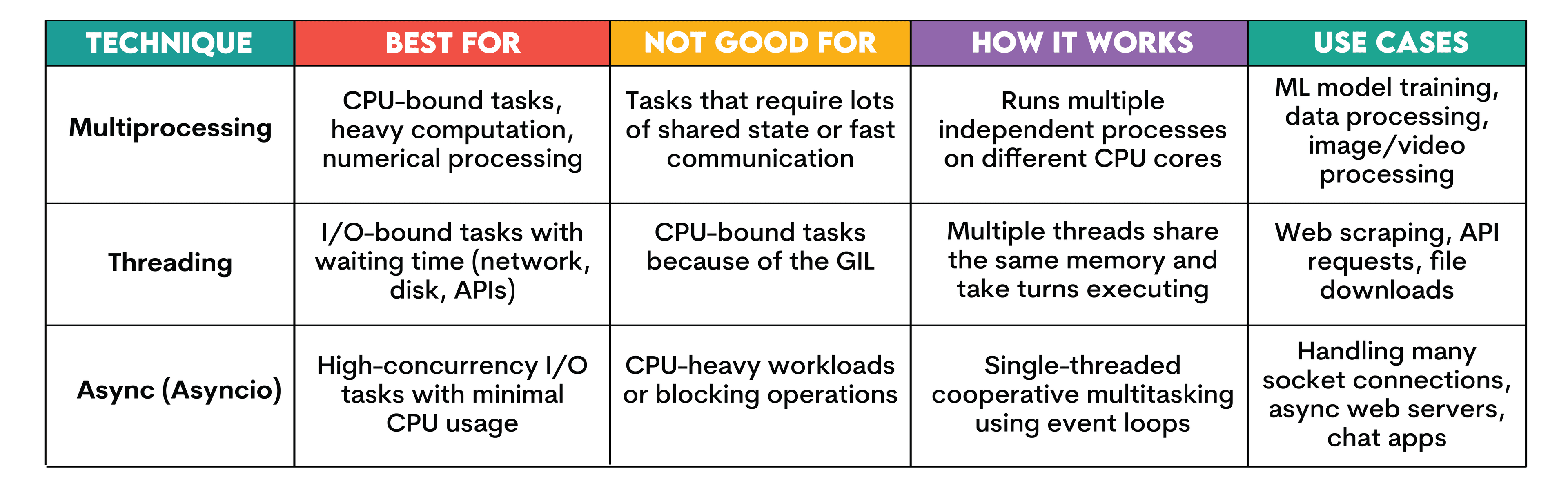
If you want to learn more, check out the Python threading article.
Key Concepts in Python Multiprocessing Module
In this section, let’s explore the foundational ideas behind the multiprocessing modules, such as Process, Pool, and Queue.
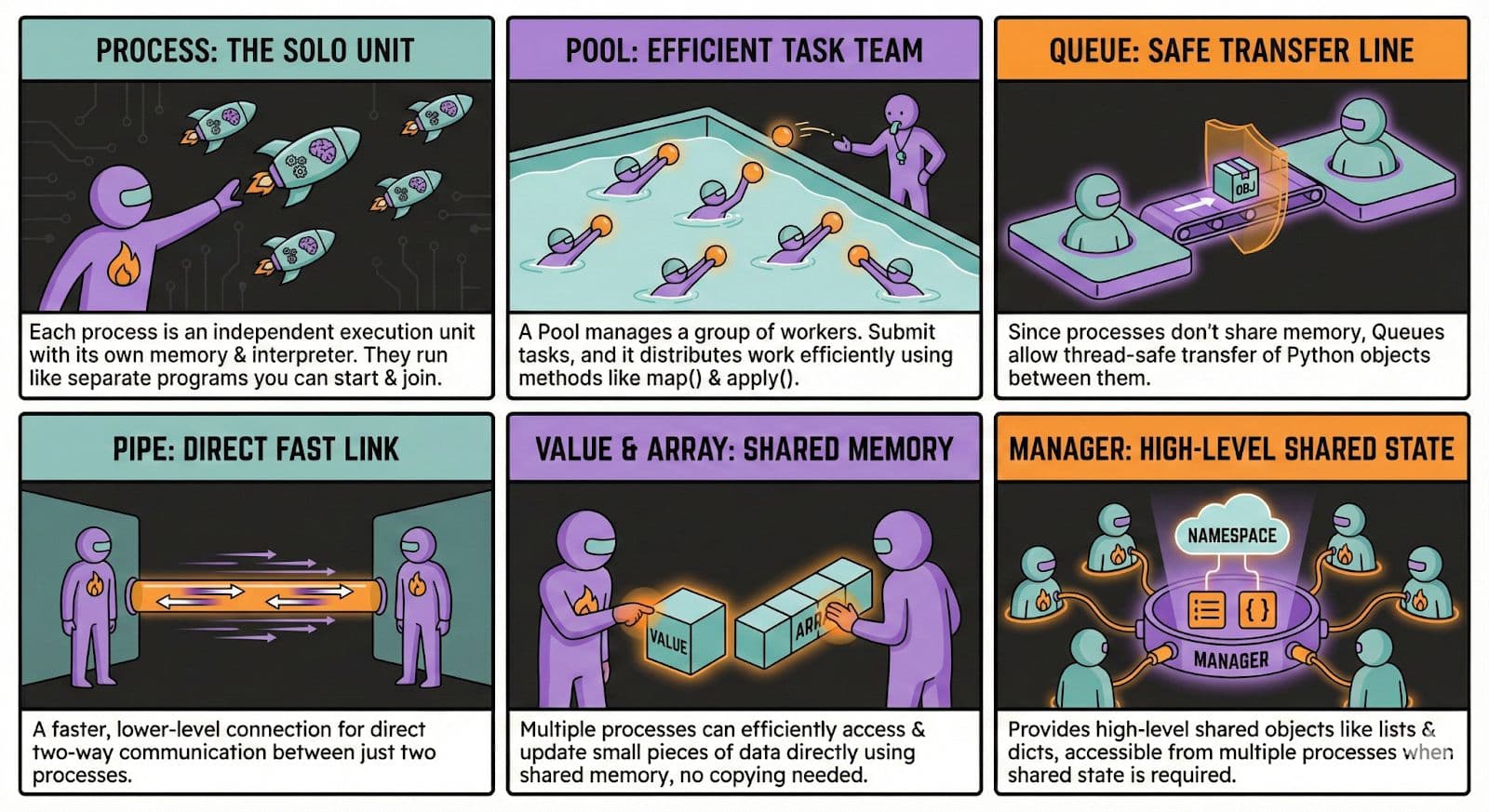
Python Multiprocessing Basic Usage: Processes & Pools
Now we know what multiprocessing is, when to use it, and why to use it. So let’s implement a simple Python multiprocessing.
You can perform multiprocessing with a pool or a process, but for this example, we’ll keep it simple and use a process.
We'll use the breast cancer dataset from scikit-learn, since it is simple and already available. The goal is to show what parallel model training looks like, so we'll prepare a small function that trains a model and measures how long it takes. Here is the code for that function.
from multiprocessing import Process
from sklearn.linear_model import LogisticRegression
from sklearn.datasets import load_breast_cancer
import time
def train_model(name, X, y):
    model = LogisticRegression(max_iter=500)
    start = time.time()
    model.fit(X, y)
    end = time.time()
    print(f"{name} finished in {end - start:.3f} seconds")
Now that the training function is ready, we can create two separate processes and let each one handle a model. This is the part where multiprocessing actually happens. Each process will run the same function, but they will do it at the same time on different CPU cores. Here is the full setup.
if __name__ == "__main__":
    # Load BREAST CANCER dataset once
    X, y = load_breast_cancer(return_X_y=True)

    print("Dataset loaded:")
    print("X shape:", X.shape)
    print("y shape:", y.shape)

    # Run multiprocessing on THIS dataset
    p1 = Process(target=train_model, args=("Model A", X, y))
    p2 = Process(target=train_model, args=("Model B", X, y))

    p1.start()
    p2.start()

    p1.join()
    p2.join()

    print("Both models completed on breast cancer dataset.")
Now you have to save this code into a Python file, like: multiprocess_example.py
Next, run this Python code in your terminal with the following command.
python multiprocess_example.py
Let’s see the output.
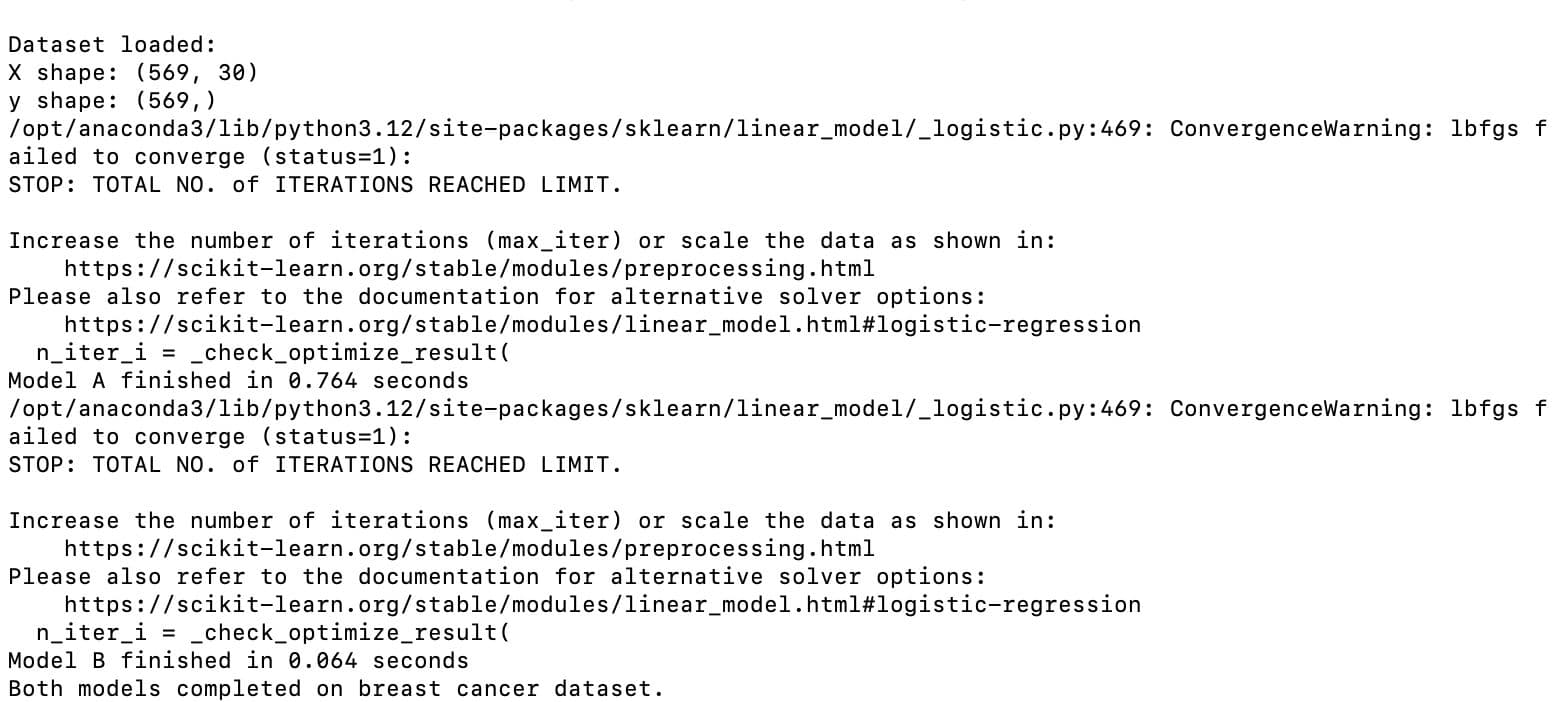
As you can see, the output shows that both models were trained in parallel on the breast cancer dataset. Each of them was completed independently in its own process.
Advanced Python Multiprocessing Patterns for Better Performance
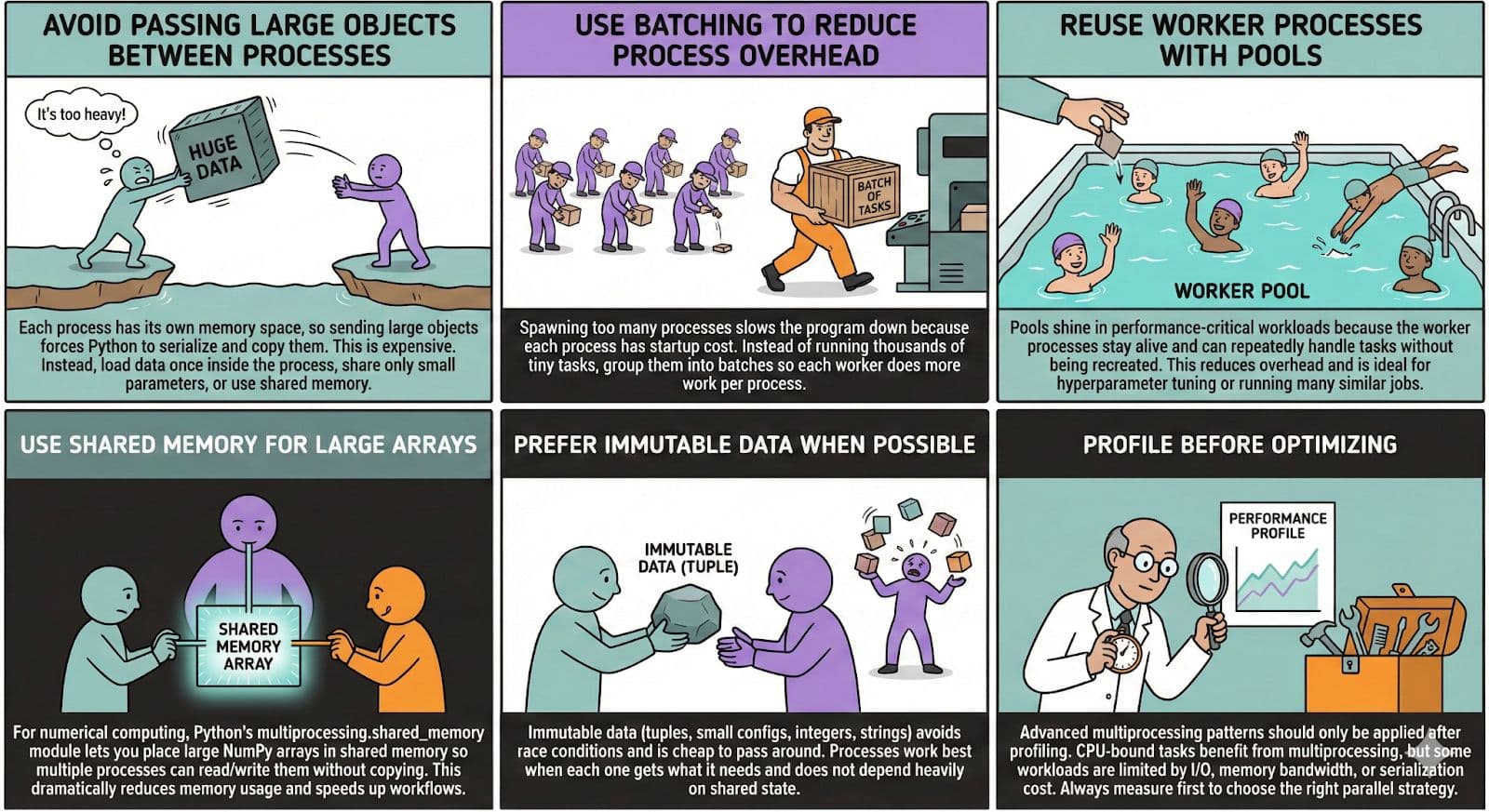
In this section, we'll explore how multiprocessing becomes even more powerful when you start using patterns that reduce overhead, avoid unnecessary data copying, and improve coordination between processes.
These techniques help squeeze more performance out of multi-core CPUs, especially when working with large datasets or compute-heavy ML workflows.
In the following image, let’s explore how multiprocessing can become even more powerful as you get into patterns, starting from avoiding large data transfers between processes to batching work so each worker handles more useful computation with less overhead.
Implementation of Advanced Patterns
Let’s see the coding implementation of advanced patterns.
Avoid Passing Large Objects Between Processes
Passing large arrays between processes forces Python to copy and serialize them. A better approach is to load the data inside each worker process.
We first define a worker to create its own data, then finish with an if block to start the processes.
Let’s see the code.
from multiprocessing import Process
import numpy as np

def worker():
    data = np.random.rand(5_000_000)
    print("Worker finished:", data.size)

if __name__ == "__main__":
    Process(target=worker).start()
    Process(target=worker).start()
Use Batching to Reduce Process Overhead
Instead of sending thousands of tiny tasks, group them into bigger batches so each worker does more useful work.
We first define a batch function to handle a chunk of work, then finish with an if block to send batches to the pool.
Here is the code.
from multiprocessing import Pool

def process_batch(batch):
    return sum(x*x for x in batch)

if __name__ == "__main__":
    data = list(range(1_000_000))
    batch_size = 50_000
    batches = [data[i:i+batch_size] for i in range(0, len(data), batch_size)]

    with Pool() as pool:
        results = pool.map(process_batch, batches)

    print(sum(results))
Reuse Worker Processes with Pools
Pools keep worker processes alive so they can handle many tasks without being recreated.
We first define a simple task function, then finish with an if block that uses a pool to run it many times.
Here is the code.
from multiprocessing import Pool
import time

def square(x):
    time.sleep(0.1)
    return x * x

with Pool(4) as pool:
    print(pool.map(square, range(20)))
Use Shared Memory for Large Arrays
Shared memory lets multiple processes read the same large array without copying it.
We first define worker to attach to shared memory, then finish with an if block that creates the shared array.
Here is the code.
from multiprocessing import Process, shared_memory
import numpy as np

def worker(name, size):
    shm = shared_memory.SharedMemory(name=name)
    arr = np.ndarray((size,), dtype=np.float64, buffer=shm.buf)
    print("Sum:", arr.sum())
    shm.close()

if __name__ == "__main__":
    data = np.random.rand(1_000_000)

    shm = shared_memory.SharedMemory(create=True, size=data.nbytes)
    shared_arr = np.ndarray(data.shape, dtype=data.dtype, buffer=shm.buf)
    shared_arr[:] = data

    p = Process(target=worker, args=(shm.name, data.size))
    p.start()
    p.join()

    shm.close()
    shm.unlink()
Prefer Immutable Data When Possible
Immutable objects are cheaper and safer to send between processes.
We first define a function that reads a small tuple, then finish with an if block that passes these items to a pool.
Here is the code.
from multiprocessing import Pool

def process_item(item):
    name, value = item
    return value * 2

if __name__ == "__main__":
    items = [("a", 10), ("b", 20), ("c", 30)]

    with Pool() as pool:
        print(pool.map(process_item, items))
Profile Before Optimizing
Always measure before applying multiprocessing.
We first define a small task function, then finish with an if block that times the multiprocessing run.
Here is the code.
import time
from multiprocessing import Pool

def work(x):
    return x * x

start = time.time()

with Pool() as pool:
    pool.map(work, range(5_000_000))

print("Time:", time.time() - start)
Python Multiprocessing Inter-process Communication & Shared State
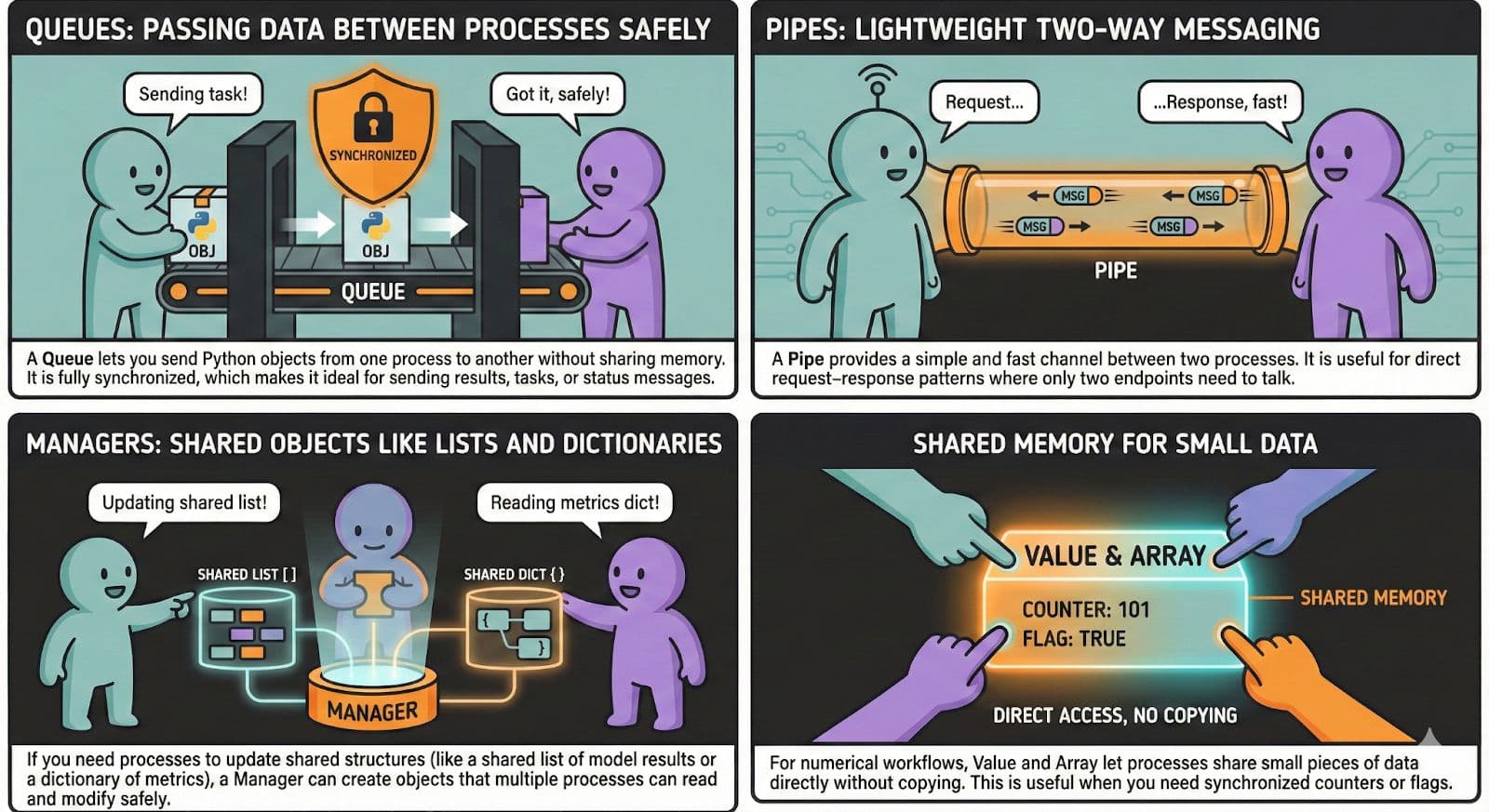
While each process operates in its own isolated memory space, there are many use cases for processes to communicate with one another, coordinate how a job should be done, or simply share some context.
In the multiprocessing context, shared variables are not supported. Instead, there are several safe ways to exchange data between processes.
Coding Implementation
In this section, we'll see how to implement each communication method with a simple code example so you can understand how processes exchange data in practice.
Queues
A queue lets processes send Python objects to each other without sharing memory. We first define a worker that reads from the queue, then finish with an if block that sends items into it.
Here is the code.
from multiprocessing import Process, Queue

def worker(q):
    item = q.get()
    print("Worker received:", item)

if __name__ == "__main__":
    q = Queue()

    p = Process(target=worker, args=(q,))
    p.start()

    q.put("hello from main")
    p.join()
Pipes
A pipe allows two processes to communicate directly in both directions.
We first define a worker that listens on one end of the pipe, then finish with an if block that sends a message. Here is the code.
from multiprocessing import Process, Pipe

def worker(conn):
    msg = conn.recv()
    conn.send(msg.upper())

if __name__ == "__main__":
    parent, child = Pipe()

    p = Process(target=worker, args=(child,))
    p.start()

    parent.send("hi")
    print("Response:", parent.recv())

    p.join()
Managers
A manager lets processes work with shared Python objects such as Python lists and Python dictionaries.
We first define a worker that updates the shared object, then finish with an if block that creates the manager list.
Here is the code.
from multiprocessing import Process, Manager

def worker(shared_list):
    shared_list.append(10)

if __name__ == "__main__":
    with Manager() as manager:
        shared_list = manager.list()

        p = Process(target=worker, args=(shared_list,))
        p.start()
        p.join()

        print("Final list:", list(shared_list))
Shared Memory For Small Data
Shared memory lets processes access the same small numeric values without copying.We first define a worker that increments the shared value, then finish with an if block that creates the shared variable.
Here is the code.
from multiprocessing import Process, Value

def worker(counter):
    counter.value += 1

if __name__ == "__main__":
    counter = Value('i', 0)  # shared integer

    p1 = Process(target=worker, args=(counter,))
    p2 = Process(target=worker, args=(counter,))

    p1.start()
    p2.start()

    p1.join()
    p2.join()

    print("Final counter:", counter.value)
Python Multiprocessing Performance Measurement, Benchmarking & Tuning
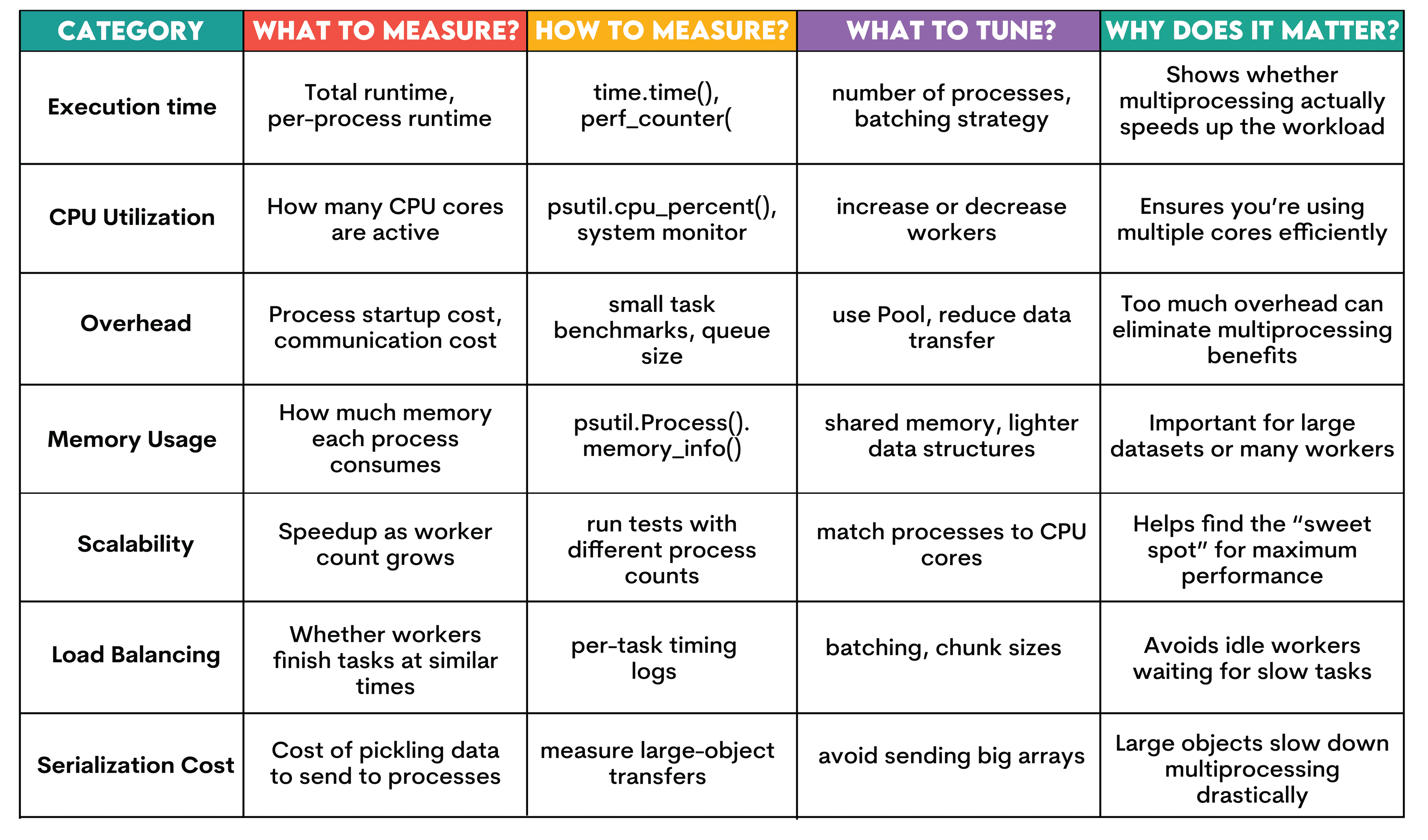
You need to measure and tune multiprocessing performance, as your speedup depends on factors such as the size of the workload, CPU count, communication costs between workers, and how well your processes are created and recycled.
The following table lists the significant elements you can measure, describes what to measure, and explains how you might address performance through these measurements. Let's see.
Python Multiprocessing Common Pitfalls and Best Practices
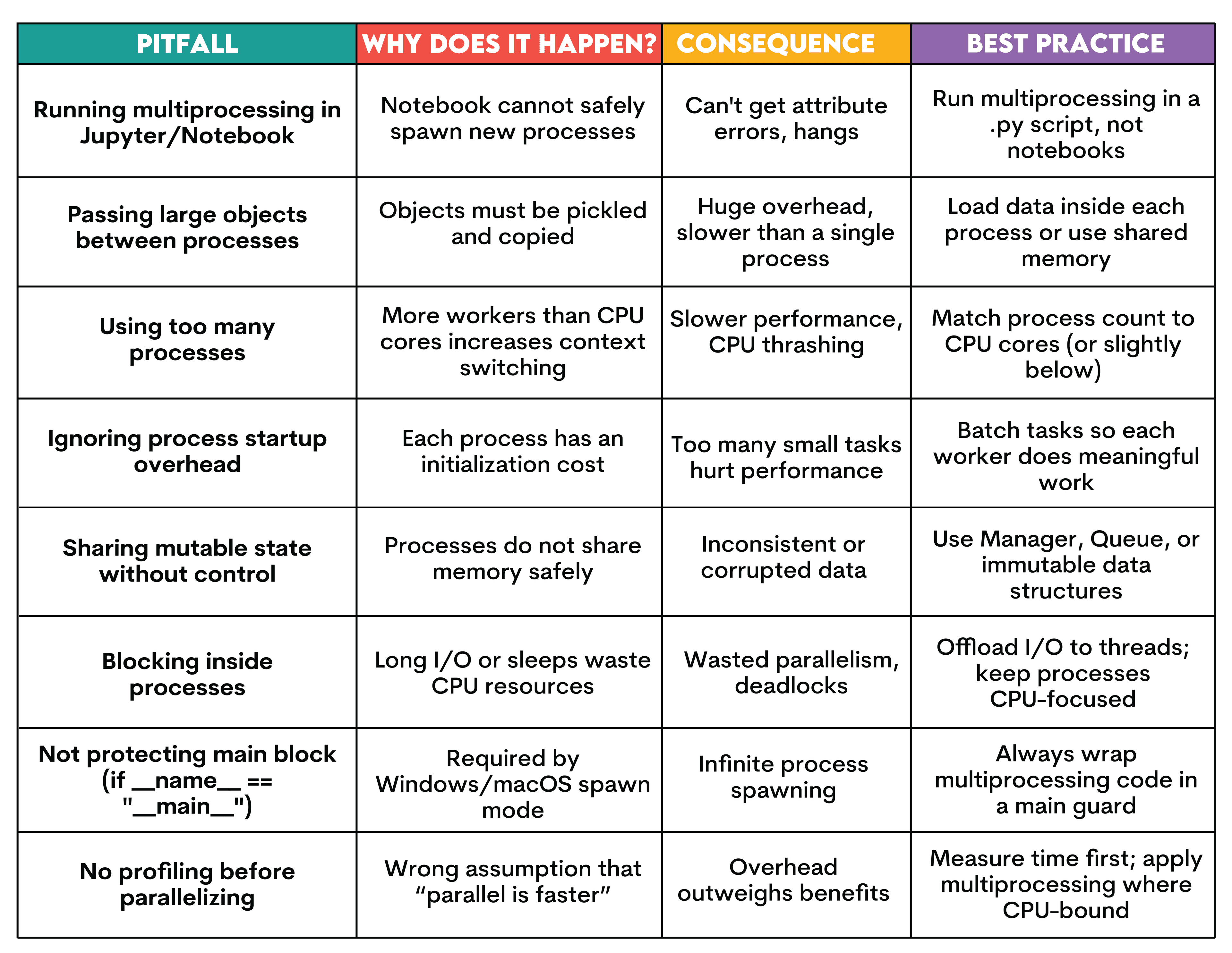
You are using multiprocessing, but performance keeps going down. But why? What are you doing wrong?
In the following table, let’s explore different pitfalls, reasons, results, and best practices.
Python Multiprocessing Real-world Use Cases & Workflows
Multiprocessing is used in real production environments, especially in machine learning. In this section, let’s see different use cases.
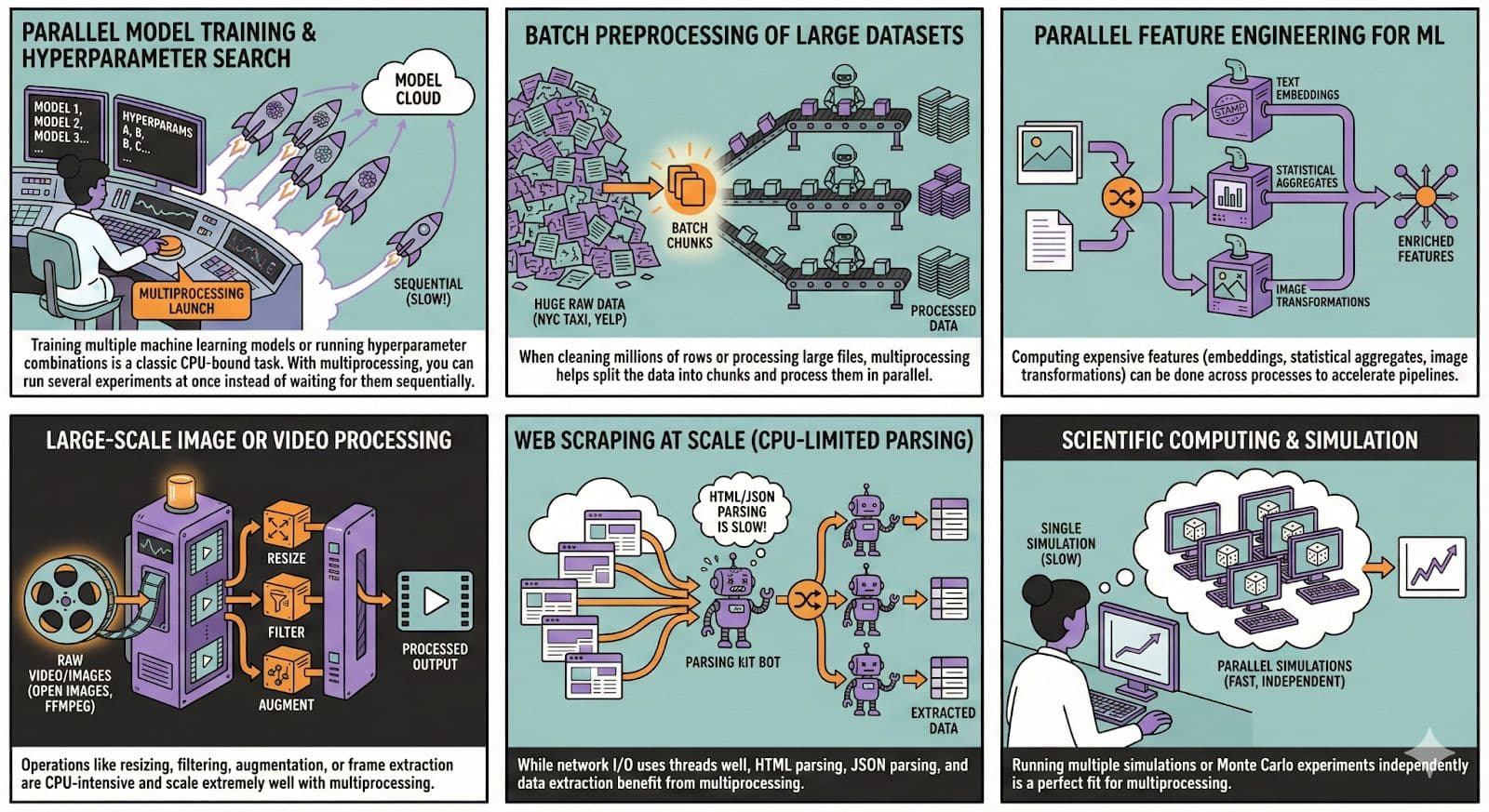
You can use the NYC taxi dataset to apply batch preprocessing because it is large. To scale image or video processing, you can use Open Image Dataset.
Conclusion
Multiprocessing allows you to break free from the GIL and use multiple CPUs to run tasks simultaneously. In this article, we learn what it is, why to use it instead of threads, and when to use it.
Next, we’ve explored the key concepts, implemented basic multiprocessing, and the advanced patterns.
With the appropriate setup, by avoiding pitfalls and following best practices, you can multiply the speed of your code.
FAQs
What is Python multiprocessing used for?
To run parallel tasks on the multiple cores of the CPU.
When should I use multiprocessing instead of threading?
When your code needs multiple CPU cores and the GIL becomes a bottleneck.
Does multiprocessing always make Python faster?
No, for instance, overhead can outweigh the benefits for simple tasks.
How many processes should I use in multiprocessing?
The best practice is your CPU cores minus one.
How do I share data between processes in Python?
You can use Queue, Pipe, Manager, Value, or Array.
Can I use multiprocessing in Jupyter notebooks or on Windows?
Jupyter, generally no, but Windows yes; it requires adjustment.
What are common multiprocessing errors in Python?
Using too many processors, running in Jupyter Notebook, or passing large objects are common errors.
Is concurrent.futures.ProcessPoolExecutor better than multiprocessing.Pool?
It is simpler, but the performance is similar.
Can I combine multiprocessing with threading or asyncio?
Yes, it is common practice to combine them.
What are alternatives to multiprocessing for parallelism in Python?
Threading and asyncio, but each has advantages and disadvantages.
How do I debug multiprocessing code effectively?
You can use logging or run tasks in a single process first.
How can I measure performance improvement from multiprocessing?
You can compare the runtime using the time module.
Does multiprocessing work with pandas or NumPy?
Yes, but large objects are copied between processes, so keep that in mind.
Is multiprocessing safe for production applications?
Yes, if implemented with proper adjustment, error handling, and resource control.
Share