Understanding FLOOR and CEILING Functions in SQL

Categories:
 Written by:
Shivani Arun
We explore fundamental concepts of FLOOR and CEILING functions in SQL and demonstrate their value for interview preparation and handling data at scale.
Last week, I was analyzing two massive datasets that were relatively new to me, and I wanted to query a large date range and compute specific metrics.
Without optimization, I could be sitting around for hours just to get one output, which is not a luxury anybody has at work, not to mention the cost implications one could rack up!
In the world of heavy AI tool usage, I could just provide my query structure to AI and ask it to optimize it for me? Absolutely! While tinkering with the data, I tried a few prompts starting from:
V1: ‘optimize this query.’
V2: ‘optimize this query and here are my partition columns and my join conditions.’
V3: ‘optimize this query, here are my partition columns and join conditions, and I want to ensure that I leverage a CEILING() function on column Y, and I eventually want my output as Z.’
Guess what approach worked the best? You get my point!
All in all, the moral of the story is that using AI as an assistant versus AI becoming a crutch continues to require us as data scientists to know our fundamentals deeply and have breadth and depth to drive impact with agility and precision.
FLOOR() and CEILING() functions are a class of SQL math functions that have wide-ranging applications beyond doing mathematical computations and rounding to specific use cases in data science and analysis. Let’s zoom in to understand these in detail!
What is the FLOOR() Function in SQL?
FLOOR() function in SQL simply takes any number and rounds the number to an integer value that is smaller than or equal to that number. Let’s take a quick look at the code and output for a few different values.
SELECT FLOOR(3.7);
Here’s the output:
3
SELECT FLOOR(-4.7);
Here’s the output:
-5
SELECT FLOOR (-4.3);
Here’s the output:
-5
Note:
- Positive decimal numbers will always return an integer smaller than them, which is quite straightforward.
- Negative decimal numbers will also always return an integer smaller than them. Note that -5 is smaller than -4.3.
What is the CEILING Function in SQL?
The opposite of the FLOOR() function in SQL is the CEILING() function (PostgreSQL implementation can use either CEIL() or CEILING()), which simply takes any number and rounds the number to an integer value that is larger than or equal to that number. Let’s take a quick look at the code and output for a few different values.
SELECT CEILING(3.7);
Here’s the output:
4
SELECT CEILING(-4.7);
Here’s the output:
-4
SELECT CEILING(-4.3);
Here’s the output:
-4
Note:
- Positive decimal numbers will always return the next integer larger than the number, which is quite straightforward.
- Negative decimal numbers will also always return an integer larger than them. Note that -4 is larger than -4.3.
With this basic understanding, we can look at a wide variety of applications of FLOOR() and CEILING() functions in SQL.
When to Use FLOOR vs. CEILING?
There are various applications of these functions both in the day-to-day life of a data scientist as well as in commonly asked SQL interview questions. Let’s take a look at the most commonly occurring themes or patterns:

Pattern 1: Rounding & Implications for Capacity Planning
The most common and often the simplest use case is to round values up or down, depending on the business problem you are trying to solve. E.g., if you are doing capacity planning, you would always want to round your estimates up to ensure that you are never short of capacity or budget, and as a result, you will need to use the CEILING() function.
Practical Example
Here’s an example question to apply your understanding to a real interview question from LinkedIn.
Risky Projects
Last Updated: November 2020
You are given a set of projects and employee data. Each project has a name, a budget, and a specific duration, while each employee has an annual salary and may be assigned to one or more projects for particular periods. The task is to identify which projects are overbudget. A project is considered overbudget if the prorated cost of all employees assigned to it exceeds the project’s budget.
To solve this, you must prorate each employee's annual salary based on the exact period they work on a given project, relative to a full year. For example, if an employee works on a six-month project, only half of their annual salary should be attributed to that project. Sum these prorated salary amounts for all employees assigned to a project and compare the total with the project’s budget.
Your output should be a list of overbudget projects, where each entry includes the project’s name, its budget, and the total prorated employee expenses for that project. The total expenses should be rounded up to the nearest dollar. Assume all years have 365 days and disregard leap years.
The goal of this question is to find over-budget projects, and the most important line to think about in the context of how to define over-budget is given by:
Your output should be a list of over-budget projects, where each entry includes the project’s name, its budget, and the total prorated employee expenses for that project. The total expense should be rounded up to the nearest dollar.
Based on everything we have learned, it should now be clear that the CEILING() function would be fit for purpose to round up to the nearest dollar. Let’s take a quick look at the tables before we formulate our approach:
Tables:
This table gives us the id, start_date, end_date, and budget for each project. The important thing to note here is that the duration for every employee working on the project will remain the same because there is no start_date or end_date in any of the other tables. These kinds of assumptions are always valuable to validate with the interviewer, especially since in most interviews, you are unable to query the base tables.
Tables:
This table is a dimension table that you will want to leverage to link the employee to the corresponding project that they worked on, using the employee_id and project_id fields.
Tables:
This table contains the salary for each employee_id, which is the most important field to leverage to calculate the pro-rated cost and identify if the project expenses are over or under budget.
Now let’s review the solution:
Solution:
To summarize, let's understand the solution in detail:
- Source CTE: Joins all 3 tables and selects the relevant columns, i.e.,
project_name,budget,end_date- start_date as duration, and salary for each employee_id. This is labelled as ‘base.’ - Calculate pro-rated cost and round up: Calculate the pro-rated cost by multiplying each employee’s salary by project duration and dividing by 365 days to pro-rate the expense. Note that
CEILING()is used to round up the cost. - Aggregate function:
SUM() - Group by columns:
project_name,budget. This ensures that the expense calculation is done for each project that has a specific budget associated with it. - Having:
HAVINGis used to filter out the over-budget projects, as projects where the rounded-up expense exceeds the budget
Voila! Your solution is ready with a clean-cut explanation of how to use the CEILING() function for rounding up and planning resources/budget/capacity.
Pattern 2: Range Calculation/Binning/Percentile Distributions
Range calculations are a commonly used application of these functions in SQL. For e.g., suppose you had to calculate age ranges with bounds both on the upper and lower ends, FLOOR() and CEILING() functions are very useful in these situations.
Practical Example
Suppose you have a dataset of demographic information, and age is one of the variables that you would like to bin into bounds with upper and lower ends. Here’s some sample code on how to intuitively understand this pattern:
SELECT FLOOR(age / 10) * 10 AS bucket_start,
       FLOOR(age / 10) * 10 + 9 AS bucket_end, -- Last age in bucket
       FLOOR(age / 10) * 10 + 10 AS next_bucket, -- Start of next bucket
       COUNT(*) AS COUNT
FROM users
GROUP BY FLOOR(age / 10);
Try this exercise by simulating a sample dataset and then evaluating how these functions work in practice. Here’s some intuition on what you would expect to see:
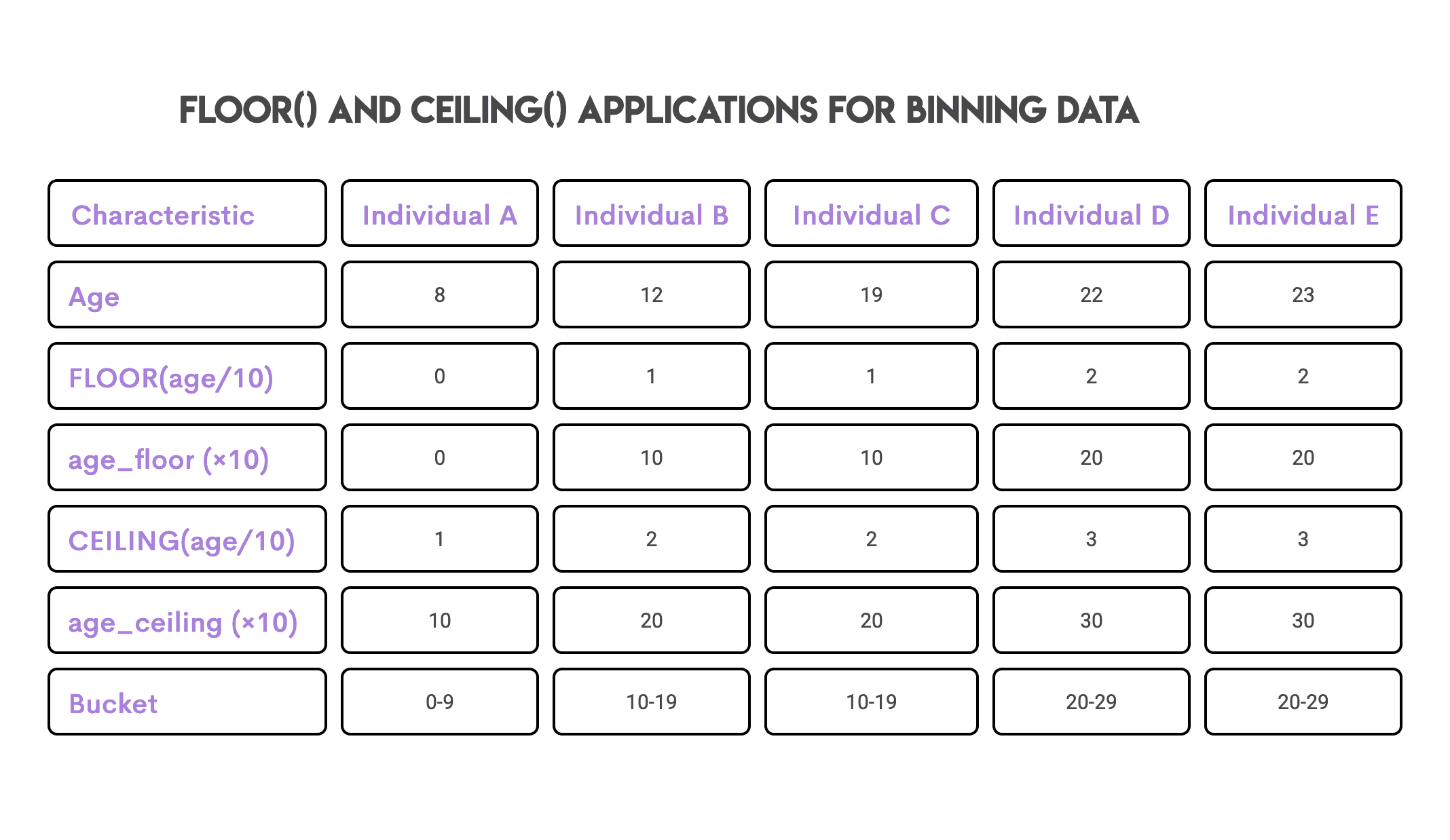
The same logic and approach apply to decile/percentile calculations and binning data, both of which are fairly common applications in data analyses.
Pattern 3: Finding the Median
I added this as a separate section because of the popularity of this question across not just SQL interviews but also basic Python data structures and algorithm interviews. Let’s take a look at another question that requires us to calculate the median using the concepts we have learned in this article.
Practical Example
Here’s an example question to apply your understanding to a real interview question from some companies, including Google.
Find Students At Median Writing
Identify the IDs of students who scored exactly at the median for the SAT writing section.
Our goal in this question is to find the students who scored exactly at the median in their SAT writing scores.
To talk about my journey of solving this question, I first came up with an approach that used window functions, but as always, I try to solve the same question a few different ways and think about efficiency, which helped me understand that this is a perfect example for using our knowledge of FLOOR() and CEILING() functions.
Before we double-click into the two different types of solutions I used, let’s take a look at our data:
Tables:
This table contains the SAT scores of every student, and according to the question, we should hone in on the SAT writing section.
There are three main steps involved in this solution:
- Assigning a position to every sat_writing score using the
row_number()function - Applying the median logic, a neat trick using the
FLOOR()andCEILING()functions, respectively. If the number of rows is odd, assign the median as the value at the positional index(total + 1)/2, and if the number of rows is even, then assign the value as the average of the lower bound and the upper bound using these functions. - Finding all students whose score is equal to this median score. This is the tricky part in the logic, as the median is a positional value; however, multiple students could have the same score as the median score. These assumptions should always be clarified with the interviewer as you proceed through the coding logic.
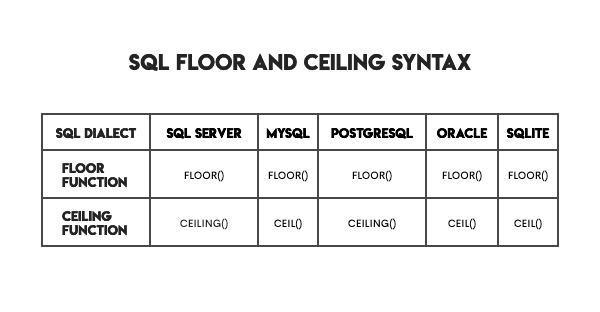
Syntax of FLOOR and CEILING Functions in Popular SQL Dialects
While it’s not necessary to memorize all the implementations of SQL functions across different dialects, a basic understanding of the various dialects and their implementations is helpful to navigate different tech stacks.
Advanced Techniques Using FLOOR and CEILING Functions
Now that we have a solid understanding of the applications, we can explore more advanced concepts such as using FLOOR() with date and time functions, custom rounding logic, range control, and performance optimization techniques.
Pattern 1: Using FLOOR() and CEILING() with date and time for time series resampling/aggregation
This is a critical pattern to understand, especially when working with massive datasets for performance optimization.
Practical Example
Suppose you had user_id and event_timestamp, and you want to find the number of users each hour performing a certain event (e.g., clicking on a CTA).
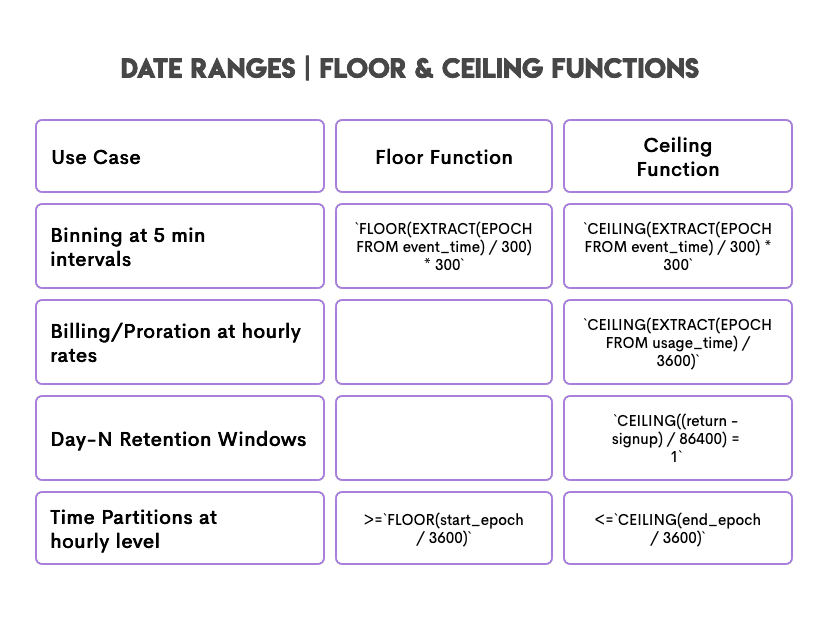
The preferred solution for a large dataset is to use FLOOR() and EXTRACT(EPOCH). To continue to hone your intuition, try this query with a sample dataset of your choice and play around with what happens if you don’t use FLOOR().
SELECT
  DATE(event_time) AS event_date,
  FLOOR(EXTRACT(EPOCH FROM event_time) / 3600) AS hour_bucket,
  COUNT(DISTINCT user_id)
FROM events
GROUP BY 1, 2;
There are two main takeaways here:
EXTRACT(EPOCH FROM ….)- This ensures that we have a globally unique hour bucket, as it returns the number of seconds since January 1, 1970, and then converts them into an hour bucket.FLOOR()- This is used to convert continuous time to discrete buckets. These buckets are used to optimize for accuracy and performance. By convention,FLOOR()also clearly communicates the intent to aggregate by the hour in this query.
Date ranges can be extensively used with these functions in interview patterns. Here are a few themes to further explore as you scale your understanding and depth of business questions and query performance considerations.
Pattern 2: Custom Rounding Logic
The first example is an interview favorite and can be summarized as rounding to the nearest defined value. Let’s take a look at this example.
Practical Example 1: Round up to the nearest multiple of 10
Here’s some sample code for the same:
SELECT
  CEILING(15.3 / 10.0) * 10 AS nearest_10
FROM numbers;

Here’s the output:
`20.0`
Practical Example 2: Custom Rounding Rule
Question:
Implement a custom rounding rule for values in the field val of table abc. Assume that the numbers in the val field are positive.
- If the fractional part of the value is < 0.50 → round down
- If the fractional part ≥ 0.50 but < 0.55 → round to 0.5
- If the fractional part ≥ 0.55 → round up
Here’s how the code would look to solve this question:
SELECT val,
       CASE
           WHEN MOD(val, 1) < 0.5 THEN FLOOR(val)
           WHEN MOD(val, 1) < 0.55 THEN FLOOR(val) + 0.5
           ELSE CEILING(val)
       END AS rounded_value
FROM abc;
The two main takeaways to keep in mind:
MOD(x, 1)gives the remainder after dividing by 1, which is the fractional part of the valueFLOOR(val)andCEILING(val)round down and round up, respectively, to meet all three conditions. The conditions are evaluated sequentially to reach the final output.
Pattern 3: Range Control
Now, let’s take custom rounding one step further with this example problem. Suppose you have to generate a random number between 50 and 100. Here’s how the code would look for the same:
SELECT FLOOR(RANDOM() * (100 - 50 + 1)) + 50 AS rand_int;
Some key aspects to note:
RANDOM()returns a float between [0,1). Note that this range doesn’t include 1 (exclusive).- The upper bound is included because 1 is added inside the range
RANDOM()* 51 → [0, 51) (includes 0, excludes 51)FLOOR()ensures that the values are rounded down between [0, 50] inclusive
In this section, we focused on the more advanced patterns that you can expect in interview questions or while working on the job, and oftentimes, these patterns require multiple concepts to be used together.
Armed with this understanding, let’s dive into common errors and how to avoid them.
Common Errors and How to Avoid Them
In SQL, it may be easy to get a solution, but it’s not always easy to get the right solution to the problem. As a result, it’s important to understand common errors and how to avoid them with the use of these functions.
Here’s a quick visual to remember the errors to avoid while using these functions:
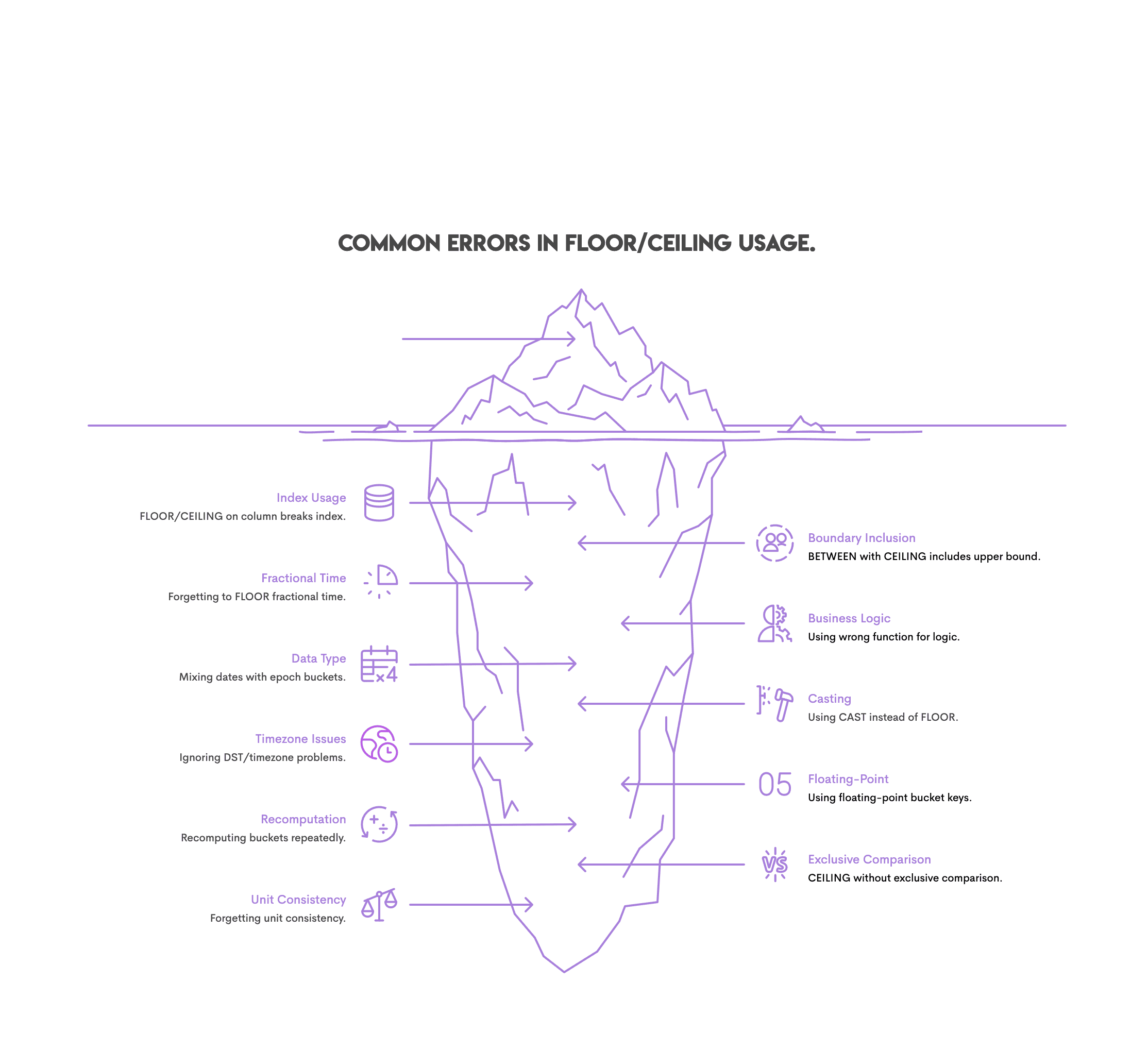
- Index usage: Avoid using
FLOOR()andCEILING()functions in where clauses, as it may trigger a full scan of large tables. The best practice is to precompute bins using these functions and then apply them to the where clause. - Fractional time: To group data in bins, don’t forget to use
FLOOR(). Otherwise, each time unit will become its own bin. - Data Type: When using
FLOOR()andCEILING()with date/time fields, mixing both dates and epoch integer units is redundant and not advisable. - Timezone Issues: Ignoring time zones and then using these functions can change the start dates and end dates for computational purposes. Always convert to UTC before applying these functions.
- Recomputation: Recomputing bins with date/time fields can be computationally expensive. It’s best to precompute and store the data in a field.
- Unit Consistency: Before binning or grouping data using these functions, ensure that the units are all in a consistent format (e.g., minutes, seconds, hours, etc). This is standard best practice to ensure that inconsistencies in date and time fields don’t wreak havoc in your computations!
- Between Clause: Use inclusive start and exclusive end by using >=
FLOOR(start)and <CEILING(end). The BETWEEN clause is contradictory as it assumes an inclusive end. - Business Logic:
CEILING()is the best to use when planning the budget and capacity. - Casting: Using CAST() instead of
FLOOR(), especially with date/time data, can cause bugs and precision errors. If the goal is to bin by integer time buckets,FLOOR()is the right approach. - Floating-Point: Use integer types to avoid precision errors.
- Exclusive Comparison: Be thoughtful about binning your day to avoid double-counting. Using <=
CEILING()can result in the upper bound being double-counted.
Conclusion
In this article, we learned the various use cases of FLOOR() and CEILING() functions and covered advanced patterns to understand implications for their use in real-life scenarios. Remember to use these examples and patterns while preparing for SQL interviews to go beyond surface level and leverage the power of SQL for complex querying and handling data at scale. Remember, there’s a whole iceberg beneath the visible tip!
Frequently Asked Questions
What is the difference between FLOOR and CEILING in SQL?
FLOOR() is used to round down, while CEILING() is used to round up.
Does SQL Server support CEIL?
No, the implementation of SQL Server supports the CEILING() function.
Can FLOOR be used with decimals?
Yes, you can use the FLOOR() function with decimals.
How do FLOOR and CEILING handle negative numbers?
The approach is consistent with how they handle positive numbers, but this may cause confusion. E.g., FLOOR(-4.3) is -5 since -5 < -4.3 and CEILING(-4.3) is -4 since -4 > -4.3.
What is the alternative to CEILING in Oracle?
CEIL() is the alternative to the CEILING() function.
Share