Simplifying Python’s IF and AND Statements

Categories:
 Written by:
Sara Nobrega
Python IF and AND statements help you write clear, correct conditional logic by safely combining checks, handling edge cases, and keeping your code readable, efficient, and maintainable.
Python conditionals appear to be very simple on the surface. It seems just a question of “if this is true, do that.”
But in real programs, it is not only one check. Many times, we need to check more things. For example, we might need to verify that a user is logged in and active, confirm input is present and valid, or check if a number is between a range and not excluded.
Because of this, code can become hard to read. In Python, we use if and and to check many things at the same time and means all conditions must be true.
In this article, you’ll learn:
- how
ifworks in Python - what is true and false in Python
- how
andworks in a simple way - how to join conditions without making messy code
- common mistakes that change logic by accident
- better ways to write clear conditions
- real examples you can run and check yourself

1. What Are IF Statements in Python? (Python if and basics)
What does the if statement do? An if statement tells the program what to do only when something is true. It means: “If this is true, do this.” Otherwise, it does not run.
An if statement in Python is: “If this thing is true, do the following.”
Like:
if condition:
    # do something
We can also add elif (else-if) branches and an else to say “do this if nothing is true”.
What’s interesting (and also the source of confusion many times) is that in Python, a condition is not always True or False. Python sees some values as False: 0, None, '' (empty string), and also empty lists. Everything else is True.
So when:
if username:
    print("Welcome!")
So when Python checks something, it asks: “Is this empty or not?”
Let’s see another example.
Basic syntax
x = 7

if x > 10:
    print("Big")
elif x == 10:
    print("Exactly ten")
else:
    print("Small")
Outputs:
Small
Check another one:
values = [None, 0, "", [], "hello", [0], 42]

for v in values:
    if v:
        print(f"{v!r} is true")
    else:
        print(f"{v!r} is false")
Outputs:
None is false
0 is false
'' is false[] is false'hello' is true[0] is true42 is true
Its importance for Python if and
When we write if A and B:, we’re merging truthiness checks. They are flexible and give a lot of power. This is useful, but it can also make bugs if we don’t understand it well.
2. Understanding the AND Operator in Python
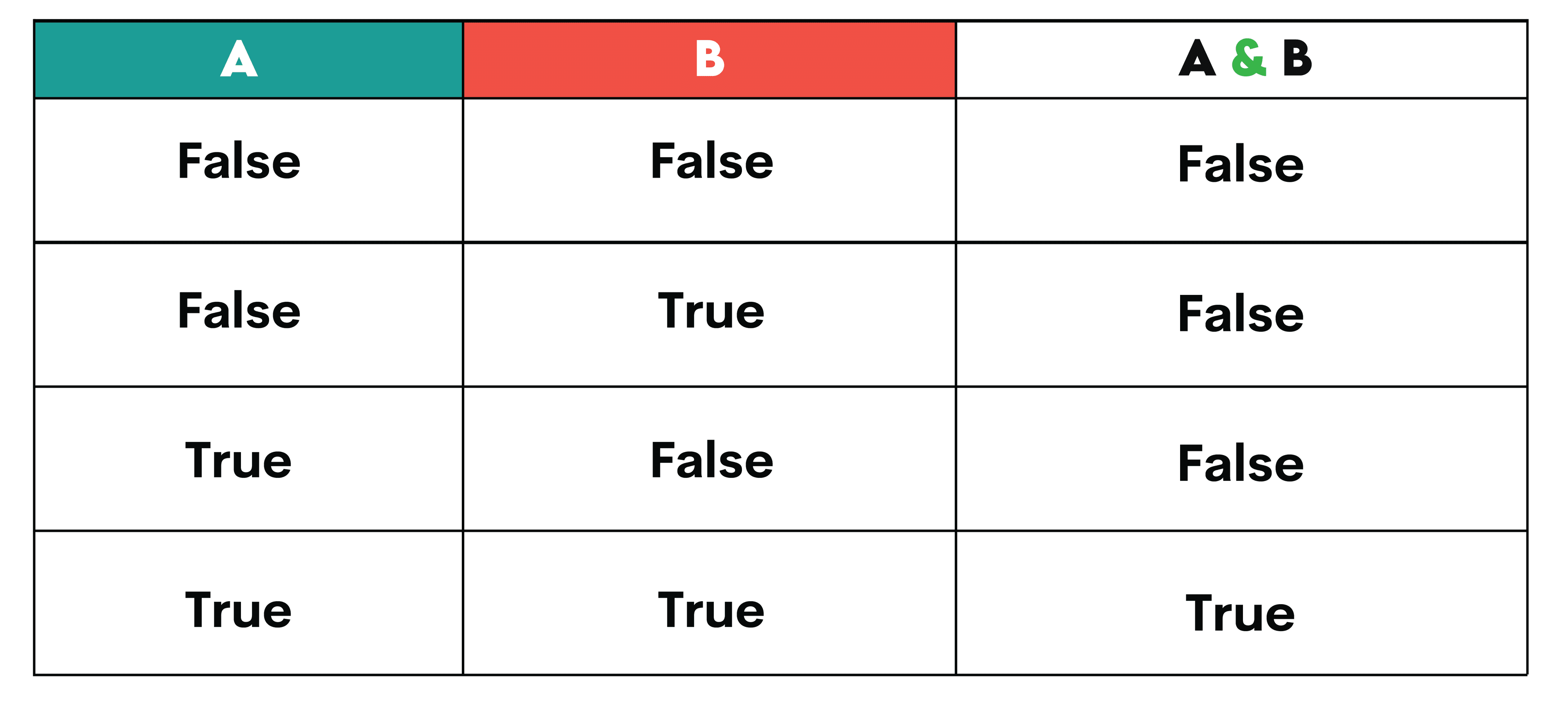
The and operator joins two or more checks and the result is True only if all parts are True.
- A and B is
Trueonly if both A and B areTrue. - If A is
False, Python just returns A right away and doesn't even bother checking B (that's called short-circuiting). - If A is
True, then Python checks B and returns whatever B is.
A quick truth table
Key detail: and returns an operand, not a boolean
This is one of the most important edge cases to understand.
print("" and "backup")
print("primary" and "backup")
print(0 and 99)
print(10 and 99)
Outputs:
backup
0
99
What's going on here?
"" and "backup"gives us""because the empty string on the left isFalse. When the first value isFalse, Python returns it right away."primary" and "backup"gives us"backup". When both values areTrue, Python returns the last one.0 and 99returns0because0isFalse.10 and 99returns99because both areTrue.
This can look strange at first, but it follows the same rule every time. If we want a straight True or False answer, just wrap it:
value = "primary" and "backup"
print(bool(value))
Outputs:
True
Short-circuiting: and can save from errors
Python stops checking when it already knows the answer. This is called short-circuiting.
user = None

if user is not None and user.get("name") == "Ava":
    print("Hi Ava")
else:
    print("No valid user")
Outputs:
No valid user
Here, because user is not None is false, Python never even checks user.get(...), which prevents an exception.
3. Using Python IF and AND Together
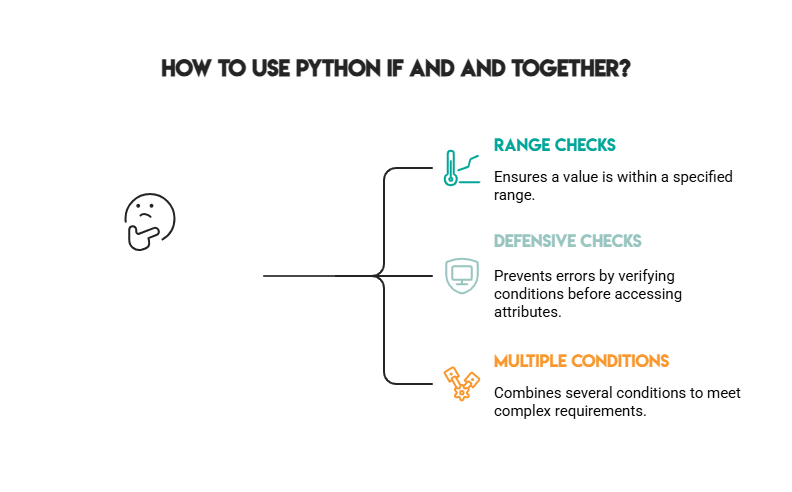
This is the classic Python if and pattern:
age = 22
has_id = True

if age >= 18 and has_id:
    print("Entry allowed")
else:
    print("Entry denied")
Outputs:
Entry allowed
This example shows how Python if and needs both conditions to be true for the code inside to run. Here, the age is 18 or more, so this part is True. The person also has an ID, so this part is True too. Because both conditions are True, the check passes.
Pattern 1: Checking the ranges
This example illustrates how Python if and are used to check a range. A range means the value must be between two numbers. Both comparisons must be true at the same time, so the message shows only when the number is bigger than 10 and smaller than 20.
n = 15

if n > 10 and n < 20:
    print("n is between 10 and 20")
else:
    print("n is outside the range")
Outputs:
n is between 10 and 20
We can also write this with chained comparisons:
n = 15

if 10 < n < 20:
    print("n is between 10 and 20")
Outputs:
n is between 10 and 20
Pattern 2: : Check first before using values
This is super common in real-world code.
profile = {"email": "user@example.com", "verified": True}

if profile is not None and profile.get("verified") and profile.get("email"):
    print("Verified user with email")
else:
    print("Not ready")
Outputs:
Verified user with email
We see from this example how Python if and can help avoid errors.
First, it checks if the profile exists. Then it checks if the needed data is there and not empty.This way, the code makes sure everything's good before it continues.
Pattern 3: Multiple and conditions
This example below shows that Python if and can join many checks in one if statement, becoming very flexible.
All three conditions have to be true for access to be granted. This pattern is useful when there is a need to check many things, like login, user status, or account state.
is_logged_in = True
is_verified = True
is_banned = False

if is_logged_in and is_verified and not is_banned:
    print("Access granted")
else:
    print("Access denied")
Outputs:
Access granted
4. Simplifying Complex IF and AND Conditions
Long and chains work, but they are hard to read and to debug. When we make a modification, it is easy to break the logic by mistake. The next approaches help keep Python if and conditions clean and easy to read.

Name the intent with variables (or helper functions)
Instead of forcing readers to parse a big expression:
user = {"active": True, "role": "admin", "email": "a@b.com"}

if user is not None and user.get("active") and user.get("role") == "admin" and user.get("email"):
    print("Admin is active and has email")
Outputs:
Admin is active and has email
We can refactor it:
user = {"active": True, "role": "admin", "email": "a@b.com"}

is_valid_user = user is not None and user.get("active")
is_admin = user.get("role") == "admin"
has_email = bool(user.get("email"))

if is_valid_user and is_admin and has_email:
    print("Admin is active and has email")
Outputs:
Admin is active and has email
Now each piece is understandable, testable, and reusable.
Use guard clauses to avoid “one giant if”
This pattern is great inside functions.
def checkout(user, cart_total):
    if user is None or not user.get("active"):
        return "User not allowed"

    if cart_total <= 0:
        return "Cart is empty"

    if user.get("balance", 0) < cart_total:
        return "Insufficient funds"

    return "Checkout complete"

user = {"active": True, "balance": 50}
print(checkout(user, 20))
Outputs:
Checkout complete
Even if this also uses or, the goal is the same: make the logic simple and make problems easy to see.
Add parentheses when mixing and and or
When we mix and and or, it can be confusing. Python may read it in a different way than expected. Adding parentheses helps a lot, as they make the meaning clear and easier to understand later.
has_coupon = False
is_member = True
cart_total = 120

# Clear intent: either member or coupon is required, AND total must be high enough
if (has_coupon or is_member) and cart_total >= 100:
    print("Discount eligible")
else:
    print("Not eligible")
Outputs:
Discount eligible
5. Common Mistakes With Python IF and AND

These mistakes are common because they look correct at first but later they give wrong results.
Mistake 1: Forgetting to repeat comparisons
Bad:
status = "active"

if status == "active" and "verified":
    print("This prints, but it's wrong logic")
Outputs:
This prints, but it's wrong logic
Because "verified" is a string that is not empty, which is always True, it doesn’t actually check anything.
Let’s correct it:
status = "active"
state = "verified"

if status == "active" and state == "verified":
    print("Correct check")
Outputs:
Correct check
Mistake 2: Writing if a and b == True
This can work, but it is too noisy. It can hide what the code really means so it is better to use boolean variables directly.
a = True
b = True

if a and b:
    print("Clean")
Outputs:
Clean
Mistake 3: Confusing and with &
and is logical. & is bitwise/elementwise.
print(True and False)
print(True & False)
print(6 & 3)   # bitwise AND on integers
Outputs:
False
False
2
This output shows why using & instead of if and can be dangerous outside of specific contexts like bitwise operations or data libraries.
and is used for logic checks but & works on numbers, bit by bit. So & can give strange number results and it may not give clear True or False.
Mistake 4: Precedence confusion without parentheses
Python evaluates and before or. That means:
a = False
b = True
c = False

if a or b and c:
    print("Condition met")
else:
    print("Condition NOT met")
This is interpreted as: a or (b and c).
Outputs:
Condition NOT met
If the desired is (a or b) and c, write it:
if (a or b) and c:
    print("Condition met")
else:
    print("Condition NOT met")
Outputs:
Condition NOT met
And if the test values change, these two expressions can change too.
Mistake 5: Calling expensive functions with no need
A good use of short-circuiting is to avoid expensive work:
def cheap_check():
    print("cheap_check ran")
    return False

def expensive_check():
    print("expensive_check ran")
    return True

if cheap_check() and expensive_check():
    print("All good")
else:
    print("Stopped early")
Outputs:
cheap_check ran
Stopped early
expensive_check never ran because short-circuiting helped.
To correct this, it’s better to only use this when the skipping the expensive function is intentional. If both checks must always run, evaluate them separately first, and, after that, combine the results.
def cheap_check():
    print("cheap_check ran")
    return False

def expensive_check():
    print("expensive_check ran")
    return True

cheap_result = cheap_check()
expensive_result = expensive_check()

if cheap_result and expensive_result:
    print("All good")
else:
    print("Checks completed, condition failed")
Outputs:
cheap_check ranexpensive_check ranChecks completed, condition failed
6. Advanced Tips for Writing Clean & Pythonic Conditions
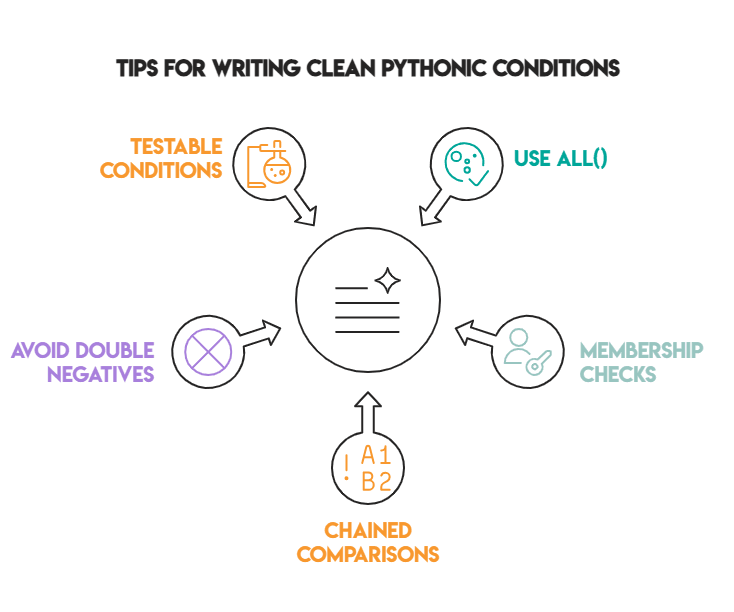
Tip 1: Use all() for “every condition must pass”
all() is friendly to read when there are many conditions, more even when they are dynamic.
user = {"active": True, "email": "a@b.com", "verified": True}

checks = [
    user is not None,
    user.get("active") is True,
    bool(user.get("email")),
    user.get("verified") is True,
]

if all(checks):
    print("User passes all checks")
else:
    print("User fails at least one check")
Outputs:
User passes all checks
An edge case here is that all([]) is True (vacuous truth). If the list is empty by mistake, the check still passes.
checks = []
print(all(checks))
Outputs:
True
Tip 2: It’s better to have membership checks rather than or chains
Then combine with and:
role = "editor"
is_active = True

if role in {"admin", "editor"} and is_active:
    print("Can publish")
else:
    print("Cannot publish")
Outputs:
Can publish
Instead of many or checks, we just check if the role is in a small allowed list and if the user is active. This keeps the condition short, clear, and hard to read wrong.
Tip 3: Use chained comparisons
x = 5

if 1 <= x <= 10 and x != 7:
    print("In range and not excluded")
Outputs:
In range and not excluded
Python lets us check a range in one clean line, and adding and x != 7 makes it easy to skip one edge case without making the condition complicated.
Tip 4: Avoid double negatives and unclear truthiness
Instead of:
enabled = False
if enabled is not False:
    print("Enabled")
else:
    print("Not enabled")
Prefer:
enabled = False
if enabled:
    print("Enabled")
else:
    print("Not enabled")
Outputs:
Not enabled
Use clear checks when it really matters (for example, distinguishing None from False):
flag = None

if flag is None:
    print("Not set")
elif flag is True:
    print("Explicitly enabled")
else:
    print("Explicitly disabled")
Outputs:
Not set
This makes the code easier to understand. When we really need to tell the difference between values like None and False, being explicit keeps the logic honest.
Tip 5: Keep conditions testable by extracting them
This is a huge win when logic is reused.
def is_valid_discount(cart_total, is_member, has_coupon):
    return (is_member or has_coupon) and cart_total >= 100

print(is_valid_discount(120, True, False))
print(is_valid_discount(80, True, False))
Outputs:
TrueFalse
This keeps the logic in one place instead of copying the same if condition all over the code. It’s easier to test, easier to reuse, and if the rules change later, we fix it one time, not in many places.
7. Real World Examples of Using IF and AND

Now let’s use Python if and to scenarios that we actually see in apps, scripts, APIs, and automation.
Example 1: Filtering values based on multiple business rules
Let’s have one of the Python interview questions, for example, which asks to calculate the sum of numbers from 0 to N. But some numbers must not be included. In this case, numbers that can be divided by 3 or 7 are excluded.
Sum Numbers with Exceptions
Calculate the sum from 0 to a given number N, excluding numbers that are divisible by 3 and 7.
To solve this, we iterate through all numbers from 0 to N and decide, for each number, whether it should be included in the sum. This decision is made using an if statement combined with and.
The important part is the condition:
i % 3 != 0checks that the number is not divisible by 3i % 7 != 0ensures the number is not divisible by 7- Using
andmeans both conditions must be true for the number to be added
Here’s the output.
Expected Output
Test 1
Test 2
Test 3
Example 2: Input validation (string must exist and be long enough)
username = "sam"

if username and len(username) >= 3:
    print("Valid username")
else:
    print("Invalid username")
Outputs:
Valid username
Try an edge case:
username = ""
if username and len(username) >= 3:
    print("Valid username")
else:
    print("Invalid username")
Outputs:
Invalid username
This is a simple check, but very common in real life. The condition makes sure the username exists and is long enough. Empty text fails right away and does not pass.
The second example shows why this is important. An empty value looks harmless, but without the first check it could easily cause invalid input to be accepted.
Example 3: Safe dictionary access (avoid KeyError)
payload = {"action": "delete", "confirmed": True}

if payload.get("action") == "delete" and payload.get("confirmed") is True:
    print("Proceed with deletion")
else:
    print("Stop")
Outputs:
Proceed with deletion
This pattern keeps things safe when working with dictionaries. Using .get() together with and avoids crashes and ensures the code only moves forward when the action is correct and the operation is clearly confirmed.
Example 4: File processing (exists and has the right extension)
filename = "report.csv"

if filename and filename.endswith(".csv"):
    print("Process CSV")
else:
    print("Unsupported file")
Outputs:
Process CSV
This is a fast and practical check that is seen a lot in scripts and automation. It makes sure a filename actually exists and that it’s the right type, to help avoid accidentally trying to process something invalid or unsupported.
Example 5: API authorization (token exists and is not expired)
token = {"value": "abc123", "expired": False}

if token and token.get("value") and token.get("expired") is False:
    print("Authorized")
else:
    print("Unauthorized")
Outputs:
Authorized
This example shows a common authorization check in APIs and backend code. It checks that the token exists, has a value, and is not expired. Access is allowed only when everything is correct and nothing important is missing.
Example 6: Avoiding division by zero with and
numerator = 10
denominator = 0

if denominator != 0 and numerator / denominator > 1:
    print("Greater than 1")
else:
    print("Safe: no division performed")
Outputs:
Safe: no division performed
This is a classic safety check that saves from crashes. The and condition ensures the division never runs unless the denominator is valid, so the program stays safe even when the numbers are bad.
Example 7: Combining user choice and stock availability
wants_item = True
in_stock = False
can_backorder = True

if wants_item and (in_stock or can_backorder):
    print("Order can be placed")
else:
    print("Cannot place order")
Outputs:
Order can be placed
This example is like real shopping logic. The order goes through when the user wants the item and there is a way to get it, from stock or by backorder.
Example 8: and returning non-boolean values (real-world filtering)
A common pattern is to use and to “gate” a value:
user = {"active": True, "email": "a@b.com"}
email = user.get("active") and user.get("email")

print(email)
Outputs:
a@b.com
But if active is false:
user = {"active": False, "email": "a@b.com"}
email = user.get("active") and user.get("email")

print(email)
Outputs:
False
That might be fine or it might be surprising. If we want either the email or None, use a ternary:
user = {"active": False, "email": "a@b.com"}
email = user.get("email") if user.get("active") else None
print(email)
Outputs:
None
Here, and is used as a quick filter that only returns the email if the user is active. This can be handy, but it can also be surprising since the result isn’t always a boolean, which is why the ternary version is clearer when we want either a real value or None.
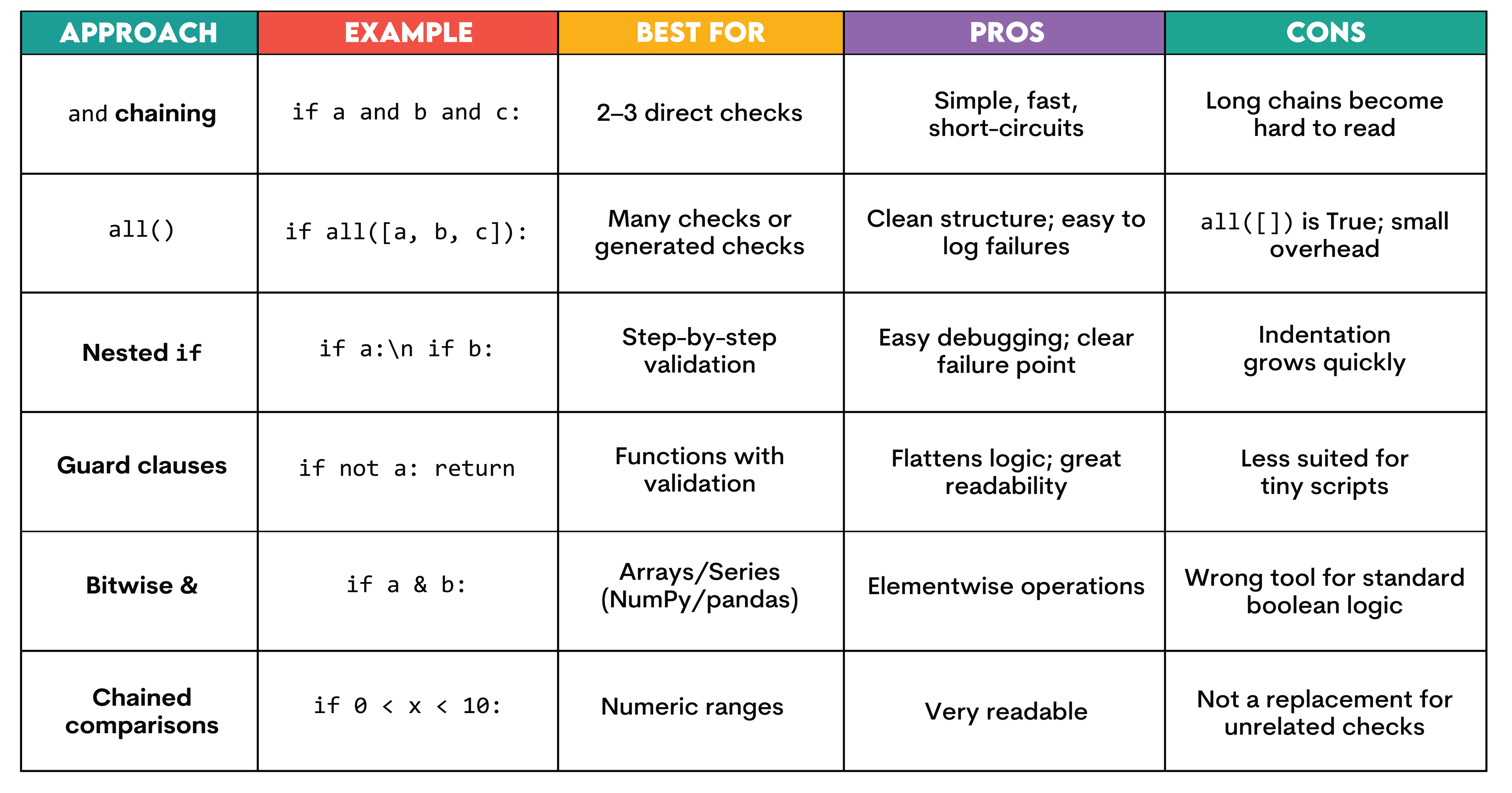
8. Comparison Table: AND vs Other Ways to Combine Conditions
This table is a quick way to see that and isn’t always the only (or best) option. Simple and chaining works great for a few checks, but as things grow, options like all() or guard clauses are easier to read.
The main takeaway is to pick the approach that keeps the intent clear, not just the one that technically works.
Conclusion
When we understand how if evaluates truthiness and how and short-circuits, Python if and and becomes one of the cleanest ways to express real program logic: “only proceed if every required condition is met.”

If you remember just a few rules, most bugs can be dodged:
andreturns operands, not necessarilyTrue/False- Short-circuiting can prevent errors (and skip expensive calls)
- Repeat comparisons explicitly
- Use parentheses when mixing
andandor - Refactor long chains into named conditions or
all()
Frequently Asked Questions
What is the difference between Python and and &?
and is a logical operator designed for truthiness checks and it short-circuits:
def left():
    print("left ran")
    return False

def right():
    print("right ran")
    return True

print(left() and right())
Outputs:
left ranFalse
& is a bitwise operator (or elementwise operator in some Python libraries). It does not short-circuit:
a = True
b = False

print(a & b)
Outputs:
False
And with integers:
print(6 & 3)Outputs:
2
Use and for normal conditions. Save & for bitwise work or array/Series elementwise operations where it’s the correct tool.
Can I use multiple and conditions in one IF statement?
Yes, it is possible to chain many conditions:
a, b, c = True, True, False

if a and b and c:
    print("All true")
else:
    print("At least one is false")
Outputs:
At least one is false
If the chain gets long, consider:
- Extracting named booleans (
is_valid_user,has_access, etc.) - Using
all([...])for readability and easy debugging
Why is my IF AND condition not working as expected?
Common causes include:
1. You didn’t repeat the comparison
x = 1
if x == 1 and 2:
    print("This prints")
Outputs:
This prints
Because 2 is True, not because we checked x == 2. The fix is explicit:
if x == 1 and x == 2:
    print("Impossible")
else:
    print("Correctly not triggered")
Outputs:
Correctly not triggered
2. Truthiness surprises (empty strings, empty lists, 0, None)
3. Mixing and/or without parentheses, leading to different grouping than intended
4. Using & instead of and
Is and faster than all()?
In many small cases, and is slightly faster because it’s direct syntax and short-circuits immediately. But most of the time, the speed difference is very small.
What really takes time are things like:
- database calls
- API requests
- reading files
- heavy calculations
Use what reads best:
- Use
andwhen there are a few clear checks. - Use
all()when we have many checks or a list we want to look at
How does short-circuiting in Python’s AND work?
Python evaluates left to right:
- If the left operand is
False, Python stops and returns it. - Otherwise, Python continues and returns the first
Falseoperand it finds, or the final operand if all areTrue.
See it in action:
def check(name, value):
    print(f"checked {name}")
    return value

result = check("A", True) and check("B", True) and check("C", False) and check("D", True)
print("result:", result)
Outputs:
checked Achecked Bchecked Cresult: False
D is never checked because once C is false, the full and expression can’t become true, so Python stops early.
Share