How to Use SELECT INTO in SQL for Analytics

Categories:
 Written by:
Tihomir Babic
SELECT INTO is an often-overlooked tool for analytics. Here we explain its syntax, use cases, how to use it in staging, and how it is tested in interviews.
What if you could create analytical staging tables in seconds without writing separate CREATE TABLE statements?
SELECT INTO quietly solves that problem while most analysts keep overengineering simple workflows.
In this article, I will show you how it works, when you should use it, how it compares to alternatives, and how to avoid mistakes that silently break analytics pipelines.
Why Analysts Use SELECT INTO
Analysts typically use it for creating a staging table during analysis when exploring raw or semi-processed data.
You could do that with CREATE TABLE first, then inserting data with INSERT INTO (or manually, shudder to think), but this will make you lose the momentum.
SELECT INTO allows you to generate a new table directly from a query result, which is surprisingly efficient.
I have used it in analytics when:
- building transformation layers
- creating ad-hoc reporting datasets
- preparing intermediate tables before complex joins
- running interview SQL exercises under time pressure
It just feels lighter and more controlled.
What SELECT INTO Actually Does
We already mentioned that SELECT INTO creates a new table from a query result. But how does it do that? It copies column names and inferred data types directly from the SELECT statement output.
What it does not copy are:
- indexes
- primary keys
- foreign keys
- constraints
- triggers
You can think of SELECT INTO as a shortcut for doing two actions at once:
- Creating a brand new table
- Inserting query results into that table
If the table already exists, most databases will throw an error. That’s why you use SELECT INTO when building a fresh table, essentially as a storage for your result set.
SELECT INTO Syntax and Examples
We’ll now get into the more practical turf and show how SELECT INTO is actually used in SQL.
Basic SELECT INTO Syntax
The syntax is virtually the same as the SELECT statement; here, you only specify the new table name in addition.
SELECT column1,
       column2,
       …
INTO new_table_name
FROM existing_table;
Create Backup Snapshot Using SELECT INTO
Sometimes you want a quick snapshot before modifying data. Instead of exporting data externally, you create a snapshot table with SELECT INTO inside the database.
For example, you have a table called orders. Before making changes, you want a full copy of the current data.
Here’s a code example.
SELECT *
INTO orders_backup_2026
FROM orders;
Filtered or Aggregated Data Example
Often, you don’t want all the data. You want filtered or summarized data stored for analysis. SELECT INTO lets you do that, too.
Imagine you have a sales table with millions of rows. You want only data from 2025 and the total revenue per product.
No need to run aggregation every time. Instead, use SELECT INTO to put your data into a staging table.
SELECT product_id,
       SUM(amount) AS total_revenue
INTO product_revenue_2025
FROM sales
WHERE order_date >= '2025-01-01'
AND order_date < '2026-01-01'
GROUP BY product_id;
Using SELECT INTO With Joins
Those simple examples I’ve shown so far will be used seldom. The reason? Data analysis rarely involves using a single table.
So, you’ll probably use SELECT INTO with joins much more frequently. Here’s an example.
Let’s assume you work with two tables:
orders– contains transactionscustomers– contains user details
You want a new table that combines customer name, order date, and order amount.
SELECT o.order_id,
       c.customer_name,
       o.order_date,
       o.amount
INTO customer_order_details
FROM orders o
JOIN customers c
ON o.customer_id = c.customer_id;
Using Temporary Tables
We’ve so far shown how to use SELECT INTO to save the new table permanently in the database.
However, you’ll sometimes need data for only one session. To achieve that, you can use SELECT INTO to create a temporary table and select data into it.
For example, imagine you’re debugging a complex revenue query. You want to filter raw sales data, store the intermediate result, and run calculations on that smaller dataset.
That’s a case for creating a temporary table. In PostgreSQL, you must use a special prefix: TEMP. (In SQL Server, the prefix is #.)
SELECT customer_id,
       amount
INTO TEMP temp_sales
FROM sales
WHERE order_date >= '2026-01-01';
Real Analytics Use Case: Build a Staging Table
Now I want to show you how to build a staging table. I’ll use the dataset from the Income by Title and Gender interview question. Ignore the question’s request, just focus on the dataset.
The first table is sf_employee.
The second one is sf_bonus.
You can create those tables locally by running this script, so you can run the code I’ll show you below.
Problems to Solve
Imagine HR asks you the following:
- What is the total compensation per employee?
- Are Sales employees hitting targets relative to salary?
- Which managers oversee the highest payroll?
- How much bonus is duplicated or inflated?
By trying to answer those questions directly from raw tables, you risk:
- double-counting salary
- inflating compensation
- producing messy logic
Why is that? Because the dataset contains real-world issues, for example:
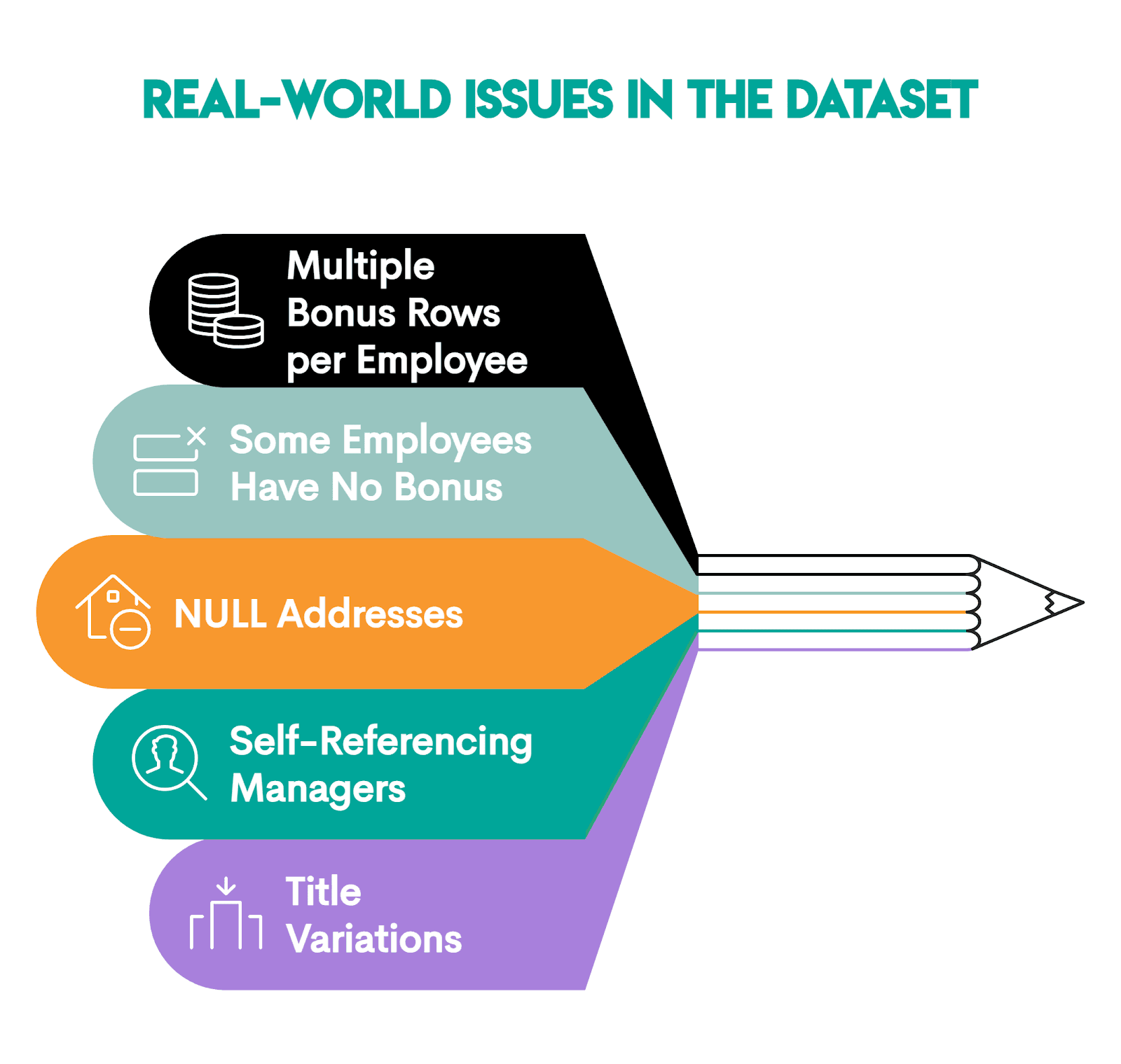
So, you need a staging layer first.
We’ll build a clean employee-level staging table using this code.
SELECT e.id,
       e.first_name,
       e.last_name,
       e.department,
       e.employee_title,
       e.city,
       e.salary,
       COALESCE(SUM(b.bonus), 0) AS total_bonus,
       e.salary + COALESCE(SUM(b.bonus), 0) AS total_compensation,
       e.target,
       CASE
           WHEN e.target > 0 THEN ROUND(e.salary::NUMERIC/e.target, 2)
           ELSE NULL
       END AS salary_to_target_ratio,
       m.first_name || ' ' || m.last_name AS manager_name
INTO stg_employee_compensation
FROM sf_employee e
LEFT JOIN sf_bonus b ON e.id = b.worker_ref_id
LEFT JOIN sf_employee m ON e.manager_id = m.id
GROUP BY e.id,
         e.first_name,
         e.last_name,
         e.department,
         e.employee_title,
         e.city,
         e.salary,
         e.target,
         m.first_name,
         m.last_name;
This is what the code does:
- Selects employee fields
COALESCE(SUM(b.bonus), 0) AS total_bonus: Aggregating them into one number per employee usingSUM()and turningNULLinto0e.salary + COALESCE(SUM(b.bonus), 0) AS total_compensation: Calculating total compensation withCOALESCE()returning 0 when the bonus is missing, so the calculation stays correct for employees with no bonusesCASE WHEN: Computes thesalary/targetratio with two decimals; if target is 0, it returnsNULLto avoid division by zero.- The second
LEFT JOIN: It’s a self-join for pulling the manager's name. We useLEFT JOINso employees with the missing manager don’t disappear. - The query output is selected into the
stg_employee_compensationtable. - GROUP BY to get one row per employee, with bonuses aggregated.
Our stg_employee_compensation staging table’s first five rows look like this.
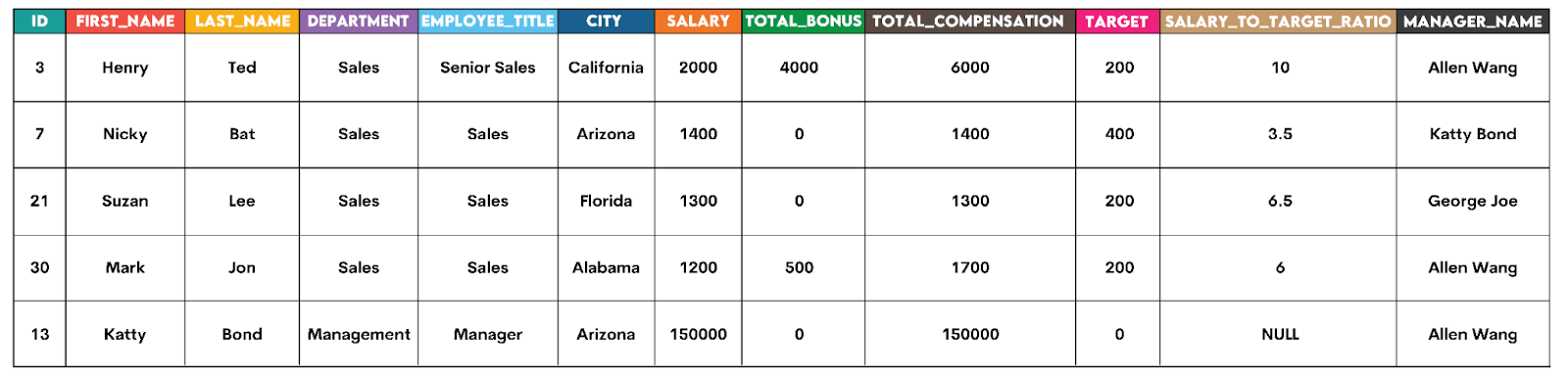
If you’ve created the dataset, run the above code to see the full output.
Solution #1: What Is Total Compensation per Employee?
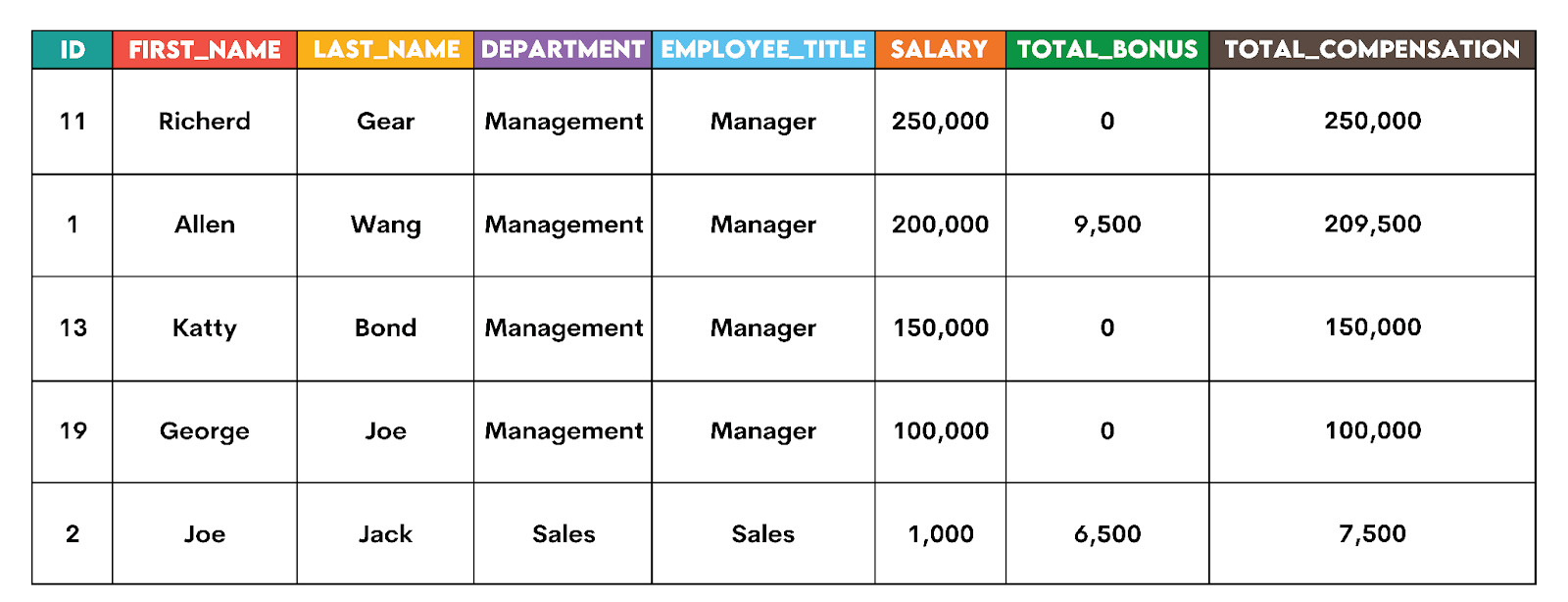
With the staging table, this becomes trivial: select the required columns and, optionally, order from the highest to lowest compensation to make it more readable.
SELECT id,
       first_name,
       last_name,
       department,
       employee_title,
       salary,
       total_bonus,
       total_compensation
FROM stg_employee_compensation
ORDER BY total_compensation DESC;
Here’s the output snapshot.
Solution #2: Are Sales Employees Hitting Targets Relative to Salary?
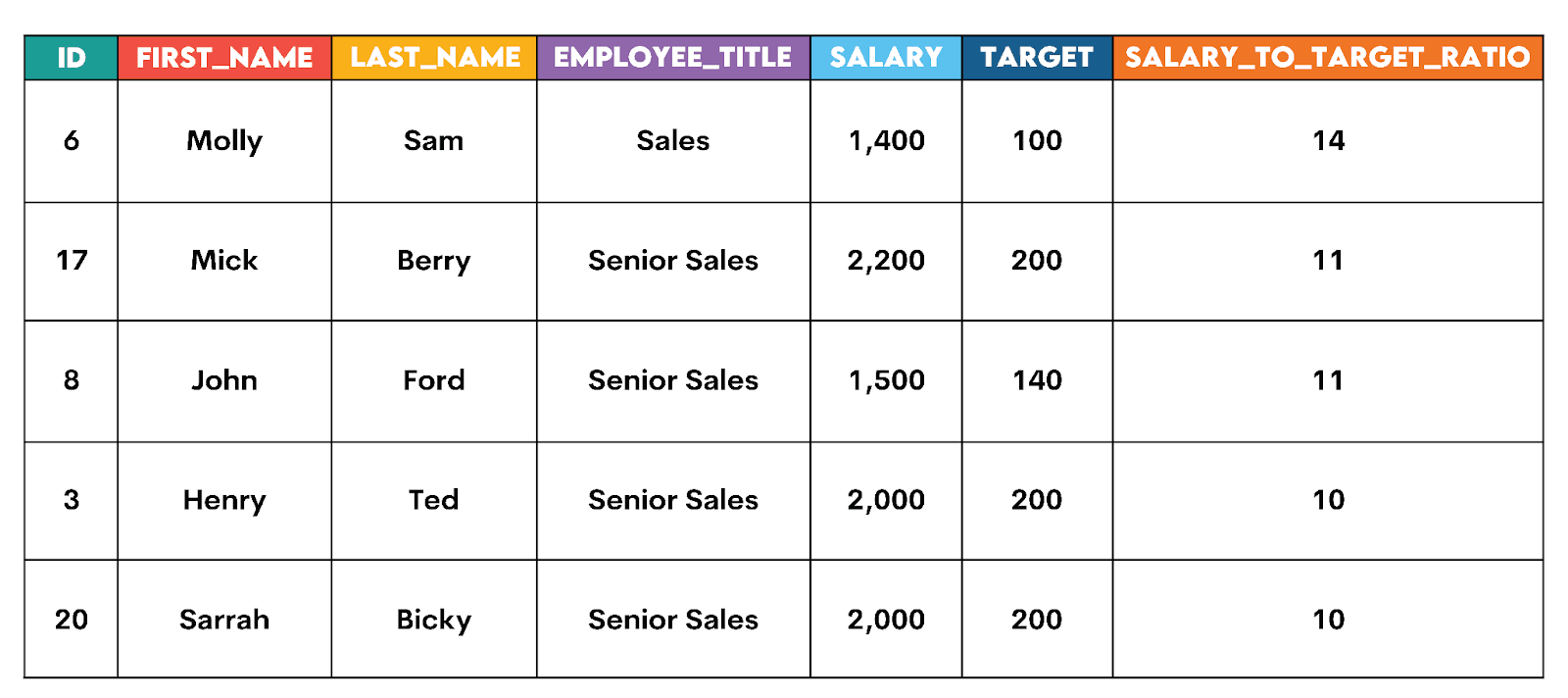
We already calculated that ratio while preparing the staging table. Now, you need to select the columns and filter data in WHERE so that the output includes only the Sales department data. Finally, order the output from the highest to the lowest ratio, with NULL LAST forcing NULL values (employees whose target = 0) to the bottom of the output.
SELECT id,
       first_name,
       last_name,
       employee_title,
       salary,
       target,
       salary_to_target_ratio
FROM stg_employee_compensation
WHERE department = 'Sales'
ORDER BY salary_to_target_ratio DESC NULLS LAST;
Here’s the output snapshot.
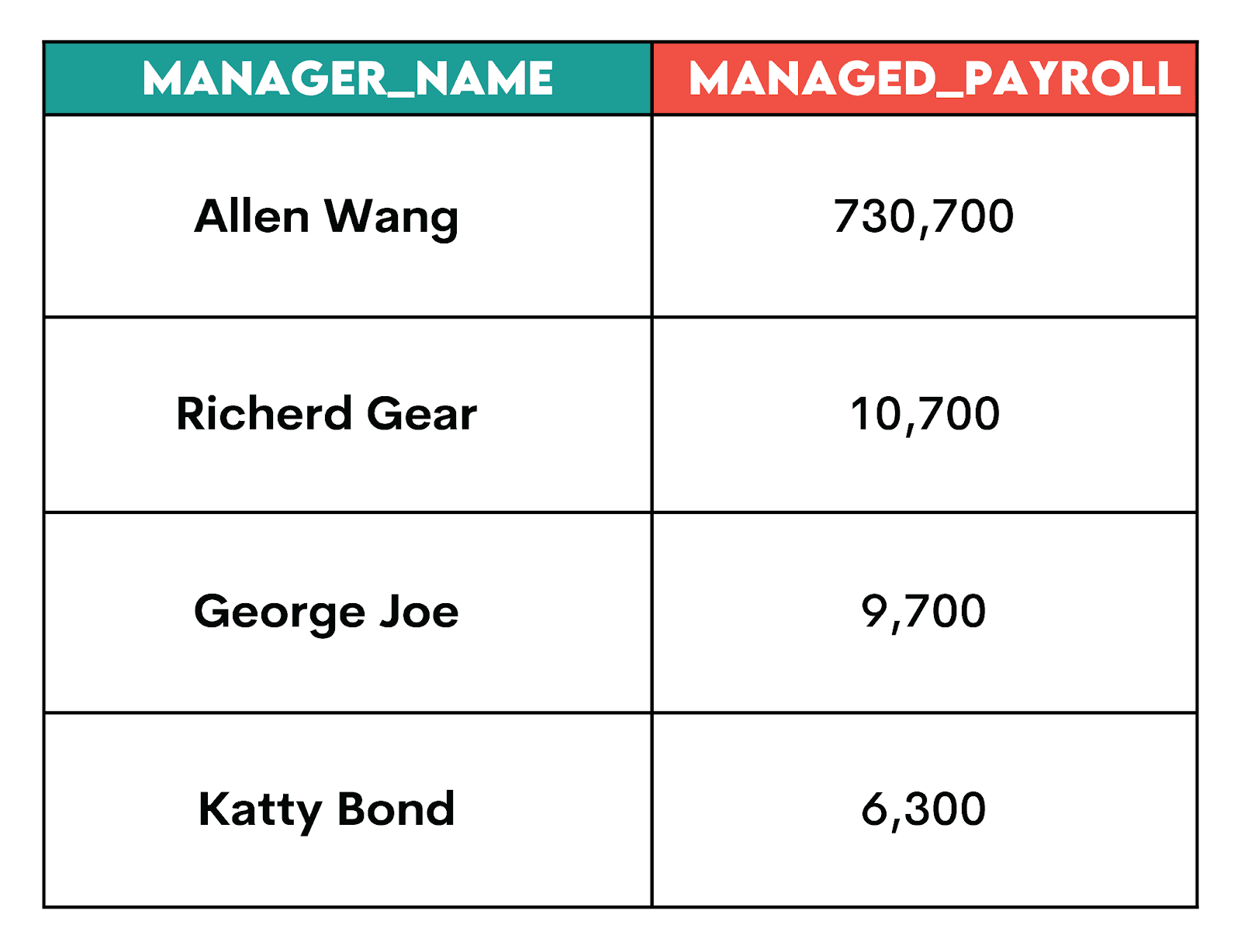
Solution #3: Which Managers Oversee the Highest Payroll?
For this problem, you need to use a simple aggregation using SUM(), exclude NULLs (so the manager name exists in the staging table), and group by the manager name.
SELECT manager_name,
       SUM(total_compensation) AS managed_payroll
FROM stg_employee_compensation
WHERE manager_name IS NOT NULL
GROUP BY manager_name
ORDER BY managed_payroll DESC;
Here’s the output.
Interview Pattern: Stage → Join → Compute
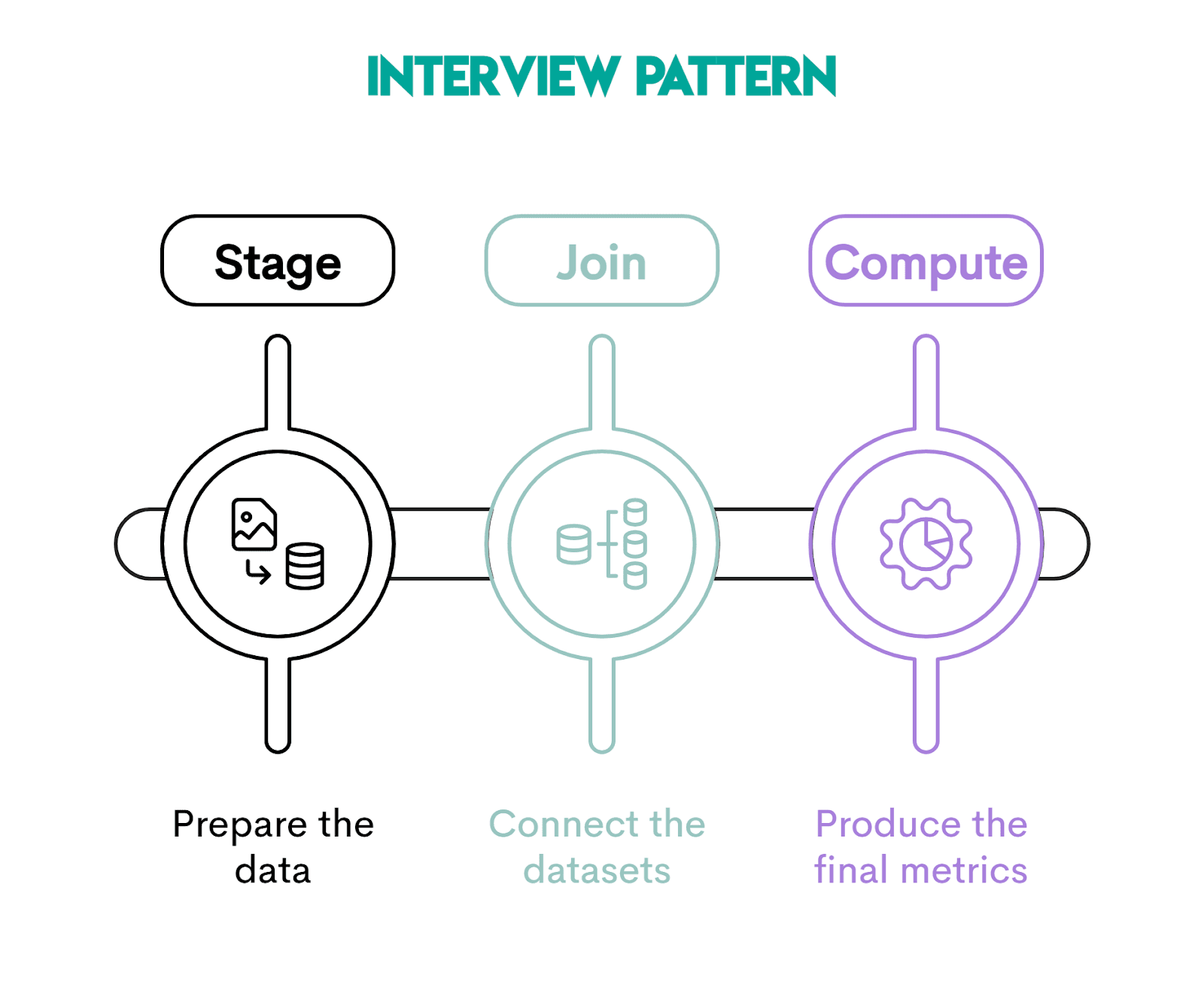
SQL interview questions don’t just test the SELECT INTO syntax. They test whether you can structure a complex solution clearly under pressure.
The approach that will help you with that is to use the Stage → Join → Compute pattern. That way, you’ll break problems into logical steps, instead of solving everything in one giant query.
It shows structured thinking, so interviewers are guaranteed to like it.
Stage: Preparing Clean Intermediate Data
In this step, you isolate and prepare the raw data needed for the analysis. It typically includes filtering rows, aggregating data, and standardizing columns.
The goal is to create a clean, transformed, intermediate dataset that represents one row per entity at the desired analysis grain. In our earlier example, the stg_employee_compensation table shows one row per employee.
Join: Combining Prepared Data
At this point, you join the prepared staging data with other tables. Because the staging table already has one row per entity, joining it won’t cause data duplication problems.
Compute: Deriving Business Metrics
In this final step, you calculate the metrics required by the interview question.
If the previous two steps were performed properly, computing metrics should be a walk in the park.
You can see several metrics we calculated in the earlier section.
SELECT INTO vs INSERT INTO SELECT
These two patterns look similar, so it’s not surprising some analysts confuse them. Spoiler alert: they’re not the same!
You’ve already learned what SELECT INTO is, but let’s repeat briefly: it creates a new table and loads rows into it.
INSERT INTO SELECT loads rows into an already existing table. That’s why it’s common in repeatable pipelines and production workflows.
To continue with our stg_employee_compensation example, before you use INSERT INTO SELECT, you’d first have to create the table with explicit data types and constraints.
CREATE TABLE stg_employee_compensation (
             id INT PRIMARY KEY,
             first_name TEXT NOT NULL,
             last_name TEXT NOT NULL,
             department TEXT,
             salary NUMERIC(12,2),
             total_bonus NUMERIC(12,2),
             total_compensation NUMERIC(12,2)
);
Then you write the INSERT INTO statement. It should explicitly list the columns you’re loading into. This is then followed by SELECT, which fills the corresponding column: the first column in INSERT INTO is filled by the first SELECT, the second by the second, and so on.
INSERT INTO stg_employee_compensation (id, first_name, last_name, department, salary, total_bonus, total_compensation)
SELECT e.id,
       e.first_name,
       e.last_name,
       e.department,
       e.salary,
       COALESCE(SUM(b.bonus), 0) AS total_bonus,
       e.salary + COALESCE(SUM(b.bonus), 0) AS total_compensation
FROM sf_employee e
LEFT JOIN sf_bonus b ON b.worker_ref_id = e.id
GROUP BY e.id,
         e.first_name,
         e.last_name,
         e.department,
         e.salary;
Pro tip: Always do the cleanup before using INSERT INTO SELECT, otherwise you could duplicate data. That’s why CREATE TABLE should be followed and INSERT INTO SELECT should be preceded by either:
- Truncating:
TRUNCATE TABLE stg_employee_compensation;, or - Deleting a partition (if the table has a
load_date):DELETE FROM stg_employee_compensation WHERE load_date = CURRENT_DATE;
SELECT INTO avoids this by forcing a new table each run.
Here’s a quick overview of those two SQL statements.
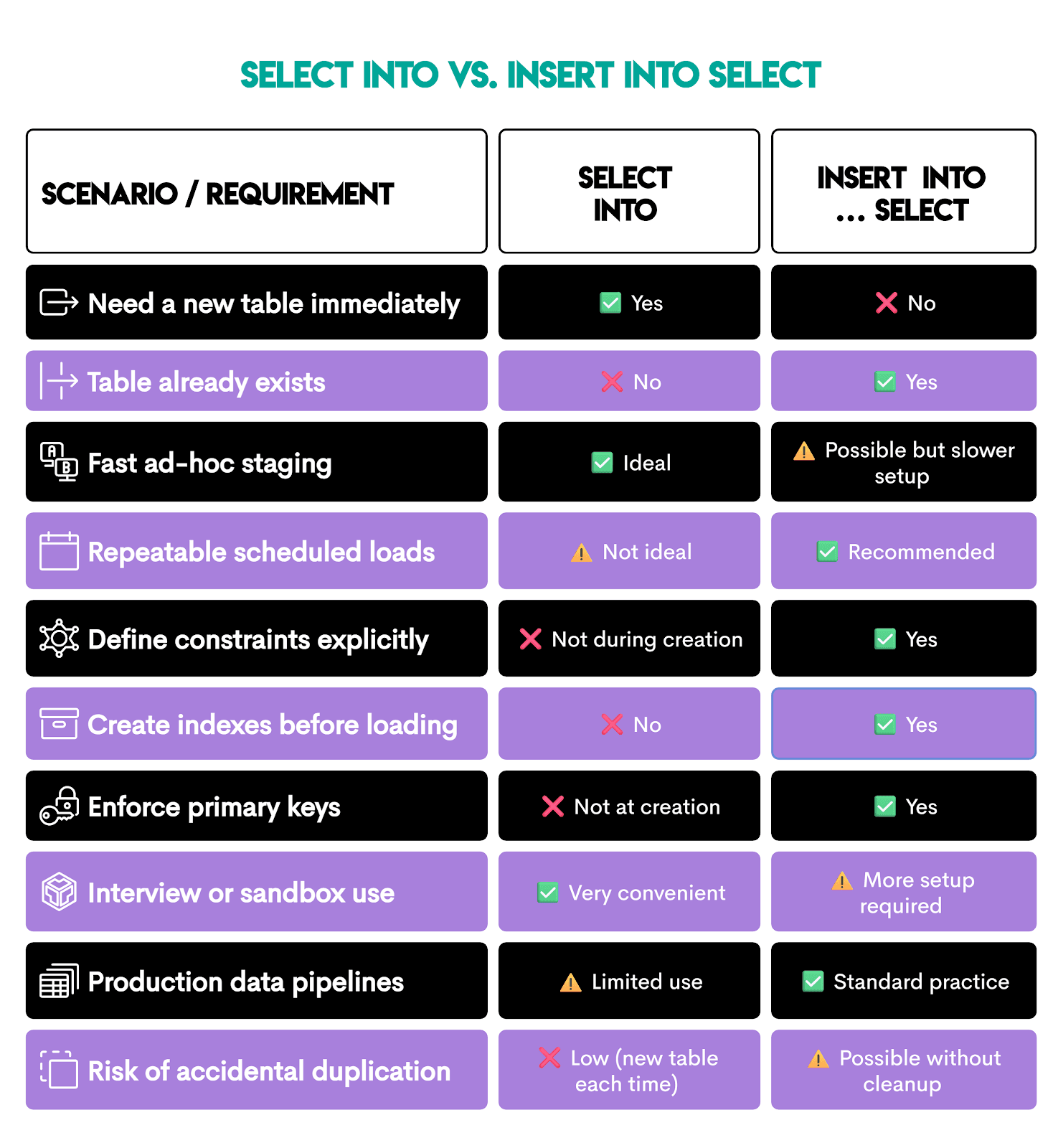
If you need a one-line decision rule, then:
- If speed of analysis matters more →
SELECT INTO - If stability of the system matters more →
INSERT INTO SELECT
SELECT INTO vs CTEs (When to Use Which)
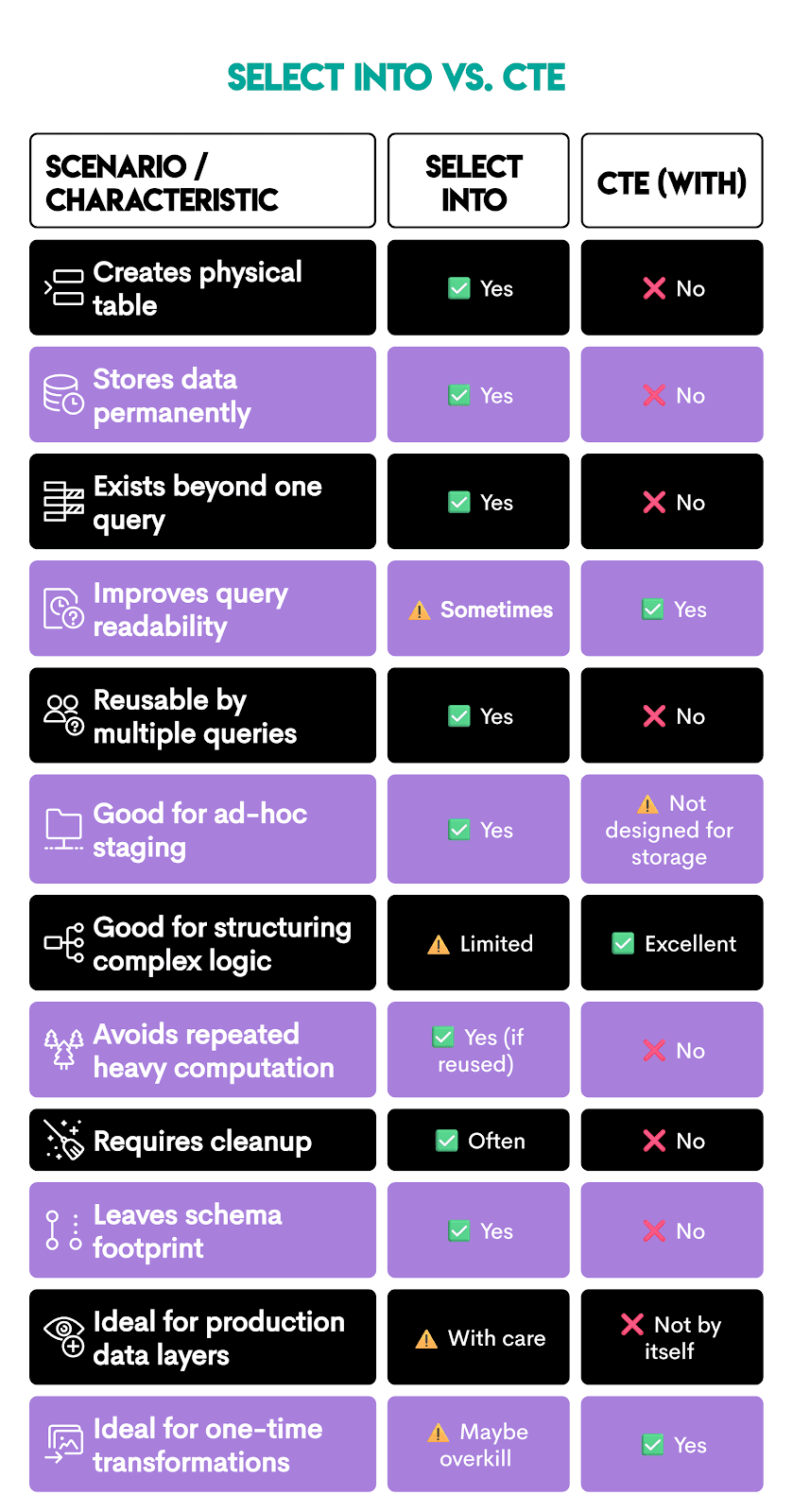
SQL CTEs are primarily used to improve the code structure and readability. They create a temporary result set that exists only during query execution, unlike SELECT INTO, which creates a whole new table with data.
Take a look at this. The same logic we used to create the stg_employee_compensation with SELECT INTO can be rewritten with CTEs.
CTEs are created using the WITH keyword, followed by the CTE name, then AS, with the regular SELECT statement in the parentheses. To get the CTE result, you need to reference it in a separate SELECT statement.
In our example, there are two CTEs:
bonus_aggemployees_with_manager
The final SELECT joins the CTEs to get the output that is exactly the same as our staging table we created earlier.
WITH bonus_agg AS (
  SELECT
    worker_ref_id,
    SUM(bonus) AS total_bonus
  FROM sf_bonus
  GROUP BY worker_ref_id
),
employees_with_manager AS (
  SELECT
    e.id,
    e.first_name,
    e.last_name,
    e.department,
    e.employee_title,
    e.city,
    e.salary,
    e.target,
    e.manager_id,
    m.first_name || ' ' || m.last_name AS manager_name
  FROM sf_employee e
  LEFT JOIN sf_employee m
    ON m.id = e.manager_id
)
SELECT
  ewm.id,
  ewm.first_name,
  ewm.last_name,
  ewm.department,
  ewm.employee_title,
  ewm.city,
  ewm.salary,
  COALESCE(ba.total_bonus, 0) AS total_bonus,
  ewm.salary + COALESCE(ba.total_bonus, 0) AS total_compensation,
  ewm.target,
  CASE
    WHEN ewm.target > 0 THEN ROUND(ewm.salary::numeric / ewm.target, 2)
    ELSE NULL
  END AS salary_to_target_ratio,
  ewm.manager_name
FROM employees_with_manager ewm
LEFT JOIN bonus_agg ba
  ON ba.worker_ref_id = ewm.id;
However, in this query, bonus_agg exists only inside the query; there is no physical table created, and the result is not stored permanently.
Here’s a quick overview to help you decide when to use SELECT INTO and when CTEs are more appropriate.
How to Sanity-Check a Staging Table
Sanity-checking a staging table depends on the data you have there. However, there are some general rules you can apply to most staging tables, regardless.
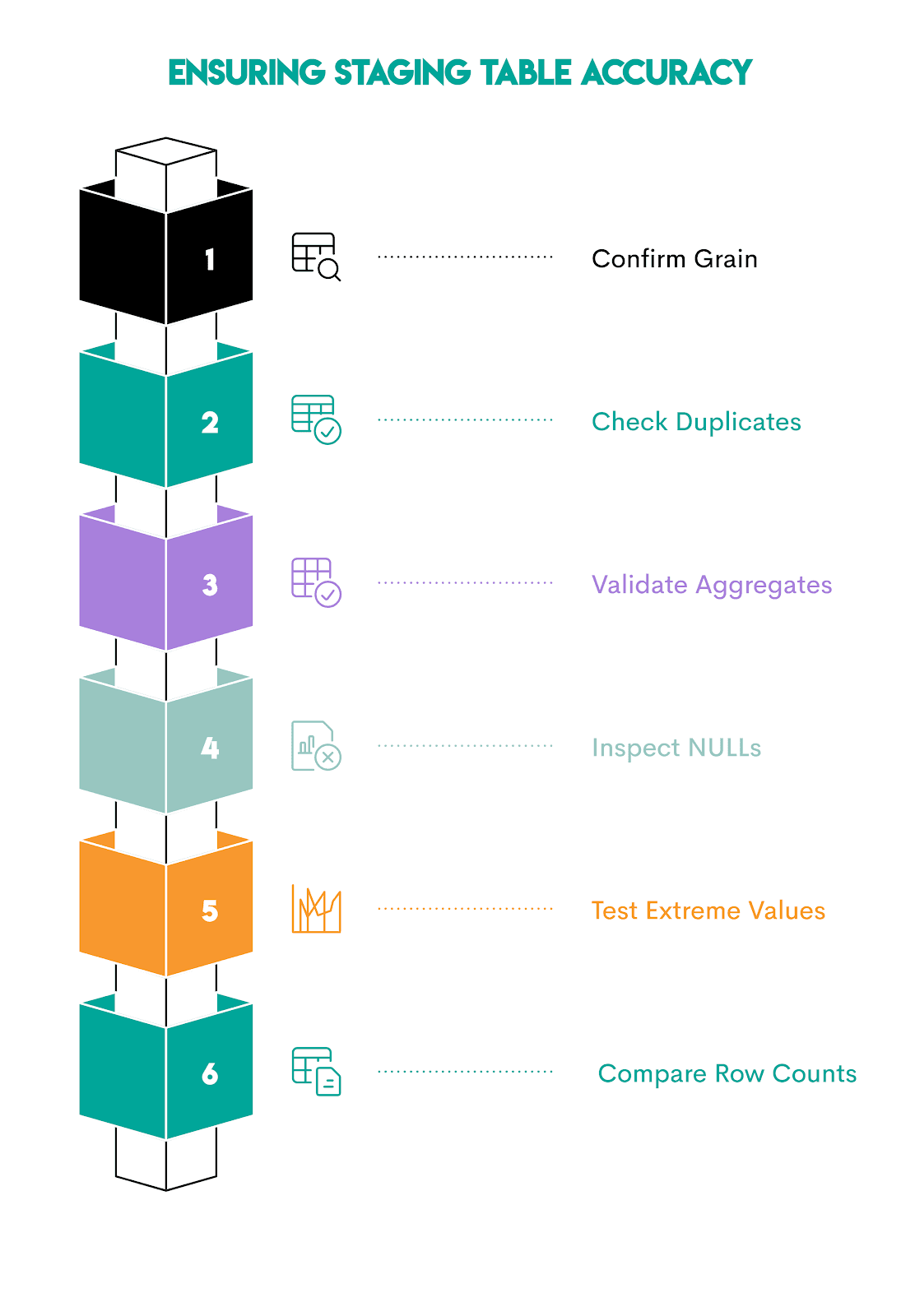
1. Confirm the Grain (One Row per What?)
Every staging table has a grain, for example:
- One row per customer?
- One row per order?
- One row per employee?
- One row per day per product?
Verify the grain using COUNT(*).
SELECT COUNT(*) AS total_rows
FROM staging_table;
Now, compare that output with the distinct count of the business key.
SELECT COUNT(DISTINCT business_key_column) AS distinct_keys
FROM staging_table;
Do you get a different result? Then your grain is broken, as joins probably multiplied rows.
2. Check for Duplicate Business Keys
If the previous check goes well, you will have confirmed the number of rows. That still doesn’t mean there are no duplicates. Therefore, use this query to identify duplicate business keys.
SELECT business_key_column,
       COUNT(*) AS row_count
FROM staging_table
GROUP BY business_key_column
HAVING COUNT(*) > 1;
Normally, that code should return zero rows for most staging tables. Otherwise, your joins inflated the dataset.
3. Recompute Critical Metrics Independently
The metric(s) you recalculate depend on your staging table. For our stg_employee_compensation case, one metric we could recompute is the total bonus.
We recalculate it in the CTE, then join it with the staging table to output the rows where the results differ, i.e., WHERE s.total_bonus <> r.recalculated_bonus.
WITH recompute_bonus AS (
  SELECT e.id,
         COALESCE(SUM(b.bonus), 0) AS recalculated_bonus
  FROM sf_employee e
  LEFT JOIN sf_bonus b
  ON b.worker_ref_id = e.id
  GROUP BY e.id
)

SELECT s.id,
       s.total_bonus,
       r.recalculated_bonus
FROM stg_employee_compensation s
JOIN recompute_bonus r
ON r.id = s.id
WHERE s.total_bonus <> r.recalculated_bonus;
Expected result: no rows. (That’s the case here, too.)
4. Validate NULL Handling
If you used SQL COALESCE when creating the staging table, confirm it worked.
SELECT COUNT(*)
FROM staging_table
WHERE critical_column IS NULL;
If the code returns nothing, you’re good.
5. Look for Impossible Values
Ask basic sanity questions, e.g.,
- Can revenue be negative?
- Can age be 300?
- Can compensation be less than salary?
Then test. In our example, we could check (among other things) if there are negative salaries. This should never happen.
SELECT *
FROM stg_employee_compensation
WHERE salary < 0;
6. Compare Row Counts Before and After Joins
Joining tables can unintentionally inflate the row count.
Check it before joining.
SELECT COUNT(*) FROM base_table;Then, after joining.
SELECT COUNT(*) FROM staging_table;If you see a spike, then there’s a one-to-many relationship that wasn’t handled properly.
Best Practices for Using SELECT INTO
To keep the staging fast and reliable, follow these best practices. They will ensure you maximize the SELECT INTO potential and avoid chaos.
1. Name Tables Like They Are Disposable
When you name tables you create with SELECT INTO, use a clear prefix, e.g., stg_ or staging.
Adding scope is also helpful:
stg_employee_compensationstg_orders_2025_q1stg_customer_snapshot_2026_03_02
It’s important that you assign clear, descriptive names. You’ll come to them months later, and you’ll think “WTF!?” if you have tables named like for_mike_ad_hoc_final or something similar. Yeah, yeah, we’ve all done that, but please stop.
2. Drop Explicitly Before Creating
SELECT INTO will fail if the table already exists. Include this line before SELECT INTO to ensure everything runs smoothly.
DROP TABLE IF EXISTS staging_table;3. Filter Early Before You Stage
From the technical aspect, staging is easy. However, it can become expensive very quickly. So, don’t just simply stage all the data. Use filters in SELECT before you create the table:
- time windows
- relevant segments
- status conditions
- only needed columns
Smaller staging tables mean faster joins later.
4. Control Your Grain on Purpose
Pick a grain first, enforce it, then check it the way we showed earlier.
If your grain is wrong, the analysis you base on the staging table data will be wrong, too. Think of inflated revenue or costs, headcount or salaries exaggerated, you get the image.
5. Add Indexes
If you plan to reuse the staging table, add indexes to it. Otherwise, joining and filtering data will mean performing a full table scan. Imagine doing that on a staging table with 5 million rows! Your queries will be significantly slower.
Common index targets are:
- Join keys
- Date columns for filtering
- High-cadinality dimensions (many unique values), e.g., ids, emails, addresses
6. Cast Types When Analytics Precision Matters
Be explicit with casting data types when precision matters, for example:
- currency amounts
- ratios
- timestamps vs dates
That way, you’ll prevent silent rounding bugs and misrepresenting the calculation results.
7. Treat SELECT INTO as a Staging Step, Not a Pipeline
Don’t use SELECT INTO in production pipelines, as it gets messy if a workflow repeats daily.
In repeatable production workflows, it’s preferable to use:
CREATE TABLE+INSERT INTO … SELECT- or
CREATE TABLE ASin controlled jobs - or build views and incremental models
8. Be Explicit With Business Definitions
Staging tables often embed business definitions. Make them as readable as possible from your SELECT INTO query.
Use readable column names that convey the business logic (e.g., avg_daily_cost, not average) and clean CASE WHEN statements from which the business logic is easy to understand.
Common Mistakes to Avoid
There are eight mistakes analysts commonly make when using SELECT INTO.
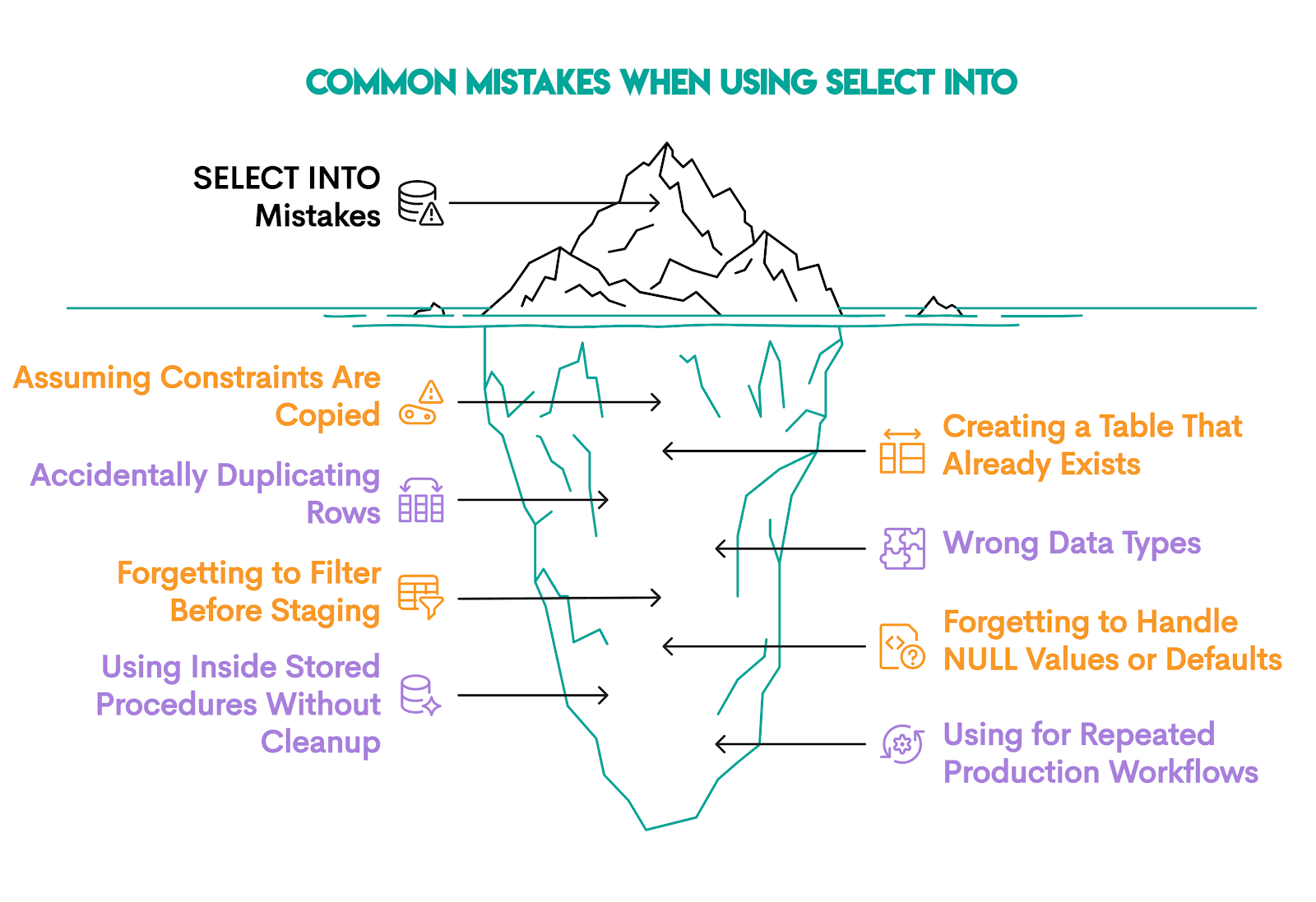
1. Assuming Constraints Are Copied
You’ll typically create a staging table from a source table that has:
- primary keys
- foreign keys
NOT NULLconstraints- indexes
You’re wrong if you’re assuming those constraints are carried over. No, they’re not! SELECT INTO copies only column names and data.
If constraints matter, add them explicitly after creation or use CREATE TABLE, then INSERT INTO … SELECT
2. Creating a Table That Already Exists
If the table already exists, SELECT INTO won’t overwrite it. So, you either:
- use a different name
- drop the existing table and create a new one
3. Accidentally Duplicating Rows
This problem occurs when you join one-to-many relationships without aggregating.
Avoid this mistake by:
- deciding grain before joining
- aggregating before joining when necessary
- immediately compare
COUNT(*)vsCOUNT(DISTINCT key)
4. Wrong Data Types From Inference
SELECT INTO infers data types automatically. This may cause you problems if arithmetic expressions become:
- numeric without desired precision
- integer when you expected a decimal
- text when casting was required
The solution: Always cast explicitly when precision matters! It matters especially for:
- currencies
- ratios
- timestamps
5. Forgetting to Filter Before Staging
No need to stage the entire historical dataset when you only need one month of data. This increases:
- Storage requirements
- Execution time
- Join complexity
Use filters.
6. Forgetting to Handle NULL Values or Defaults
Aggregations return NULL when no rows exist.
If you forget to handle NULLs with COALESCE(), your arithmetic might break silently. So, don’t.
7. Using SELECT INTO Inside Stored Procedures Without Cleanup
Why is this a problem? Because inside procedural logic, SELECT INTO can mean variable assignment, not table creation.
8. Using SELECT INTO for Repeated Production Workflows
Yes, creating tables using SELECT INTO is easy. But if the workflows are repeated, you’ll end up with an endless number of staging tables with no ownership or lifecycle control.
If a process repeats on schedule, it’s better to:
- Define the table explicitly
- Use
INSERT INTO - Add indexes and constraints
SELECT INTO is best used for exploration, not pipelines.
Performance Optimization Techniques
At a small scale, SELECT INTO will work well, no matter what. However, at a large scale, mistakes become expensive, so it’s good to be familiar with several performance optimization techniques.
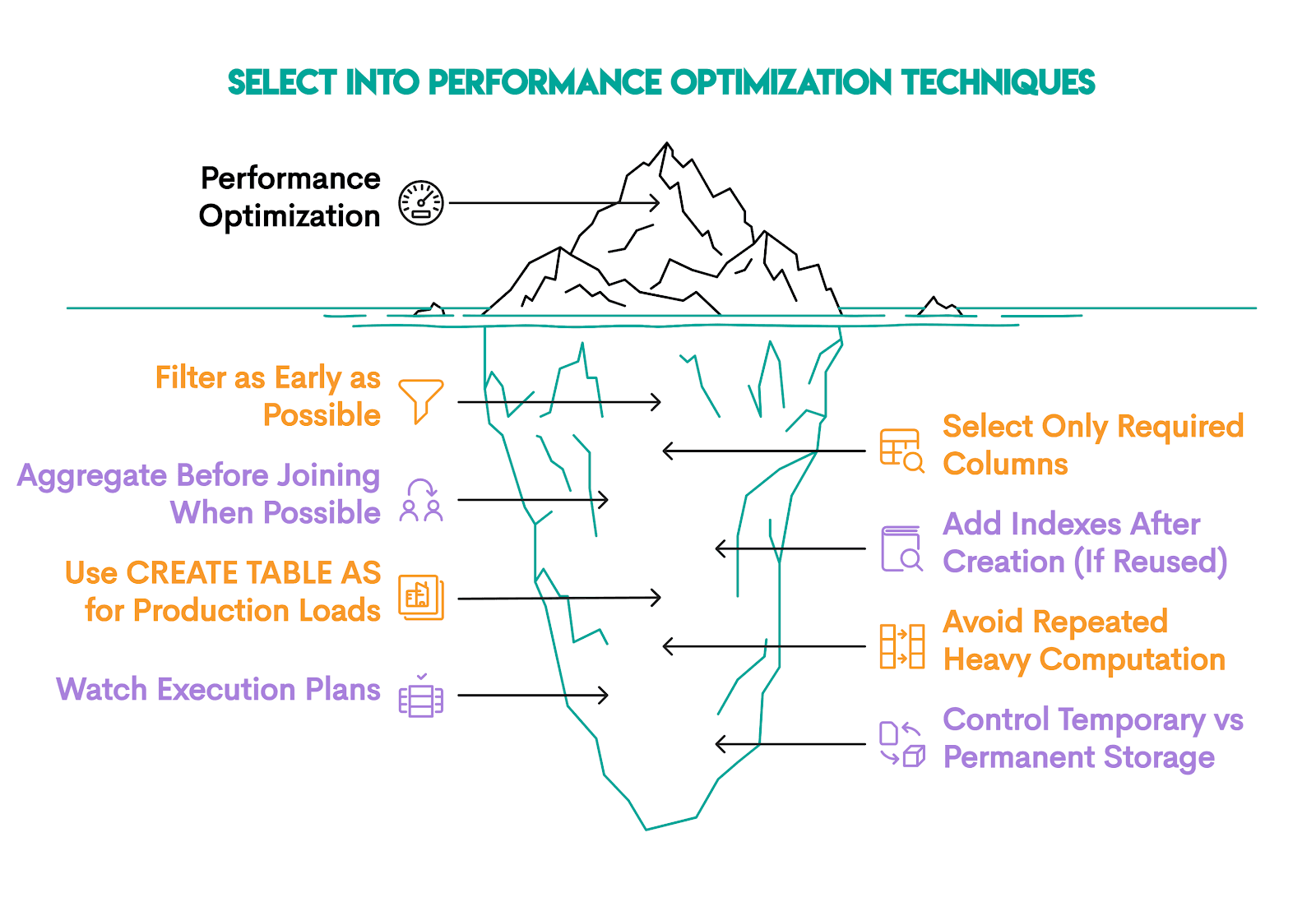
1. Filter as Early as Possible
We already mentioned this, so you know that the fewer rows, the less work the database must do:
- more disk writes
- more memory usage
- slower aggregation
- slower downstream joins
Filter data whenever possible in SELECT before INTO. It will improve:
- I/O
- sorting speed
- hash aggregation cost
2. Select Only Required Columns
Each extra column increases:
- row size
- disk write volume
- memory consumption during sorting
3. Aggregate Before Joining When Possible
If you join a detailed table before aggregating, the row counts will explode. That, of course, causes the memory usage to increase and hash joins become heavier.
To avoid that, aggregate the detail table first, then join the smaller summarized result.
4. Add Indexes After Creation (If Reused)
SELECT INTO creates a heap table.
If you plan to read the table repeatedly (e.g., joining on id, filtering by date, filtering by department, etc.), add indexes. If not, don’t, because they slow down writes.
5. Use CREATE TABLE AS for Production Loads
You should choose CREATE TABLE AS SELECT (CTAS) over SELECT INTO for production systems.
Here are the reasons:
- clearer intent
- more flexible table options
- less ambiguity than
SELECT INTO, as it can mean both table creation and variable assignment (if you’re using PostgreSQL)
6. Avoid Repeated Heavy Computation
If a transformation is expensive and reused, then SELECT INTO helps, as it materializes data once, which you can then query many times.
Even though materialization is powerful, it’s not free. So, if logic is used once, use CTEs to avoid unnecessary disk writes.
7. Watch Execution Plans
Execution plans reveal hidden inefficiencies, so inspect them.
In PostgreSQL, you can do it like this.
EXPLAIN ANALYZE
SELECT …
When analyzing execution plans, look for:
- sequential scans on large tables
- hash joins consuming high memory
- unexpected nested loops
8. Control Temporary vs Permanent Storage
If the table is short-lived, use TEMP (session-only) or UNLOGGED (faster writes, less durability) tables.
Temporary tables reduce WAL logging overhead, significantly speeding up staging for large loads.
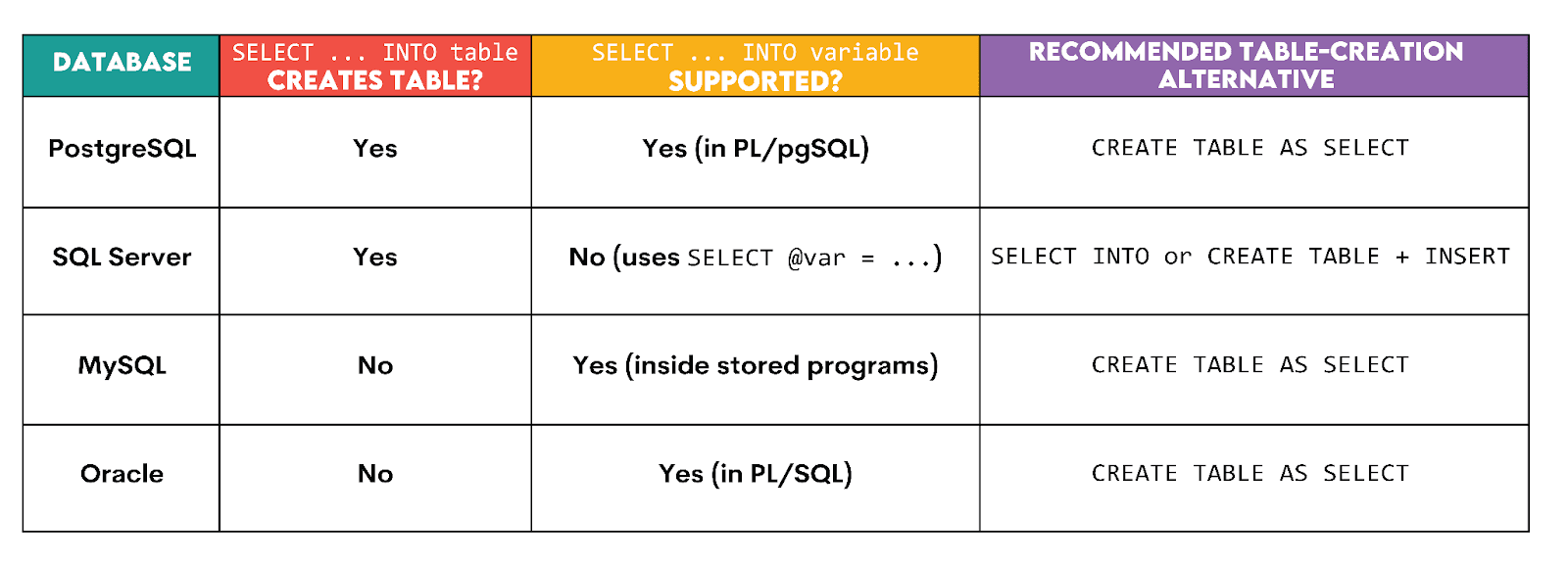
SQL Dialect Comparison Table
SELECT INTO doesn’t behave the same across SQL databases, as we already touched upon.
In some dialects, it creates tables. In others, it assigns variables. In others, it doesn’t exist at all (for table creation).
Here’s an overview.
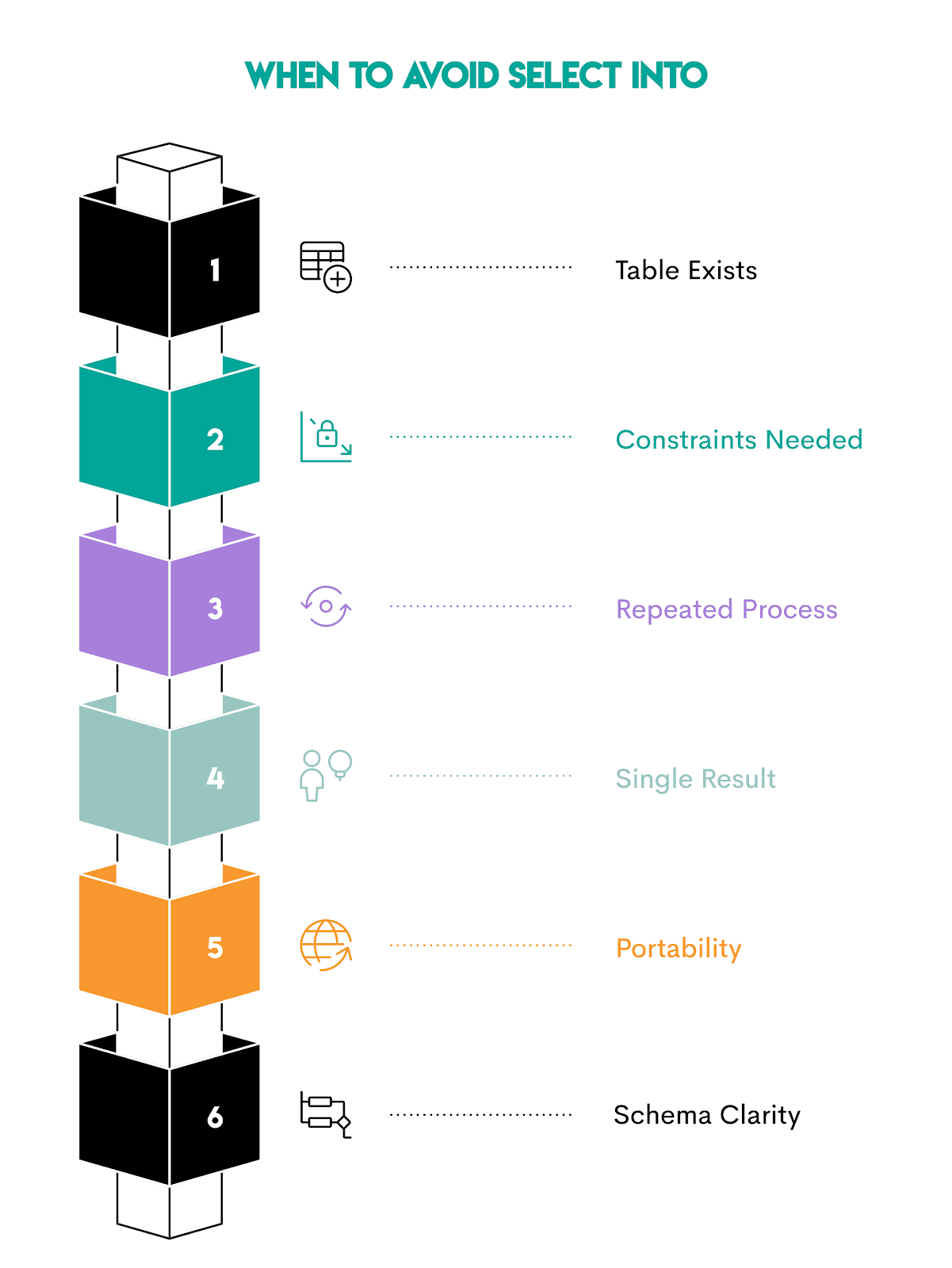
When NOT to Use SELECT INTO
When talking about common mistakes and optimization techniques, we also indirectly talked about when not to use SELECT INTO.
Here are all those situations in one place.
1. When the Table Already Exists
You already know that SELECT INTO creates a new table; it can’t insert into an existing table.
If the table structure already exists – such as in production pipelines – use INSERT INTO … SELECT.
2. When You Need Constraints Immediately
If your workflow depends on strict constraints (e.g., primary and foreign keys, check constraints, and indexes), you should define the table first. Typically, this means employing CREATE TABLE, then INSERT INTO … SELECT.
3. When the Process Runs Repeatedly
SELECT INTO is best suited for one-off staging.
For recurring workflows, use a stable table and load data into it.
4. When You Only Need the Result Once
SELECT INTO adds disk writes and cleanup work. Avoid that by using CTEs or subqueries if you need the result only once.
5. When Portability Across Databases Matters
We’ve already mentioned several times that different databases could interpret SELECT INTO differently. That reduces its portability across databases.
If your query must run across multiple databases, CREATE TABLE AS SELECT is a safer alternative. It is more widely supported and less ambiguous.
6. When Schema Clarity Is Important
Frequent SELECT INTO usage can leave behind many temporary tables. Over time, it could become difficult to know which tables are current, which are safe to drop, or which ones feed production dashboards.
Conclusion
SELECT INTO is an immensely useful tool for staging and making your data analysis easier and error-free. The syntax is straightforward, too.
However, you have to be very intentional about when you use it. With all the info from this article, you’ll know when to use it and how, and how to avoid the common mistakes.
You’ve also learned about alternatives, such as INSERT INTO SELECT and CTEs, that are preferable in certain situations.
Frequently Asked Questions
1. Is SQL SELECT INTO faster than INSERT INTO SELECT?
Often yes, but not always.
It can be faster because it creates the table and loads the data in a single operation, without checking indexes or constraints.
However, the difference is typically very small. Don’t base the decision of which one to use on the speed, but on workflow design.
SELECT INTO→ quick staging or exploratory analysisINSERT INTO … SELECT→ repeatable production pipelines
2. Does SELECT INTO copy indexes?
No. You must create them manually after the table is created, along with:
- primary keys
- foreign keys
- constraints
- triggers
SELECT INTO only copies:
- column names
- inferred data types
- query results
3. Does MySQL support SELECT INTO?
Yes, but not for table creation.
In MySQL, SELECT INTO is used to assign query results to variables inside stored programs.
If you want to create a table from a query, you should use CREATE TABLE … AS SELECT.
4. How do I use INTO with temporary tables?
You can create them directly in PostgreSQL by adding the TEMP prefix before the table name.
5. Is SELECT INTO safe in production?
It’s generally avoided in production pipelines because:
- it doesn’t enforce schema constraints
- it recreates tables each run
- it can cause dependency problems if downstream systems expect stable tables
Instead, CREATE TABLE + INSERT INTO … SELECT or CREATE TABLE AS SELECT are preferred.
SELECT INTO is generally safe for:
- temporary staging
- ad-hoc analysis
- experimental workflows
Share