INTERSECT vs UNION in SQL for Reasoning About Overlapping Data

Categories:
 Written by:
Sara Nobrega
INTERSECT vs UNION in SQL: choose the wrong set operator, and the query returns a plausible but incorrect result, with no error and no warning to tell you so.
SQL set operators look deceptively simple. UNION vs UNION ALL is one of them. UNION merges two result sets. INTERSECT in SQL returns what's shared between them. UNION ALL stacks everything without removing duplicates. EXCEPT returns rows in the first set that don't appear in the second.
The problem is that each operator encodes a specific logical relationship between two sets of rows. Choose the wrong one, and the query runs, returns rows, and looks correct. There's no error message. The analyst gets a number, the number is plausible, and the mistake stays hidden until someone checks the data another way.
The seven questions below come from real interviews at Meta, Google, Apple, Amazon, and Credit Acceptance. Each one maps to a specific place where the operator choice matters and where the wrong choice produces a wrong but silent result.
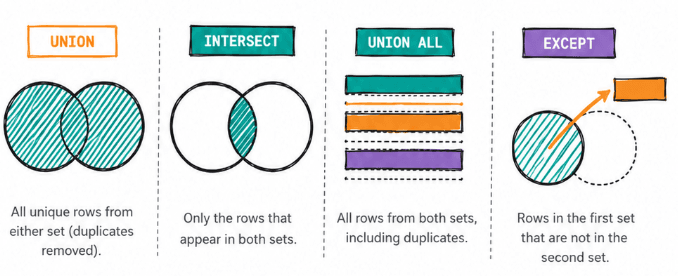
INTERSECT vs UNION in SQL: The Core Difference
UNION combines two result sets and removes duplicates. The output is every row that appeared in either set, once.
INTERSECT compares two result sets and returns only the rows that appear in both. Every column must match exactly.
-- UNION: rows from A, plus rows from B, deduped
SELECT user_id FROM table_a
UNION
SELECT user_id FROM table_b;
-- INTERSECT: only rows that appear in both A and B
SELECT user_id FROM table_a
INTERSECT
SELECT user_id FROM table_b;
The selection logic differs on one axis: UNION asks "what is in A or B?" and INTERSECT asks "what is in A and B?" Both require the same number of columns with compatible types. Both deduplicate the result.
UNION ALL is UNION without the deduplication step. EXCEPT is the set difference: rows in A that don't appear in B.
The right operator depends entirely on the business question, not the table structure.
The Business Question Should Choose the Operator
Mobile & Web Users
Last Updated: February 2023
Count the number of unique users per day who logged in from either a mobile device or web. Output the date and the corresponding number of users.
Mobile and Web Users
Data View
mobile_logs holds one row per user per login date from a mobile device. web_logs holds the same structure for web logins. A user who logged in from both devices on the same date appears in both tables.
Grain (what one output row means): one date, with the count of unique users who logged in from any device on that date.
What Candidates Get Wrong Here
The question asks "how many users logged in from either mobile or web." UNION is correct: it merges both tables and deduplicates on (user_id, log_date), so a user who logged in from both devices on the same day counts once.
The mistake happens when the question changes slightly. "Count users who logged in from both mobile and web on the same date" requires INTERSECT on the same two tables. Same data, different operator, different meaning. On small datasets where most users appear in both tables, UNION produces a number close to INTERSECT, close enough to look right.
One subtlety: the official solution uses COUNT(DISTINCT user_id) after UNION. That DISTINCT is redundant. UNION already deduplicates on all projected columns. Swapping to UNION ALL with COUNT(DISTINCT user_id) makes the deduplication intent explicit in the aggregation rather than the set operation.
Solution
1) Combine both log tables and remove duplicates
We UNION the two projections. Projecting only user_id and log_date means that users who appear in both tables on the same date collapse into a single row.
SELECT user_id, log_date FROM mobile_logs
UNION
SELECT user_id, log_date FROM web_logs
2) Count unique users per date (final solution)
Output
What if the question were: "Count users who logged in from both mobile and web on the same date?"
That's a different business question, and it requires INTERSECT instead of UNION.
WITH both_devices AS (
    SELECT user_id, log_date FROM mobile_logs
    INTERSECT
    SELECT user_id, log_date FROM web_logs
)
SELECT log_date,
       COUNT(DISTINCT user_id) AS n_users
FROM both_devices
GROUP BY log_date;
Output
The UNION output includes every user who logged in from at least one device on a given date. The INTERSECT output includes only users who logged in from both. Same tables, same columns, different operators, and the counts will differ wherever some users use only one device.
Where Combined Results Get Mistaken for Shared Results
Submission Types
Last Updated: January 2021
Write a query that returns the user ID of all users that have created at least one ‘Refinance’ submission and at least one ‘InSchool’ submission.
Submission Types
Data View
loans holds one row per loan application, with the loan type in type. A user who submitted both a Refinance and an InSchool application appears in the table twice, once per submission.
Grain (what one output row means): one user_id who has at least one Refinance submission and at least one InSchool submission.
How This Shows Up in Interviews
The question asks for users who did both things. A UNION returns users who did either, which is a superset. The output looks reasonable, it's a list of user IDs, and on data where most users appear in both categories, the numbers are similar.
Interviewers at companies like Credit Acceptance use this question to check whether candidates read "both" as a UNION or as an INTERSECT. A correct answer names the operator and explains what it does: "We INTERSECT the two sets because we want only users who appear in both."
A follow-up we've seen: "What changes if a user has 3 Refinance submissions and 1 InSchool submission?" The answer: nothing. INTERSECT deduplicates, so the user appears once regardless of how many submissions they have per type.
Solution
1) Return users who appear in both sets (final solution)
Output
Why Overlap Queries Often Return Less Than Expected
Common Interests Amongst Users
Count the subpopulations across datasets. Assume that a subpopulation is a group of users sharing a common interest (ex: Basketball, Food). Output the percentage of overlapping interests for two posters along with those poster's IDs. Calculate the percentage from the number of poster's interests. The poster column in the dataset refers to the user that posted the comment.
Common Interests Amongst Users
Data View
facebook_posts holds one row per post, with the poster's ID in poster and the post keywords stored as a bracket-delimited list in post_keywords. A user with 3 posts has 3 rows, each with a different keyword set.
Grain (what one output row means): one pair of posters, with the percentage of their interests that overlap, calculated against the first poster's total interest count.
Why INTERSECT Doesn't Give the Full Answer
Overlap percentage requires a count of shared elements and a count of total elements per user. INTERSECT gives existence: it tells you which interests appear in both sets, but it doesn't carry the denominator needed to compute a fraction.
A query that applies INTERSECT to the raw post tables returns shared keywords with no way to divide by each user's total distinct interests. The percentage is impossible without both counts.
The correct approach: unnest the keywords first to get one row per keyword per poster, then self-join to find matches, then compute the ratio. INTERSECT is the right tool when the question is binary (did they share any interest?). When the question is a ratio, you need both the intersection size and the set size.
Solution
1) Extract individual interests per poster
We strip the brackets and split the comma-delimited string into individual keywords using unnest(string_to_array(...)).
SELECT poster,
       unnest(string_to_array(BTRIM(post_keywords, '[]'), ',')) AS interests
FROM facebook_posts
ORDER BY 1, 2;
2) Compute the overlap percentage for each poster pair (final solution)
Output
| poster1 | poster2 | overlap |
|---|---|---|
| 2 | 1 | 0.6 |
| 1 | 2 | 0.6 |
Set Operators vs Joins: Choosing the Right Tool
Common Friends Script
Last Updated: January 2024
You are analyzing a social network dataset at Google. Your task is to find mutual friends between two users, Karl and Hans. There is only one user named Karl and one named Hans in the dataset.
The output should contain 'user_id' and 'user_name' columns.
Common Friends Script
Data View
users holds one row per user with their ID and name. friends holds one row per directed friendship: user_id is the source, friend_id is the target.
Grain (what one output row means): one user who is a mutual friend of both Karl and Hans, with their user_id and user_name.
When to Use INTERSECT vs a JOIN
INTERSECT handles the membership question: which friend_id values appear in Karl's friend list and also in Hans's friend list. That's a pure set operation.
A JOIN handles enrichment: once we have the mutual friend IDs, we need the corresponding user_name from the users table. That's a relational operation.
The right combination is INTERSECT to find the overlap, then JOIN to fetch attributes. Using only JOIN to express the intersection means writing an INNER JOIN with a WHERE clause that enforces the mutual-friend condition, plus a DISTINCT to undo the row multiplication. The INTERSECT version is shorter and maps directly to what the question is asking.
The boundary between the two tools: use INTERSECT when you're asking an existence question across two sets, and JOIN when you need to combine columns from related rows.
Solution
1) Find friend IDs that appear in both friend lists
We query Karl's friends and Hans's friends separately, then INTERSECT to find the shared ones.
SELECT friend_id
FROM friends
WHERE user_id IN (SELECT user_id FROM users WHERE user_name = 'Karl')
INTERSECT
SELECT friend_id
FROM friends
WHERE user_id IN (SELECT user_id FROM users WHERE user_name = 'Hans')
2) Join the result to users to retrieve names (final solution)
Output
Duplicate Rows and Why They Change Interpretation
Most Active Users On Messenger
Last Updated: November 2020
Meta/Facebook Messenger stores the number of messages between users in a table named 'fb_messages'. In this table 'user1' is the sender, 'user2' is the receiver, and 'msg_count' is the number of messages exchanged between them. Find the top 10 most active users on Meta/Facebook Messenger by counting their total number of messages sent and received. Your solution should output usernames and the count of the total messages they sent or received
Most Active Users on Messenger
Data View
fb_messages holds one row per conversation, with the sender in user1, the receiver in user2, and the message count in msg_count. A user appears in user1 for conversations they started and in user2 for conversations they received.
Grain (what one output row means): one username, with their total message count across all conversations as sender and receiver, for the top 10 most active users.
The UNION vs UNION ALL Mistake
Counting total messages requires each conversation's msg_count to count once for the sender and once for the receiver. UNION ALL gives that: it stacks all rows without removing any.
Using UNION breaks the count. UNION deduplicates on the full row, comparing (username, msg_count). Two conversations where a user appears with the same msg_count collapse to one row. A user who sent a 5-message conversation and received a different 5-message conversation contributes 5 to the total, not 10. The query runs without errors and produces a plausible leaderboard.
We've seen this mistake at ML engineer and data analyst interviews at Meta. The interviewer's follow-up is predictable: "What changes if we swap UNION ALL for UNION?" The precise answer: users with repeated msg_count values across conversations get undercounted, silently. The leaderboard changes but gives no indication that it's wrong.
Solution
1) Stack both sides of each conversation so each user appears once per conversation
UNION ALL preserves all rows. Each conversation contributes 2 rows: one for the sender, one for the receiver.
SELECT user1 AS username, msg_count FROM fb_messages
UNION ALL
SELECT user2 AS username, msg_count FROM fb_messages
2) Sum message counts per user, rank, and return the top 10 (final solution)
Output
Designing Reliable Overlap Analysis in SQL
Customers Without Orders
Last Updated: April 2019
Find customers who have never made an order. Output the first name of the customer.
Customers Without Orders
Data View
customers holds one row per customer with name and contact details. orders holds one row per order with a cust_id foreign key. A customer with no orders has no rows in orders.
Grain (what one output row means): one first_name for each customer who has placed no orders.
Four Ways to Express Set Difference, One Trap
There are 4 ways to answer "what's in A but not in B" in SQL:
- NOT IN (subquery): the platform solution. It fails silently when any row in
orders.cust_idisNULL. WhenNOT INcompares against a set that containsNULL, it evaluates toUNKNOWNfor every row and returns zero results. Production orders tables often have nullable foreign keys from historical imports where the customer reference was lost. - NOT EXISTS (correlated subquery):
NULL-safe. The correlated subquery evaluates toFALSEwhen no match exists, regardless ofNULLsin the subquery result. - LEFT JOIN ... WHERE orders.cust_id IS NULL:
NULL-safe, but ifcustomers.idis non-unique, the join multiplies rows and the result includes duplicate names. - EXCEPT: the clearest expression.
SELECT id FROM customers EXCEPT SELECT cust_id FROM ordersreturns customer IDs with no orders. A back-join tocustomersgives names.EXCEPTdeduplicates by definition and handlesNULLscorrectly.
The practical recommendation: use NOT EXISTS or EXCEPT in production. Save NOT IN for clean, guaranteed-non-NULL data.
Solution
1) Get customer IDs with no orders using EXCEPT
SELECT id FROM customers
EXCEPT
SELECT cust_id FROM orders2) Back-join to customers to retrieve names (final solution)
Output
| first_name |
|---|
| John |
| Emma |
| Liam |
| Jack |
| Mona |
| Lili |
| Justin |
| Frank |
Grain, Projection, and Why Row Shape Matters
Find the list of intersections between both word lists
Find the list of intersections between both word lists.
Find the List of Intersections Between Both Word Lists
Data View
google_word_lists holds one row per word-list pair, with words1 and words2 stored as comma-delimited strings. A typical row looks like ant,bat,cat,dog in words1 and bat,cat,fox,gnu in words2.
Grain (what one output row means): one word that appears in both words1 and words2 across all rows in the table.
Why the Raw Columns Don't Match
Applying INTERSECT directly to the raw table columns fails:
-- Returns nothing useful:
SELECT words1 FROM google_word_lists
INTERSECT
SELECT words2 FROM google_word_lists;
Each row in words1 is a full string like "ant,bat,cat,dog". INTERSECT compares full rows. No string in words1 is identical to any string in words2, even if they share individual words. The result is empty, or contains rows that match only by string coincidence, with no error and no warning.
The fix: unnest the strings into individual words first, then apply INTERSECT. The operator works correctly once the grain matches what you want to compare.
This is the mechanism behind every "INTERSECT returns fewer rows than expected" problem. The operator runs correctly on the data it receives. The data just doesn't have the shape the question requires.
Solution
1) Expand each word list into individual rows
unnest(string_to_array(...)) converts each comma-delimited string into one row per word.
SELECT unnest(string_to_array(words1, ',')) AS word
FROM google_word_lists;
2) Find words that appear in both lists (final solution)
Output
| word |
|---|
| sun |
| flower |
| nature |
| photo |
Chaining Set Operators Without Logical Errors
Set operators can be chained. PostgreSQL evaluates them left to right with equal precedence unless you use parentheses. That default evaluation order often produces unexpected results.
-- Evaluated left to right:
SELECT user_id FROM table_a
UNION
SELECT user_id FROM table_b
INTERSECT
SELECT user_id FROM table_c;
-- What PostgreSQL actually runs:
(SELECT user_id FROM table_a
 UNION
 SELECT user_id FROM table_b)
INTERSECT
SELECT user_id FROM table_c;
If the intent is to first intersect B and C, then union the result with A, the query without parentheses gives the wrong answer. The output is still a valid list of user IDs, so nothing signals the error.
Use parentheses whenever you chain more than one set operator. Write the grouping explicitly.
SELECT user_id FROM table_a
UNION
(
    SELECT user_id FROM table_b
    INTERSECT
    SELECT user_id FROM table_c
);
A second issue with chaining: the column list must match across all branches. If any branch projects a column, the others don't, the query fails. The column names in the output come from the first SELECT. When the branches are inconsistent in meaning but consistent in type, the query runs with wrong semantics and no warning.
A Simple Framework for Choosing UNION, UNION ALL, or INTERSECT
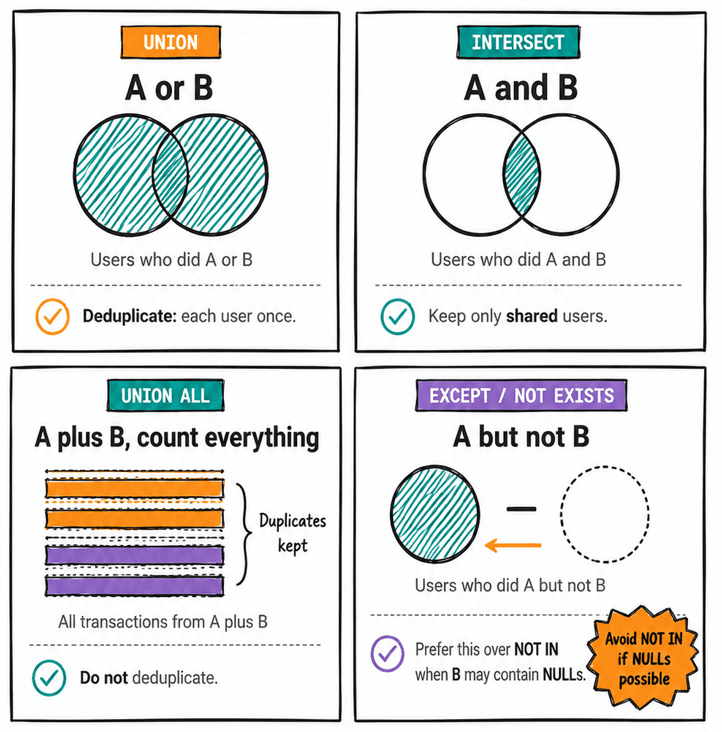
The question to ask is: what logical relationship does the business question describe?
"Users who did A or B (at any point)" → UNION. Deduplication is correct because we want each user once.
"Users who did A and B" → INTERSECT. Deduplication is correct because we want only users who qualify on both sides.
"All transactions from A plus all transactions from B, including duplicates" → UNION ALL. Deduplication is wrong because we want each transaction to count.
"Users who did A but not B" → EXCEPT or NOT EXISTS. Avoid NOT IN if the B-side may have NULLs.
A second check: does the operator run at the right grain? INTERSECT compares full rows. If the projected columns include values that can never match across the two sets (different years, different statuses, timestamps), the result is empty. Aggregate first, project down to the columns that define the overlap, then apply the operator.
Practical SQL Examples
The 7 questions above cover the most common patterns. Here is a quick reference for each case.
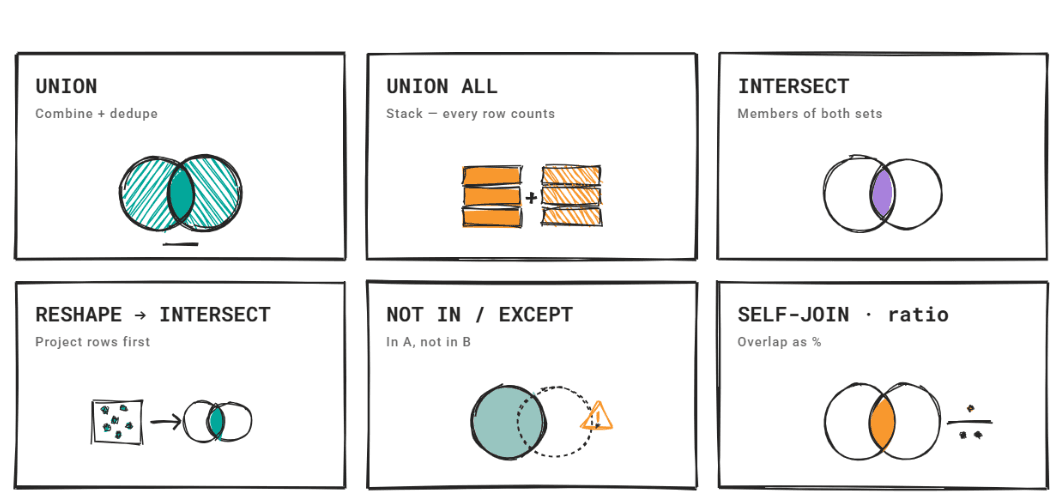
UNION for combining sources with deduplication (Q10561): Two device logs, one user count per day. Project to (user_id, date) before the union so cross-device duplicates collapse correctly.
UNION ALL for stacking facts that all count (Q10295): Each message row contributes once as sender and once as receiver. Deduplication would drop rows and produce wrong totals.
INTERSECT for membership in multiple sets (Q2002, Q10365): "Users who did both X and Y" maps directly to INTERSECT. The operator deduplicates, so a user with 5 qualifying submissions still appears once.
Reshaping data before INTERSECT (Q9816): When the data isn't in individual-row form, unnest or flatten it first. INTERSECT works on what it receives; if the row shape is wrong, the result is empty with no warning.
NOT IN for set difference (Q9896): Works on clean data. Fails silently when the subquery contains NULLs. Use NOT EXISTS or EXCEPT in production.
Self-join for overlap metrics (Q9776): When overlap is a percentage rather than a binary filter, INTERSECT isn't enough. A self-join gives both the count of shared elements and the total per user, which are both needed for the ratio.
Summary
UNION, UNION ALL, INTERSECT, and EXCEPT each encode a specific logical relationship. Choosing the wrong operator produces results that are formatted correctly and look plausible. The error shows up later, if at all.
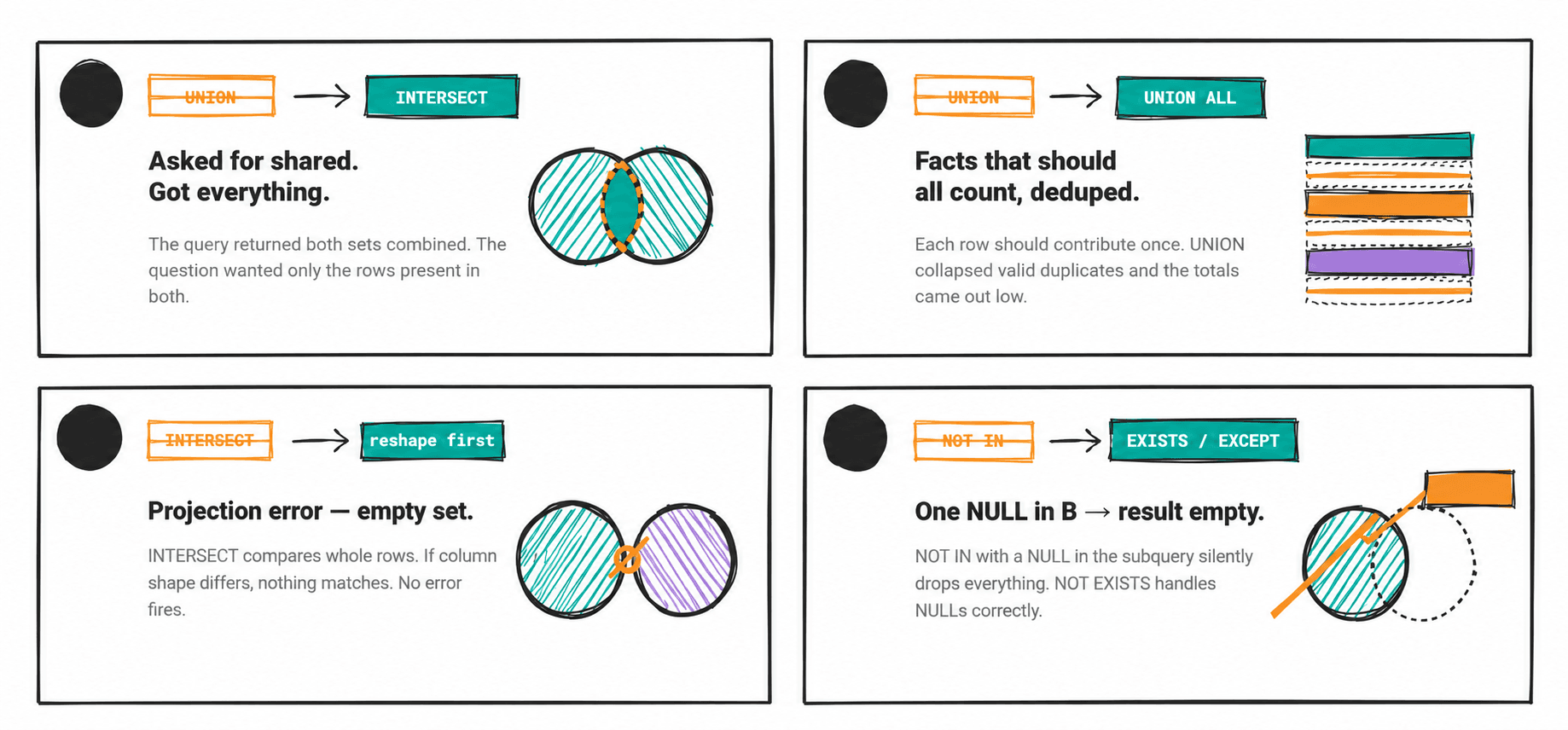
The 4 places where operator choice fails silently:
UNIONwhen the question asks for shared results (should beINTERSECT)UNIONwhen facts that should all count get deduplicated (should beUNION ALL)INTERSECTon data where rows can never match across sets because of projection errorsNOT INwhen the subquery containsNULLs.
Knowing these 4 failure modes is what lets a data scientist answer "what could break this query?" with a specific, correct answer.
FAQs
What is the difference between INTERSECT and UNION in SQL?
UNION returns all rows from both queries combined, with duplicates removed. INTERSECT returns only rows that appear in both queries. UNION answers "A or B." INTERSECT answers "A and B."
Does UNION remove duplicates?
Yes. UNION deduplicates the combined result set by comparing full rows. Use UNION ALL to keep all rows, including duplicates.
What is the difference between UNION and UNION ALL?
UNION removes duplicate rows from the result. UNION ALL keeps all rows, including exact duplicates. UNION ALL is faster because it skips the deduplication sort step. Use UNION ALL when you need all rows to count, for example, when summing values from two tables where the same row could appear in both.
Is INTERSECT the same as INNER JOIN?
No. INTERSECT compares full rows across two result sets and returns the matching rows. INNER JOIN combines rows from two tables based on a join condition and can produce new rows with columns from both tables. INTERSECT deduplicates; INNER JOIN does not. For existence queries, "find users who appear in both sets", INTERSECT is typically simpler. For enrichment, use JOIN.
When should I use INTERSECT instead of JOIN?
Use INTERSECT when the question is about set membership: which rows appear in both result sets. Use JOIN when you need to combine columns from two tables, enrich a result, or count matches. When you need both, find the overlap and attach attributes; use INTERSECT to find the IDs, then JOIN to fetch the attributes.
Why is my INTERSECT returning fewer rows than expected?
The most common cause: the data isn't at the right grain. INTERSECT compares complete rows. If any column in the projection differs between the two sets (a year, a status, a timestamp), those rows won't match. Aggregate or project down to only the columns that define the overlap before applying INTERSECT.
Do UNION and INTERSECT require the same number of columns?
Yes. Both operators require the same number of columns in each SELECT statement, with compatible data types in corresponding positions. The column names in the output come from the first SELECT.
Does SQL compare full rows or just keys in INTERSECT?
Full rows. INTERSECT compares every column in the projection. If you project only user_id, it compares only user_id. If you project (user_id, order_date), it compares both columns. Projecting too many columns, especially columns that will never match across sets, causes empty results with no error.
Share