Data Type Conversion in SQL: A Closer Look at CAST Function

Categories:
 Written by:
Tihomir Babic
Master data type conversion: why do it, how to do it, and how not to do it. The article covers all that with some real-world examples from the platform.
Certain SQL concepts are deceptively simple. Data type conversion is one of those.
Most people go through this naive phase. “You simply use CAST() and convert from one data type to another.” If it were that simple, I wouldn’t be writing this article. If it were that simple, you wouldn’t fail a job interview, unaware of all the pitfalls data conversion hides.
Understanding SQL data type conversion goes beyond knowing the CAST() syntax. In this guide, you’ll learn how to avoid common mistakes, JOIN failures, performance impacts, handle NULLs, and what safe conversion patterns across major databases are.
What Is Data Type Conversion in SQL?
In SQL, or to be precise, in relational databases, every column is assigned a data type. For example: numeric (INT, DECIMAL, FLOAT) or textual (VARCHAR, TEXT, CHAR), or date-time (DATE, TIMESTAMP).
Data type conversion – or casting – is the process of changing a column's data type from one to another.
The question now is, why do we even need to convert data types in SQL? Here’s a detailed look at those scenarios.
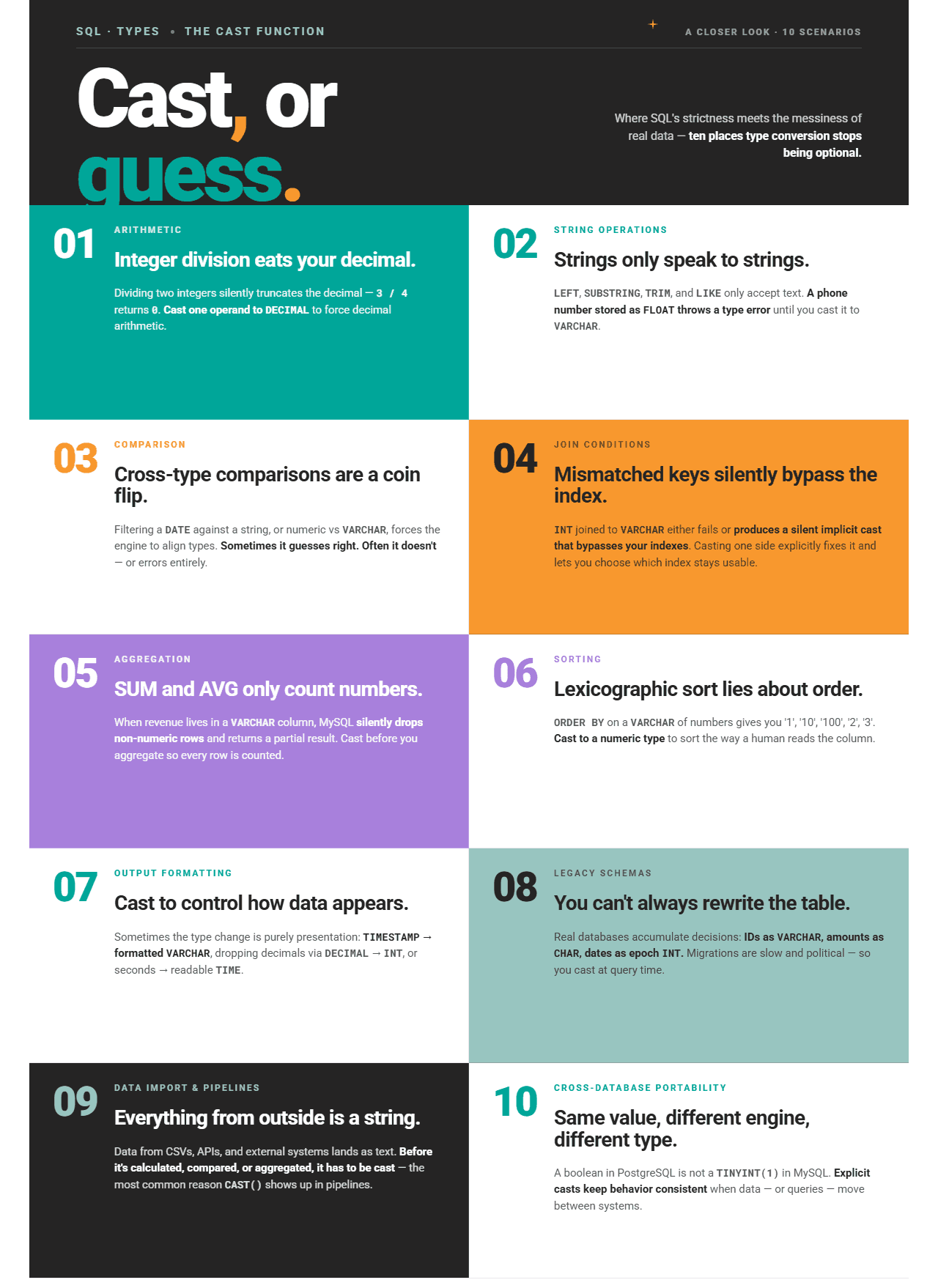
Explicit vs Implicit Casting
I’ve mentioned explicit casting in the infographic, so let me explain what it is.
Explicit casting is the one you do deliberately by using functions like CAST(), CONVERT(), or TRY_CAST(). You fully control what data type is produced.
On the other hand, implicit casting is when the database automatically converts a value without any explicit instructions from you. This happens silently during comparisons, joins, or arithmetic when two sides of an expression have mismatched types.
The implicit conversion rules can vary across different database engines.
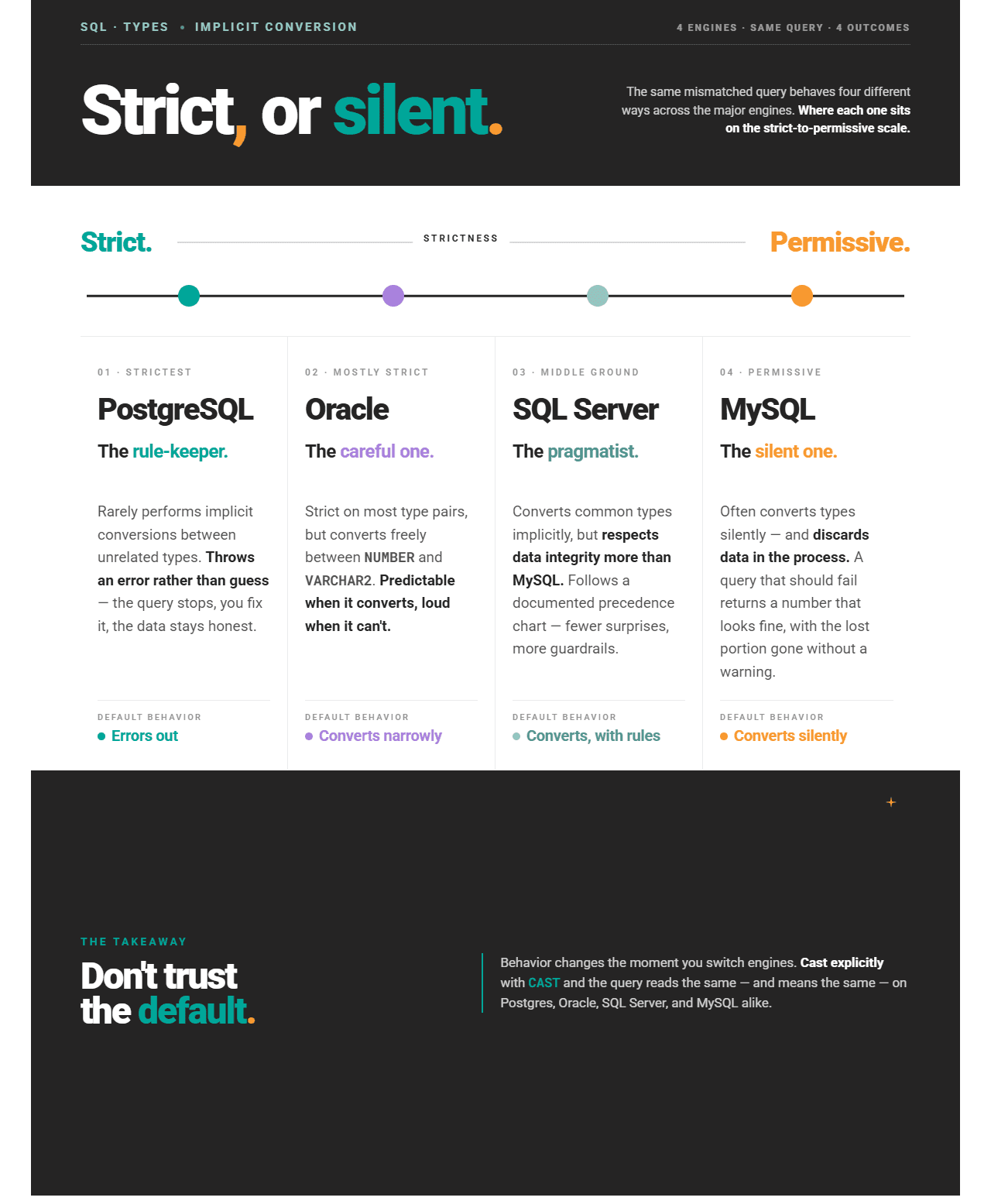
Why Implicit Casting Changes Query Results
Implicit casting changes query results because there’s a data type conflict, and the database must resolve it.
When two sides of a comparison, join condition, or arithmetic expression have different types, the database engine picks one type to convert toward, following its own internal conversion rules.
This makes the problem twofold.
- The conversion direction determines the result: For example, comparing the integer
100to the integer'100abc'could go two ways. One is to convert the integer to a string and compare textually. Another is to convert the string to an integer and compare numerically. Neither is wrong, but different databases can have different approaches. - Type coercion can destroy information: If a non-numeric string like
'N/A'is implicitly cast to a number, it becomes0. Another example: a decimal cast to an integer drops the fractional part. In both cases, the query doesn’t fail, but still returns incorrect data.
The safest approach: Don’t rely on implicit conversion when you care about the exact result. Cast explicitly.
CAST() Function and Its Syntax
CAST() is a standard SQL function for explicit data type conversion supported by all database engines. That’s the main reason why I advise using this function as a default when casting explicitly.
Here’s the syntax.
CAST(<expression> AS data_type);<expression>– the value or column to be converteddata_type– the target data type you want to convert to
The syntax is simple, so there’s really nowhere deeper to go in that sense. However, there are many pitfalls caused by the data type mismatch.
Let’s have a look at them and how CAST() can help you avoid them.
Numeric vs String Comparison Pitfalls
Comparing numbers stored as strings is one of the most common data type pitfalls.
Why? String comparison is lexicographic, meaning it compares character by character from left to right.
Numeric comparison, on the other hand, evaluates the mathematical value of the number, regardless of the number of digits it contains.
Pitfall #1: Range Filters Return Wrong Rows (Or No Rows)
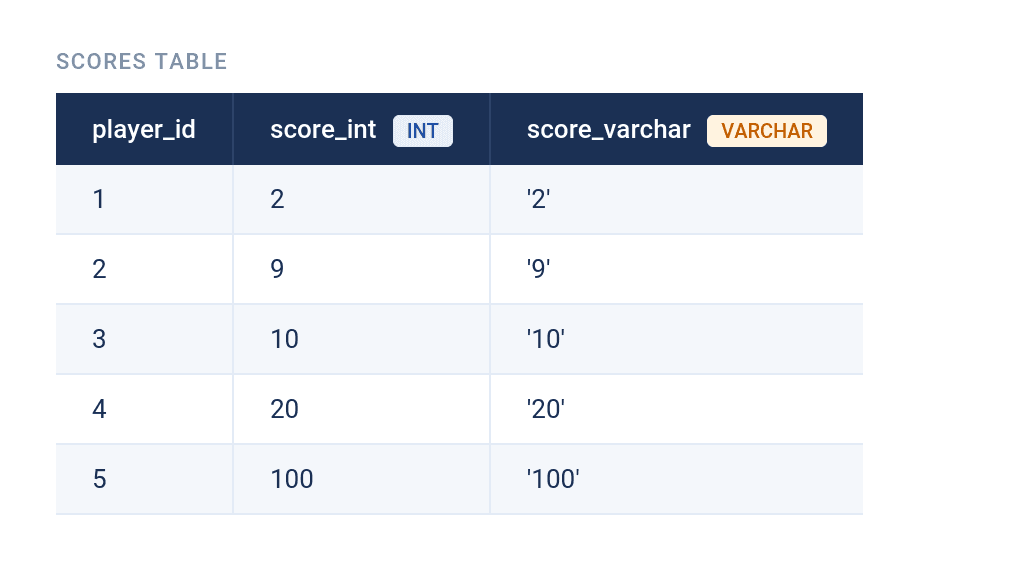
Consider this scores table. We have the same values as INT and VARCHAR.
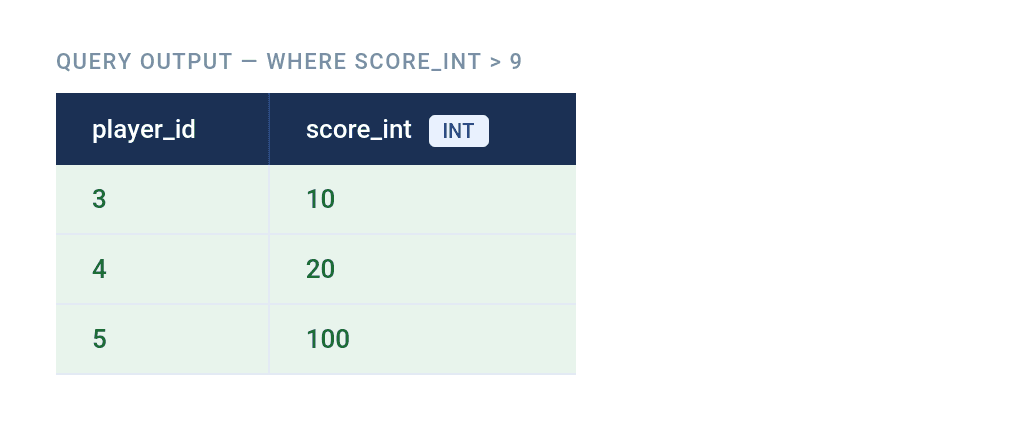
Writing this numeric comparison code…
SELECT player_id,
 score_int
FROM scores
WHERE score_int > 9;
…returns the expected result; only the players with a score above 9.
The same filtering against the VARCHAR column…
SELECT player_id,
 score_varchar
FROM scores
WHERE score_varchar > 9;
…triggers a lexicographic comparison in most databases, resulting in an empty table.

The reason is '10', '20', and '100' are all evaluated as lower than 9, because '10', '20', and '100' all start with a digit whose ASCII value is less than '9'.
The Fix
If you have a column with numeric strings and you want to compare them numerically, cast them explicitly first.
SELECT *
FROM scores
WHERE CAST(score_varchar AS INT) > 9;
Pitfall #2: Sorting Produces Lexicographic Order Instead of Numeric Order
Take this employee table.
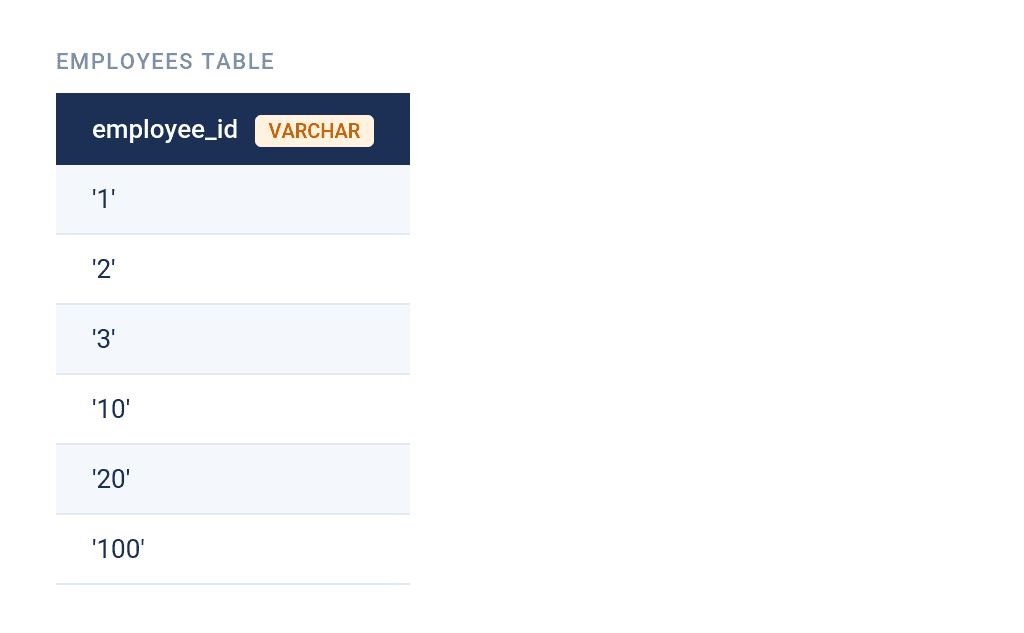
This query…
SELECT employee_id
FROM employees
ORDER BY employee_id;
…sorts the data lexicographically.
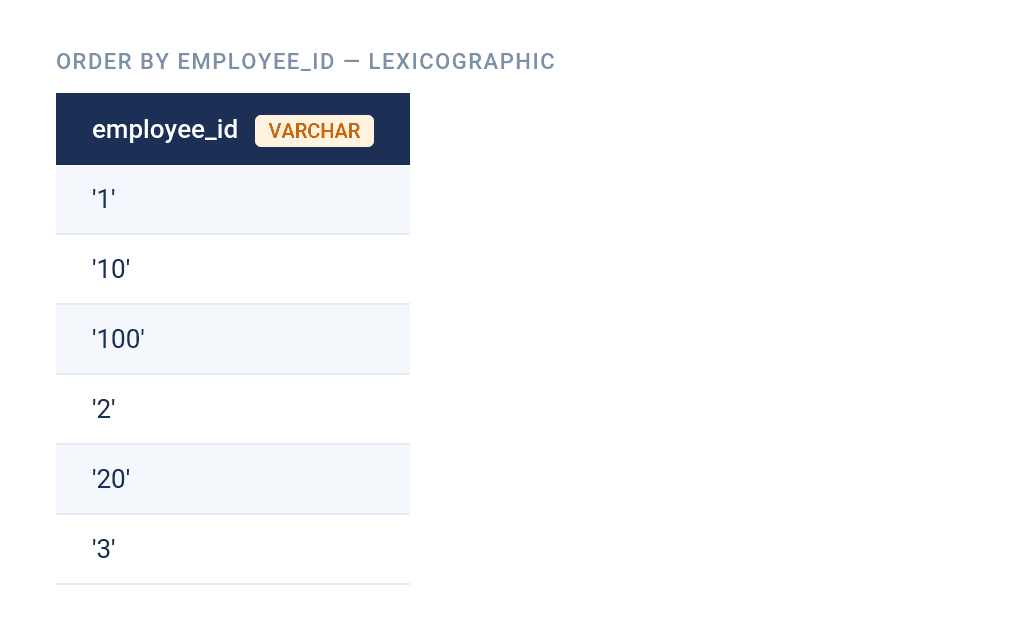
That’s because the data type is VARCHAR and '1' comes before '2' at the first character, so '10' and '100' slot in right after '1' before the engine ever reaches '2'.
The Fix
Of course, you expected the data to be sorted like this.
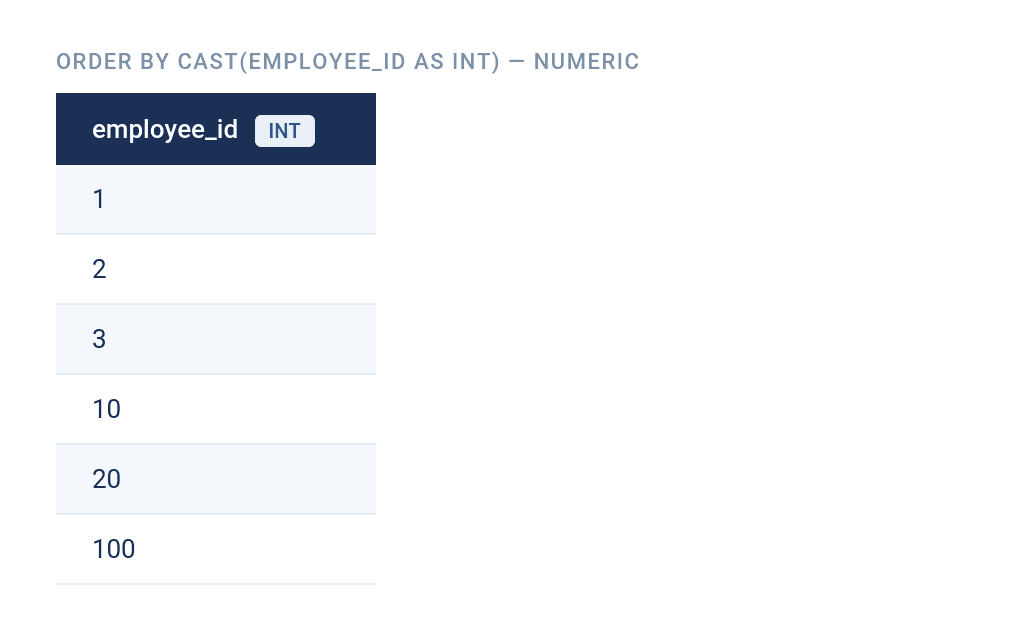
That would’ve happened if the data type were numerical, which means you have to cast the column explicitly.
SELECT employee_id
FROM employees
ORDER BY CAST(employee_id AS INT);
How Data Type Mismatches Break SQL Joins
When the joined columns have incompatible data types – say, INT and VARCHAR – JOINs will break.
Take, for example, these two tables. The first one is users.

The second one is orders.
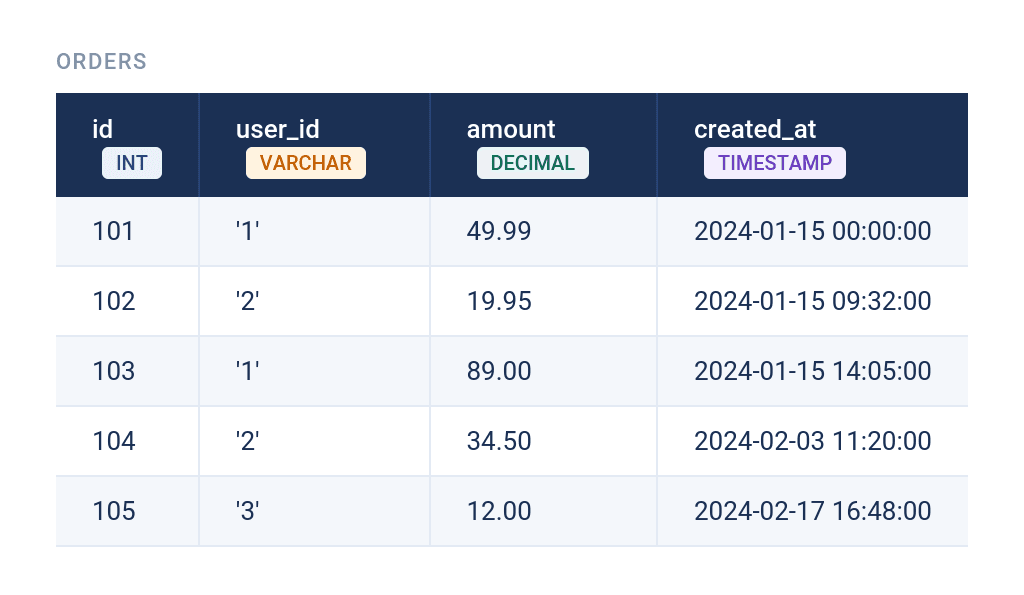
If you wanted to join these two tables, you would do it on id (from the first table) and user_id (from the second table). You can see there’s a data mismatch between those two columns.
Because of the mismatch, writing this query…
SELECT u.name,
	 o.amount
FROM users u
JOIN orders o ON u.id = o.user_id;
…will result in one of two scenarios, depending on the database engine.
First scenario, you’ll get a mismatch error (PostgreSQL), so no output at all.
The second scenario is that you get the correct output, but at the cost of performance degradation (MySQL, SQL Server, Oracle). Namely, implicitly converting VARCHAR to INT means evaluating a type cast on every row in the table, which scales linearly with table size and prevents the query optimizer from using an index on the converted column. Hence, slower query.
The Fix
For the JOIN to work, cast one of its columns.
You could cast the VARCHAR side to INT...
SELECT u.name, o.amount
FROM users u
JOIN orders o ON u.id = CAST(o.user_id AS INT);
…or the INT side to VARCHAR.
SELECT u.name, o.amount
FROM users u
JOIN orders o ON CAST(u.id AS VARCHAR) = o.user_id;
These are the options you have. As for which one is better, I’ll leave that for the How Casting Affects SQL Performance and Indexing section.
Common Date Casting Mistakes in SQL
Dates are the most error-prone type for casting in SQL. The same value can be stored as a string, a timestamp, a date-only value, or even an integer, and each database handles implicit date conversion differently.
I’ll show you several common mistakes using the same orders table as in the previous section.
Here’s an overview of how different databases handle different date formats.
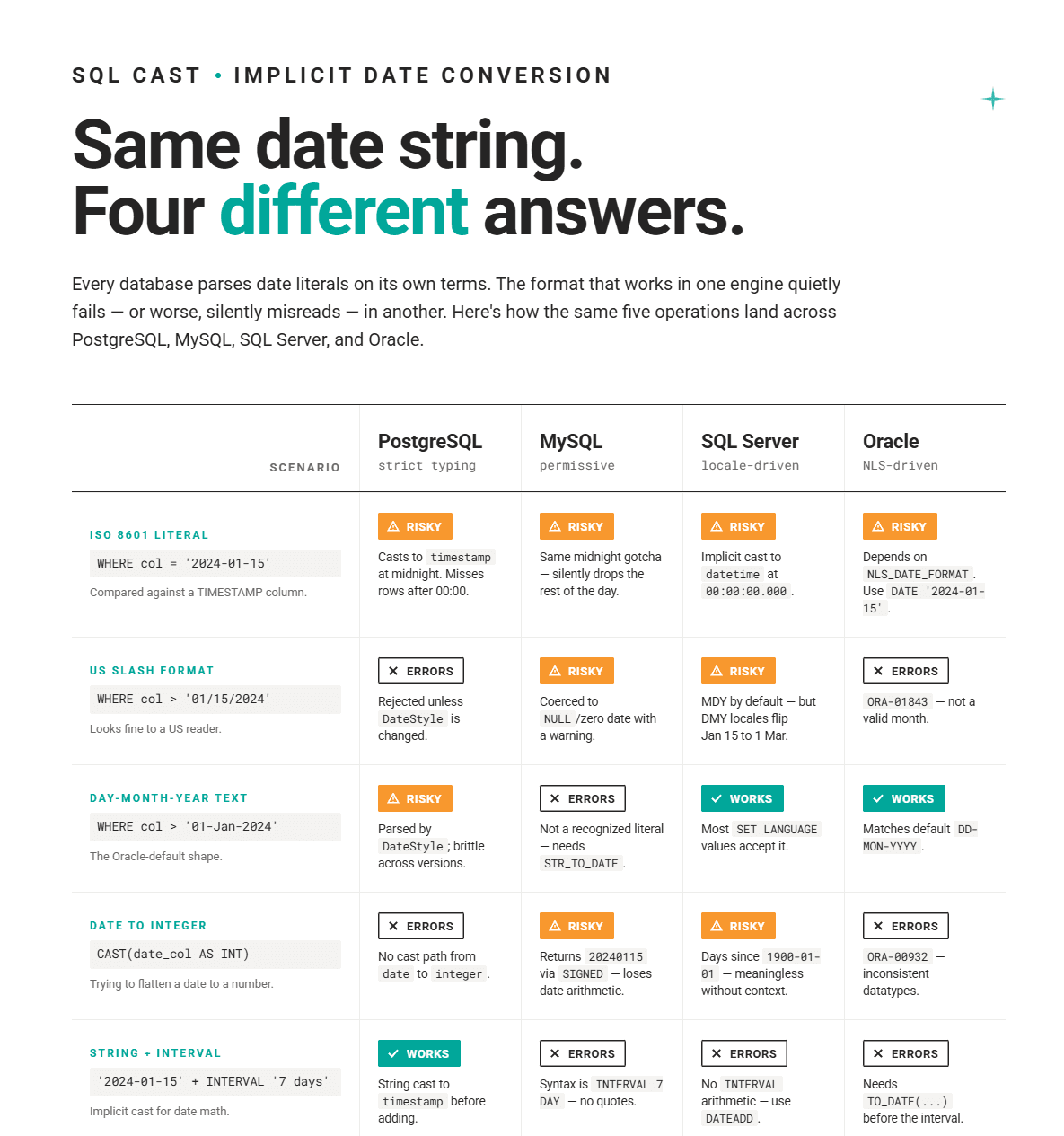
Mistake #1: Using Non-ISO Date String Formats in Comparisons
Don’t assume that the non-ISO date string format in your query will be parsed by the database correctly.
All these non-ISO formats…
SELECT *
FROM orders
WHERE created_at > '01-Jan-2024';
SELECT *
FROM orders
WHERE created_at > '01/15/2024';SELECT *
FROM orders
WHERE created_at > '15-01-2024';…are database-specific and unreliable. Not only does their handling vary by engine, but also by locale setting and version.
The Fix
The ISO 8601 format (YYYY-MM-DD) is the only date string format that all major databases parse consistently, so stick to it.
SELECT *
FROM orders
WHERE created_at > '2024-01-15';
Mistake #2: Comparing a TIMESTAMP to a Date String Literal Without Truncation
If you filter the table like this…
SELECT *
FROM orders
WHERE created_at = '2024-01-15';
…you’re comparing the date string literal in your WHERE clause to a TIMESTAMP data type in the created_at column.
And you miss all orders on 2024-01-15 after midnight. Why? Because the database implicitly casts that string literal to TIMESTAMP as 2024-01-15 00:00:00, which is exactly midnight.
Fix
There are two fixes here. You either use a date range…
SELECT *
FROM orders
WHERE created_at >= '2024-01-15' AND created_at < '2024-01-16';
…or cast the column to DATE.
SELECT *
FROM orders
WHERE CAST(created_at AS DATE) = '2024-01-15';
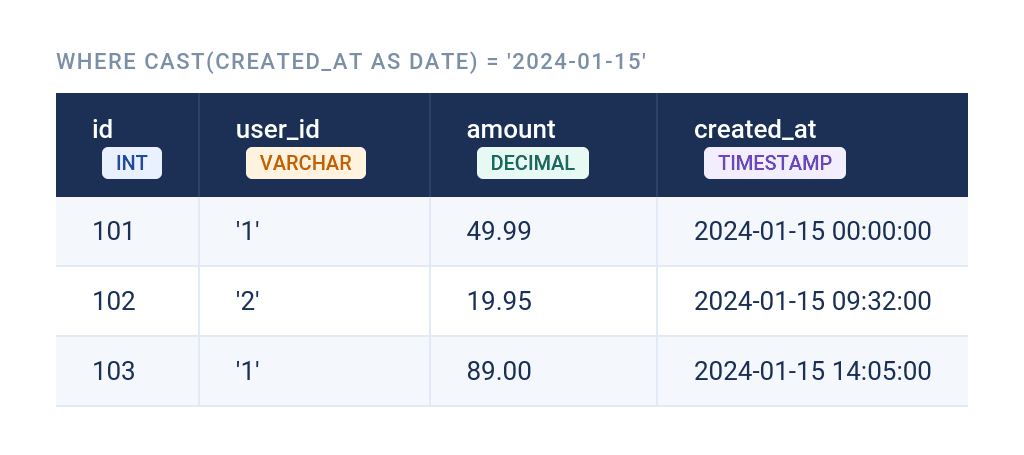
Note that the second option prevents the use of indexes. (I’ll cover this in more detail in the following section.) Either way, you get this output.
Mistake #3: Casting Dates to INT
Some databases allow CAST(date AS INT). Developers accustomed to those databases then tend to use this approach on other database engines.
Don’t do that! There are three very good reasons why you should avoid it:
- The cast fails on some databases: PostgreSQL, Oracle, and MySQL will throw an error, so the code will break if run on those databases.
- Loss of data semantics: That syntax is allowed in SQL Server, but it returns the number of days since
1900-01-01. Without the context, that number is meaningless; getting45306doesn’t tell you it represents January 14, 2024. - Loss of date arithmetic: Once a date is
INT, you can no longer use date functions, such asDATEDIFF(),DATE_ADD(), orEXTRACT()on it. You've converted to a less capable type for no gain.
Mistake #4: Fragile Implicit Date Arithmetic
If your date arithmetic depends on the implicit cast of a string to a date, like in this query…
SELECT '2024-01-15' + INTERVAL '7 days';…the behavior depends entirely on the database engine's willingness to guess the type.
The Fix
Best practice is to store dates as proper DATE or TIMESTAMP data type. If dates arrive as strings (from APIs, file imports, or user input), cast the string explicitly.
SELECT CAST('2024-01-15' AS DATE) + INTERVAL '7 days';How Casting Affects SQL Performance and Indexing
If you apply CAST() – or any function – to a column in a WHERE clause or JOIN condition, the index on that column will become unusable. That means the database must evaluate the function for every row, resulting in a full table scan rather than using an index. This will adversely affect the query's performance.
Instead of writing this code…
SELECT *
FROM orders
WHERE CAST(created_at AS DATE) = '2024-01-15';
…write it so it avoids casting the indexed column.
SELECT *
FROM orders
WHERE created_at >= '2024-01-15' AND created_at < '2024-01-16';
As for JOIN, it’s always better to preserve the more selective index, i.e., the one that narrows down the result to a small number of rows.
Imagine that the users.id column is INT, while orders.user_id is VARCHAR. Both columns are indexed.
The code below will have degraded performance because it casts the primary key, which is a maximally selective index, meaning it points to exactly one row.
SELECT u.name, o.amount
FROM users u
JOIN orders o ON CAST(u.id AS VARCHAR) = o.user_id;
A better approach is to cast the foreign key column. Its index typically points to several rows, so the query optimizer still has to read all of them, cast or not. So, casting it won’t result in performance problems, unlike casting the primary key column.
SELECT u.name, o.amount
FROM users u
JOIN orders o ON u.id = CAST(o.user_id AS INT);
What If CAST() Is Unavoidable
Sometimes you genuinely need to cast, such as when formatting output. In that case, apply CAST() in the SELECT list, not in WHERE or JOIN. That way, the cast is run only on the smaller dataset (after filtering), not on every row during filtering.
Don’t do this, as it casts every row in products before a single row is filtered out.
SELECT price
FROM products
WHERE CAST(price AS DECIMAL(10, 2)) = 9.99;
Do this, instead. Here, filtering happens first on the raw column, and the cast is applied only to the one row that comes back.
SELECT CAST(price AS DECIMAL(10, 2)) AS formatted_price
FROM products
WHERE product_id = 101;
In SQL Server and Oracle, you can apply advanced optimization by using function-based indexes. This means you can create a computed column or function-based index that pre-computes the cast result. This allows the optimizer to use an index even when your query includes CAST() on that column.
CAST() vs. CONVERT() vs TRY_CAST() vs TRY_CONVERT()
All four do the same thing; they convert data types. However, they differ in syntax, availability, and behavior on invalid input.
Here’s an overview.
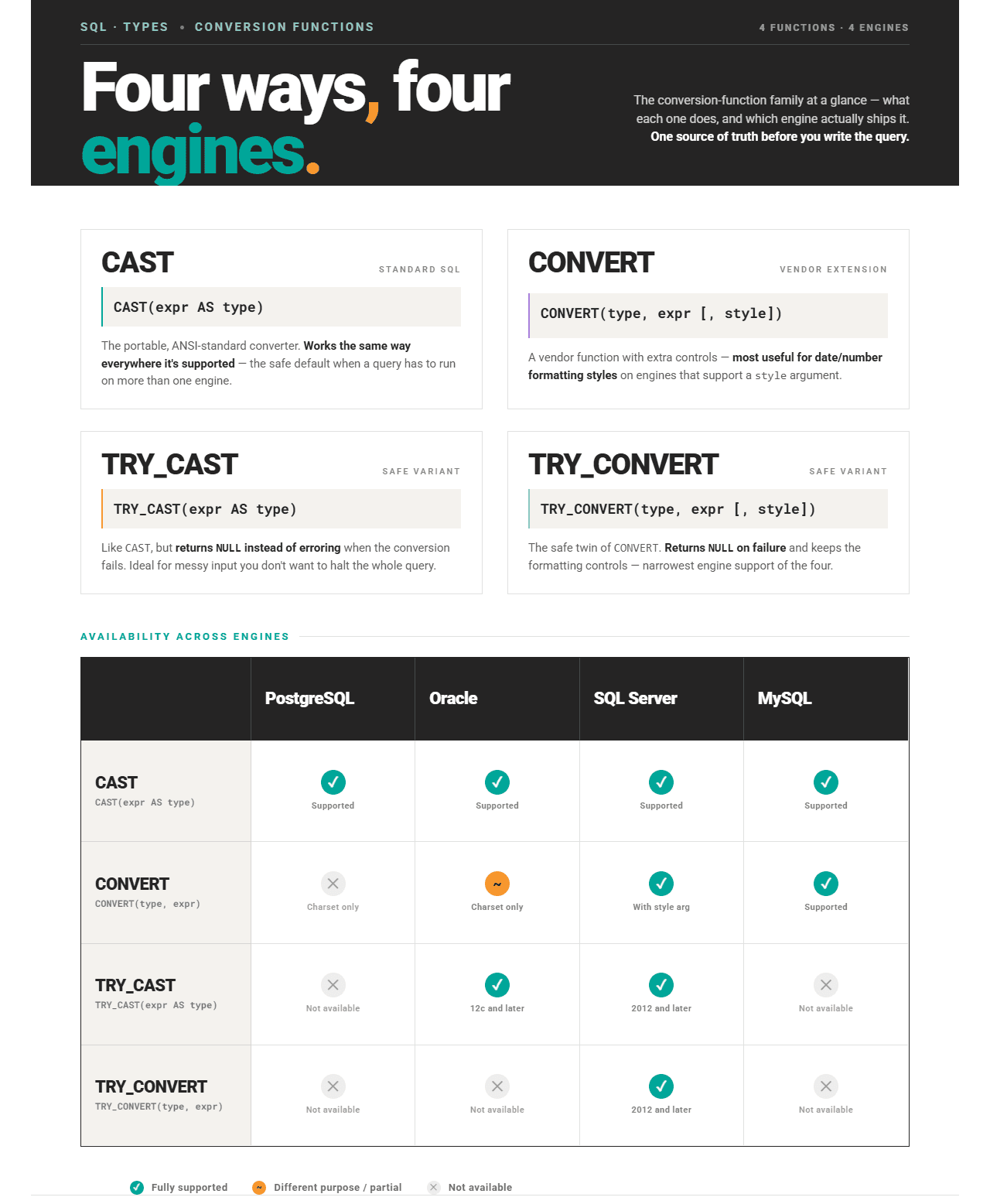
CAST() is standard SQL supported by all database engines, so it’s always the best choice for portability.
As for other functions, CONVERT() in SQL Server offers a feature CAST() doesn’t have, namely, an argument for date format style codes. For example, the 101 code style…
SELECT CONVERT(VARCHAR, GETDATE(), 101);…returns MM/DD/YYYY.
If you use the 120 code style…
SELECT CONVERT(VARCHAR, GETDATE(), 120);…you get this format: YYYY-MM-DD HH:MI:SS.
Those two functions throw an error on invalid input, unlike TRY_CAST() and TRY_CONVERT(), which return NULL. That’s useful when working with data that may contain non-convertible values, such as in the case of user-supplied or imported data.
NULL Handling and Type Conversion
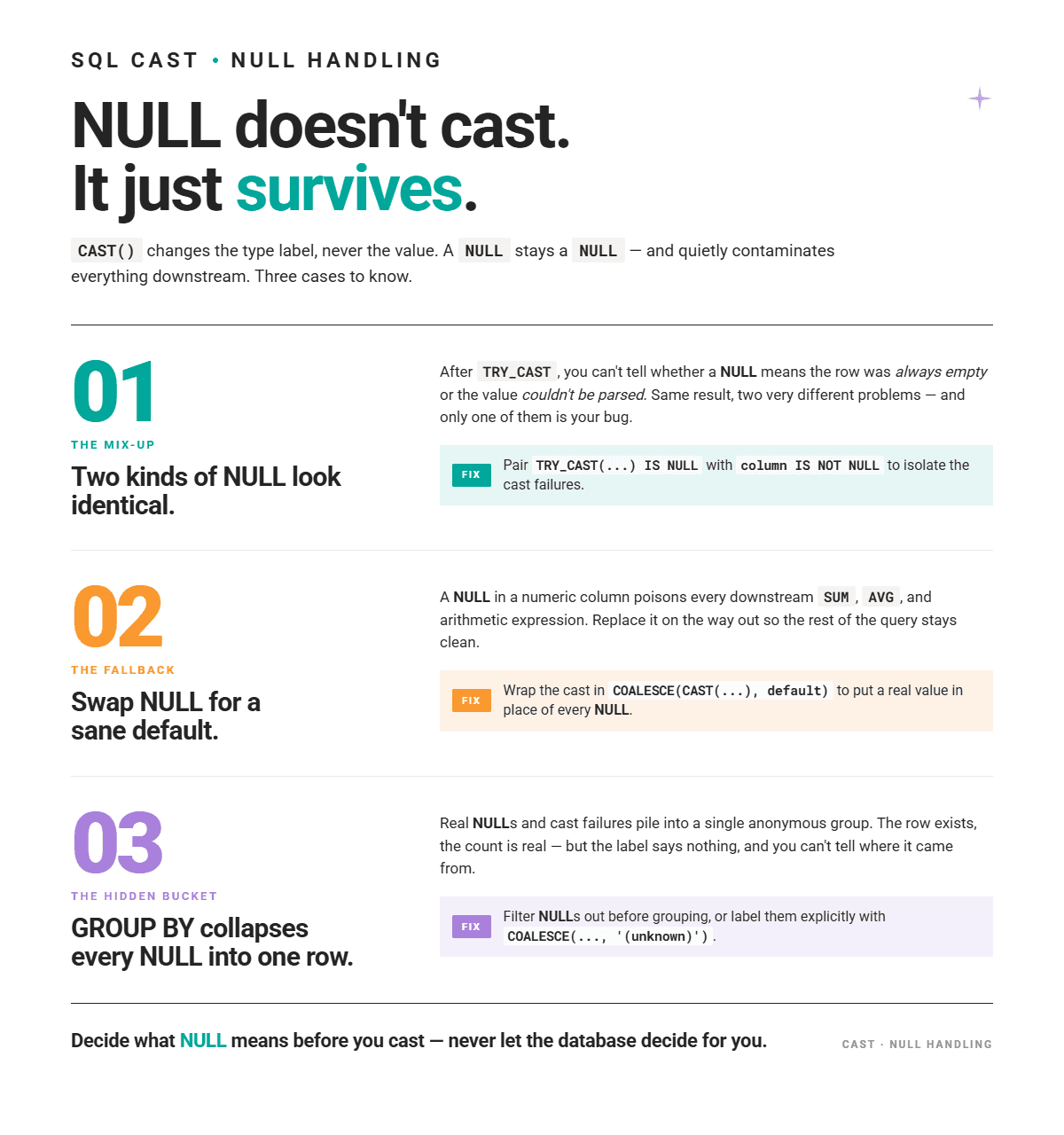
If you use CAST() on NULL values, the data type will change on paper, but the value will still be NULL. That’s because NULL is the absence of a value, not a value that can be converted.
Conversion Failures vs Original NULLs
If you use TRY_CAST() and then look for NULLs, you can’t immediately tell which are original NULL values, and which are the result of the conversion failure.
To distinguish between the two, use this pattern.
SELECT *
FROM orders
WHERE TRY_CAST(user_input AS INT) IS NULL
  AND user_input IS NOT NULL;
WHERE TRY_CAST(user_input AS INT) IS NULL will capture both rows where user_input is NULL and where there’s a string that can’t be converted to INT. The AND user_input IS NOT NULL part will then eliminate the first kind, leaving only the second.
COALESCE() With CAST()
Another way to handle NULLs when casting is to cast as usual, then fall back to a default if the result is NULL by using the SQL COALESCE function.
SELECT COALESCE(CAST(discount AS DECIMAL(10, 2)), 0.00) AS safe_discount
FROM orders;
With this code, NULLs will be replaced with 0.00.
NULLs in GROUP BY After Casting
When casting produces NULLs, rows will be grouped as a single NULL group by GROUP BY. Depending on the goal, you may want to filter them out beforehand or handle them explicitly with COALESCE().
Type Conversion and Aggregation Errors
SQL Aggregation functions, such as SUM(), AVG(), and MAX() expect numeric or date types. If the column data type is defined as VARCHAR but actually contains numeric data, aggregation will either fail or return wrong results.
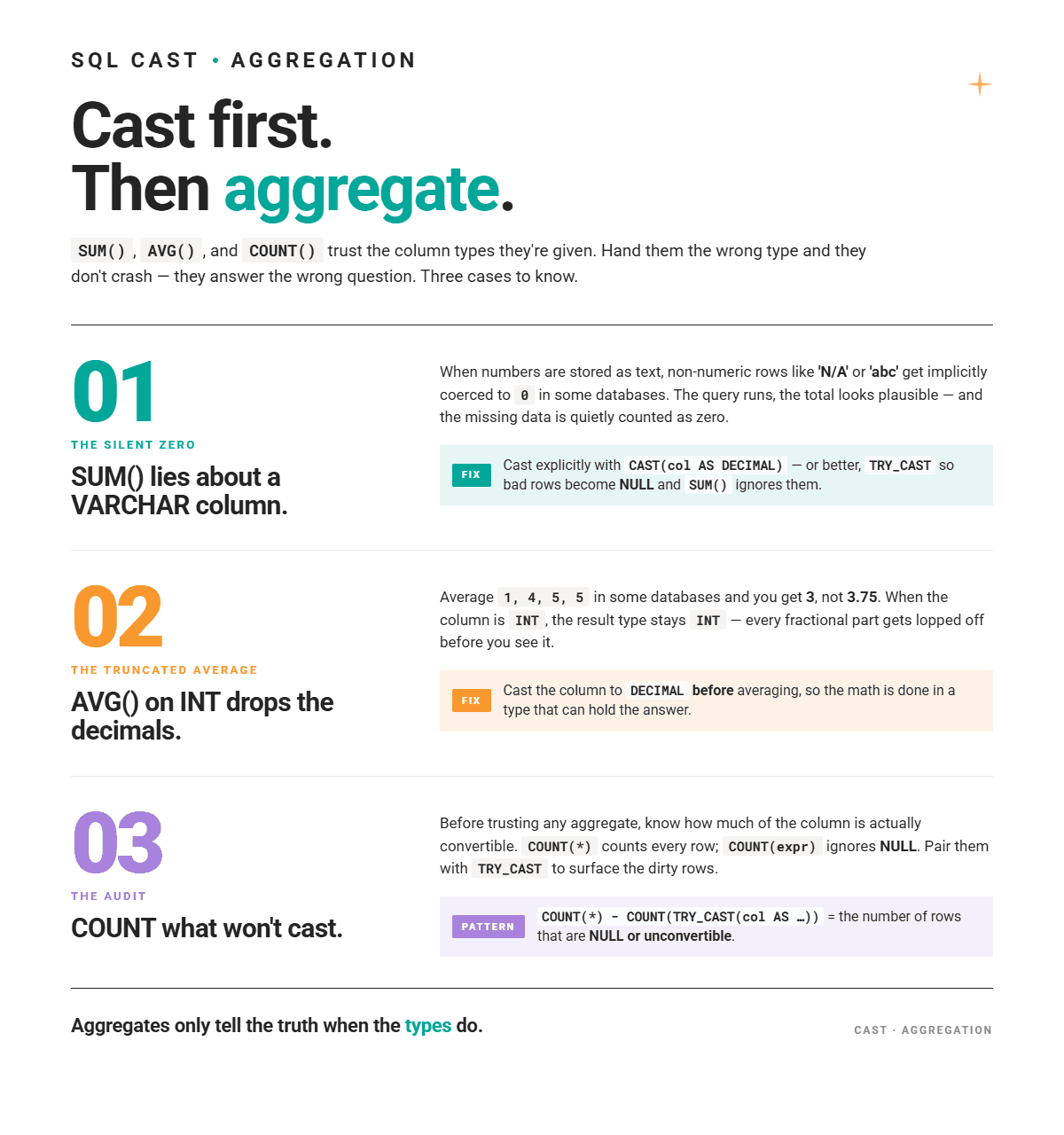
SUM() With a VARCHAR Column
Take this example, where revenue is stored as VARCHAR.
SELECT SUM(revenue)
FROM transactions;
Consider yourself lucky if that returns an error. Some databases, such as MySQL, will implicitly convert. This includes the non-numeric rows (e.g., 'N/A' or 'abc'), which will get the 0 value. This value then gets included in the sum, which will be incorrect. Remember, such string values mean the (revenue) data is missing, not that it’s 0.
The Fix
As in most cases, you should cast explicitly before aggregating.
SELECT SUM(CAST(revenue AS DECIMAL(15, 2)))
FROM transactions;
An even better solution is to use TRY_CAST(), if supported.
SELECT SUM(TRY_CAST(revenue AS DECIMAL(15, 2)))
FROM transactions;
NULLs from failed conversions are excluded by SUM() automatically.
AVG() Precision Loss
When you use AVG() on the INT column, some databases may return INT. Truncated decimals mean precision loss in the average calculation.
For example, this code may return 3 instead of 3.75.
SELECT AVG(quantity)
FROM order_items;
The Fix
The fix is to first cast to DECIMAL.
SELECT AVG(CAST(quantity AS DECIMAL(10, 2)))
FROM order_items;
Data Quality Check With COUNT() and TRY_CAST()
COUNT(*) counts all rows, including NULLs. On the other hand, COUNT(expression) ignores NULLs.
You can combine the latter with TRY_CAST to count only rows where the conversion succeeded. Then, subtract it from COUNT(*) to get the count of rows where TRY_CAST() returned NULL, meaning either the original value was NULL or the conversion failed.
SELECT COUNT(*) AS total_rows,
       COUNT(TRY_CAST(user_input AS INT)) AS valid_numeric_rows,
       COUNT(*) - COUNT(TRY_CAST(user_input AS INT)) AS invalid_or_null_rows
FROM user_submissions;
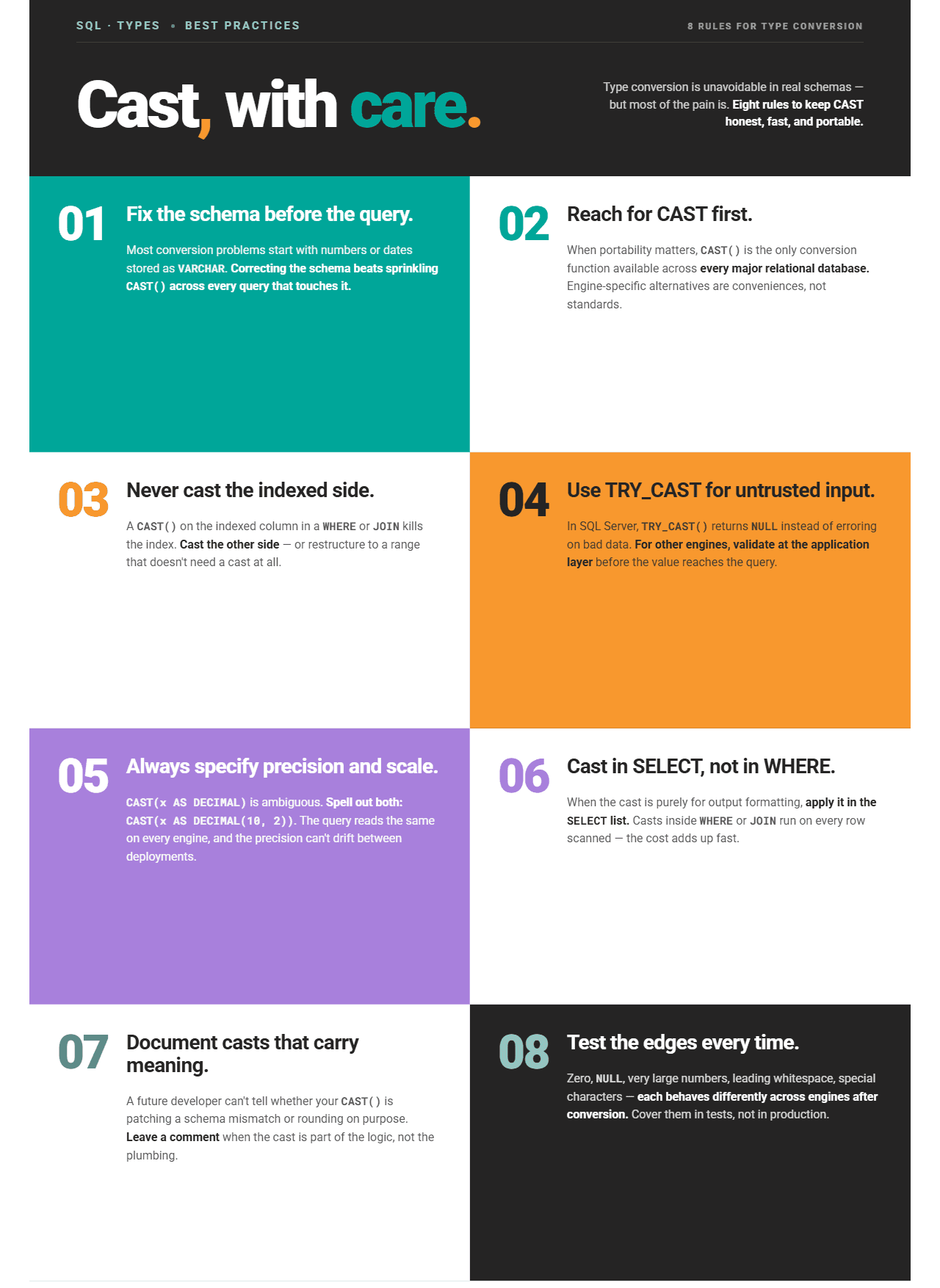
Best Practices for SQL Type Conversion
Here are eight rules you should follow when casting data types.
Real-World SQL Conversion Bugs and Examples
I’ll now show you some real-world interview questions from our platform to illustrate how data type conversion works in practice. Each question requires you to recognize the type mismatch, choose the right conversion, and apply it correctly.
Example #1: INT to DECIMAL – Avoiding Integer Division
When you divide two integers in SQL, the result is always an integer. The decimal part is truncated, not rounded.
To get a percentage, you must cast one side to DECIMAL first.
Here’s one of the Meta SQL interview questions that shows this.
Sales with Valid Promotion
Last Updated: October 2021
The marketing manager wants you to evaluate how well the previously ran advertising campaigns are working.
Particularly, they are interested in the promotion IDs from the online_promotions table.
Calculate the percentage of orders in the online_orderstable that used a promotion from the online_promotions table.
The task is to calculate the percentage of orders that used a promotion.
Data
The dataset consists of two tables; online_promotions is the first one.
| promotion_id |
|---|
| 1 |
| 2 |
The second table is online_orders.
Where the Interviewers Want To Catch You Off Guard
We categorized this interview question as easy. And it is easy, but it still hides a trap.
The code is a simple calculation where you divide the number of orders that used the promotion by the total number of orders.
SELECT COUNT(p.promotion_id) / COUNT(*) * 100.0 AS percentage
FROM online_orders AS s
LEFT JOIN online_promotions AS p ON s.promotion_id = p.promotion_id;
This code, however, returns 0.
| percentage |
|---|
| 0 |
That’s not because there really are no orders that used the promotion. Let’s prove this by splitting the code into two counts, but without the division.
SELECT COUNT(p.promotion_id) AS count_orders_with_promotion,
       COUNT(*) AS count_total_orders
FROM online_orders AS s
LEFT JOIN online_promotions AS p ON s.promotion_id = p.promotion_id;
The output proves that the percentage can’t be 0, as there are 22 orders with promotion.
SELECT COUNT(p.promotion_id) AS count_orders_with_promotion,
       COUNT(*) AS count_total_orders
FROM online_orders AS s
LEFT JOIN online_promotions AS p ON s.promotion_id = p.promotion_id;
Where’s the error in the earlier so-called solution?
Solution
The error is that we divided integers without casting to the decimal type. If you divide 22 by 29 (see the output above), you get 0.7586. But, since you’re dividing integers, you lose decimals, so you end up with 0. Multiply that by 100 to get the percentage, and you still get 0.
Interviewers test if you know that and whether you will cast one side of the division.
Here’s the (correct) output.
| percentage |
|---|
| 75.86 |
Example #2: FLOAT to TEXT – Using String Functions on Numeric Columns
Text functions like LEFT() and SUBSTRING() only work on text type. If a column number, such as a phone number, is stored as FLOAT, you must cast it to TEXT before applying string operations.
Here’s the City of San Francisco question that tests that.
Verify that the first 4 digits are equal to 1415 for all phone numbers
Verify that the first 4 digits are equal to 1415 for all phone numbers. Output the number of businesses with a phone number that does not start with 1415.
It asks you to verify that the first 4 digits are equal to 1415 for all phone numbers. You should output the number of businesses for which this verification didn’t succeed.
Dataset
Here’s the table named sf_restaurant_health_violations.
Where the Interviewers Want To Catch You Off Guard
This interview question tests the ability to handle text data. By realizing you could easily use the LEFT() function to solve the question, you might jump immediately into writing this code.
It seems logical: keep those businesses whose phone number is not null and whose phone numbers don’t start with 1415, and that’s it. Right?
SELECT COUNT(*)
FROM sf_restaurant_health_violations
WHERE business_phone_number IS NOT NULL AND LEFT(business_phone_number, 4) <> '1415';
No. The code will throw an error.
Solution
The reason for the error is that LEFT() works on text data, and the column business_phone_number is stored as double precision. (Scroll up to the dataset and see for yourself.)
So, you need to cast that column, and LEFT() will work.
Here’s the output.
| count |
|---|
| 1 |
Shorthand for CAST() in PostgreSQL
If you use PostgreSQL, you can avoid writing the CAST() function. There’s the :: shorthand for CAST() that works like this.
SELECT COUNT(*)
FROM sf_restaurant_health_violations
WHERE business_phone_number IS NOT NULL AND LEFT(business_phone_number::TEXT, 4) <> '1415';
Example #3: TEXT to DOUBLE PRECISION – Casting a Price Column With Embedded Currency Symbols
Imagine the price column contains values like '$19.99', i.e., a currency symbol embedded in a string, which makes the entire value a text. What can you do with it? Can you rank, compare, or aggregate that data?
Here’s one of the Amazon SQL interview questions that will give us the answer.
The Most Expensive Products Per Category
Find the most expensive products on Amazon for each product category. Output category, product name and the price (as a number)
The task is to find the most expensive products on Amazon for each product category. The output should contain category, product name, and price as a number.
Dataset
The table we’ll use to solve this problem is named innerwear_amazon_com.
What the Interviewers Want You to Show
While this question focuses on ranking window functions and text-handling functions, all you do will fall apart if you don’t know one crucial thing.
And that thing is, if the column has a currency symbol embedded in a string, it makes the entire value text. The consequence is that the database can’t do anything with it – it can’t rank, compare, or aggregate it – until the symbol is stripped and the result is cast to a numeric type.
Let me show you how to write the solution.
1. Casting the price column
The first step is to write a CTE that casts the price column from the TEXT to DOUBLE PRECISION data type.
I use regex to match the pattern of the first sequence of digits, a dot, and more digits, then SUBSTRING() to extract that pattern. In other words, the $ sign is never matched, so I get the numerical part of the price column.
However, that numeric part is still a TEXT data type, so I cast it to DOUBLE PRECISION so I can use it for ranking afterward.
WITH cte AS
  (SELECT product_category AS category,
          product_name,
          price,
          SUBSTRING(price FROM '(([0-9]+.)[0-9]+)')::DOUBLE PRECISION * 1.0 AS modified_price
   FROM innerwear_amazon_com)
Next, I write a query with a subquery. Let me first explain the subquery.
2. A ranking subquery
It queries the CTE and ranks the products within each category from most expensive to cheapest.
SELECT cte.category,
          cte.product_name,
          price,
          cte.modified_price,
          RANK() OVER (PARTITION BY category ORDER BY modified_price DESC) AS row
   FROM cte
3. Filtering the ranks
Let’s now turn this into a subquery and finalize the code. The outer SELECT uses the subquery output to keep only products with rank 1, i.e., the most expensive ones.
Here’s the final code.
Here’s the output.
| category | product_name | modified_price |
|---|---|---|
| Bras | Wacoal Women's Retro Chic Underwire Bra | 69.99 |
| Panties | Calvin Klein Women's Ombre 5 Pack Thong | 59.99 |
Conclusion
Data type conversion in SQL looks straightforward on the surface, but it is far from that. It quietly causes some of the most frustrating bugs in production systems: wrong query results, index bypasses, silent precision loss, and JOIN failures that are difficult to trace.
The bugs don’t arise from not knowing the CAST() function, as it's really simple to use. What matters more is knowing when to cast, which direction to cast, and where in the query to place the cast so you don’t slow down the query or introduce errors.
In this article, we practiced catching them on several real-world SQL interview questions. Continue to do so and build the pattern recognition needed to recognize these issues before your interviewer does.
FAQs
1. What is implicit casting in SQL?
Implicit casting is when the database automatically converts a value from one data type to another, without any explicit instruction from the developer. For example, comparing a VARCHAR column to an integer literal may trigger an implicit cast from string to number. The database decides which direction to cast, and that decision varies across database engines, which can occasionally produce unexpected results.
2. Why does SQL automatically convert data types?
It does that for your convenience. Otherwise, you’d have to explicitly cast every time types differ slightly in an expression. However, implicit conversion follows database-specific rules that can cause subtle bugs, especially when comparing numeric strings, joining tables with mismatched key types, or aggregating columns that contain mixed-type data.
3. Does CAST() prevent index usage?
Yes, typically when CAST() is applied to an indexed column in a filter or JOIN condition.
4. Can CAST() slow down SQL queries?
Yes. Since it prevents index usage, it forces the database to evaluate the function on every row. To preserve index usage, cast the non-indexed side of the condition, or restructure the query to avoid casting the indexed column at all, or, at least, cast the column with the index whose loss will impact the performance less, i.e., the less selective index.
5. Why do SQL joins fail because of type mismatches?
Columns in the JOIN condition must have compatible types. Otherwise, when one column is, for example, INT and the other is VARCHAR, some databases (e.g., PostgreSQL) throw an immediate type error. Others (e.g., MySQL, SQL Server, Oracle) perform an implicit cast, which bypasses indexes and can return incorrect results when non-numeric strings are involved.
The fix is to align the column types in the schema or to cast one side of the join condition explicitly.
6. What is the difference between CAST() and TRY_CAST()?
CAST() throws an error if the conversion is not possible. TRY_CAST() returns NULL instead of an error on invalid input.
TRY_CAST() is typically used when working with imported data that may contain non-convertible values.
For databases that don’t support TRY_CAST(), a common workaround is to use CASE expressions with REGEXP validation.
7. How do I safely convert strings to numbers in SQL?
It depends on the database.
In SQL Server, use TRY_CAST(column AS INT) or TRY_CONVERT(INT, column).
In PostgreSQL, use a CASE expression with a REGEXP check: CASE WHEN column ~ '^\d+$' THEN CAST(column AS INT) ELSE NULL END.
In Oracle 12.2+, use VALIDATE_CONVERSION(): CASE WHEN VALIDATE_CONVERSION(column AS INT) = 1 THEN CAST(column AS INT) ELSE NULL END.
In MySQL, CAST() silently truncates non-numeric characters rather than failing, so validate data at the application layer before relying on the result.
Share