How SQL EXISTS Works and When to Use It

Categories:
 Written by:
Tihomir Babic
Ignore EXISTS at your own peril! Learn how SQL EXISTS actually works, how it compares to IN and JOIN, and solve actual interview questions.
Everybody ignores EXISTS until a duplicated row count wrecks your report. Then they land on the page like this one.
No worries, we have you covered. We’ll walk you through what EXISTS really does, where it beats IN and JOIN, and where correlated patterns solve real interview-style problems.
What Is EXISTS in SQL?
EXISTS does one thing and one thing only: it checks for the presence of rows. It never returns actual data, just a TRUE or FALSE.
Use it: When you’re answering the “has any?”, “at least one”, or “ever happened” prompts.
Don’t use it: When you want to know what the value was.
What SQL EXISTS Actually Checks
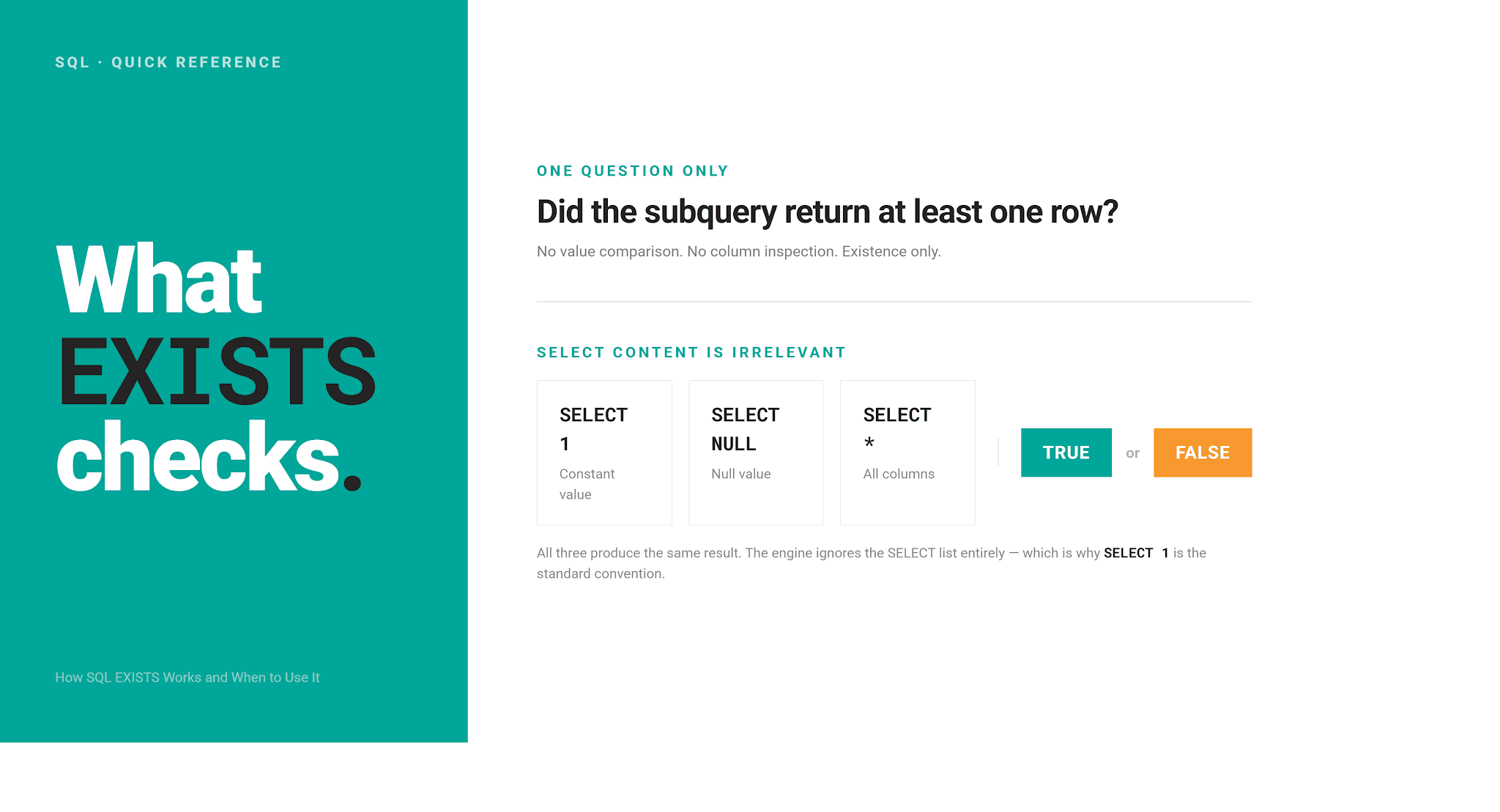
EXISTS checks logical existence.
That’s it; no value comparison! This is what often trips people up. You could select 1, NULL, or an entire row of columns inside the subquery. It doesn’t change the outcome at all: if at least one row exists, it returns TRUE; if it doesn’t, it returns FALSE.
It goes even further: the database engine completely ignores whatever is in SELECT inside an EXISTS subquery. This is why SELECT 1 has become the informal convention we also used in the above example.
How SQL EXISTS Works Step by Step
EXISTS runs one correlated check per outer row. The database engine proposes a row, tests the subquery against just that row, then moves to the next.
Here’s what that sequence looks like.
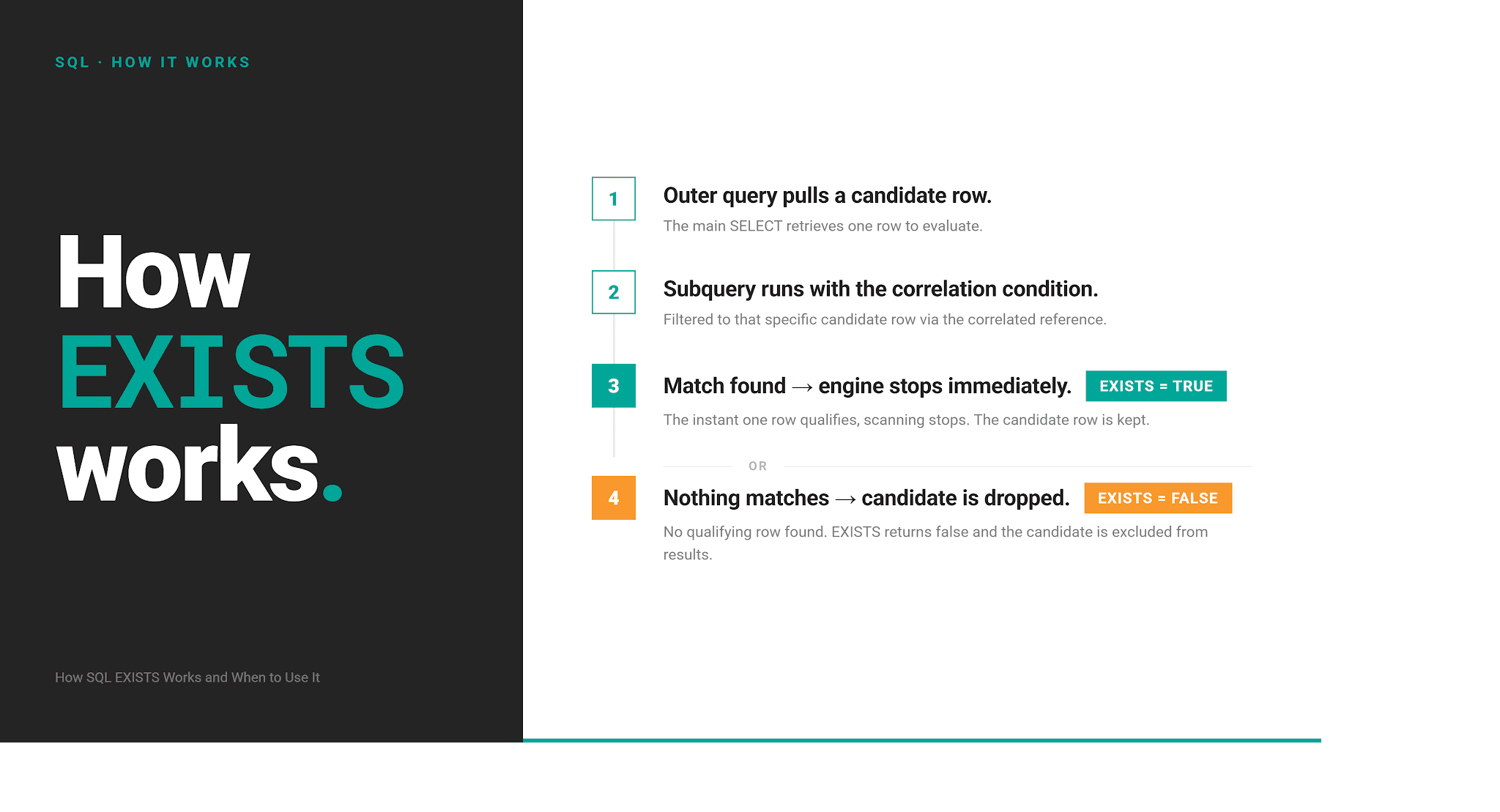
No matching values are returned by the subquery; only their presence matters.
Let’s ground this in an actual example. This code finds every customer who has placed any order at all.
For each customer, the engine scans online_store_orders looking for any row where customer_id matches that candidate’s ID.
The moment it hits one, it stops. It doesn’t care whether that customer placed one order or a hundred.
| customer_id | customer_name |
|---|---|
| 1 | Alice Johnson |
| 2 | Bob Smith |
| 3 | Carol Williams |
| 4 | David Brown |
| 6 | Frank Miller |
| 7 | Grace Wilson |
| 8 | Henry Moore |
| 9 | Ivy Taylor |
Using SQL EXISTS to Filter Rows Correctly
Filtering rows is a common use of EXISTS. Interviews also like to test it, especially these two patterns:
- Finding users who’ve done something once
- Finding users who’ve done something more than once
Pattern #1: Users With At Least One Qualifying Record
The “Customers with Large Orders” question by Uber, Netflix, and DoorDash is a textbook example of that first pattern.
It asks for customers who’ve placed at least one order over $100.
Customers with Large Orders
Last Updated: May 2025
The marketing team wants to identify high-value customers for a premium loyalty program. Find all customers who have placed at least one order over $100. Return customer ID and name. Consider all orders regardless of their payment or fulfillment status.
Dataset
We’re working with two tables; the first one is online_store_customers.
The second table is online_store_orders. If you look carefully at the data, you’ll notice that several customers have placed multiple orders, i.e., customers with IDs 1, 3, 4, 6, and 7. Keep this in mind and pay attention to what will happen in the output.
Solution
This is the same query as in the example above, where the subquery checks for a qualifying order per customer; we just added a value filtering criterion.
Here’s the output. Notice how each customer appears only once, even though we mentioned earlier that some placed more than one order. This is EXISTS in action: it stops scanning the moment it finds the first qualifying row.
| customer_id | customer_name |
|---|---|
| 1 | Alice Johnson |
| 2 | Bob Smith |
| 3 | Carol Williams |
| 6 | Frank Miller |
| 7 | Grace Wilson |
| 9 | Ivy Taylor |
Pattern #2: Detecting Repeat Behavior
Here’s where EXISTS gets more interesting. What’s repeated behavior? It’s when something happened more than once. This pattern is built on the previous one. The addition is another EXISTS inside the first, comparing a row against a different row for the same customer.
Here’s the query that outputs customers who placed more than one order. The inner EXISTS finds a second, distinct order before the customer counts as a repeat customer; matching the same row against itself would defeat the whole check.
The output now contains only customers with more than one order.
| customer_id | customer_name |
|---|---|
| 6 | Frank Miller |
| 3 | Carol Williams |
| 4 | David Brown |
| 7 | Grace Wilson |
| 1 | Alice Johnson |
Why It Avoids Row Duplication
Neither of the queries above returned duplicate customer rows, even though the online_store_orders table has multiple rows per customer.
EXISTS doesn’t join the outer row against the subquery. It just asks a yes/no question and moves on. That’s the core reason EXISTS shows up so often as the safer alternative to JOIN when you don’t need columns from the matched table. We’ll make that comparison concrete in one of the following sections.
SQL EXISTS vs IN
EXISTS is often used interchangeably with IN. There’s little surprise here, as they both return identical results.
Despite that, they are different. How is that possible – same but also different? Well, the difference isn’t where most people expect it; it lies in their negative form (NOT EXISTS/NOT IN). We will cover that later. For now, we’ll stick to the positive form of the operators.
Have a look at this. It’s the same official solution we used earlier, written with IN instead of EXISTS.
The output is the same. Even if online_store_orders.customer_id had NULL in it, IN would treat that one comparison as unknown and move on, which doesn’t stop the query from correctly finding every real match.
| customer_id | customer_name |
|---|---|
| 1 | Alice Johnson |
| 2 | Bob Smith |
| 3 | Carol Williams |
| 6 | Frank Miller |
| 7 | Grace Wilson |
| 9 | Ivy Taylor |
SQL EXISTS vs JOIN
They both can answer the same question. However, their logic is different.
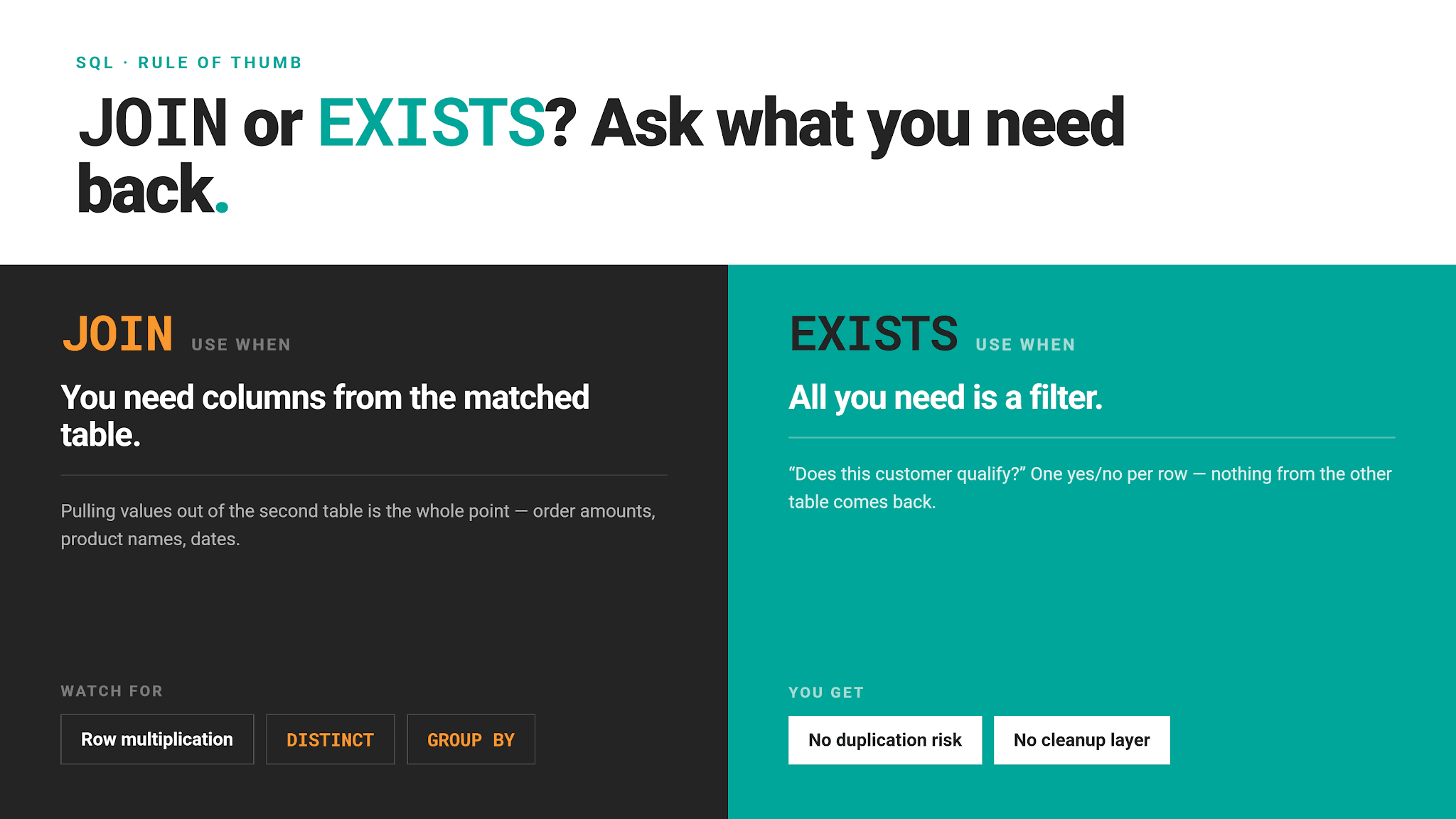
JOIN combines matching rows, EXISTS checks whether a match happened at all.
How JOINs Multiply Rows
The JOIN logic makes it prone to row multiplication: It returns one row per match, not one row per outer record. Meaning, if a customer has more than one order over $100, the query will return the customer once per matching order.
Let’s replace EXISTS from the earlier example with JOIN.
Take a look at the output. See how some customers (Alice Johnson, Carol Williams, and Grace Wilson) appear more than once?
| customer_id | customer_name |
|---|---|
| 1 | Alice Johnson |
| 1 | Alice Johnson |
| 2 | Bob Smith |
| 3 | Carol Williams |
| 3 | Carol Williams |
| 6 | Frank Miller |
| 7 | Grace Wilson |
| 7 | Grace Wilson |
| 9 | Ivy Taylor |
However, you can force JOIN to make the same output as EXISTS.
Making JOIN Match EXISTS’s Output
The secret lies in using DISTINCT.
While the output is the same as with EXISTS, the order of operations is backward. The JOIN generates every duplicate row first. Only then does it remove them with DISTINCT.
EXISTS doesn’t generate duplicates in the first place.
Choosing Between EXISTS and JOIN
SQL NOT EXISTS
NOT EXISTS asks the opposite question to EXISTS: is there nothing here that matches? In other words, it checks for non-existence. It’s a natural choice for tasks such as finding customers with no orders, users without a recommendation, or records with no corresponding record elsewhere.
As an example, a question where we need to find customers without orders.
Customers Without Orders
Last Updated: April 2019
Find customers who have never made an order. Output the first name of the customer.
Dataset
The first table is customers, a simple list of customers’ details.
Then, we also have the orders table.
Solution
The NOT EXISTS syntax is the same as EXISTS.
Here’s the output.
| first_name |
|---|
| John |
| Emma |
| Liam |
| Jack |
| Mona |
| Lili |
| Justin |
| Frank |
NOT EXISTS vs NOT IN
The same query can be rewritten with NOT IN. Actually, that’s an official solution.
The output is the same.
Where It Actually Breaks: Beware of NULLs
NOT EXISTS and NOT IN returning the same output is not what always happens. In the example above, it was purely by accident: we were lucky that there were no NULLs.
What would happen if there were? Here’s a simple example dataset that follows the same logic as the above dataset.
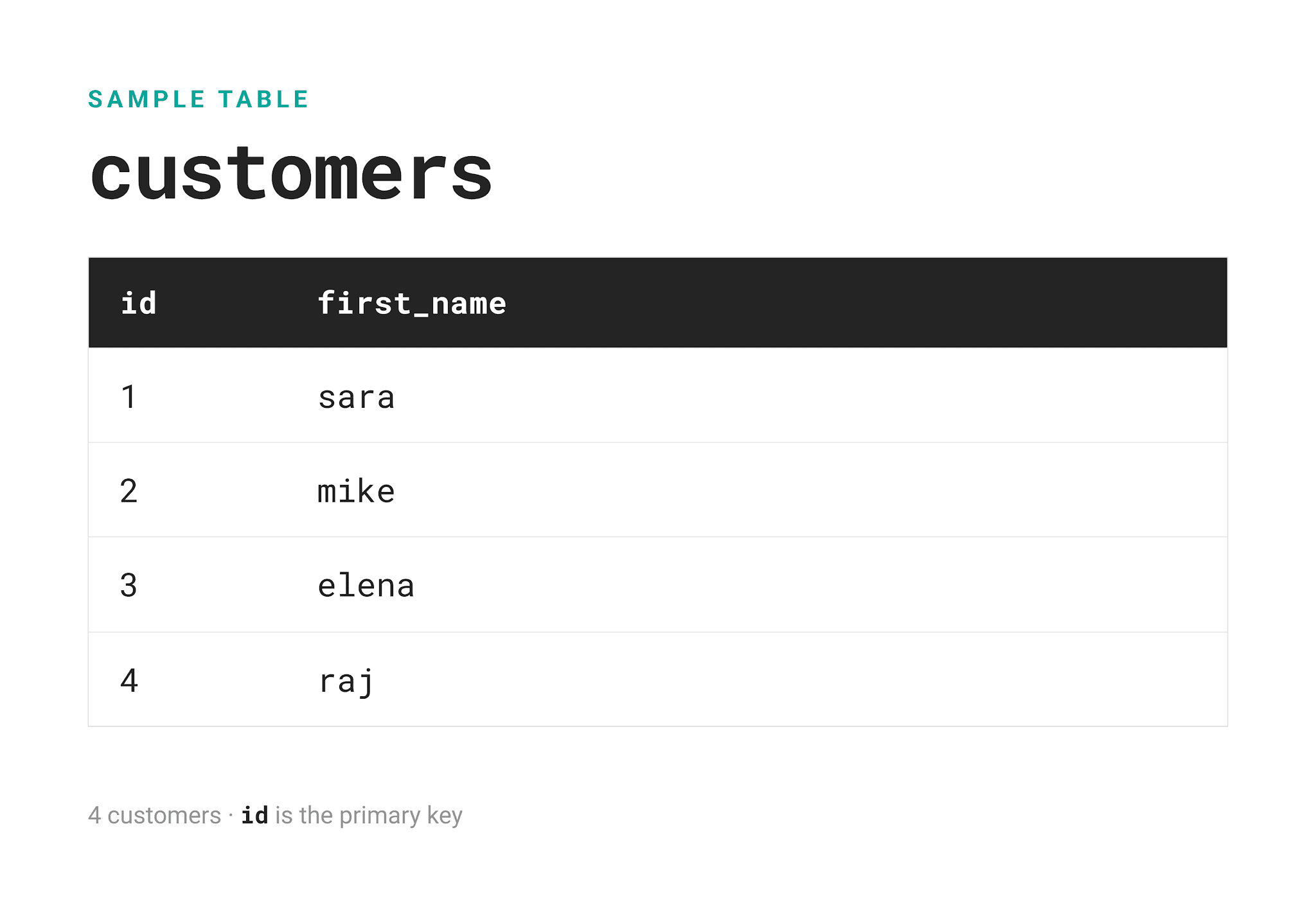
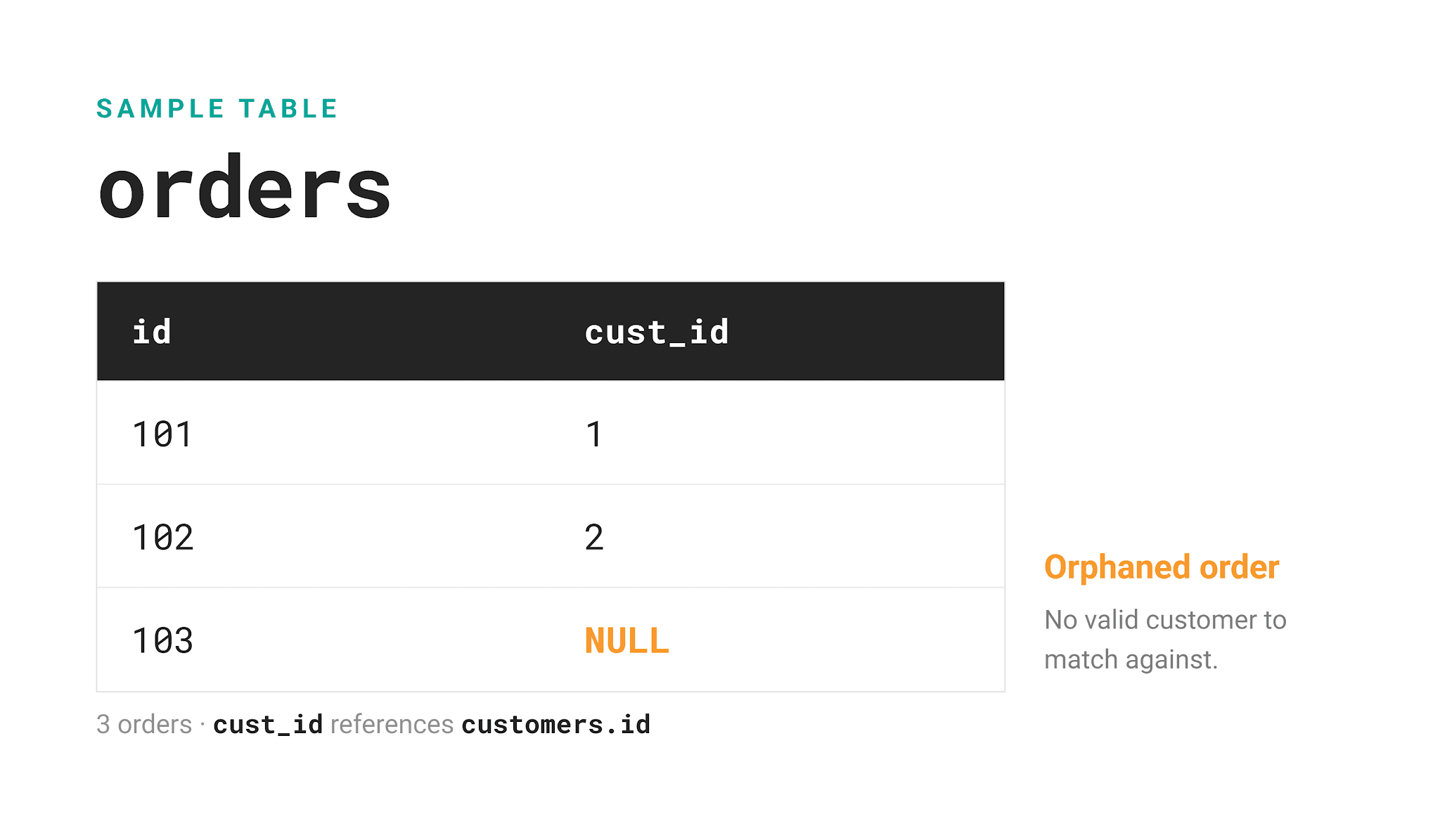
Elena and Raj (IDs 3 & 4) are not found in the orders table, meaning they didn’t place an order. However, there’s also an order that doesn't match any of the existing customers.
Running the same NOT IN query…
SELECT first_name
FROM customers
WHERE id NOT IN
    (SELECT cust_id
     FROM orders);
…returns zero rows.
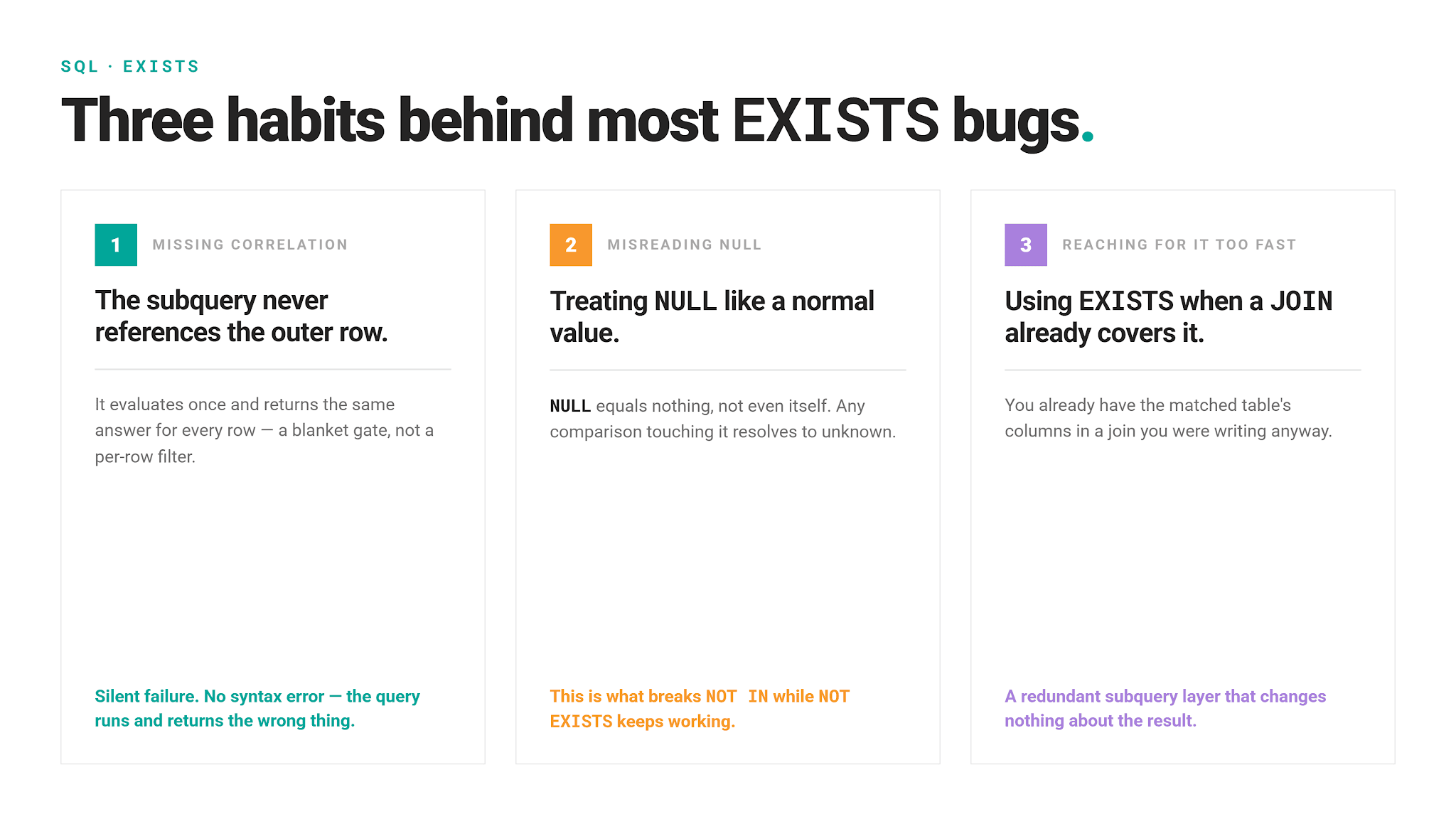
Why is that? NOT IN is a series of OR comparisons. What the above query actually does is this: id NOT IN (1, 2, NULL) ≡ NOT ( id = 1 OR id = 2 OR id = NULL ). A condition with NULL doesn’t produce TRUE nor FALSE; it produces NULL. (Read more about this in the NULL semantics in SQL article.) Therefore, one NULL poisons the whole comparison; that’s why the query returns zero rows.
NOT EXISTS doesn’t build a list or negate an OR chain. Remember, it simply wants to know whether the query found at least one row.
In Elena's case, it's like this.
`order 101: cust_id = 1 → 1 = 3 → FALSE
order 102: cust_id = 2 → 2 = 3 → FALSE
order 103: cust_id = NULL → NULL = 3 → UNKNOWN`
Elena passes the filter and shows up in the output. That’s correct, since she really hasn't placed an order. The UNKNOWN from the NULL row means the comparison failed. In that sense, NULL is treated as an actual (non-matched) value, which makes it the same as the previous two comparisons. Because NOT EXISTS checks row by row, an UNKNOWN inside NOT EXISTS only affects the single row it belongs to, never the rows being checked.
It’s clear now why we said EXISTS and IN are the same but different. Their logic under the hood is different, which becomes obvious when you use NOT EXISTS/NOT IN and your data has NULLs.
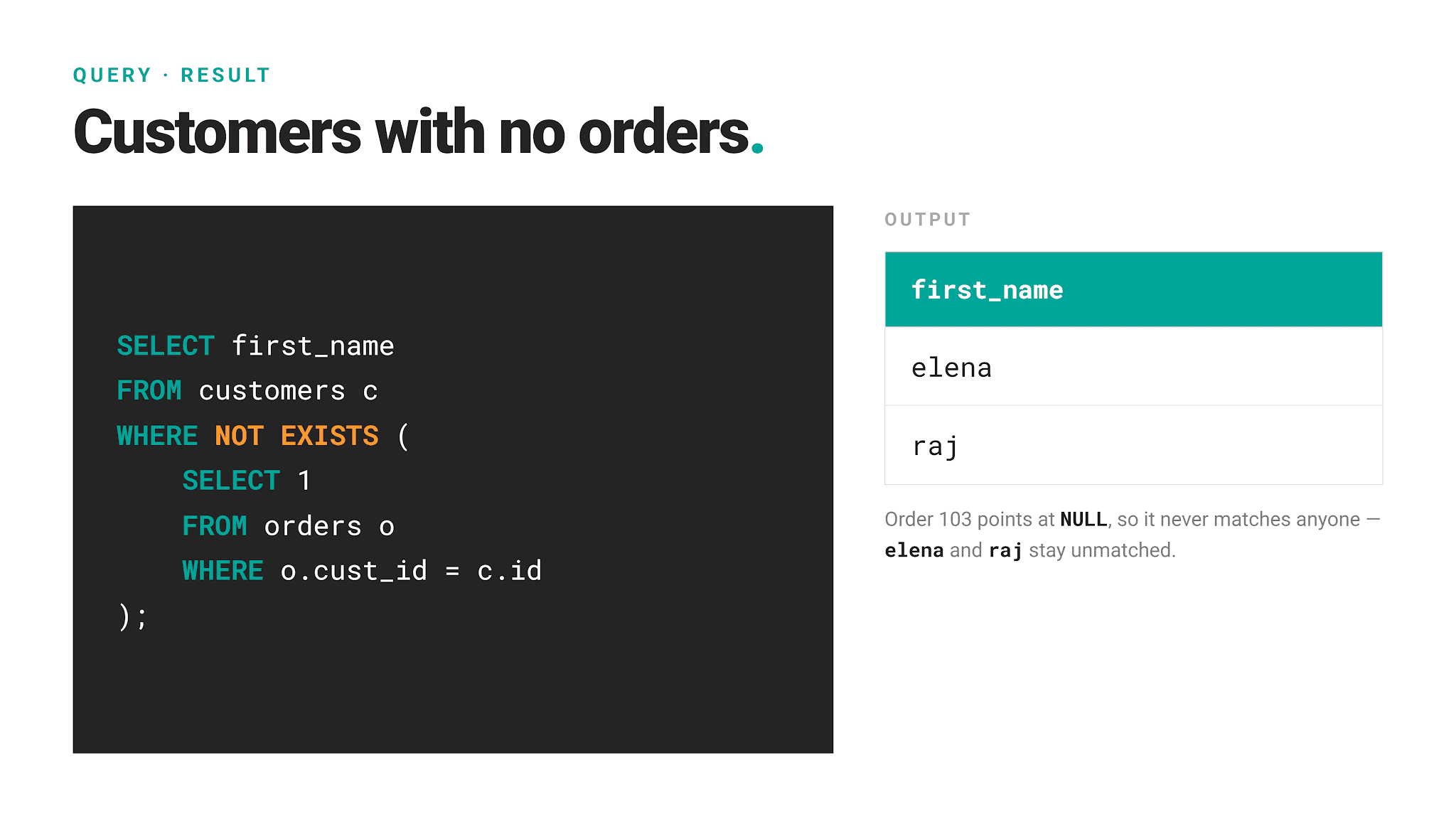
Now that this difference is clear, let’s move on to the more complex NOT EXISTS example.
A Real Multi-Table NOT EXISTS: Recommendation System
Recommendation System
Last Updated: December 2021
You are given the list of Facebook friends and the list of Facebook pages that users follow. Your task is to create a new recommendation system for Facebook. For each Facebook user, find pages that this user doesn't follow but at least one of their friends does. Output the user ID and the ID of the page that should be recommended to this user.
The goal here is to recommend, for each user, a page that at least one friend follows but the user doesn't already follow.
Dataset
The dataset consists of two tables: users_friends & users_pages.
Solution
The JOIN in the solution finds every user–friend’s page pair. Then NOT EXISTS comes in: it checks that no row in users_pages ties this exact user to this exact page already.
Here’s the output.
| user_id | page_id |
|---|---|
| 1 | 23 |
| 1 | 24 |
| 1 | 28 |
| 3 | 21 |
| 3 | 23 |
| 3 | 28 |
| 4 | 21 |
| 4 | 23 |
| 4 | 24 |
| 4 | 25 |
| 4 | 28 |
| 5 | 21 |
| 5 | 24 |
| 5 | 25 |
How Correlated EXISTS Subqueries Work
We’ve already been using correlated EXISTS subqueries without explicitly calling them out.
A correlated subquery is a subquery that references the outer query’s column.
EXISTS doesn’t need it; it can run without it and still return true or false. However, that means it would evaluate once and return the identical answer for every outer row. That’s not a real filter. Referencing the outer row – correlation – is what turns EXISTS from a one-time check into a real filter.
In this section, I will show you two common-world patterns that make for a much more interesting use than finding a simple ID match: finding the most recent record per group and detecting sequential activity across dates.
First/Last Event Logic
This pattern has broad business applicability.
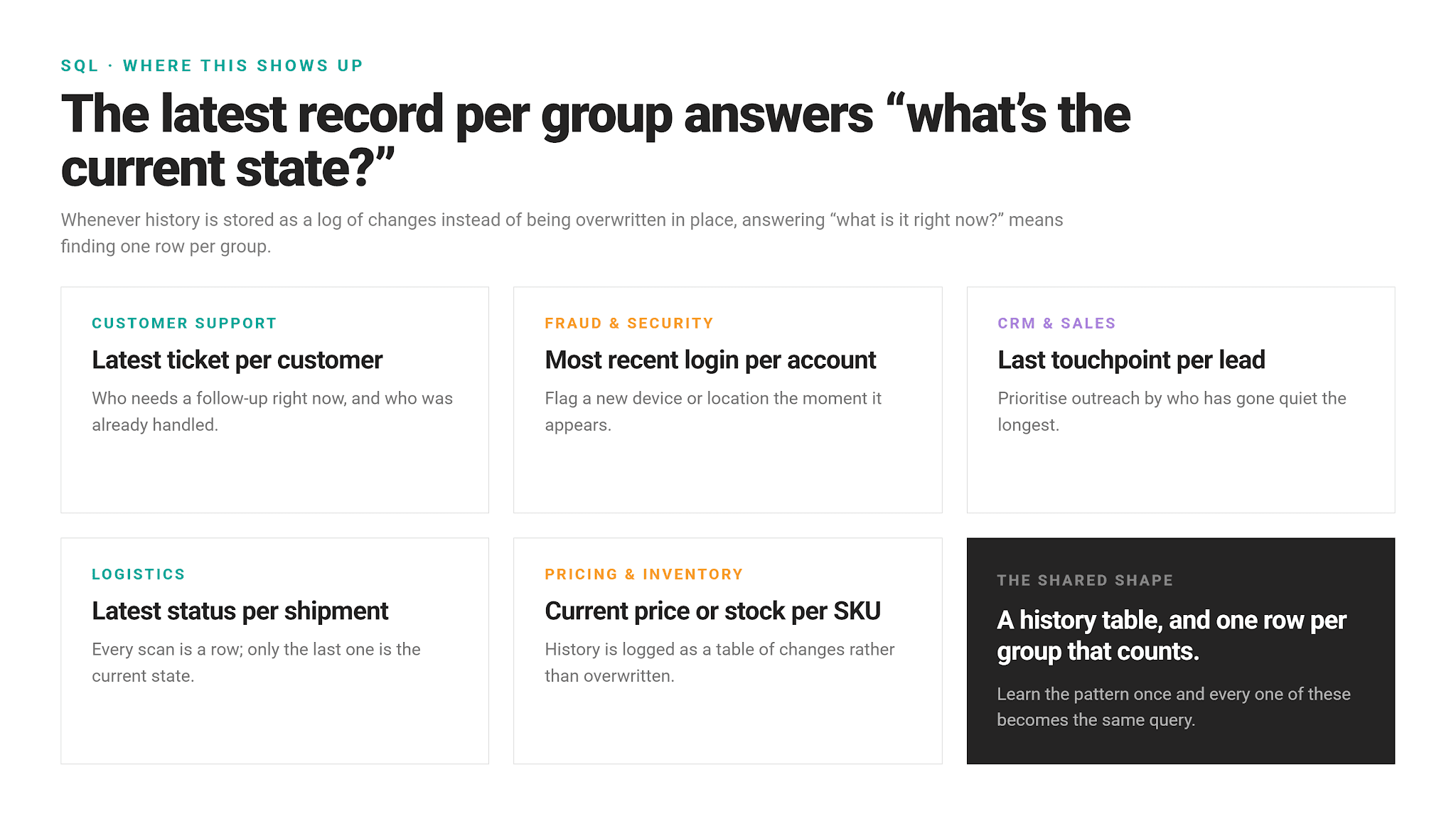
To demonstrate this pattern, we’ll use the Most Recent Employee Login Details question here.
Most Recent Employee Login Details
Last Updated: December 2022
Amazon's information technology department is looking for information on employees' most recent logins.
The output should include all information related to each employee's most recent login.
The question asks for each worker’s latest login.
Dataset
The table used is worker_logins.
RANK() Window Function & Self-Join
The official solution uses the RANK() window function plus a self join.
The “Last Event Logic” With NOT EXISTS
The same logic can be expressed with NOT EXISTS in more compact code.
Here, we build on the logic of correlation. So far, we’ve been using it to match one ID. Now, the subquery references two columns from the outer row at once: w.worker_id to stay within the same employee, and w.login_timestamp to check whether a later login exists for the same worker. If it doesn’t, you’ve got yourself the latest login.
Here’s the output.
| id | worker_id | login_timestamp | ip_address | country | region | city | device_type |
|---|---|---|---|---|---|---|---|
| 3 | 5 | 2021-12-19 09:55:00 | 10.2.135.23 | France | North | Roubaix | desktop |
| 14 | 2 | 2022-01-10 09:52:00 | 66.68.93.191 | USA | Texas | Austin | desktop |
| 15 | 4 | 2022-01-24 08:48:00 | 46.212.154.172 | Norway | Viken | Skjetten | desktop |
| 16 | 3 | 2022-01-25 08:58:00 | 80.211.248.182 | Poland | Mazovia | Warsaw | desktop |
| 17 | 6 | 2022-01-24 09:56:00 | 185.103.180.49 | Spain | Catalonia | Alcarras | desktop |
| 18 | 8 | 2022-01-25 09:59:00 | 10.1.14.224 | Italy | Lombardy | Borgarello | desktop |
| 19 | 7 | 2022-01-26 10:55:00 | 212.102.111.33 | Spain | Valencia | Sueca | mobile |
| 20 | 1 | 2022-01-26 08:58:00 | 65.111.191.14 | USA | Florida | Miami | desktop |
Sequential Activity
Another useful implementation of the EXISTS correlated subquery is to check if something happened two days in a row.
This, too, is not just an interview exercise but a real business application, primarily when calculating retention.
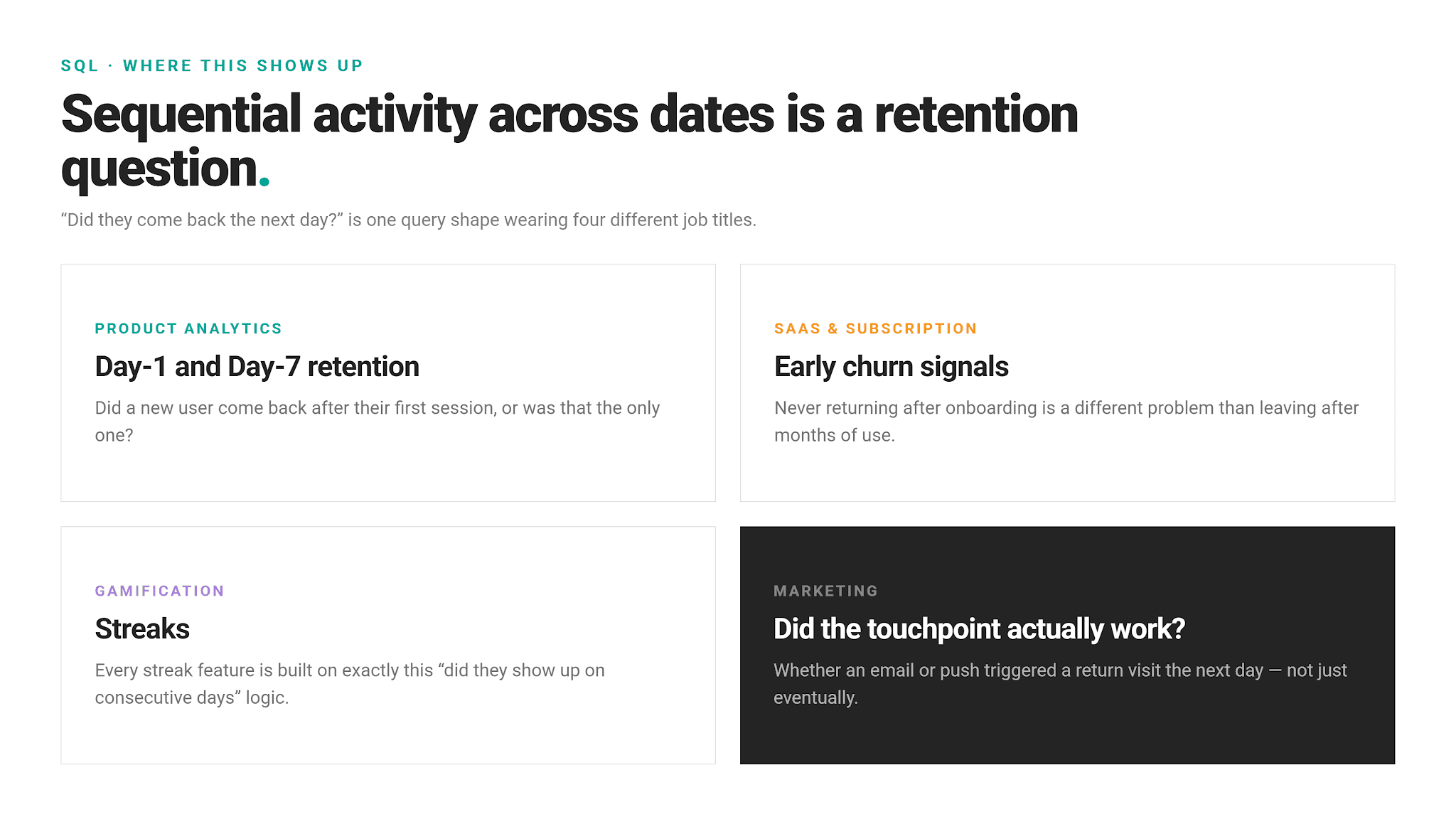
As a practical showcase, let’s solve the First Day Retention Rate question.
First Day Retention Rate
Last Updated: February 2022
Calculate the first-day retention rate of a group of video game players. The first-day retention occurs when a player logs in 1 day after their first-ever log-in. Return the proportion of players who meet this definition divided by the total number of players.
We need to measure the proportion of players who return the day after their first login in relation to the total number of players.
Dataset
The table is named players_logins
CTE + JOIN
The official solution uses a CTE and MIN() to find the first login, then uses COUNT() to calculate the ratio.
Sequential Activity With Two Correlated Subqueries & EXISTS
The EXISTS rewrite consists of two correlated subqueries. The first, scalar one, finds the first login for each player.
The second subquery then finds the players logged in one day after their first login.
EXISTS then ensures that only players who pass both checks are counted as retained.
Here’s the output.
| retention_rate |
|---|
| 0.5 |
Rewriting With EXISTS or Not? It Depends.
We did rewrite both solutions with EXISTS. That doesn’t mean we’ve actually improved the official solution.
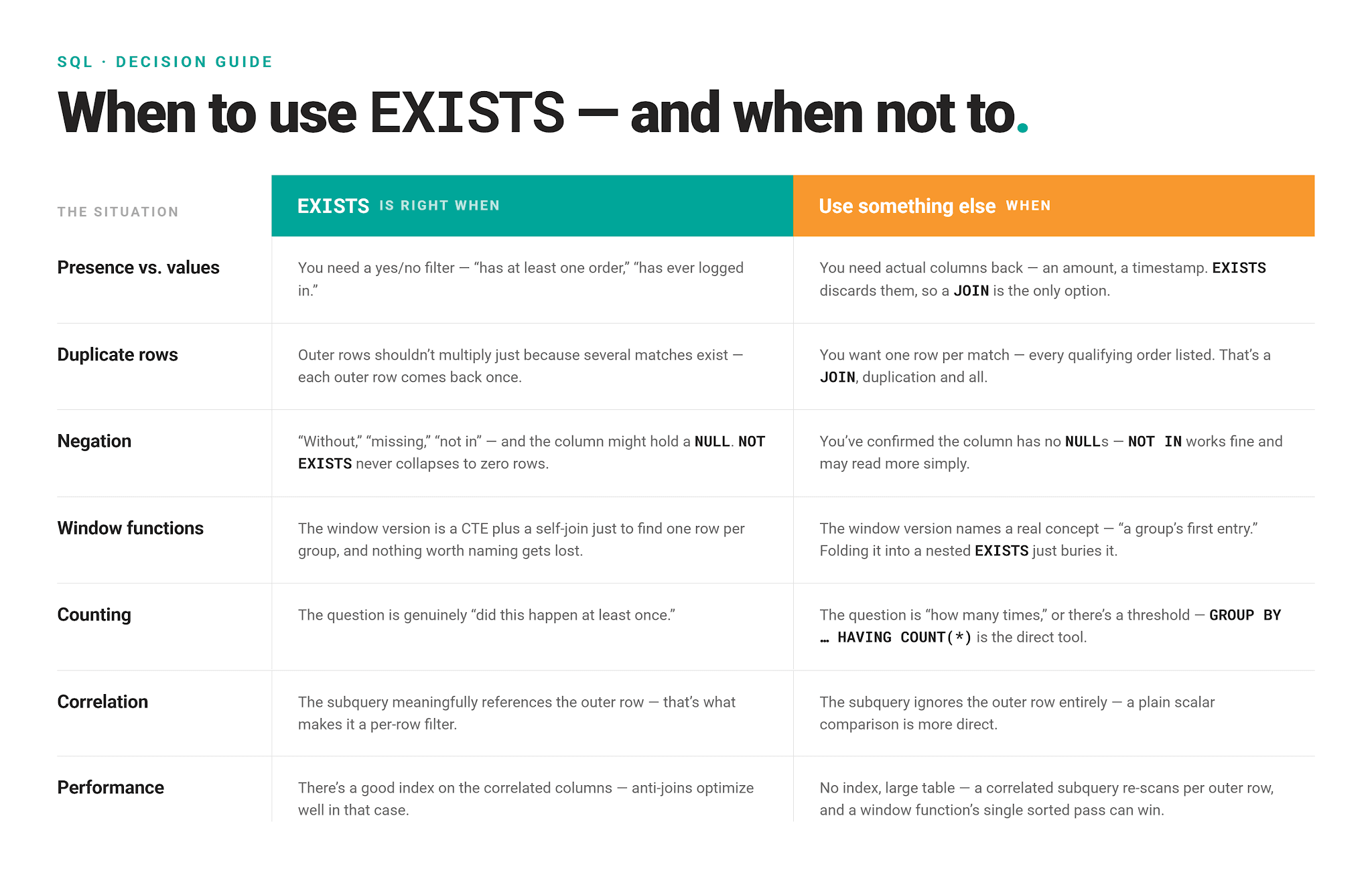
In the first example, the correlated NOT EXISTS eliminates the window function entirely, making the code much more compact. This should be considered an improvement, as long as the relevant columns are indexed.
In the second example, we didn’t achieve anything. Arguably, we made it worse. The aggregation is still there. We just replaced JOIN with EXISTS, making the code less readable.
I showed you that to demonstrate how EXISTS can be used. However, I also wanted you to realize that doesn’t mean you should use it; sometimes there are better approaches.
We will cover those in the "When to Use EXISTS (and When Not To)" section further down.
Common SQL EXISTS Mistakes
When to Use SQL EXISTS (and When Not To)
EXISTS Performance and Indexing
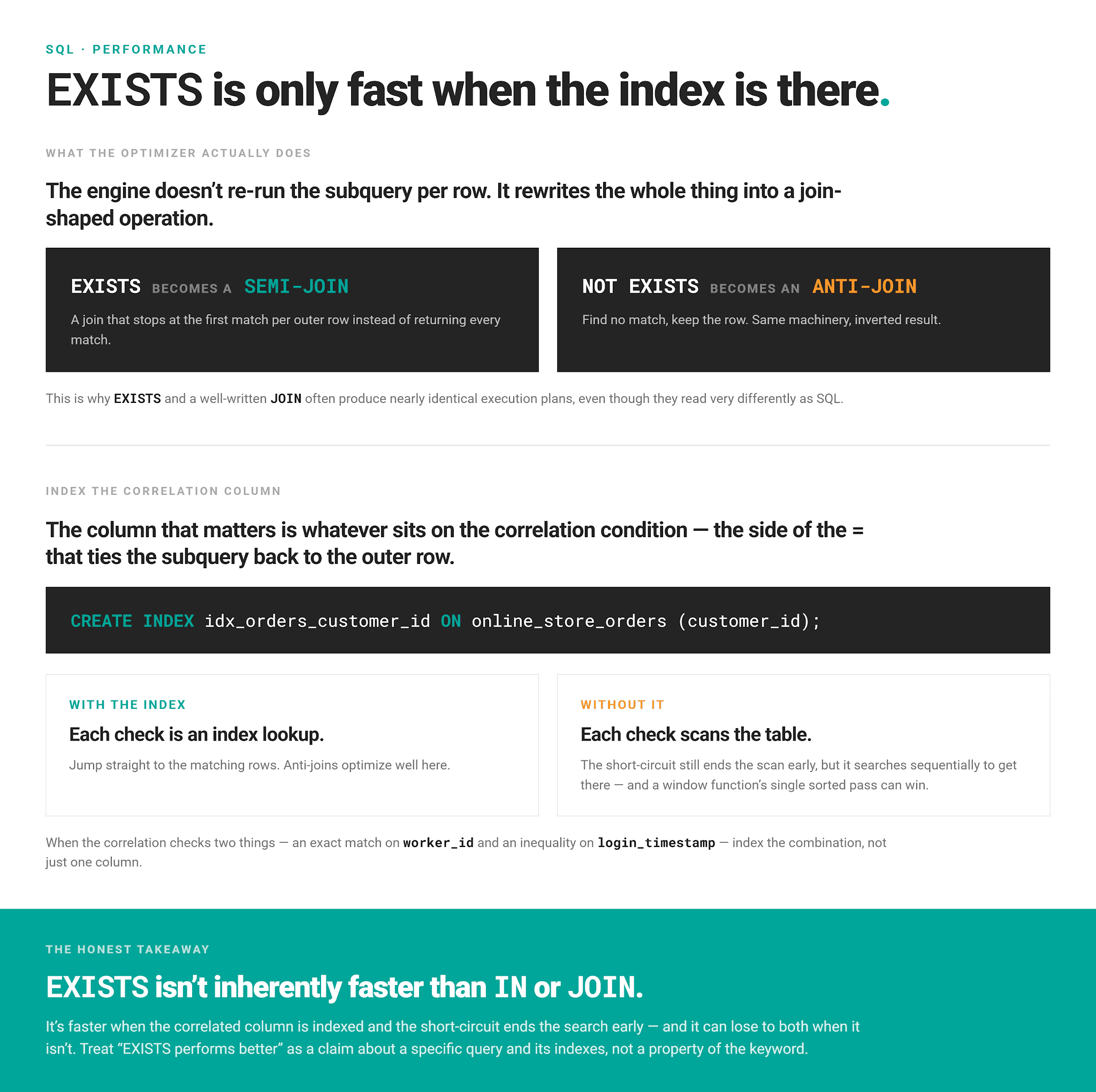
Because SQL EXISTS stops once it finds a single matching row (short-circuiting), it has a reputation for being fast. True, but only if it can find that first match quickly, which is a question of indexing.
Practical SQL EXISTS Examples
I want to quickly show you two more examples that are structurally different from anything we’ve covered so far.
Checking a Multi-Valued Field
EXISTS isn't limited to checking across two tables. It also works against values derived from a single row's own column.
The “Records With Words Starting With 'g'” question is a real example of that.
Records With Words Starting With 'g'
Find all records with words that start with the letter 'g'.
Output words1 and words2 if any of them satisfies the condition.
Each row of google_word_lists has comma-separated words, shown in the words1 and words2 columns. The task is to flag rows where any word in either field starts with "g."
STRING_TO_ARRAY() splits the comma-separated text into a list, UNNEST() turns that list into individual rows, and EXISTS checks whether any of those exploded rows match the pattern.
The two independent EXISTS joined with OR cover both columns of the same table.
Here’s the output.
| words1 | words2 |
|---|---|
| google,facebook,microsoft | flower,nature,sun |
| sun,nature | google,apple |
| beach,photo | facebook,green,orange |
EXISTS as a Flag Column
You wouldn't guess it from the examples so far, EXISTS doesn’t have to live in a WHERE clause.
You can use it directly in SELECT as a boolean flag in CASE WHEN.
Here's that pattern applied to the customers/orders data from earlier, flagging which customers have ever placed a qualifying order without filtering them out of the result entirely.
Here’s the output.
| customer_id | customer_name | has_large_order |
|---|---|---|
| 1 | Alice Johnson | yes |
| 2 | Bob Smith | yes |
| 3 | Carol Williams | yes |
| 4 | David Brown | no |
| 5 | Emma Davis | no |
| 6 | Frank Miller | yes |
| 7 | Grace Wilson | yes |
| 8 | Henry Moore | no |
| 9 | Ivy Taylor | yes |
| 10 | Jack Anderson | no |
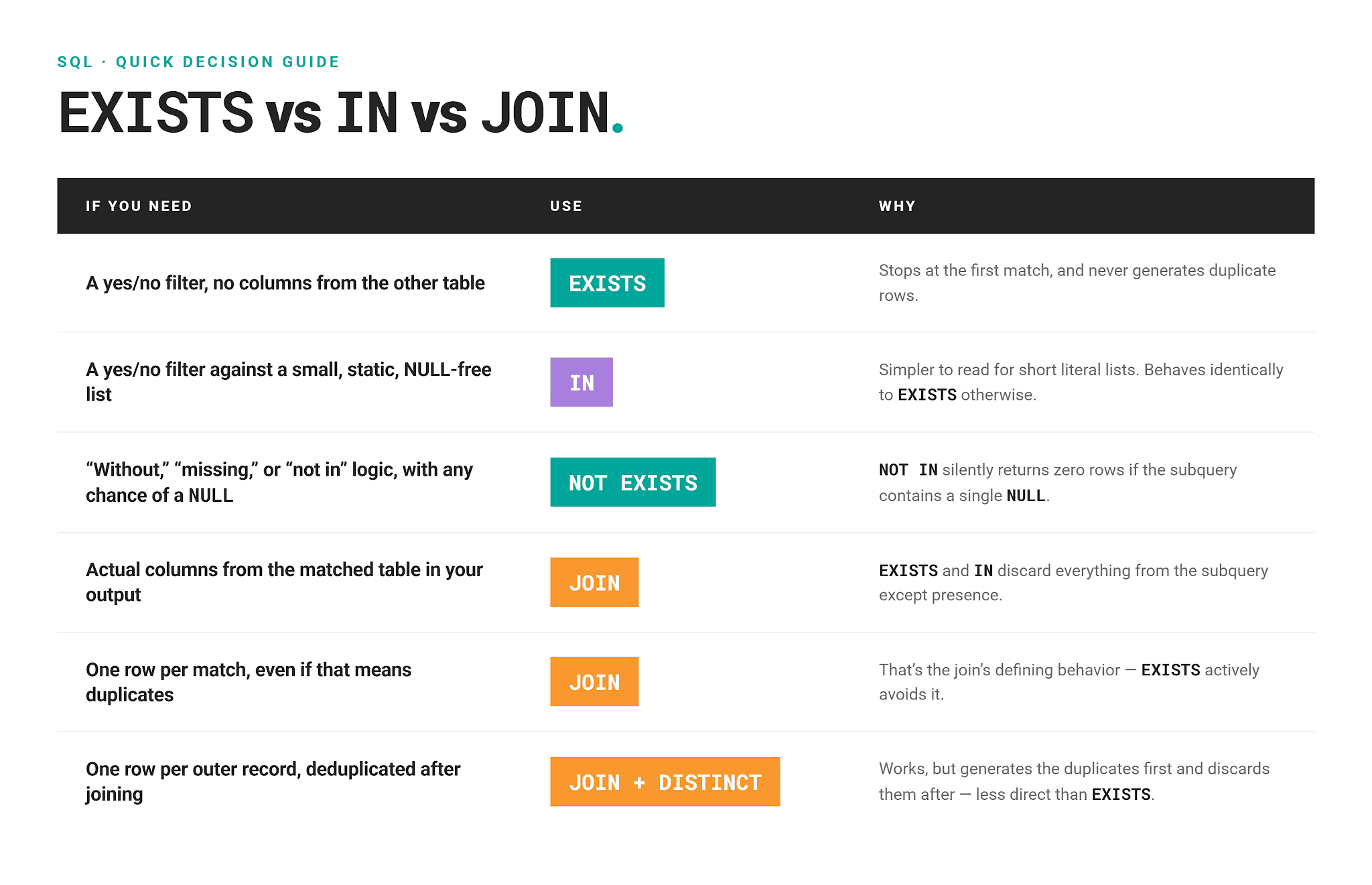
EXISTS vs IN vs JOIN: Quick Decision Guide
A compact reference for the moment you're staring at a WHERE clause deciding which of the three to reach for.
Conclusion
EXISTS answers one question and one question only: did anything match? It does so one row at a time. That makes it avoid the row duplication, sidestep the NULL trap, and easily fit in the correlated patterns.
It shouldn’t be understood as only a replacement for JOIN, IN, or window functions. While it can replace them (sometimes), it’s a standalone clause designed for checking the existence when you don’t require values.
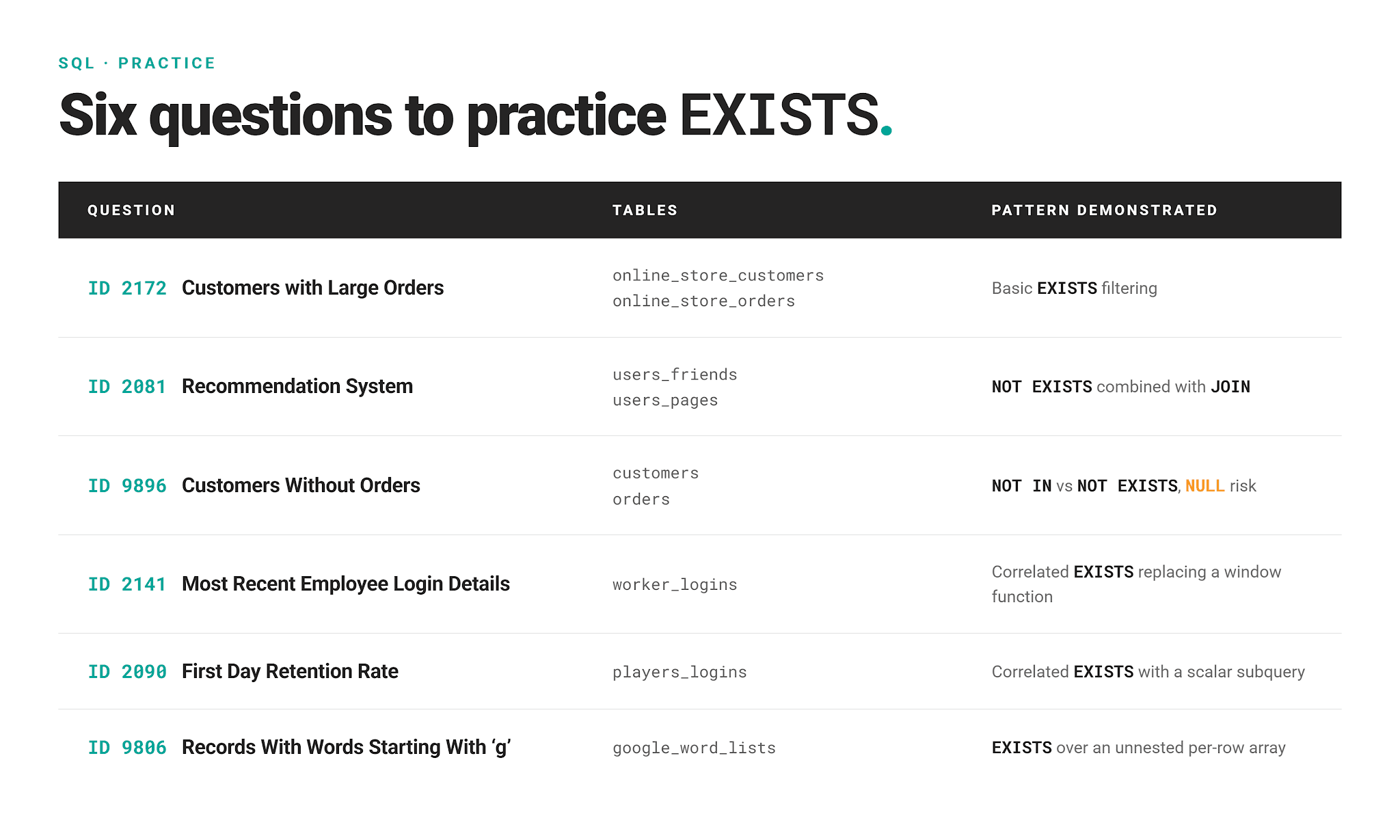
Here’s a quick reference of patterns we’ve shown if you want to practice them.
FAQs
1. What does EXISTS do in SQL?
It checks whether a subquery returns at least one row, and returns a simple true or false – never the actual matched values. It’s a presence check, not value comparison.
2. Is EXISTS faster than IN?
Not inherently. For positive checks, IN and EXISTS typically produce the same execution plan under the hood. The reason is that most optimizers, including PostgreSQL's, rewrite both into similar semi-join operations. Speed comes down to whether the correlated column is indexed, not which keyword you used.
For negative checks, it's a different story: NOT EXISTS can always be rewritten into an efficient anti-join, while NOT IN often can't, because the optimizer has to preserve three-valued NULL logic unless it can prove the subquery's column has no NULLs (for example, via a NOT NULL constraint). Where that proof isn't available, NOT IN can lose real efficiency, not just correctness, compared to NOT EXISTS.
3. Is SELECT 1 required inside EXISTS?
No. The engine ignores whatever you SELECT inside an EXISTS subquery entirely; only row presence matters. SELECT 1 is just the informal convention because it signals "we don't care what's selected here" more clearly than SELECT * or a specific column would.
4. Does EXISTS work with NULL values?
Yes. EXISTS just asks whether the subquery returns any row – a NULL sitting in some unrelated column doesn't stop other rows from matching.
The same applies to NOT EXISTS.
5. Can EXISTS be used without a correlated subquery?
Technically yes. The subquery doesn't have to reference the outer row at all, and EXISTS will still return true or false. But without that reference, it evaluates once and returns the identical answer for every outer row, functioning as a single yes/no gate on the whole query rather than a per-row filter.
However, correlation is what makes EXISTS useful as a filter in the first place.
Share