AI in Data Science: How Experts Decide What to Automate

 Written by:
Tihomir Babic
Learn how experts use AI in data science, which tasks they automate, where human judgment still matters, and how the AI data scientist workflow is evolving.
Getting AI to write a query takes seconds. For data scientists, it’s more important to know what part of your job AI should never touch. And that takes knowledge and years of experience.
In this article, we’ll skip years of learning and walk you through a framework for deciding where to use AI and where human judgment is irreplaceable.
What Does AI in Data Science Actually Mean?
“AI in data science” gets thrown around quite a bit. It usually means two very different things. Mixing them up – as many do – leads to a lot of confusion.
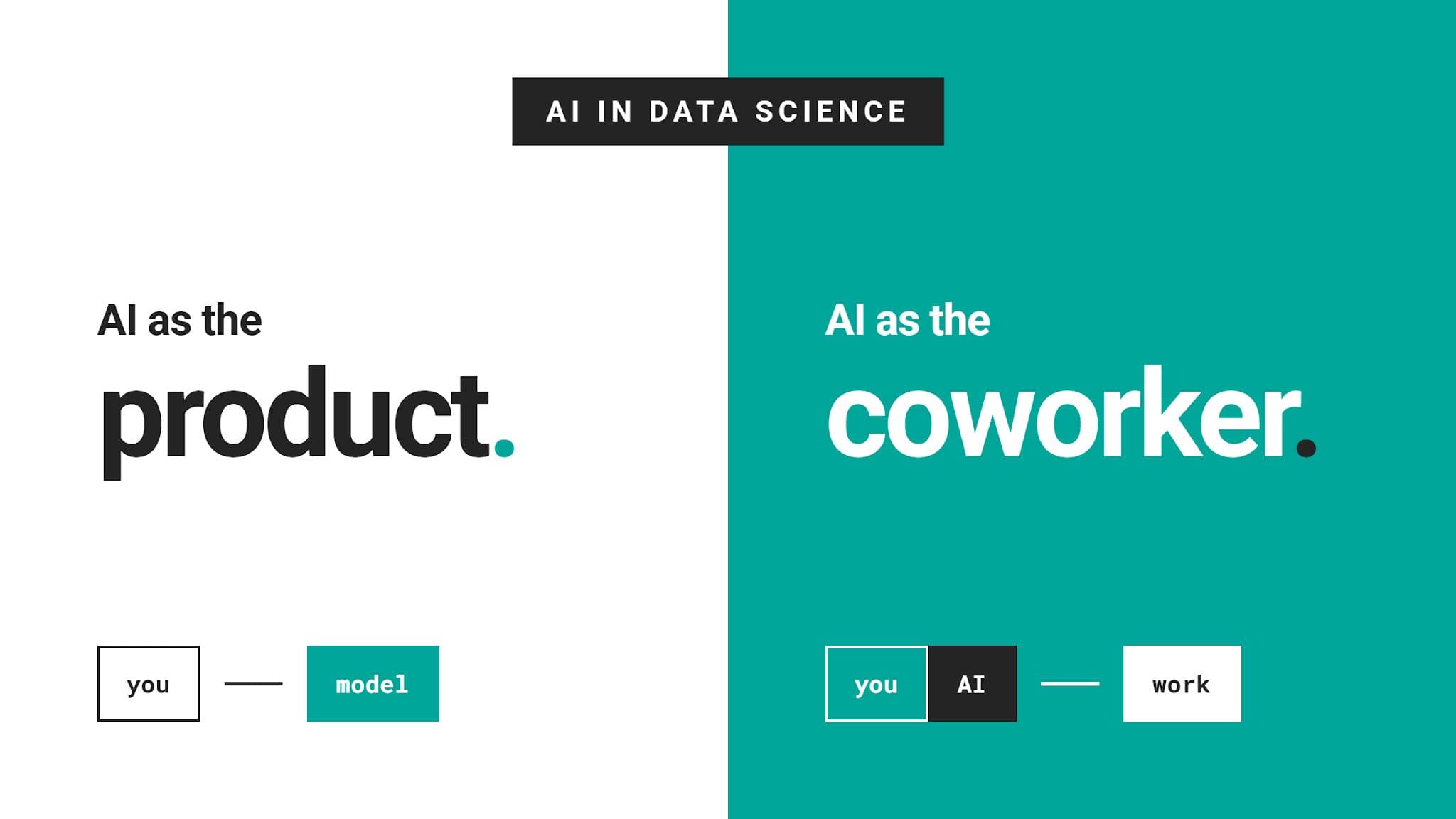
AI as the Product
For years, AI in data science referred to the models you build as a data scientist. Train a churn classifier or a demand forecast, and that is your deliverable.
That meaning is still valid, as machine learning remains a core part of what many data scientists do.
However, that’s not what most people on LinkedIn and in real life mean when they talk about AI; they talk about AI as a coworker.
AI as the Coworker
Or, in other words, a tool that improves your productivity. Here, the relationship flips around: it’s not a product that you help “become alive,” but the product helps you.
Think of it as a junior colleague that writes your SQL, explains a stack trace, or runs a multi-step analysis inside your notebook.
“AI as the coworker” is what this article covers.
Three Levels of AI Involvement
In practical data science, people usually apply AI in three ways.
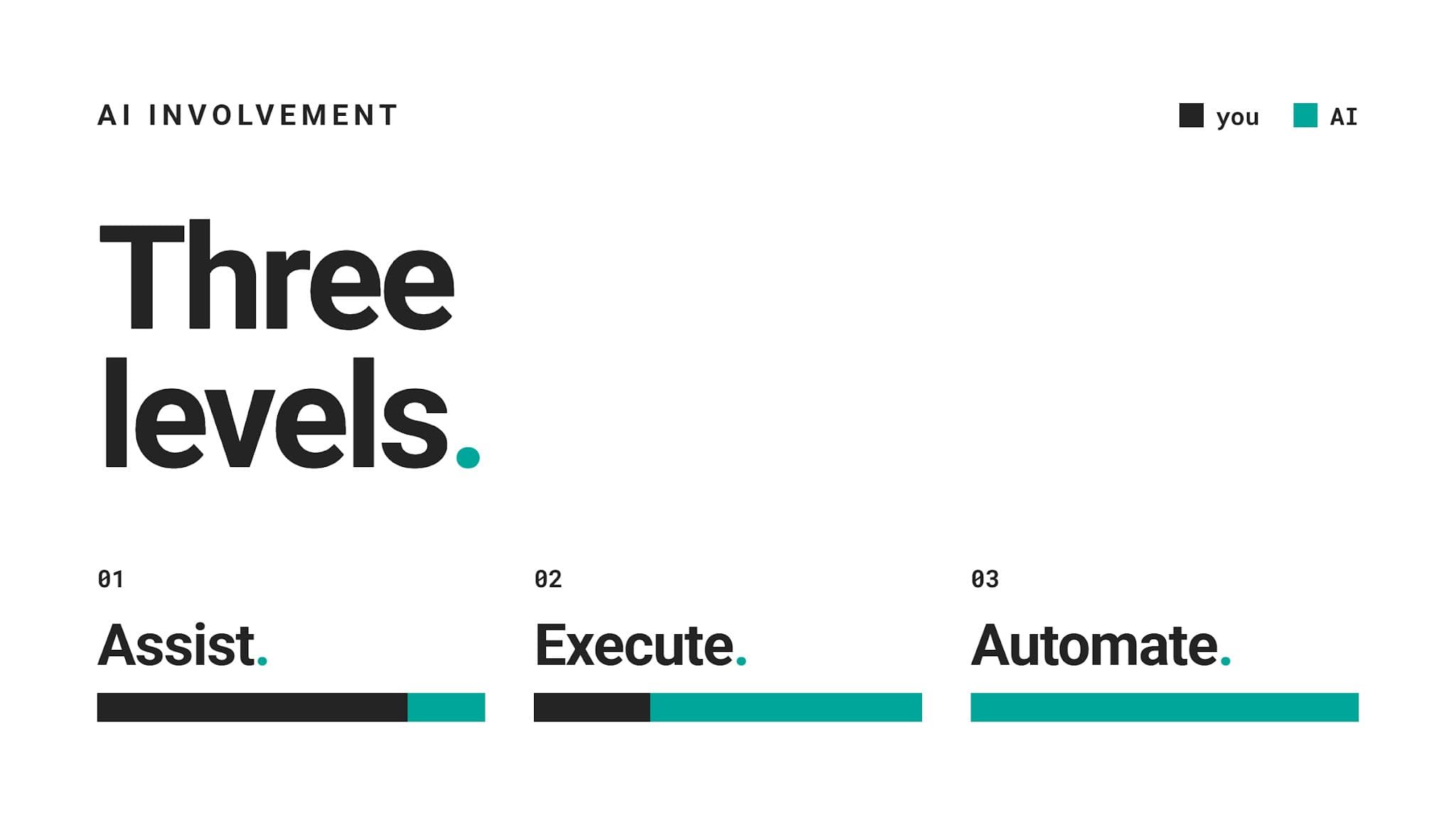
Assist: This is when AI suggests, explains, or drafts. You are still in control of every decision and every line the assistant produces.
Execute: AI produces a complete piece of work, e.g., a query, a chart, or a cleaning script. Your part is reviewing, fixing (or asking for it to be fixed), and approving it.
Automate: There’s no you here at all. AI runs a task end to end with little or no human review. Mistakes? Well, you hope for the best because mistakes surface much later.
Experts are aware AI can do most of their tasks, so it’s not a question of whether AI can do it. The question is whether it can do it well and whether it should do it at all.
Where AI Fits Into the Data Science Workflow
AI is not equally good at every task. It could work great for some project stages, and falter in others.
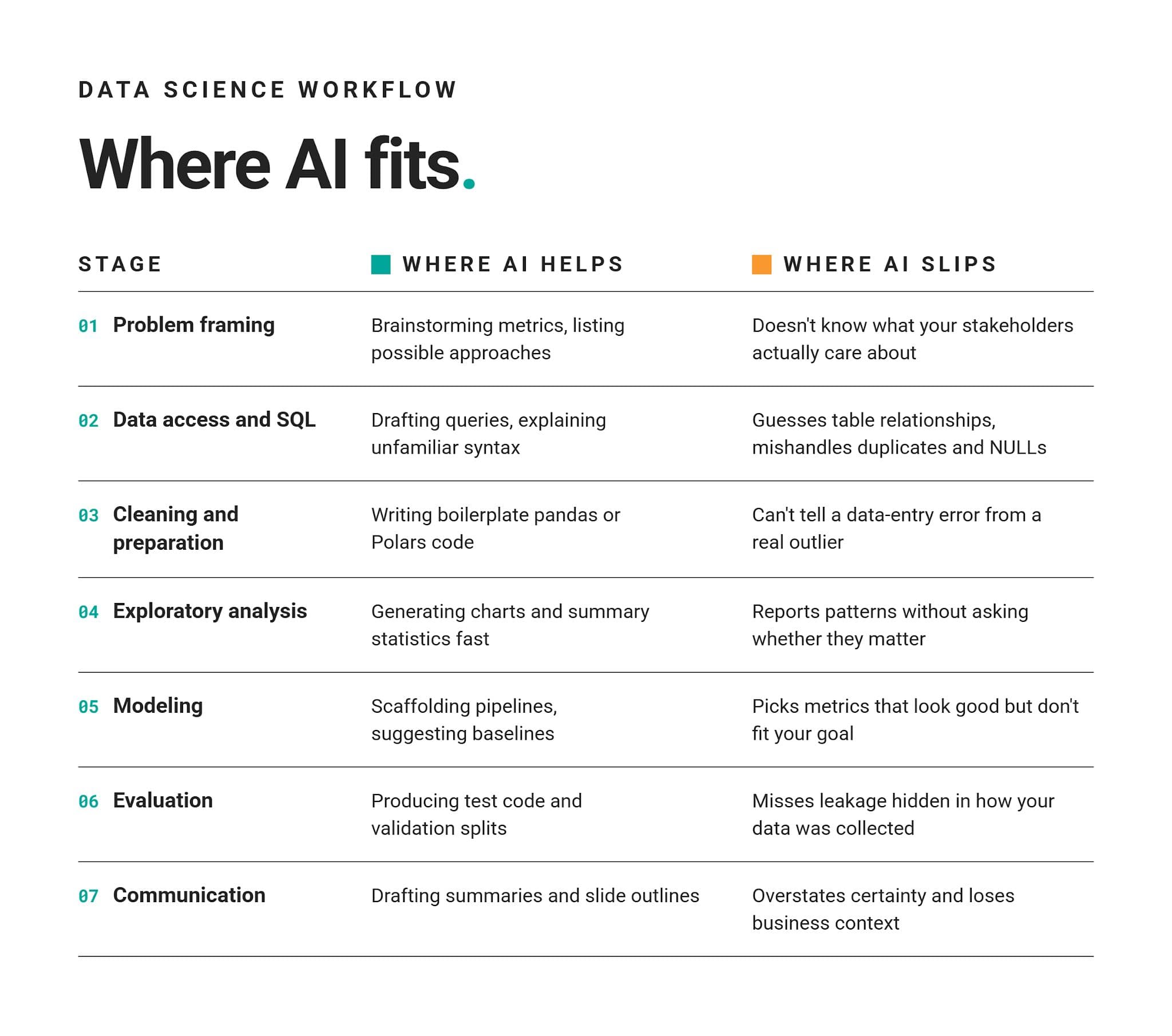
Here’s how AI typically fares across the project stages.
Did You Notice the Pattern?
If you have a closer look at the “Where AI Helps” column, you’ll see it mostly contains mechanical work. Writing, drafting, listing, generating: those are all tasks where speed matters and errors are easy to spot.
The “Where AI Slips” column demonstrates that nearly all slips come from missing context, be it your data, your business, or what a number really means.
The Expert Framework: What Should You Automate?
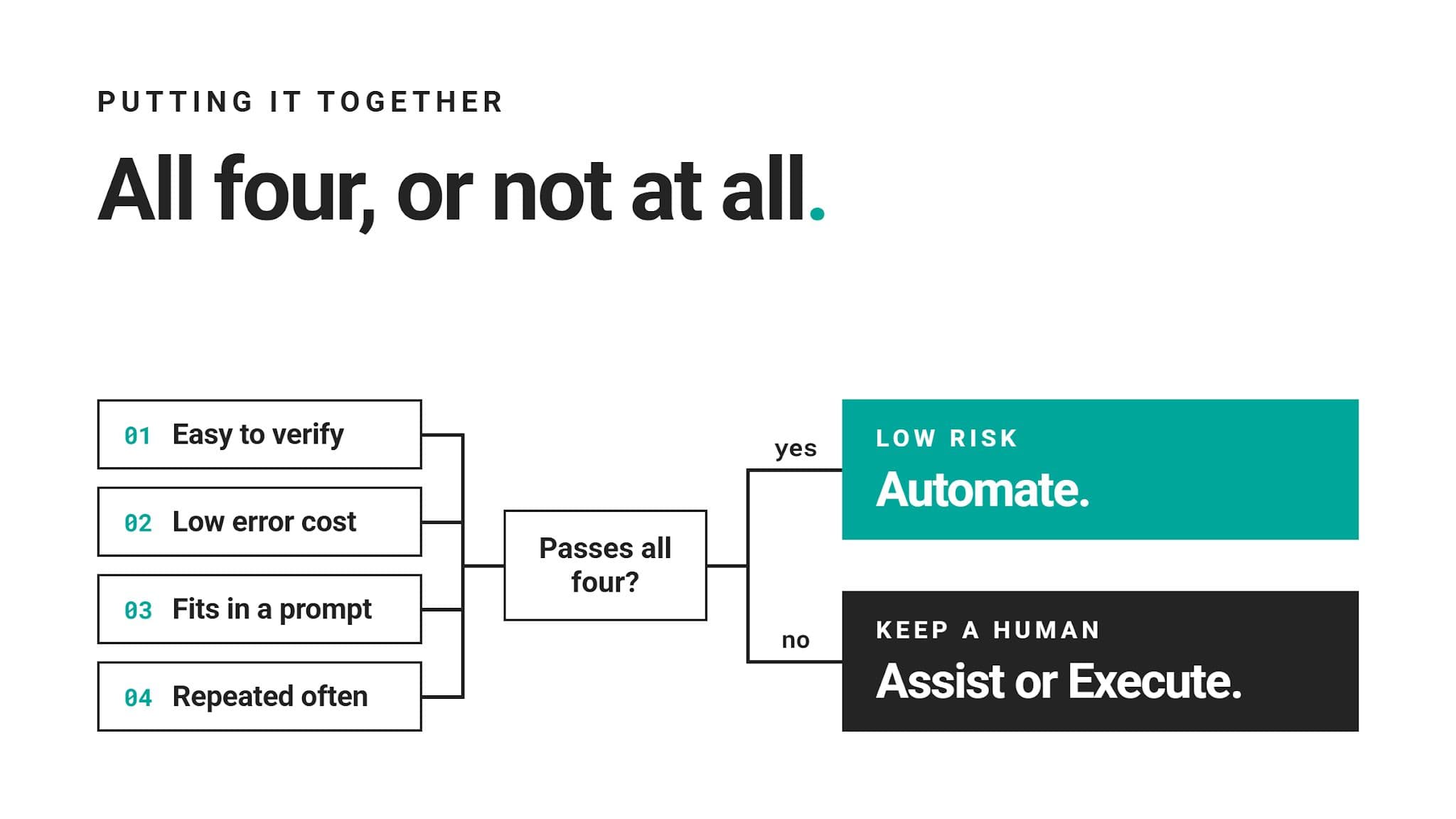
Data science experts decide what to automate based on what happens when AI gets it wrong, not on what it can do.
The decision comes down to only four questions.
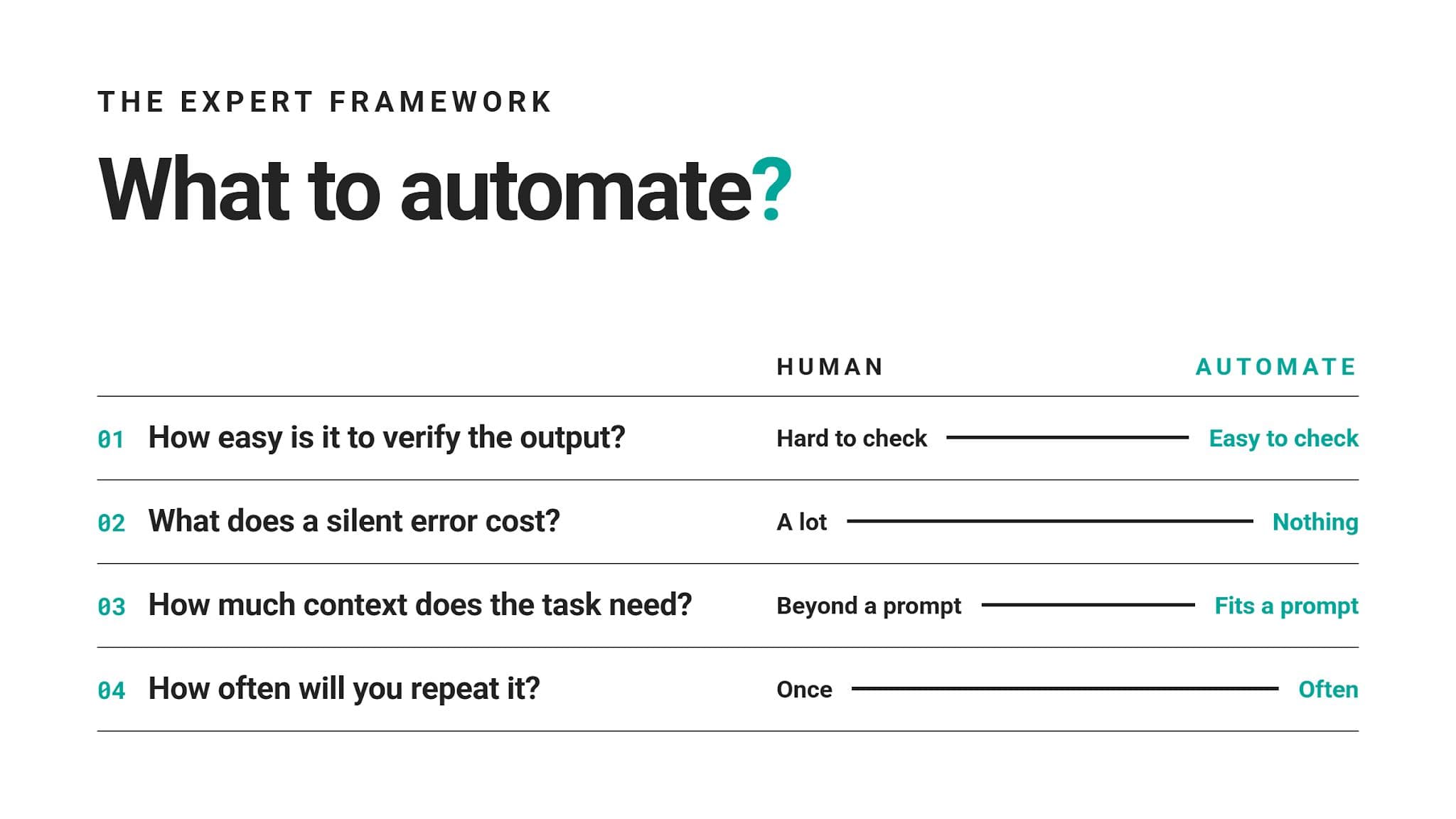
1. How Easy Is It To Verify the Output?
Some outputs are very easy for a human to check, e.g., a regex either matches your test strings or it doesn't. Such tasks are candidates for automation.
Many other outputs can look correct, but are subtly broken, and it takes a lot of effort to discover that. Think of a query that silently drops NULL rows and returns clean, plausible numbers that nobody questions. This calls for human review.
2. What Does a Silent Error Cost?
Experts are not concerned only with errors happening. They also consider the cost of errors that are never caught – the more expensive the silent error, the more human review a task needs.
For example, a wrong chart color costs nothing, so feel free to automate that. However, a wrong revenue figure in a board deck costs credibility, and sometimes a budget, so this suggests the task is not suitable for full automation and asks for as little AI involvement as possible, or none at all.
3. How Much Context Does the Task Need?
AI can’t use context it never received. So, a rule of thumb is if all the context is in the prompt, then that task is probably a safe candidate for automation.
For example, when converting code from pandas to Polars, AI doesn’t need extra context so that it can convert it easily and correctly.
On the other hand, AI will fail with tasks that depend on business history, stakeholder goals, or data quirks. It’s probably easier for you to do the tasks than to explain the complete context in a prompt.
4. How Often Will You Repeat It?
If it’s a one-off task, building a fully automated pipeline is probably overkill. A quick, AI-assisted draft is probably better than hours spent on automation.
However, if the task is recurring, that’s a different story. A well-understood and well-tested task is a perfect candidate for automation; it will free you for harder and, probably, more interesting work.
Putting It All Together for a Decision
Data Science Tasks You Should Automate or AI-Assist
Run common tasks through those four questions, and a clear group emerges. These tasks pass most or all of the tests so that AI can take a big share of the work.
We’ve sorted them by how much control you can safely give up.
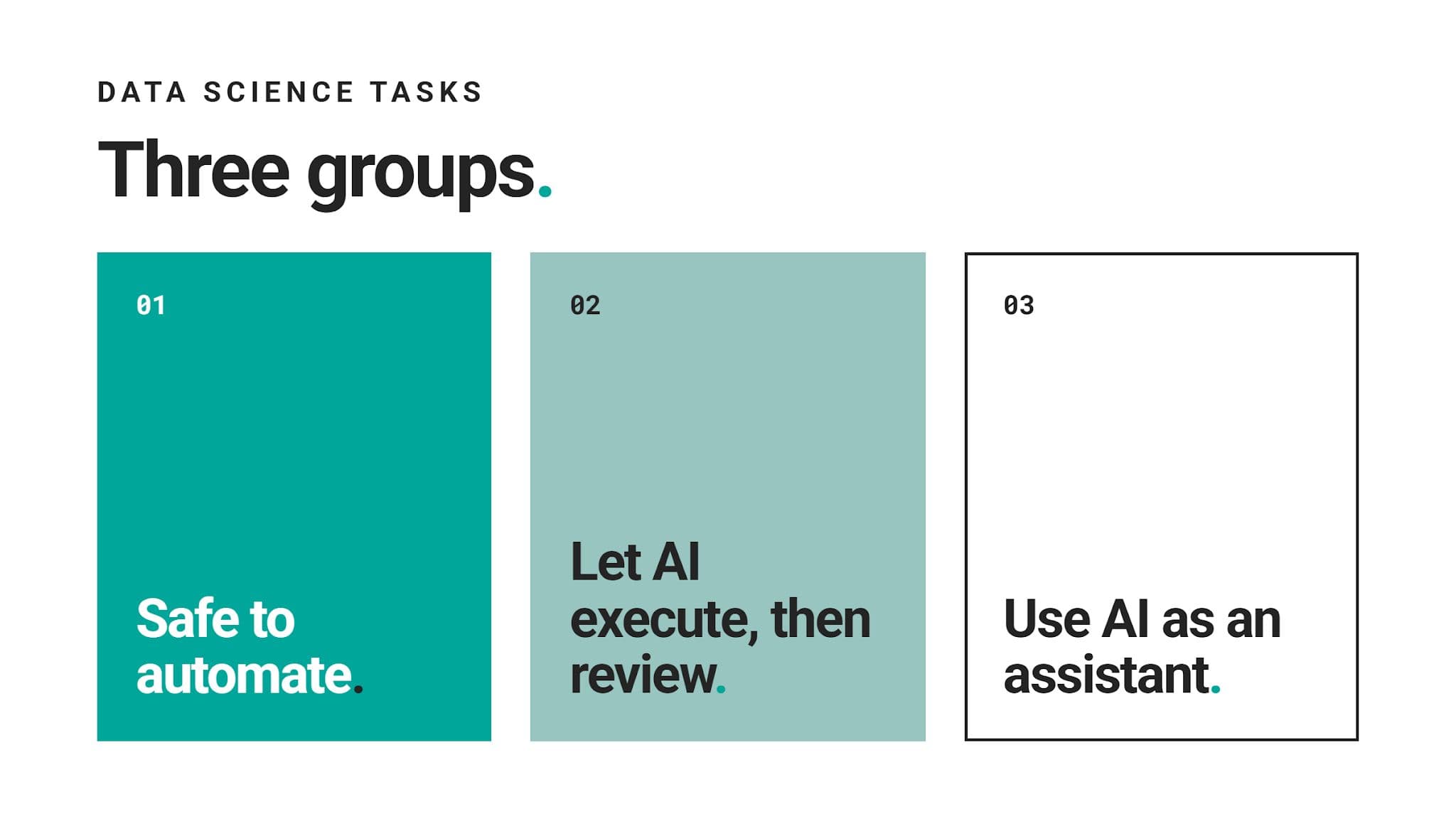
1. Safe to Automate
These tasks are easy to verify, cheap to get wrong, and need little or no outside context.
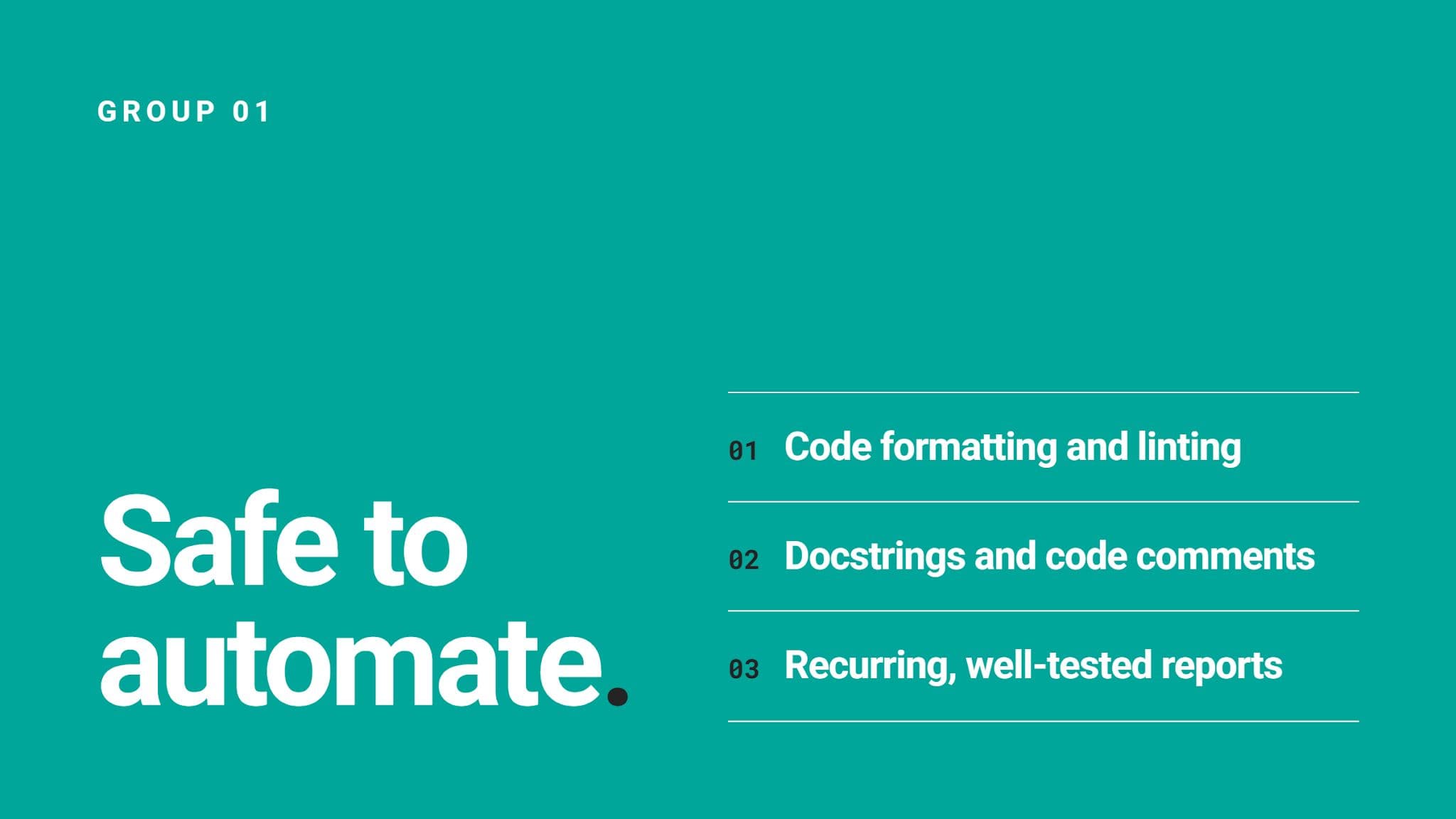
Code formatting and linting: Style fixes either pass your linter or they don’t. There’s nothing about your business that will change the result.
Docstrings and code comments: AI typically describes well what code does. Skim through it, and you will easily catch a mistake. Even if you don’t, a wrong comment doesn’t really break anything.
Recurring, well-tested reports: Once your weekly report runs correctly for some time (say, a month or two), letting it run on a schedule makes sense. However, always keep tests in place so breakage gets flagged.
2. Let AI Execute, Then Review
AI produces a full first version; you check it before it goes anywhere.
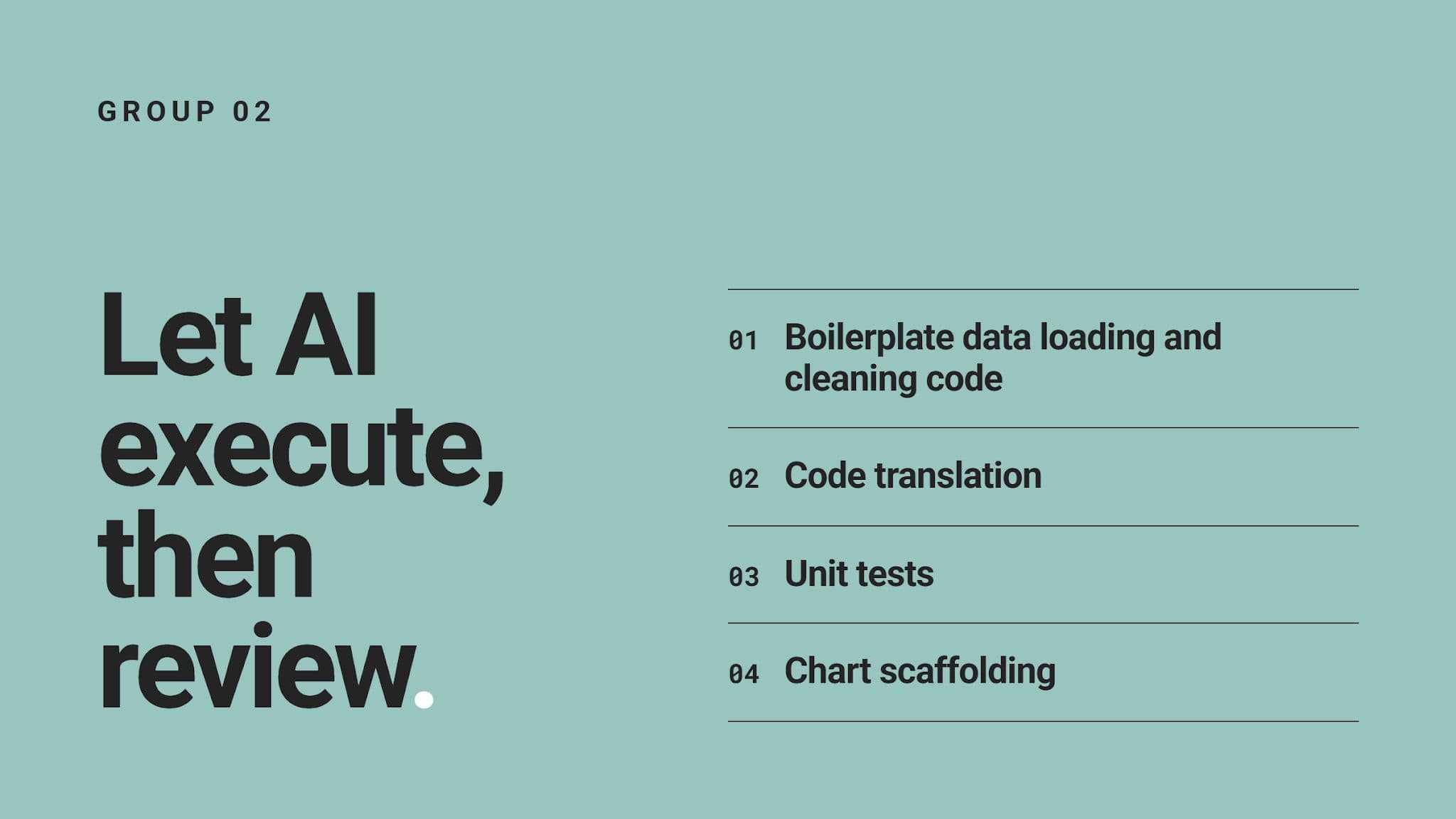
Boilerplate data loading and cleaning code: Repetitive and mechanical tasks, such as reading files, renaming columns, or fixing data types, are perfect for AI. You should review any step that drops or fills values.
Code translation: Moving logic from pandas to Polars or from one SQL dialect to another needs only the code itself. Run both versions on the same dataset and compare outputs.
Unit tests: AI writes test cases quickly and often thinks of inputs you’d skip. Your responsibility here is to make sure tests check real behavior, not just whether the code runs.
Chart scaffolding: AI easily gets plot structure, labels, and layout right. You still have to decide which chart actually makes the most sense for the business case.
3. Use AI as an Assistant
This is for tasks where AI speeds up your thinking, but doesn’t replace it.
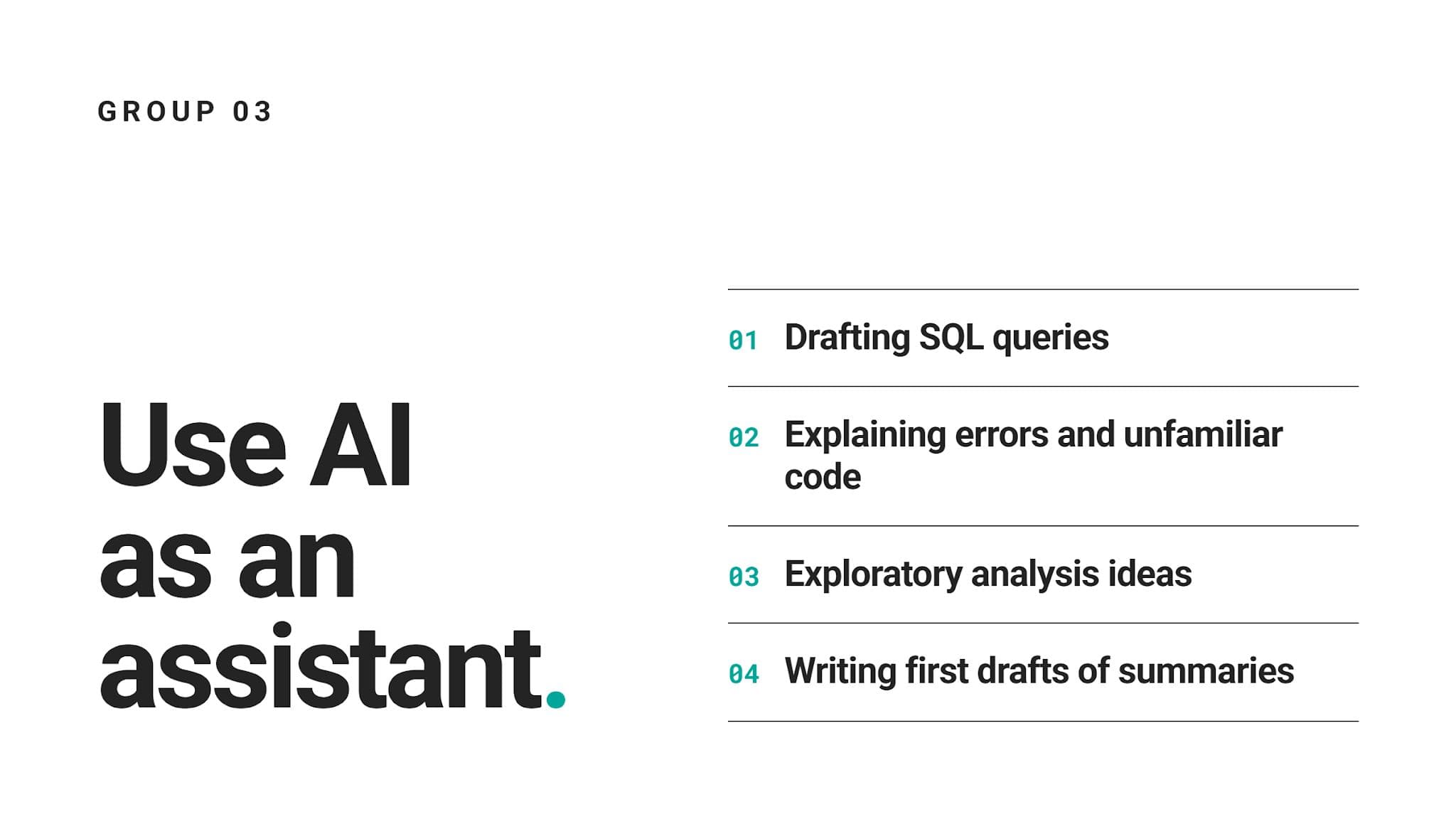
Drafting SQL queries: AI’s first code draft is a starting point. AI deals with syntax and joins to save your time. You still need to deal with table relationships and edge cases.
Explaining errors and unfamiliar code: AI quickly finds errors in code – yours or someone else’s – where you’d be eyeballing it for minutes, sometimes even hours. A suggested fix still needs your confirmation that it does what it should.
Exploratory analysis ideas: AI is great for ideation; it can suggest angles, segments, and summary statistics worth checking.
Writing first drafts of summaries: AI turns notes into readable summaries fast. You still need to smooth out the writing style and, more importantly, check every number and claim.
What These Tasks Have in Common
Each of these tasks produces output you can read, run, or test in minutes. This is verifiability, the first question in our automation decision framework. It’s a question where most of the to-automate-or-not decisions get settled. In many cases, you don’t even need the other three questions, as the task fails at verifiability.
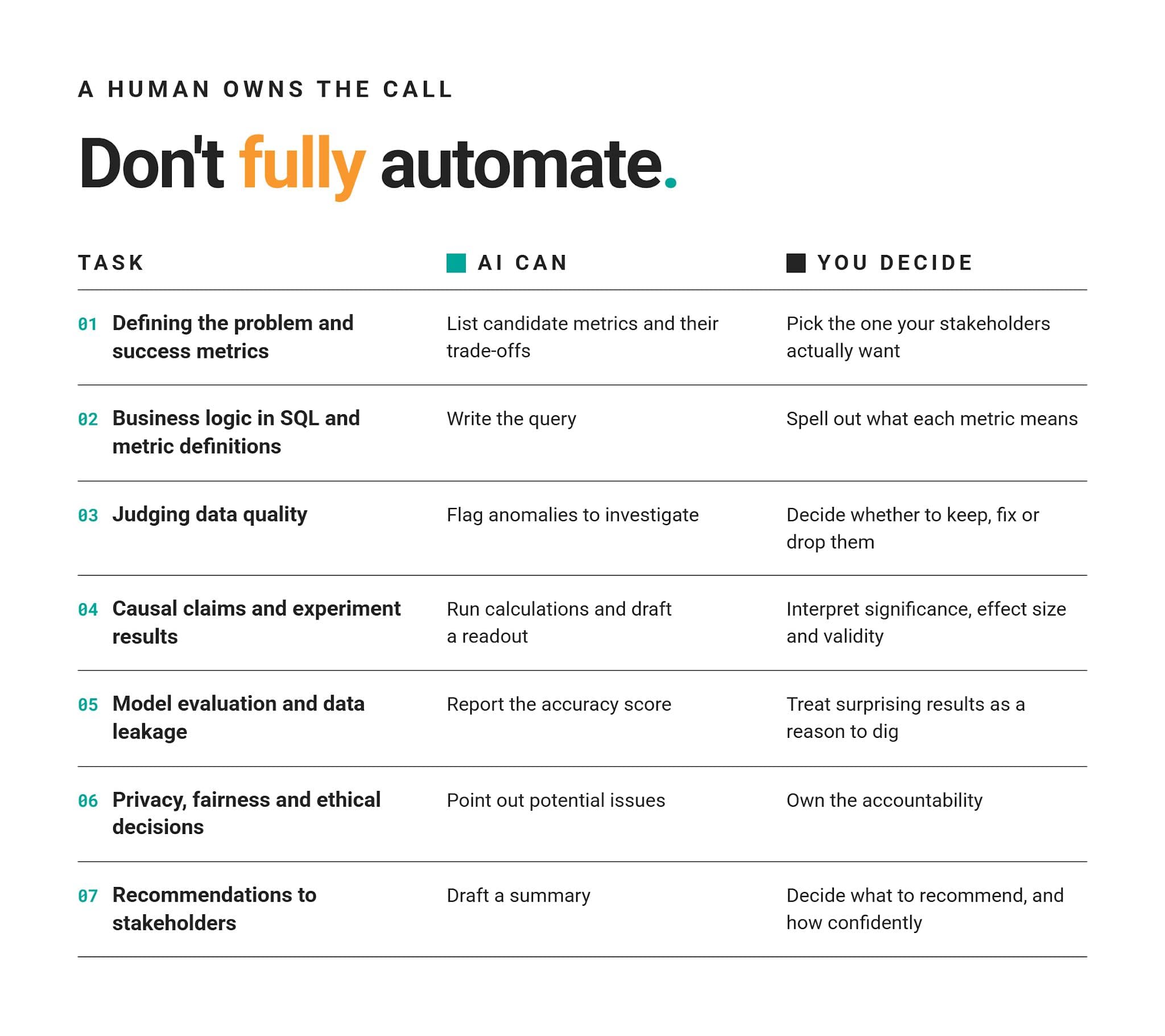
Data Science Tasks You Shouldn’t Fully Automate
Notice the word “fully” in this section’s title. None of the tasks we mention here are off-limits for AI. But they shouldn’t run without your final call, as they fail our framework on verification, error cost, or context.
What all these tasks have in common is that they produce outputs that look right – whether or not they are.
When errors are invisible and expensive, a human has to stay in that loop.
A Practical AI Automation Matrix for Data Scientists
This matrix plots all four framework questions by pairing them up.
Verification and error cost together measure risk: how bad things get if AI is wrong and nobody notices.
Context and repetition together measure readiness: whether AI has what it needs and whether you know what a good result looks like.
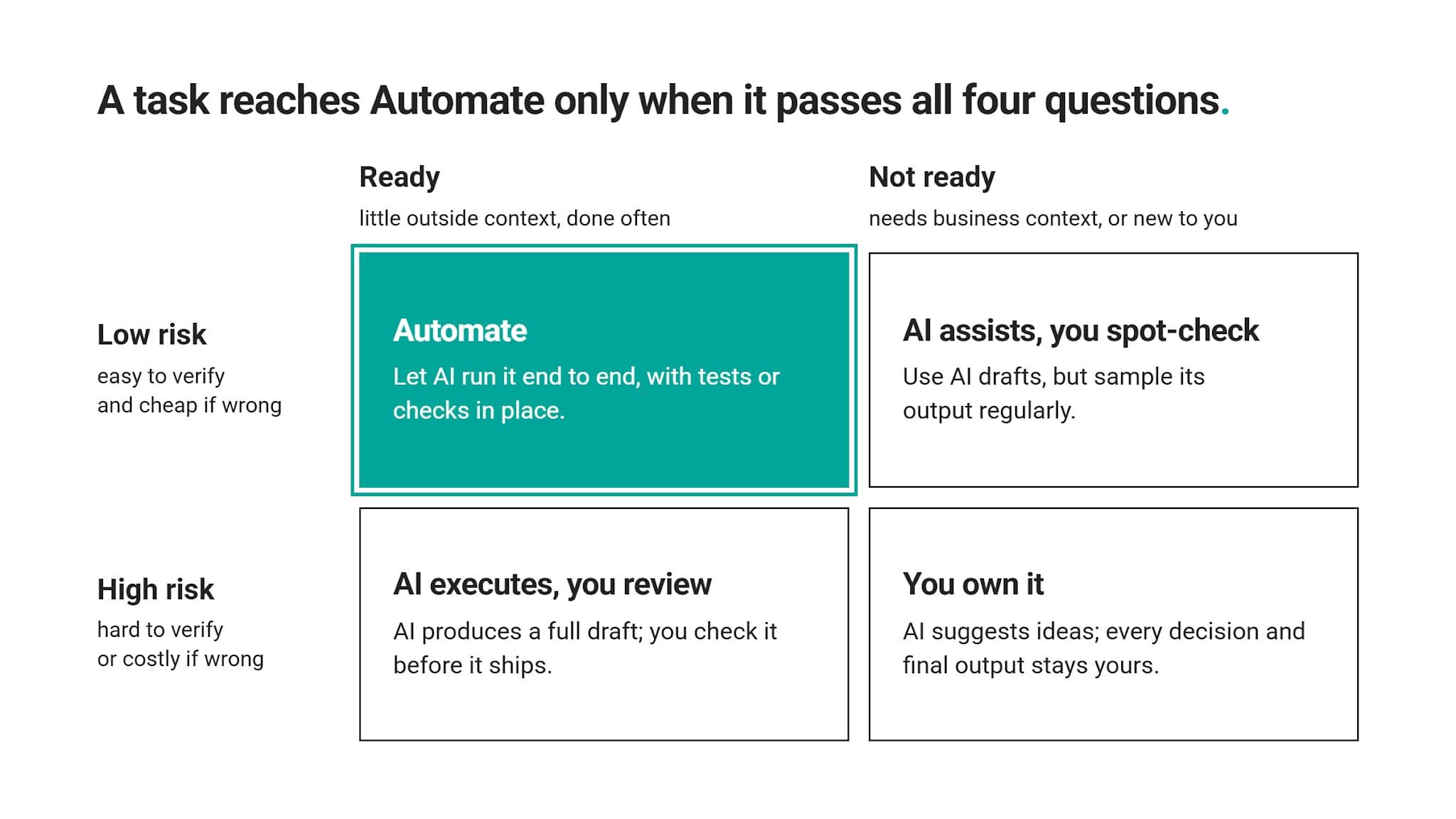
As we mentioned earlier, a task reaches Automate only when it passes all four questions. Failing any one moves it into a quadrant with more human involvement.
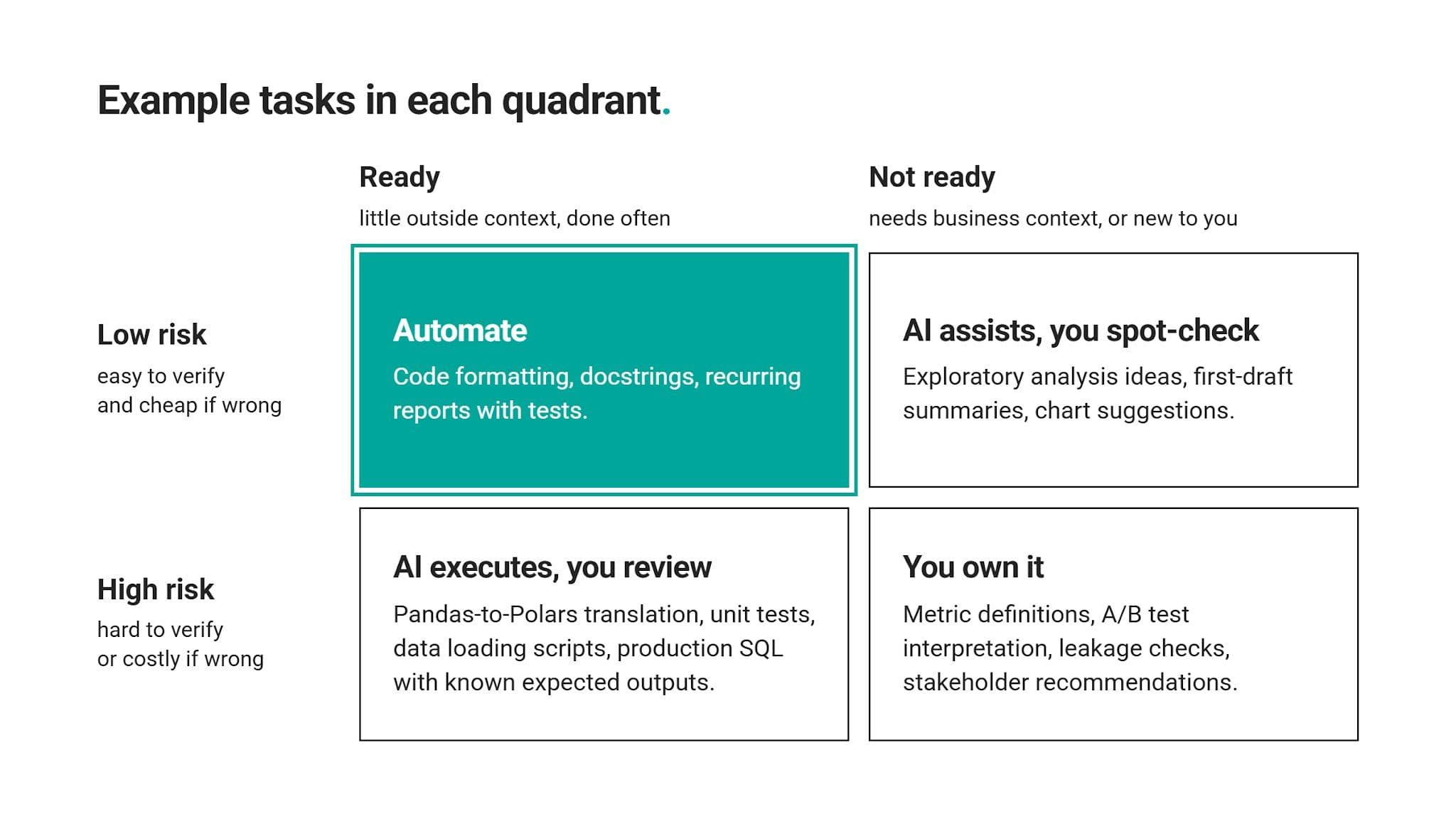
Example Tasks in Each Quadrant
Using the same matrix visual, here are several example tasks for each quadrant.
Tasks Move Over Time
The tasks are not fixed, so check them against the matrix occasionally. We recommend doing that whenever the data, tools, or your business change.
A task that was not safe to automate half a year ago might be safe now. For example, a brand-new SQL report would probably start in the bottom-right quadrant – “You own it”. After a month or two of validated runs, that same report could move to the top-left quadrant – “Automate”.
Example: How an Expert Uses AI on a Real Data Science Problem
Let’s walk through a real interview question – Ranking Most Active Guests from Airbnb – to demonstrate how the automation matrix works in practice.
Ranking Most Active Guests
Identify the most engaged guests by ranking them according to their overall messaging activity. The most active guest, meaning the one who has exchanged the most messages with hosts, should have the highest rank. If two or more guests have the same number of messages, they should have the same rank. Importantly, the ranking shouldn't skip any numbers, even if many guests share the same rank. Present your results in a clear format, showing the rank, guest identifier, and total number of messages for each guest, ordered from the most to least active.
It asks us to rank guests by how many messages they’ve exchanged with hosts. The result has to meet five requirements:
- Sum each guest’s messages into one total.
- Give the most active guest rank 1.
- Give guests with equal totals the same rank.
- Never skip a rank number, even after ties.
- Show rank, guest ID, and total messages, sorted from most to least active.
We’ll work with one table: airbnb_contacts.
What We’re Using AI For
We’re using AI to draft one SQL query. On our matrix, this task lands in “AI executes, you review”.
Why? Readiness is high because everything AI needs is the question text and its one table, and ranking queries are familiar territory. However, risk is high, too; a wrong ranking looks just as clean as a correct one. Therefore, no automation here.
Each step below alternates between you and AI. It’s a preview of a full workflow covered later in the article, so watch who owns each step.
Step #1: Human Defines the Problem
Things can immediately go wrong in the first step. Under deadline pressure, you skim that question and boil it down to one line: rank guests by total messages.
Both tie rules get lost in the prompt.
Step #2: AI Executes a First Draft
You paste the airbnb_contacts schema and your one-line summary: “Rank guests by total messages exchanged with hosts.”
As AI has no way to know about rules you never mentioned, it can easily return something like this:
The code runs without errors. There’s nothing obviously wrong with the output, either: ranks start at 1, totals are sorted from highest to lowest.
Step #3: Human Validates the Output
Still, there’s a flaw in the output. RANK() leaves a gap after every tie, and there are quite a lot of those gaps. For example, rank 2 is missing, as are 4, 6, 8, 9, and so on.
That’s not a problem in itself. However, it is for this question, and the code returns the wrong output. You’d only catch it by going back to the original question and checking each requirement against the result.
You’d then notice that the question asks for the ranks not to be skipped, even after ties. Noticing that is a skill in itself. You can practice it with StrataScratch’s Debug-AI-Code mode currently available for 50+ questions. This mode gives you AI-written solutions to real interview questions with realistic bugs inside. Your job is – like here – to find and fix them.
Step #4: AI Iterates on a Sharper Prompt
Even though the draft that AI came up with is wrong, there’s no need to throw it away. Instead, follow up your initial prompt with rules you mistakenly didn’t provide: “Guests with equal totals must share a rank, and rank numbers can’t skip.”
With that info, AI will easily discern it needs to use DENSE_RANK(), which is correct. (Why not ROW_NUMBER instead? It, too, doesn’t skip ranks. That’s true, but it doesn’t assign the same rank to tied values, which is requirement #3.)
Step #5: Human Interprets the Result
A correct query doesn’t necessarily mean you’ve got the answer you wanted.
The actual output shows there are 96 guests spread across just 16 rank levels.
Only two guests share rank 1, with 20 messages each. Meanwhile, 60 of 96 guests sit at ranks 12 to 16, with five messages or fewer.
Having 17 guests ranked 13 and 19 ranked 15 probably doesn’t tell you much. Segments would probably be much more useful: 16 guests exchanged 10 or more messages; that’s a short list worth checking against booking data.
It can answer a bigger question: does a high message count mean engagement or friction? If most of those 16 guests book, messaging means interest. If they mostly don’t, they may be struggling to get answers from hosts, resulting in fewer bookings.
All that is a judgment call that stays with you.
What This Example Shows
AI didn’t do anything wrong. It did exactly what it was asked. The problem, however, was what it wasn’t asked. All fixes that you’ve seen came from us humans going back to the requirements, spotting the flaw, and writing a more precise follow-up prompt.
Working alongside AI requires practice, even when solving interview questions. You can practice this skill by clicking “Get AI Help” (in this and any other coding interview question). It opens StrataAI, a built-in tutor, which can explain the problem or give a hint pointing you toward the tie requirement.
How AI Changes the Role of the Data Scientist
The Airbnb question shows a shift that’s happening more broadly: data scientists spend less time typing code and more time deciding what code should do.
It impacts the role of a data scientist in four ways.
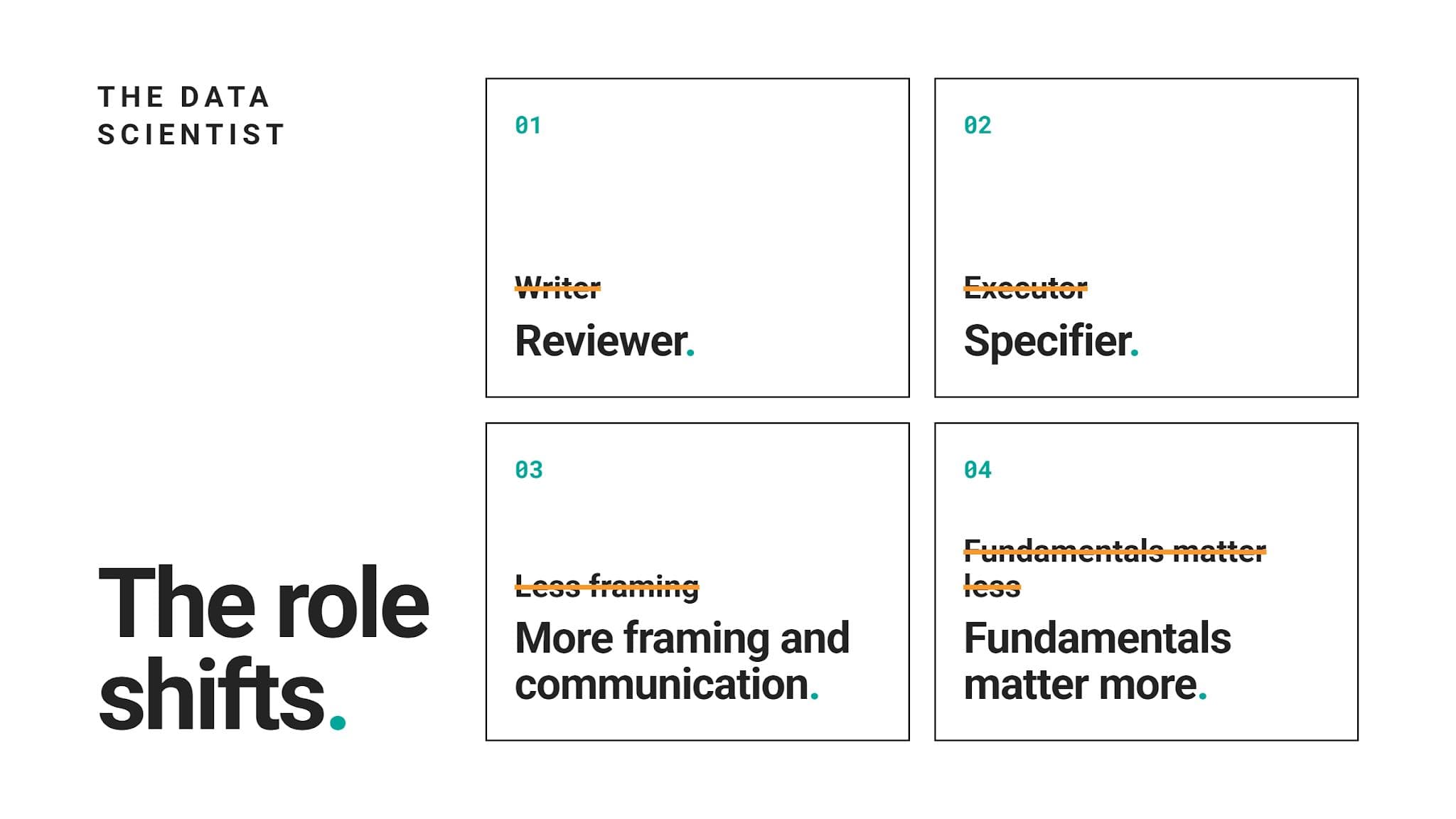
1. From Writer to Reviewer
A few years ago, most data science hours went into writing queries and scripts. Today, AI does that; at least first code drafts.
As AI writes syntax almost spotlessly, your value has moved to reviewing the code and deciding whether it answers the business question.
2. From Executor to Specifier
In our example, one omitted requirement produced a wrong answer that only looked right.
As AI only works with what you give it, turning vague business questions into precisely worded requirements is now even more important than before.
3. More Time on Framing and Communication
As code writing and execution get faster, the bottlenecks move to deciding which question matters and explaining what an answer means.
The same as the previous one, this is not a new skill. AI just made it more important and a bigger part of your workday.
4. Fundamentals Matter More, Not Less
It might sound counterintuitive, but coding fundamentals now matter even more than before. Yes, you don’t need to worry about the syntax most of the time, but you still need to understand how it works. Otherwise, you can’t review it. For example, spotting RANK() where DENSE_RANK() belongs requires knowing both functions well.
What Didn’t Change
What happens when things go wrong is what didn’t change. Accountability. You, not AI, will be blamed when a number in a report is wrong.
So, don’t treat AI as a replacement for your own judgment. Keep it at arm’s length on that. AI is only a fast collaborator.
Skills Data Scientists Need in an AI-First Workflow
As the data science role shifts toward specifying, reviewing, and judging, your skill set has to follow.
Here are the skills that you’ll need once AI enters your workflow.
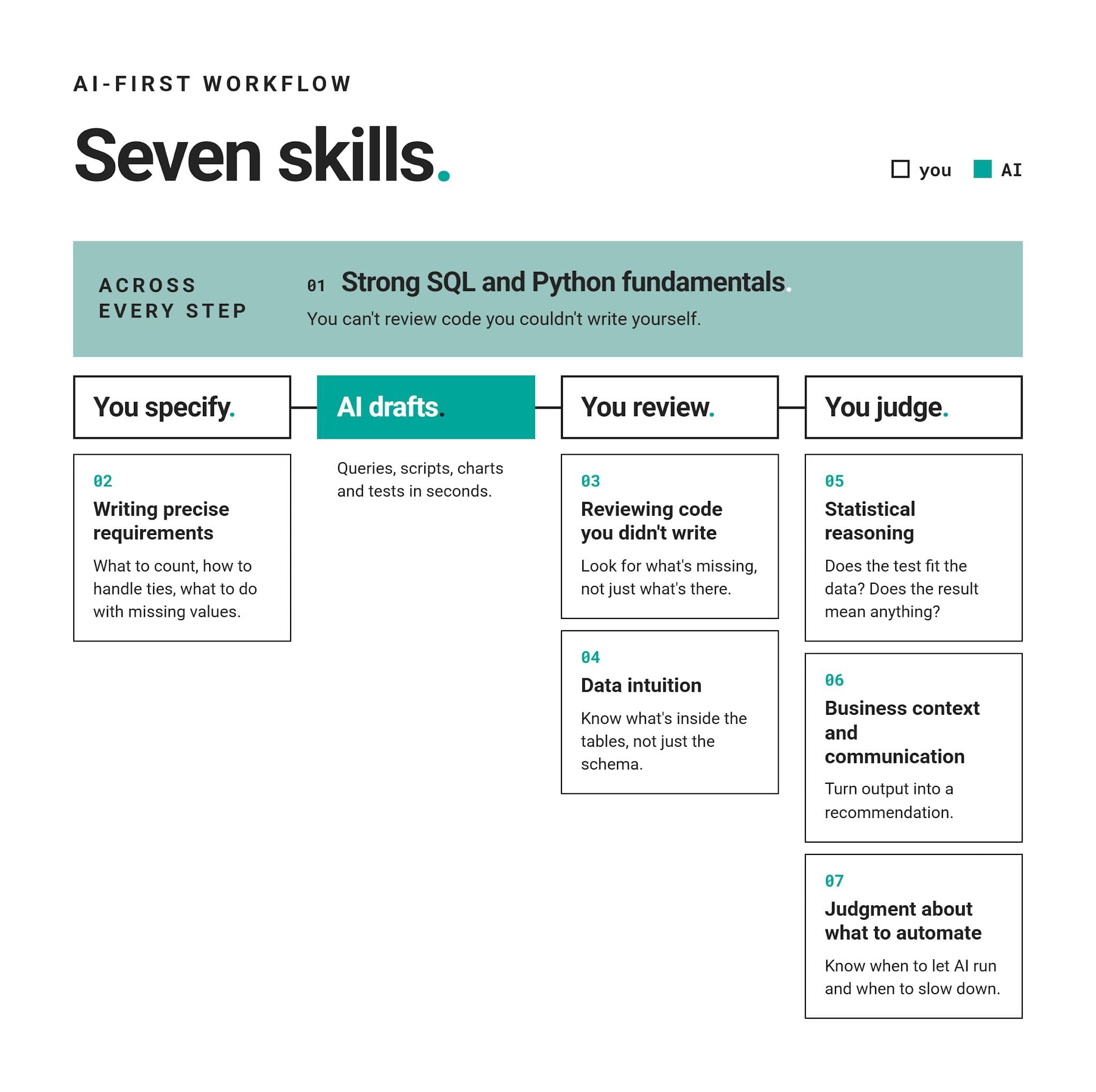
The AI Data Scientist Workflow
You’ve already seen most of this workflow in action in our Airbnb example.
Here’s the full version.
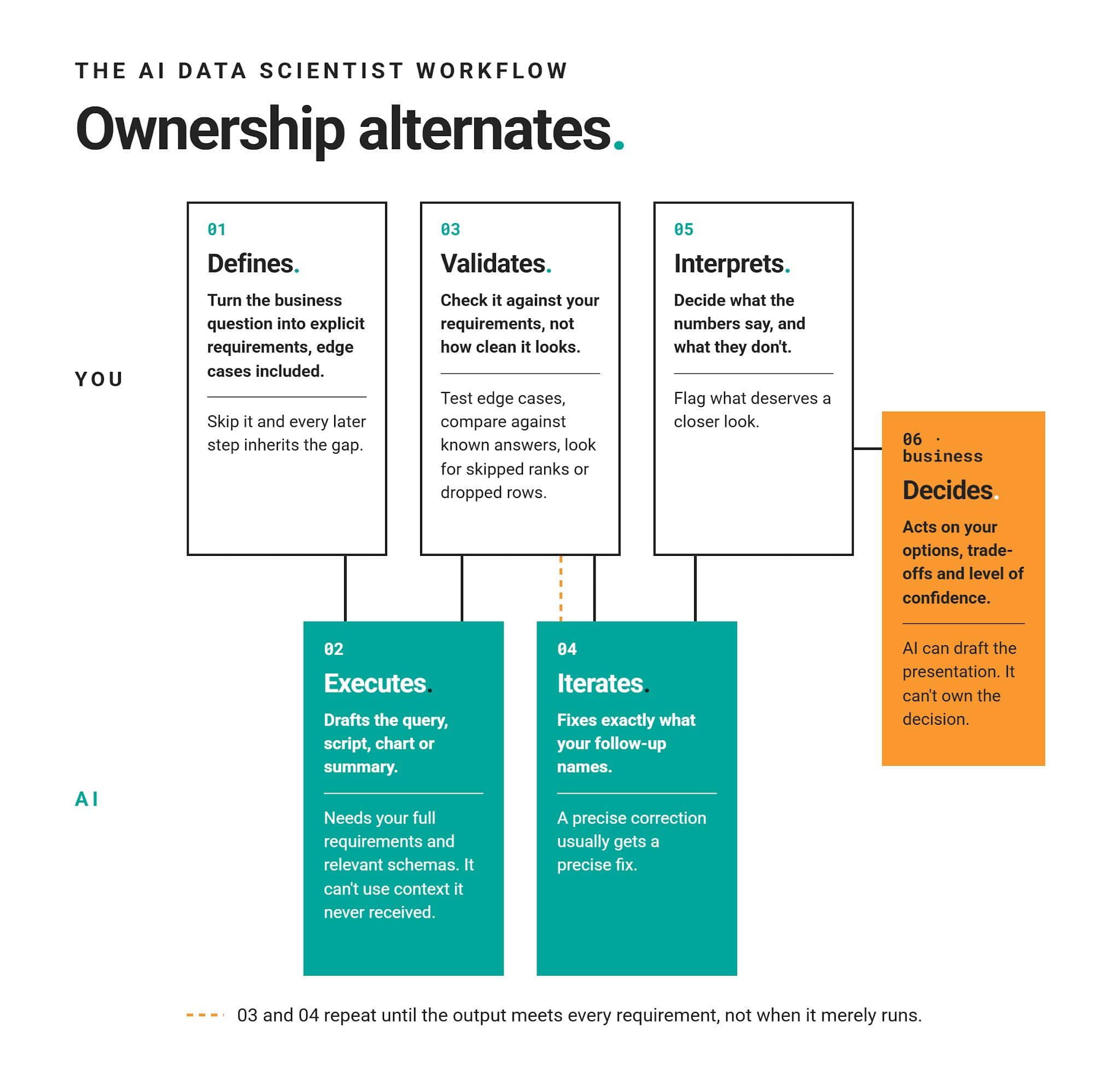
Why This Order Works
Notice how AI never takes two steps in a row. Each human step guards against a specific AI weakness:
- defining covers missing context
- validating catches plausible errors
- interpreting adds business meaning
Remove any one of the human steps, and you’re back to trusting output simply because it looks right.
How to Decide Whether to Automate Your Next Data Science Task
You shouldn’t deliberate the whole day on whether the task should be automated. Five minutes is usually enough, especially if you follow this quick routine before handing any task to AI.
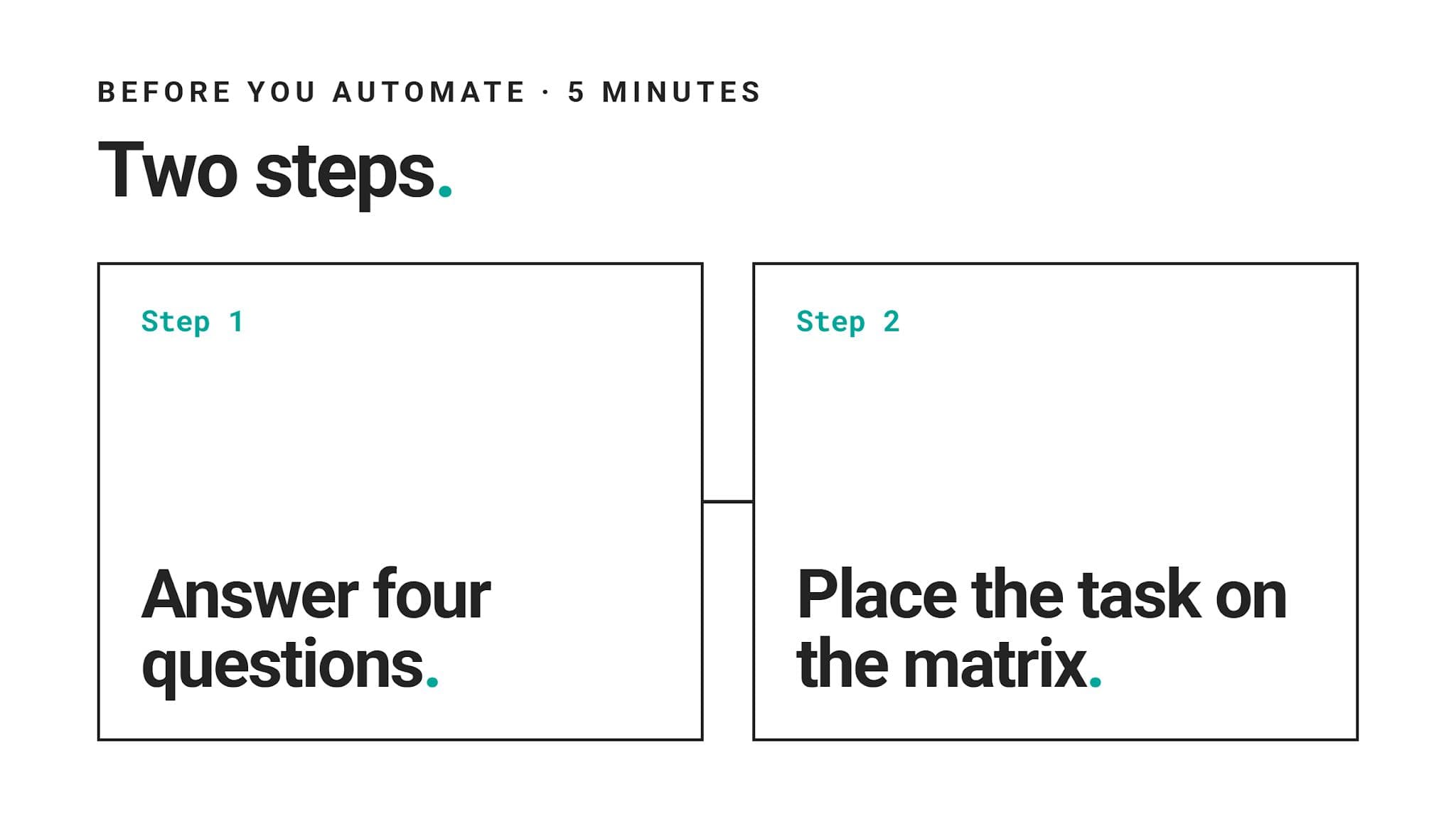
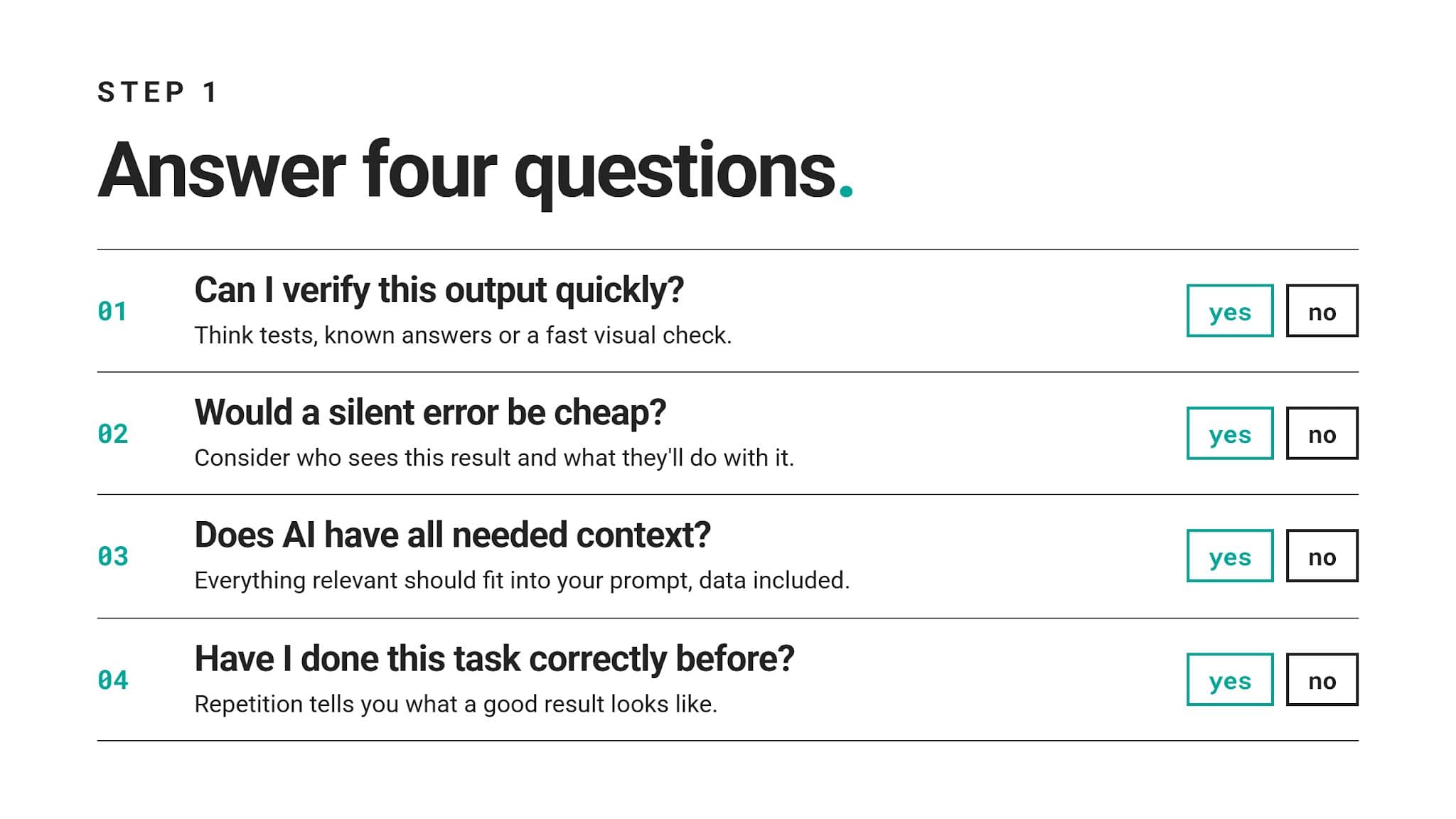
Step #1: Answer Four Questions
Answer these four questions with a simple yes or no.
Step #2: Place the Task on the Matrix
This decision tree leads to the same four quadrants as our matrix.
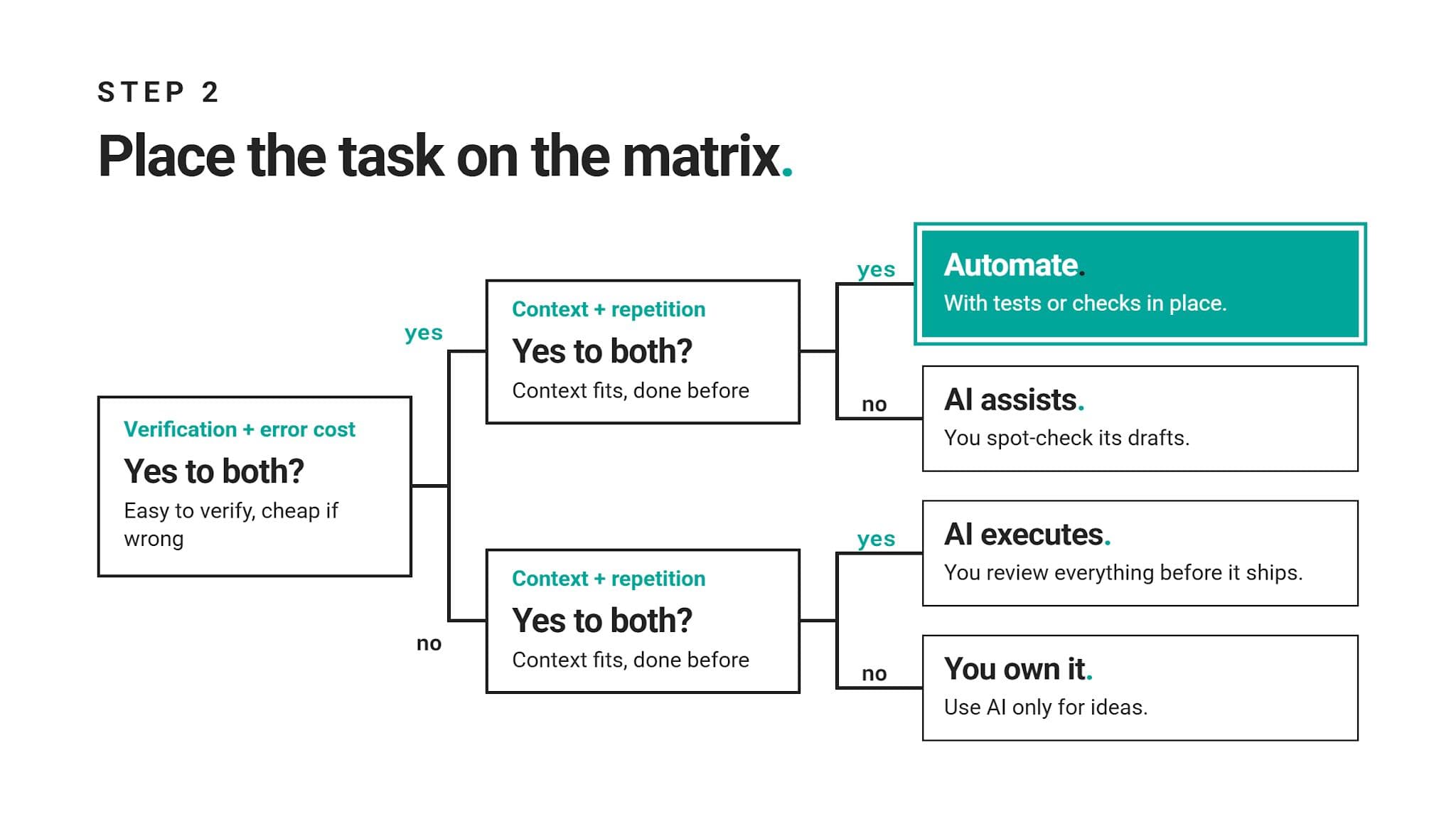
If the answer feels borderline, always pick the quadrant with more human review. From there, you can always loosen control once you understand all the facets of the task.
Play it safe. A little caution doesn’t cost much. An unnoticed error that already reached stakeholders costs a lot more.
Example: A Weekly Active-Users Report
Say your manager wants a weekly report on active users by region. You’ve never built it, and the definition of “active” is still non-existent.
Verification is hard without a known answer, and leadership will read the result. Context is missing too, so this task starts at You own it.
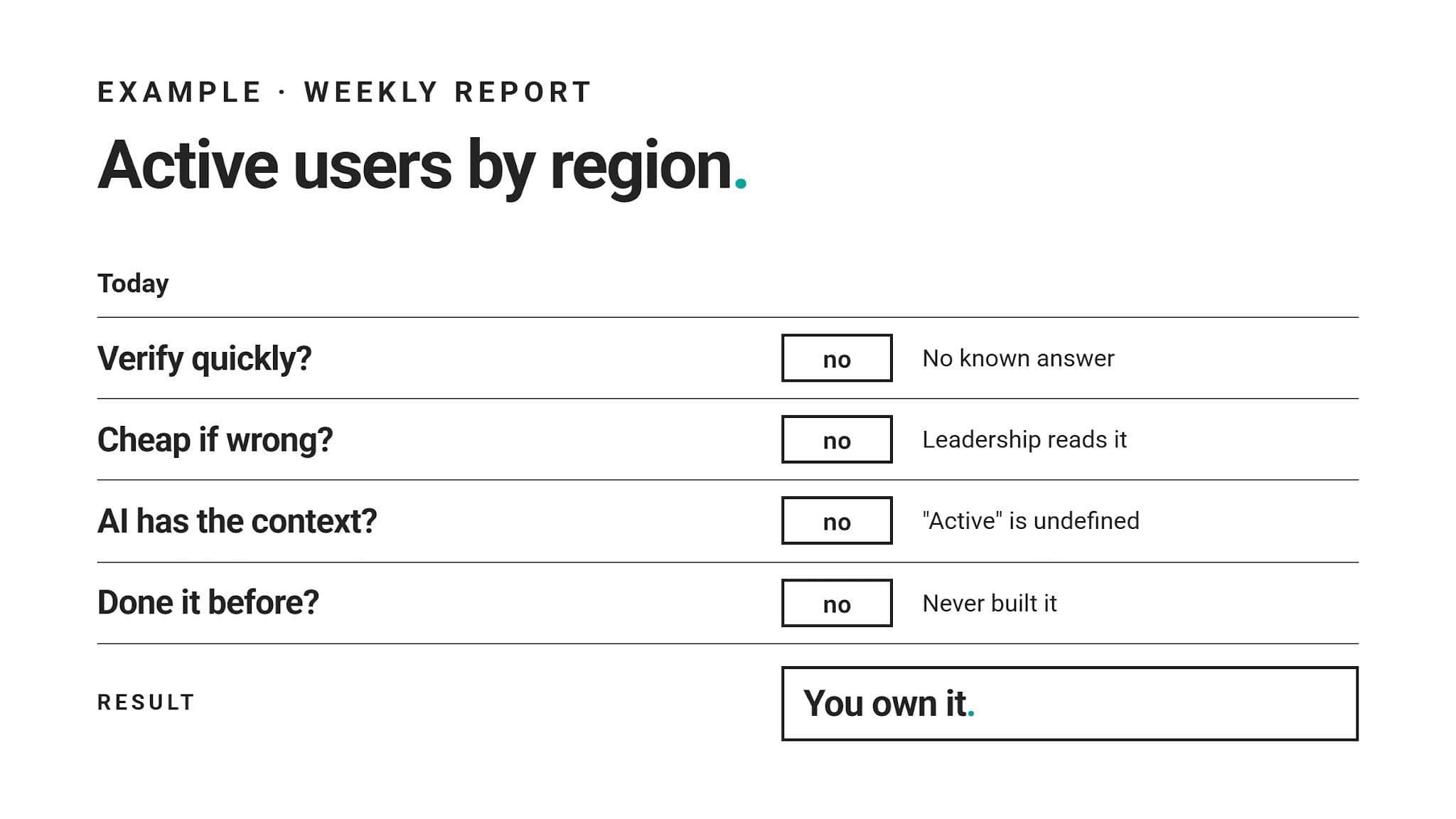
After you define “active” with your team and validate a few weeks of output, all four answers can flip to yes. At that point, scheduling that report becomes a reasonable call.
Conclusion
Deciding what to automate, and how to use AI in data science, depends on how much control you can safely give up.
Data science experts answer that dilemma with four questions about verification, error cost, context, and repetition. These four questions form a decision matrix, from “Automate” to “You own it”.
While our Airbnb example showed what AI can do, it also showed what it can’t do: it can’t work beyond the info you provide in a prompt.
That’s also why domain and coding fundamentals still count: you can’t validate what you don’t understand. Keep practicing SQL and Python on real interview questions, and let AI speed you up only where you can check its work.
FAQ
1. How is AI used in data science?
It’s used as a product a data scientist builds (e.g., a forecasting model) and as a coworker that speeds up data scientists’ work.
The latter use means drafting SQL and Python, explaining errors, suggesting analysis ideas, and writing first-draft summaries. Data scientists review, correct, and interpret AI’s output.
2. What is an AI data scientist?
An AI data scientist uses AI tools in their data science workflow for drafting and execution while keeping control of key decisions.
Sometimes, the term also means data scientists who specialize in building AI systems.
3. Can AI replace data scientists?
Not completely; it can only replace repetitive work.
Data science is a role that involves real judgment. AI can’t take that over: it can’t define a business problem, catch a requirement nobody mentioned, or take responsibility for a recommendation.
4. Which data science tasks can AI automate?
AI can fully automate only tasks that are easy to verify, cheap to get wrong, need little outside context, and repeat often. For example, code formatting, docstrings, and recurring reports that already have tests in place.
However, there are also many other tasks suitable for AI assistance rather than full automation: drafting queries, translating code between languages, and generating unit tests.
5. What shouldn’t data scientists automate?
They shouldn’t automate any task where an error could easily look correct and cost a lot. That involves tasks such as defining metrics, judging data quality, interpreting A/B tests, checking for leakage, and making stakeholder recommendations.
AI’s role in those tasks is to help with ideas and drafts, rather than executing.
6. Do data scientists still need SQL and Python because of AI?
Of course they do. Arguably, even more than before. If you don’t understand SQL or Python code enough to spot a wrong function or a missing condition, you can’t review AI-written code, either.
7. What AI tools do data scientists use?
Most data scientists use general-purpose assistants like ChatGPT or Claude. They also often use coding assistants built into editors like GitHub Copilot or Cursor, and AI features inside notebooks and BI tools.
The choice depends on the stack and the company’s data policies.
Share