How to Iterate Over a Dictionary in Python?

Categories:
 Written by:
Shivani Arun
We explore fundamental concepts in Python ‘Iterate’ over a ‘Dictionary’ (dict) and learn iteration methods to search, update, modify, and transform data.
Iteration is a complex subject in Python. The complexity gives way to powerful capabilities that can address many programming use cases and ultimately make our lives more efficient.
In this article, our goal is to articulate the most commonly used capabilities in Python to iterate over a dictionary and also explain the efficiency of these approaches to help you optimize for scale.
We will start with a quick refresher on the foundational capabilities of Python dictionaries and then quickly advance into the methods for iteration, from writing loops to ‘Pythonic’ approaches like dict comprehensions, and finally, the broad concept of iterators and iterables that can be applied not just to dictionaries, but more broadly for your programming needs.
We will end with advanced iteration patterns, solving each approach with real-life examples and, most importantly, interview question patterns that are commonly solved via dictionaries.
By the end of this guide, you will be able to think of several ways to solve an iteration problem for Python interview questions and also on the job, while optimizing for scale, efficiency, and simplicity.
As we get started, here’s a quick refresher on the concept of a dictionary data structure in Python.
What is a Dictionary in Python?
A dictionary is a type of array data structure that is defined by certain properties, and the most important one is that it represents one or more pairs consisting of a key and a value, respectively.
As a foundational first step, check out our article about Python dictionaries that gives a good overview of dictionaries, basic features that define them, commonly used methods, and an introduction to iterating over dictionaries.
Let’s take a quick overview of what a dictionary is, using a practical example that we have seen before in the introduction to Python dictionaries. Here’s a quick dictionary that shows the houses of each of our favorite characters from the Harry Potter world.
hp_dict = {'Harry': 'Gryffindor', 'Hermione': 'Gryffindor', 'Ron': 'Gryffindor'}
type(hp_dict)
Here’s the output:
<class 'dict'>
This output shows that the data stored in { } is a dictionary with keys defined by the character names and values defined by their respective houses. To quickly distinguish the main characteristics of a dictionary from other data structures, here’s a table for a 30-second overview:
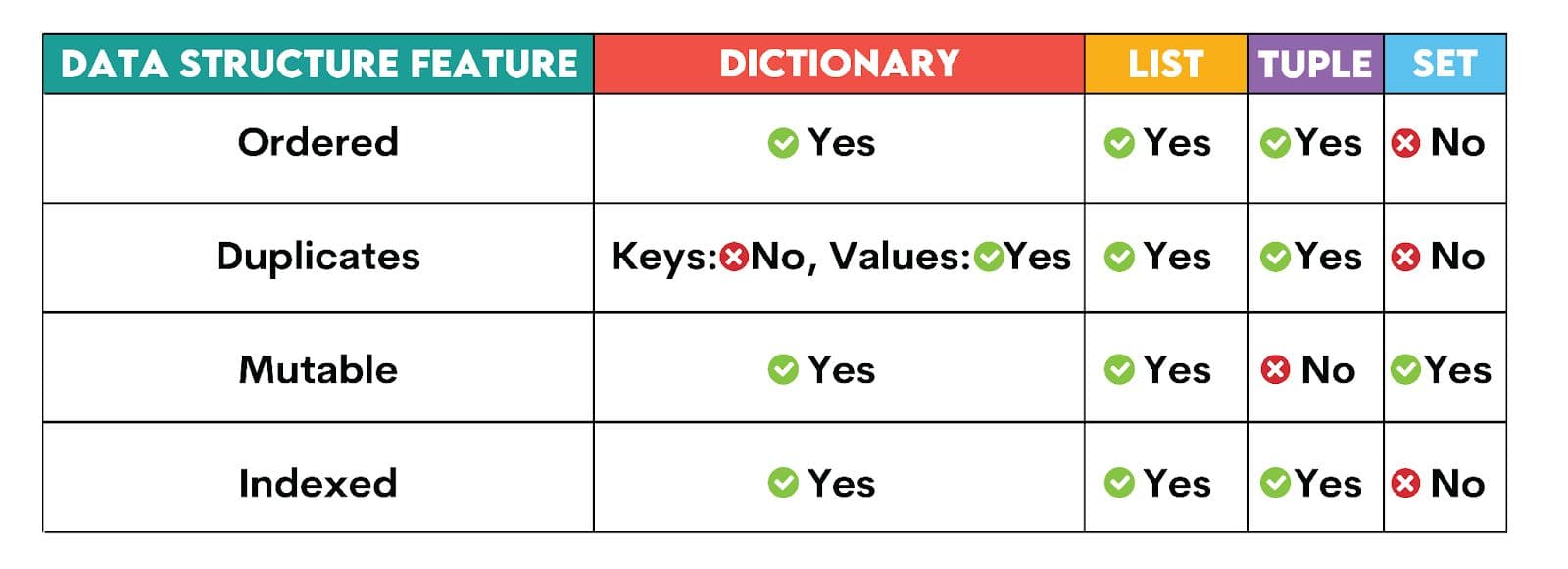
To summarize, a dictionary in Python is ordered (Python 3.7 onwards), doesn’t contain any duplicate values in keys, can be updated or changed (mutable), and is indexed, indicating that a hash function can find the memory location by using the key.
Now that we have revised the basic concept of a dictionary, let’s turn our attention to iterating over a dictionary. First, how do we know whether a dictionary object in Python can be iterated over (i.e., a dictionary is an iterable)?
print(dir(hp_dict))
Here’s the output:
['__class__', '__class_getitem__', '__contains__', '__delattr__', '__delitem__', '__dir__', '__doc__', '__eq__', '__format__', '__ge__', '__getattribute__', '__getitem__', '__getstate__', '__gt__', '__hash__', '__init__', '__init_subclass__', '__ior__', '__iter__', '__le__', '__len__', '__lt__', '__ne__', '__new__', '__or__', '__reduce__', '__reduce_ex__', '__repr__', '__reversed__', '__ror__', '__setattr__', '__setitem__', '__sizeof__', '__str__', '__subclasshook__', 'clear', 'copy', 'fromkeys', 'get', 'items', 'keys', 'pop', 'popitem', 'setdefault', 'update', 'values']
The thing to note is that any object that has the __iter__ method is considered an iterable, and hence, our dictionary hp_dict is considered an iterable object.
Basic Iteration: Keys, Values, Items
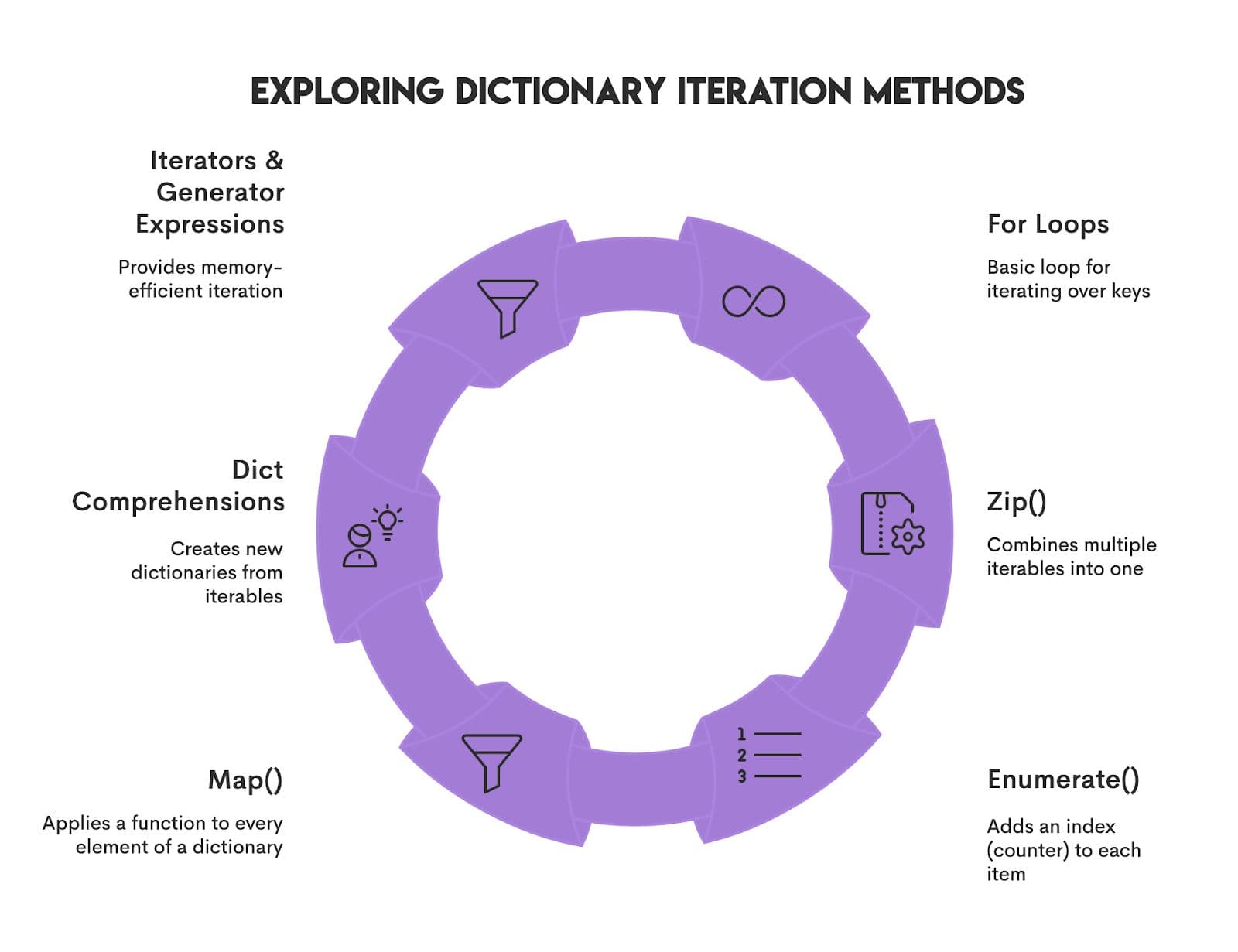
We will cover multiple approaches to iterating over a dictionary, starting from basic/foundational methods such as for loops, to more advanced methods like dictionary comprehensions and generator expressions, so hang tight and enjoy the ride!
Python For Loop
The simplest approach to iteration is to use a Python loop to go step by step through the dictionary. The syntax for this approach is given by the following:
Iterate over keys using a for loop and the .keys()...
for key in hp_dict:
   print(key, end = "  ") # `end` is used to format the output to show in the same line
Output: Harry Hermione Ron
….and the .values() method using a for loop.
for value in hp_dict.values():
   	   print(value, end = "  ")
Output: Gryffindor Gryffindor Gryffindor
Pro tip: Don’t forget to add ( ) since this is a dictionary method and requires the method to be called!
…and the .items() method to iterate over both key and value pairs using a for loop:
for key, value in hp_dict.items():
   print(f"key : {key} and value : {value} ") ## {} contain the placeholder that Python will replace with the variables value
Output:
key : Harry and value : Gryffindor
key : Hermione and value : Gryffindor
key : Ron and value : Gryffindor
If you come from the world of overusing lists, you may be tempted to convert the keys of a dictionary to a list, as shown below:
for key in list(my_dict.keys()):
     print(key)
This is generally not preferred as it is a wasteful operation and ends up using more memory (O(n)) space. Typically, the only use case where this operation is useful is if you are trying to modify the dictionary during the iteration itself.
Sample Interview Patterns
Now that we have a basic understanding of iteration, let’s formalize these concepts with a few easy interview patterns that are solved via dictionaries.
Pattern 1: Counting occurrences
Using dictionaries to count occurrences by key is a solid approach because, first, you need to keep track of both keys (e.g., a character) and values (e.g., the number of times it occurred), so dictionaries are naturally amenable to taking stock of key-value pairs. Second, for those of us familiar with BigO notation, note that time complexity is O(n), which indicates that this is an efficient approach.
Let’s look at a simple example of counting occurrences of characters in a long string.
Question 1: Write a solution that shows the no. of times each character is present in the string ‘MISSISSIPPI’? Show the result in the form of key-value pairs.
Here’s the code:
my_char = 'MISSISSIPPI'


freq_char = {} ## initialize an empty dictionary


for char in my_char:
   freq_char[char] = freq_char.get(char, 0) + 1  # .get() method will give 0 the first time and the current character count if it has already encountered the character before. +1 augments the count through the loop
print(freq_char.items())
Here’s the output:
dict_items([('M', 1), ('I', 4), ('S', 4), ('P', 2)])
Pattern 2: Simulation
Now, let’s try a more complex question that leverages both your statistical and coding knowledge.
Question 2: Here’s a question from one of my favorite books on simulation by Sheldon M. Ross: Generate uniform random numbers between 0 and 1, and keep adding them until their sum exceeds 1. How many numbers did we need? Repeat this experiment 1000 times to find the average and output the distribution of the values.
There are primarily three steps to solving this question:
- Leverage simulation variables
random.random()to generate values between 0 and 1. There are many different ways to generate a uniform random variable in Python. - Initiate variables that will keep track of the total (sum of the values from the uniform random variables) and the count (no. of draws from the uniform random variable)
- For each one of the 1000 iterations of the simulation, get a list of keys, with the key being defined as the count it took to get a total > 1 in each iteration
- Generate a distribution by iterating over a dictionary where the key is the
countvariable, and the value is the number of times that the count occurred to satisfy the constraint of getting a total value > 1
Here’s the solution:
import numpy as np

np.random.seed(48)  ## set seed for replicability
freq_n = {}  ## dictionary to keep track of the counts
for i in range(1000):  ## 1000 is the no. of trials
    total = 0 # initialize variable to keep track of total
    count = 0 # initialize variable to keep track of count
    while total <= 1:
        n = np.random.uniform(0, 1) # leverage simulation variable
        total += n
        count += 1
    freq_n[count] = freq_n.get(count, 0) + 1 # key is the count variable and value is the # of times the count occurred
print(freq_n.items())


# Calculate average using dictionary
total = sum(n * freq for n, freq in freq_n.items())  ## important - this is a generator expression, an important concept for efficient iteration over a dictionary
average_n = total / sum(freq_n.values())
print(f"Average N: {average_n:.4f}")
Here’s the output:dict_items([(2, 490), (3, 347), (4, 118), (5, 39), (6, 6)])
Average N: 2.7240
Practice makes you perfect, so why not try yet another simulation question yourself!
Question 3 (For practice): Simulation is now the name of the game in DS, and you have already encountered one example. Now, it’s time for you to practice: write a function to simulate rolling a fair 6-sided die n times. Return a dictionary showing the frequency of each outcome (how many times each number appeared).
Try writing the code on your own, and only then check the solution.
import numpy as np ## importing one of the most useful libraries for a data scientist
def simulate(no_trials):
    result = {}
    for i in range(no_trials):
        output = np.random.randint(1, 7) ## note that randint(1,7) is needed because we need 6 to be included in the range
        result[output] = result.get(output, 0) + 1
    return result

simulate(10)
Here’s a sample output:
{1: 3, 5: 2, 2: 1, 4: 1, 6: 2, 3: 1}
Python Enumerate() and Zip() Functions
As we start to look into more advanced topics on iteration, some other syntax that you may encounter is the use of enumerate() and zip() functions. Let’s quickly summarize the value of these two approaches:
Enumerate() Function
Use enumerate to call the index of a dictionary along with key-value pairs.
Let’s define a dictionary (my_dict) and leverage the enumerate function with a dictionary:
my_dict = { 'a': 1, 'b': 2, 'c': 3, 'd': 4, 'e': 5}

for i, (k, v) in enumerate(my_dict.items()):
   print(f" index: {i}, key: {k}, value: {v}")
Here’s the output:
index: 0, key: a, value: 1
index: 1, key: b, value: 2
index: 2, key: c, value: 3
index: 3, key: d, value: 4
index: 4, key: e, value: 5
What is a good real-world data science application of this approach? One simple approach that comes to mind is to sample every 3rd element in a large dictionary!
large_dictionary = {
    "a": 1,
    "b": 2,
    "c": 3,
    "d": 4,
    "e": 5,
    "f": 6,
    "g": 7,
    "h": 8,
    "i": 9,
}
For the sake of simplicity, let’s assume that this is a large dictionary :). How would you sample every 3rd element?
result = {k: v for i, (k, v) in enumerate(large_dictionary.items()) if i % 3 == 0}
print(result)
Here’s the output:
{'a': 1, 'd': 4, 'g': 7}
Pro tip: Remember, Python follows 0 indexing!
Zip() Function
This approach is typically used to combine two different data structures together to create a dictionary. The approach has been previously explained in our article on Python dictionaries.
Remember the hp_dict that we started with in this article? Well, we created that dictionary using a simple zip function. Here’s the code:
names = ['Harry', 'Hermione', 'Ron']
houses = ['Gryffindor', 'Gryffindor', 'Gryffindor']

hp_dict = dict(zip(names, houses))
print(hp_dict)
Here’s the output:
{'Harry': 'Gryffindor', 'Hermione': 'Gryffindor', 'Ron': 'Gryffindor'}
A question that may come to mind is, what does zip() have to do with iteration? Well, zip() can be combined with a for loop to iterate through multiple dictionaries together. Let’s take a look at an example:
dict1 = {'a': 1, 'b': 2, 'c': 3}
dict2 = {'a': 2, 'b': 3, 'c': 4}
dict3 = {'a': 5, 'b': 6, 'c': 7}

result = {}

# Standard pattern: zip multiple .items() and iterate
for (k1, v1), (k2, v2), (k3, v3) in zip(dict1.items(), dict2.items(),
                                        dict3.items()):
    combined_value = v1 + v2 + v3
    result[k1] = combined_value
    print(result)
Here’s the output:
{'a': 8}
{'a': 8, 'b': 11}
{'a': 8, 'b': 11, 'c': 14}
This prints the result for each iteration. What if you had to apply a transformation while looping through a dictionary?
Dict Comprehensions
The next approach that is commonly used for iteration is called dict comprehensions. This is most commonly applied when you want to look up and transform something within a dictionary. This transformation may include filtering a dictionary, or it may include changing every element in a dictionary.
Dict comprehensions are very similar to list comprehensions in their syntax and are often best understood by trying to articulate your approach in, believe you me, English!
Let’s take a simple dictionary as an example:
dict_example = {'a': 1, 'b': 2, 'c': 3, 'd': 4, 'e': 5}E.g., If I want to filter my dictionary to include the items where the values <=4, a simple way I can articulate this is: I want a value for each key, value in my_dict if value <=4
Taking this approach and then translating it to Python syntax, a dictionary comprehension would be written out as:
{v for k,v in dict_example.items() if v <= 4}
Here’s the output:
{1, 2, 3, 4}
Based on the above, the general syntax of a dict comprehension is given by:
{key: value for i in dict if condition}Another example includes squaring every value of this dictionary while keeping the keys unchanged. The way to write this using a dict comprehension is given by:
{v**2 for k,v in dict_example.items()}
Here’s the output:
{1, 4, 9, 16, 25}
Python Map() Function
Another common method to iterate through a dictionary and apply a transformation is the use of the map() function. So, what is the map() function and how is it useful?
It’s a commonly used function that applies a function to each item in the dictionary and returns a map object containing the results. This map object is also known as an iterator, i.e., an object that allows us to go through a sequence one at a time and also remembers its position in the sequence.
Using the same example as above, if we wanted every value to be squared using this approach, here’s what it would look like:
result = map(lambda x: x ** 2, dict_example.values())
print(list(result)) ## this converts the result into a list
A distinct advantage of the map() approach is that the map object (e.g., the result variable in this case) uses lazy evaluation, which avoids loading the whole data in memory. This is a distinct advantage when the dictionaries are very large, and also allows us to control the execution and print the items one by one if so desired.
For example, the way to print the first value from this dictionary is:
print(next(result))
Here’s the output:1
(This is 1 because 1^2 = 1)
A question that may come to mind is what if the dictionary is infinitely large, and you want to be careful about iterating through the dictionary for memory efficiency. Let’s double-click into methods designed for scale!
Generator Expressions & Iterators
Generator Expressions & Iterators can be a huge topic in itself to review. In the scope of this article, let’s touch on these concepts in the context of dictionary iterations.
Generator Expressions
These expressions generate values through lazy execution, i.e., on demand. They save memory and don’t load the entire dictionary into memory. They are generally used once. Generators can be created using this syntax, which closely resembles a dict comprehension but uses () instead of {}
gen_object = (v**2 for k,v in dict_example.items())
print(next(gen_object)) # this gives you the first item in the transformed dictionary
Here’s the output:1
(This is 1 because 1^2 = 1)
Iterators
These objects remember the position that they are at while traversing or going through a dictionary step by step, and can help control the iteration over a dictionary step by step. They are also memory-efficient and are generally used once. Iterators can be created by using this syntax:
itr_object = iter(dict_example.items())
print(next(itr_object))
Here’s the output:
('a', 1)
(This is 1 because 1^2 = 1)
Why Choose One Method Over Another
Ask yourself some questions when evaluating the right approach for memory efficiency, scale, and data science use cases. I generally ask myself these questions to make the right choice.
- Do you need a new dictionary? Use dict comprehension
- Do you need results more than once? Use dict comprehension
- Are you transforming values, but you don’t need the results more than once? Use a generator expression
- Do you have a large dictionary and want to apply a transformation? Use a generator expression
- Do you want control over your iteration, pause, and examine values? Use iterator
- Are you iterating only once through the dictionary? Use iterator
Since we have evaluated a range of different options, let’s pause and take stock of when to use what approach to iterate over a dict!
The choice of iteration method will really depend on four main decision points:

Now that we have a very hefty arsenal of iteration tools, let’s take a look at some more advanced iteration patterns.
Advanced Iteration Patterns
In this section, we will cover a few advanced iteration patterns, such as sorting in ascending and reverse order and using nested loops and recursive iteration for nested dictionaries.
Sorting Over a Dictionary (Dict)
Many use cases require us to do more than one action at a time. For example, you may want to iterate while sorting through a dictionary by keys or values, and so on. Furthermore, you may choose to sort in ascending order or reverse order. After all, the data scientist in you is always looking for order in chaos!
Sorting & Iteration in standard order
Let’s take a simple example of a dictionary and sort this dictionary on keys and then values in ascending order.
my_dict = { 'a': 1, 'b': 300, 'c': 2, 'e': 400, 'd': 0}
1. Sort on keys:
The approach to sort on keys is given by a simple for loop combined with the sorted() function. This can be applied to any data structure, like a dictionary, list, or tuple (as long as it is an iterable). Let’s take an example of how sorted works with iteration on a dictionary.
my_dict = { 'a': 1, 'b': 300, 'c': 2, 'e': 400, 'd': 0}
for key in sorted(my_dict): ## this is same as sorted(my_dict.keys())
   print(key + ':' + str(my_dict[key]), end = ' ')
Here’s the output:
a:1 b:300 c:2 d:0 e:400
2. Sort on values:
Sorting on values has two important steps to it, as shown below:
- Using
my_dict.items()will return both the key and value pairs as tuples - Using a lambda function
x: x[1]means the value will be extracted from each pair, and passing it to the sorted() function means that each key-value pair will be sorted based on the values. Here’s a good resource on learning more about Lambda functions in Python.
for key, value in sorted(my_dict.items(), key=lambda i: i[1]):
    print(f"{key}: {value}", end = ' ')
Output:
d: 0 a: 1 c: 2 b: 300 e: 400
Iterating in a Particular Order (Sorted, Reverse)
We can continue to build on the knowledge of sorting and iteration and think about more scenarios where we may want to sort in reverse order. A handy approach to doing this is simply to use the reverse keyword with the sorted() function.
Using the same examples as above:
1. Sort on keys in reverse:
for key in sorted(my_dict, reverse = True): ## this is same as sorted(my_dict.keys() print(key + ':' + str(my_dict[key]), end = ' ') Here’s the output:
e: 400 d: 0 c: 2 b: 300 a: 1
2. Sort on values:
for key, value in sorted(my_dict.items(), key=lambda i: i[1], reverse = True): print(f"{key}: {value}", end = ' ')Here’s the output:
e: 400 b: 300 c: 2 a: 1 d: 0
So far, we have been looking at relatively simple dictionaries, but remember that most dictionaries in the real world are very complex. Have you ever had a dream within a dream within a dream?

Well, you could have a dictionary within a dictionary within a dictionary (nested dictionaries). You will be asked to iterate over it to perform a specific operation over the keys or values!
Nested Dictionaries and Deep Iteration
There are primarily two approaches to iterate over nested dictionaries, which include using nested for loops and recursive iteration, respectively.
Nested For Loops
The first approach is using a nested for loop, which assumes that we know the levels of nesting that already exist in the dictionary. Let’s take a simple example:
my_dict = {'dict1': {'foo': 1, 'bar': 2}, 'dict2': {'baz': 3, 'quux': 4}}
Here’s some sample code:
for i in my_dict.keys():
     print(i)
     for j in my_dict[i].keys():
          print(j)
Here’s the output:
dict1
foo
bar
dict2
baz
quux
In the above approach, let’s assume that instead of just 2 levels, you had to go 10 levels deep. This means writing 10 for loops! The first disadvantage of doing this is that it would make your code a lot less manageable and prone to errors in case you want to make changes.
More importantly, iterating with 10 for loops means a huge impact on efficiency. Think O(n^10), which would make your execution very slow and almost infeasible as the size of n grows.
Recursive Iteration
So, if we had a dictionary that was truly large with many levels, is there a conceptual approach that will scale to solve for nested iteration? Yes
def recursive_iterate(d):
    for k, v in d.items():
        if isinstance(v, dict):
            print(f"{k}:")
            recursive_iterate(v)  # Recursively call this function
        else:
            print(f"{k}: {v}")
Let’s call this function:
recursive_iterate(my_dict)
Here’s the output:
dict1:
foo: 1
bar: 2
dict2:
baz: 3
quux: 4
Practical Examples & Use-Cases
Now, let’s solve an interview question that focuses on the concepts that we have learned in this article.
Discovering Max Value in Dictionary
Find the maximum value, its key, and index from a dictionary. Assume all values are unique.
Our goal in this question is to find the maximum value in a dictionary, its key, and the index, respectively. One of the assumptions of the question is that all values are unique.
Here’s a link to the question: https://platform.stratascratch.com/algorithms/10380-discovering-max-value-in-dictionary
Leverage enumerate() to get index and key value pairs, and a for loop to iterate over a dictionary. Here’s the code:
def find_max_value(dictionary):
    max_key = None  #initialize your variables
    max_value = None
    max_index = None

    for index, (key, value) in enumerate(dictionary.items()): # loop over dictionary
        if max_value is None or value > max_value: # check if the value at the position is > max_value
            max_value = value # if yes, assign the value to the max_value variable
            max_key = key # assign the corresponding key
            max_index = index # assign the corresponding index
    return (max_value, max_key, max_index) # return all 3 in the order requested by the question
This code involves three main steps:
- Initialize the variables for maximum value (
max_value), corresponding key (max_key), and index (max_index), respectively - Check if the value at the position is greater than
max_value(an initialized variable to store the maximum value). If yes, assign the value to themax_valuevariable - Assign the corresponding key and index, respectively, and return all 3 using the
returnstatement
Note that since we are looping over the dictionary once, the time complexity is O(n)
Here’s the output.
Expected Output
Test 1
Test 2
Test 3
Common Pitfalls & Best Practices
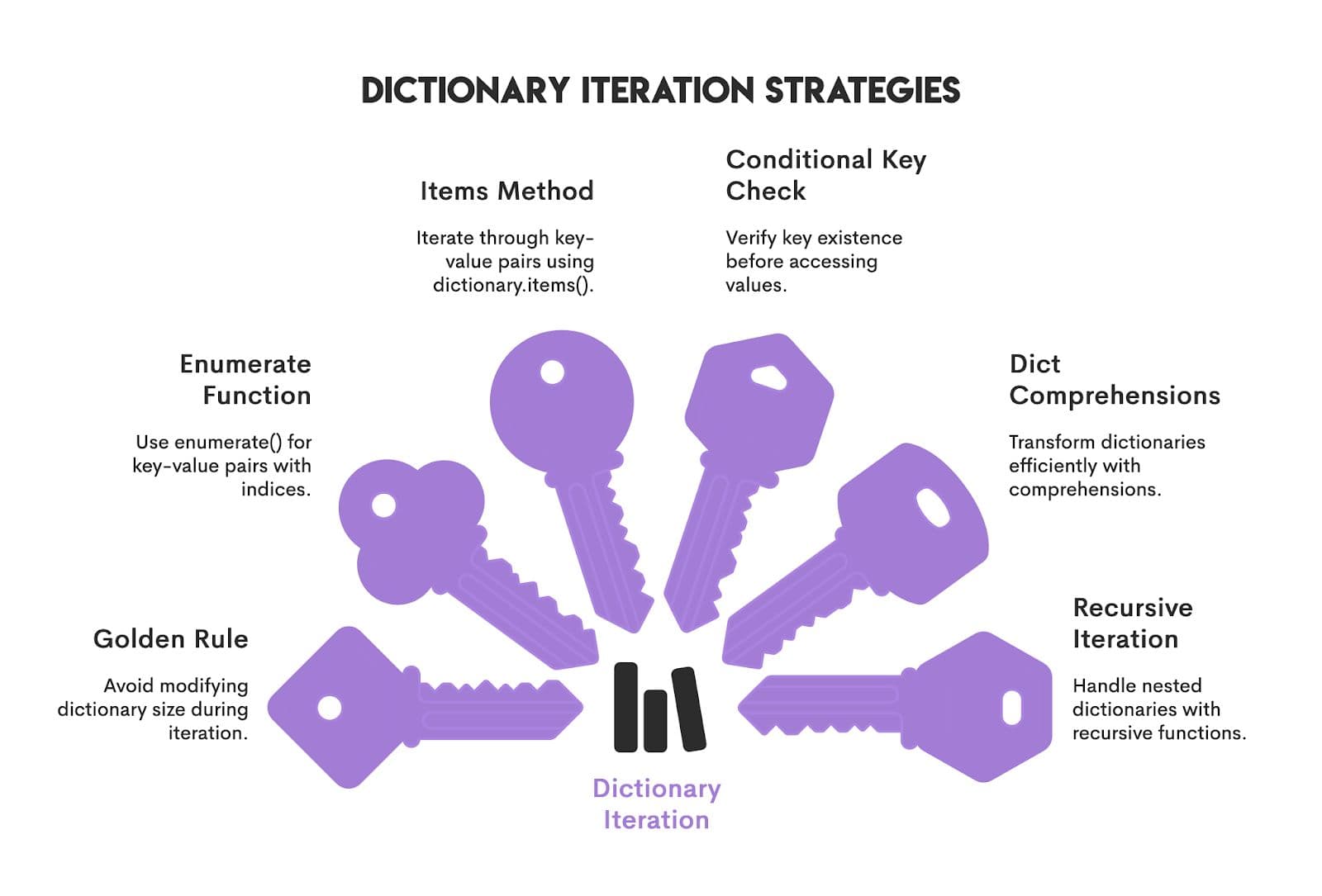
Like with any method, iterating through dictionaries requires a careful understanding of the approach and the efficiency of the approach leveraged to accomplish your end goal. A few strategies to keep in mind:
Conclusion
Iterating over collection data structures, such as dictionaries (iterables), is a valuable skill. In this article, we covered the fundamentals of iteration and then went deeper into aspects such as generators, iterators, dict comprehensions, and deep and recursive iteration.
Don’t forget to practice interview questions using these concepts to cement your learning. Onward and upward!
Frequently Asked Questions (FAQs)
Does ‘for key in my_dict:’ iterate keys, values, or items?
This will iterate over each key in my_dict.
What method should I use to iterate over values only?
The easiest approach would be to use for value in my_dict.values().
How do I iterate in sorted order?
Use the sorted() function to iterate over a dictionary in a sorted order. Note that while dictionaries maintain the order of insertion, they aren’t inherently sorted.
Is it okay to modify a dict while iterating?
It’s definitely not best practice to modify a dict while iterating for various reasons. Generally, the best practice is to create a new dictionary if you are making modifications.
What is the fastest way to iterate over a dict?
Accessing and iterating over a dictionary through .items() is faster than most methods. However, if the size of the dictionary is large, consider using memory-efficient approaches like the use of generator expressions or iterations that use lazy evaluation. If the dictionary is nested, consider using a recursive approach to iteration.
Share