Learn to Use a Recursive CTE in SQL Query

Categories:
 Written by:
Tihomir Babic
Master recursive CTEs in SQL through eight real-world use cases with ready-to-use datasets, common mistakes, performance tips, and interview questions.
Ask ten data scientists about recursive CTEs, and eight will suddenly remember an urgent meeting.
Are you one of them? Hopefully, you won’t be after reading this article. CTEs are one of SQL’s most powerful, but also most underrated tools. They are capable of walking through hierarchies, chains, and graphs no ordinary query can touch.
We’ll break down exactly how recursive CTEs work and apply them to eight real scenarios you’ll actually meet on the job.
What Is a Recursive CTE?
A recursive CTE is a common table expression that references itself.
Instead of running once and stopping – that’s what a regular SQL CTE does – it keeps feeding its own output back in as input for the next round.
Why Regular Queries Fall Short
Standard SQL wasn’t built for the open-ended depth of hierarchical data. Say you have employees and their direct superiors. A JOIN can traverse one level of a relationship. That’s fine for two to three levels. What about ten or even more, with no idea how deep it actually goes? That’s where plain SQL gives up.
The Self-Referencing Trick
A recursive CTE solves this by defining two parts inside one query: a starting point, and a rule for expanding it.
The query then runs, using each iteration’s result set as input to the next, until no new rows are produced or a condition you set is met.
Where You’ll Actually Use It
You’ll use it on hierarchical data, meaning anywhere data branches or chains into a parent-child relationship. Think organizational charts, product categories, file systems, referral networks.
And you’ll meet this pattern in interviews, too, because it shows up in work with data more than people expect. For example, a fraud check needs every account linked to a flagged one. And an org-wide headcount report needs every employee who reports to a VP, regardless of how many management layers are between them.
Without recursive CTEs, you’re either stuck with hardcoding a fixed number of JOINs (and guessing the hierarchy level) or pulling the data into Python and looping through there, which is roundabout and adds a second codebase to maintain.
Recursive CTEs keep everything in the database, which can also have performance implications at scale, since shipping it to pandas and walking it row by row is much slower.
The Recursive CTE Syntax and How It Works
The parts of the recursive CTE and the syntax are given in the image below.
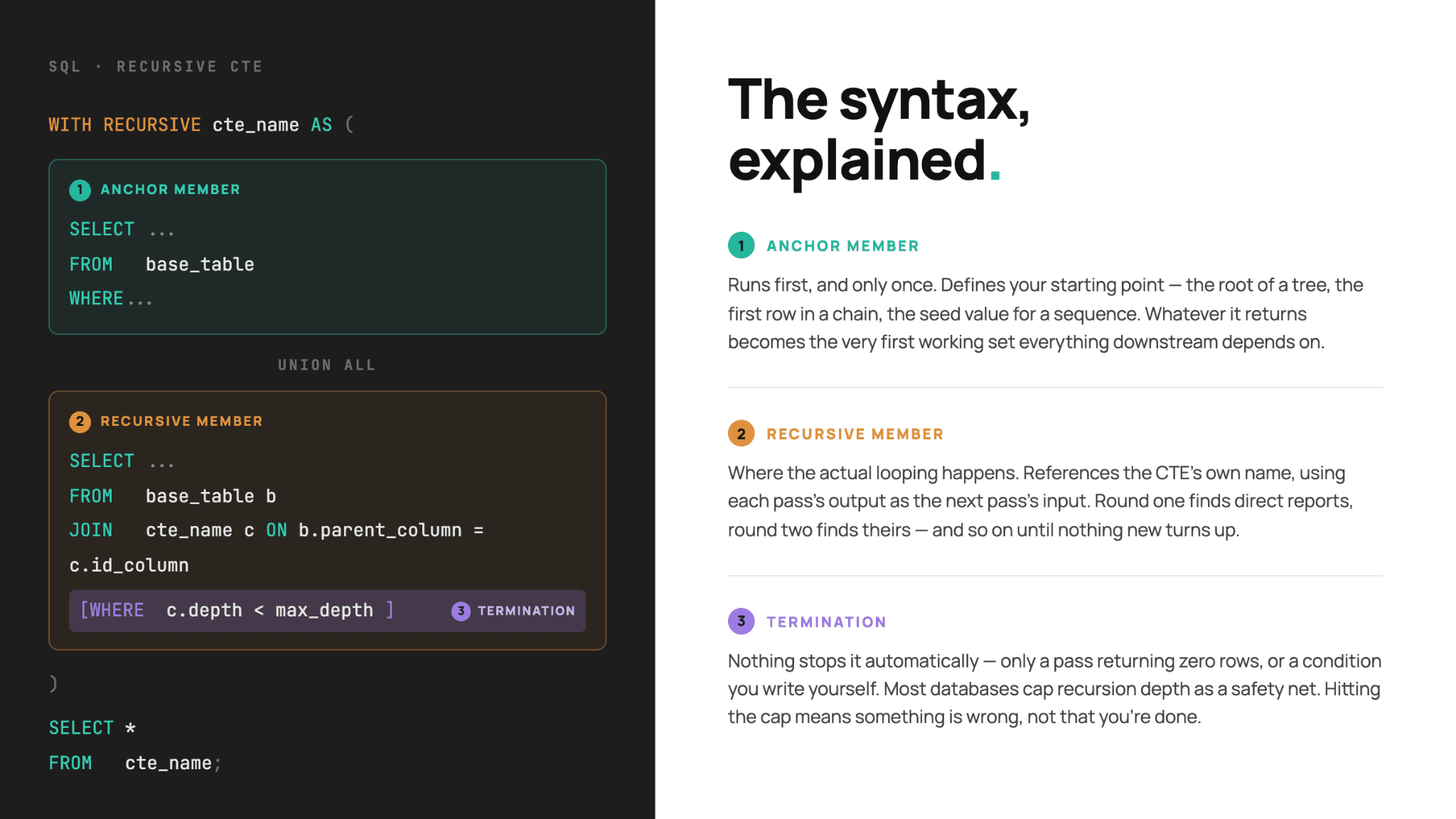
Speaking of syntax, there’s a little dialect quirk. PostgreSQL and MySQL require WITH RECURSIVE to make a regular CTE into a recursive one. SQL Server and Oracle don’t; just write plain WITH, everything else shown in the image above stays the same; the database will infer recursion from the self-reference.
Why UNION ALL Matters Here
Most recursive CTEs connect the anchor and recursive members with UNION ALL rather than UNION.
The first reason is that UNION would deduplicate rows on every single pass, which means checking the growing result set against itself again and again.
The second reason is a result of the first one: some databases (SQL Server and Oracle) don’t even allow plain UNION between the anchor and recursive members.
Takeaway: UNION is not allowed in recursive CTEs. When it is, it’s usually the wrong choice.
Real-World Use Cases
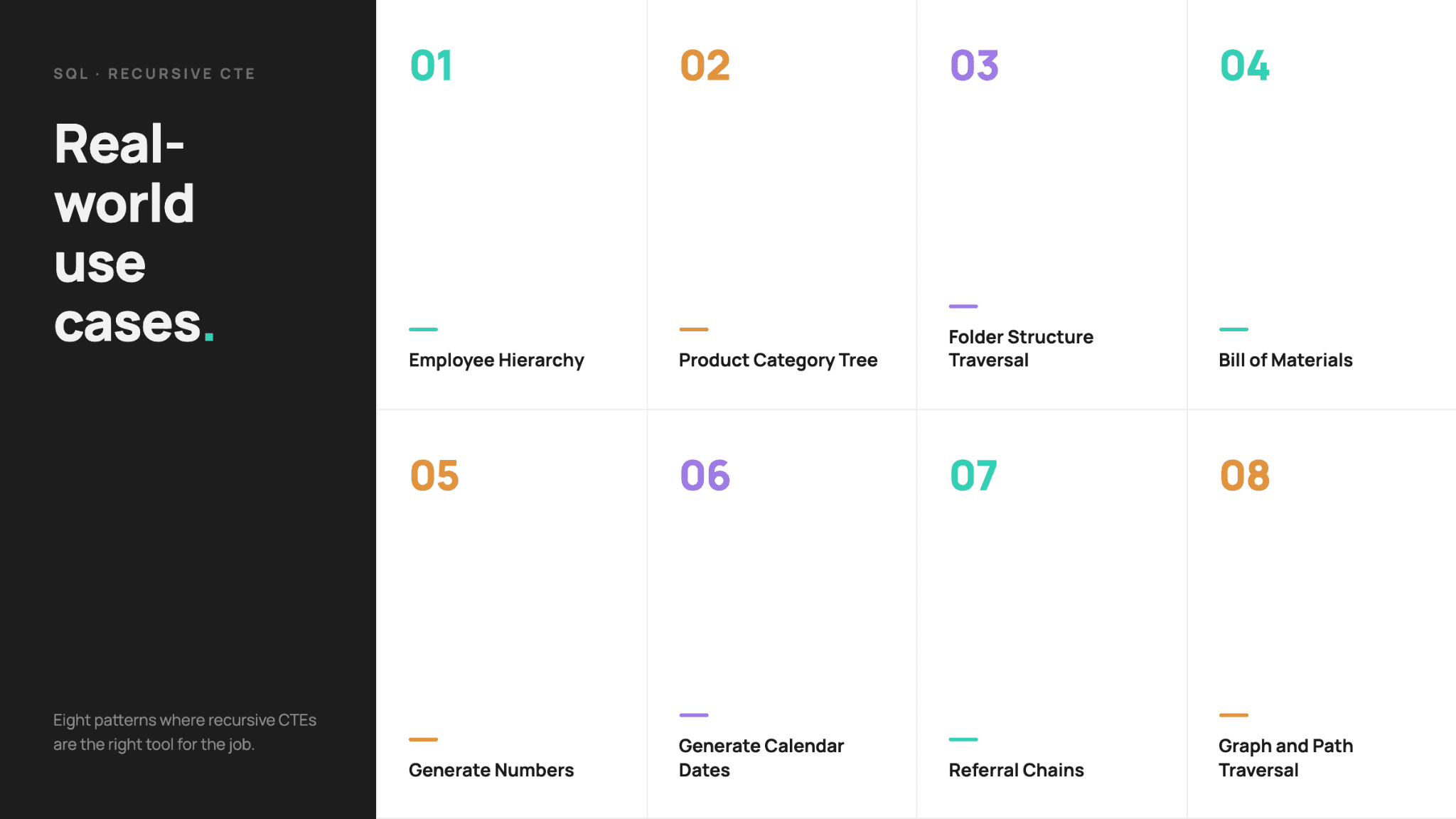
Don’t worry if this didn’t click immediately. You need something that resembles your actual job. These eight use cases do exactly that. We’ll show you eight recursion shapes you’ll run into most often.
Employee Hierarchy
The task is to write a query that returns every employee along with how many levels deep they sit below the CEO. The CEO is at level 0, VPs at level 1, and so on.
This task is the classic org chart interview prompt, where you’re given a self-referencing table that you must unroll into a flat, leveled list.
Dataset
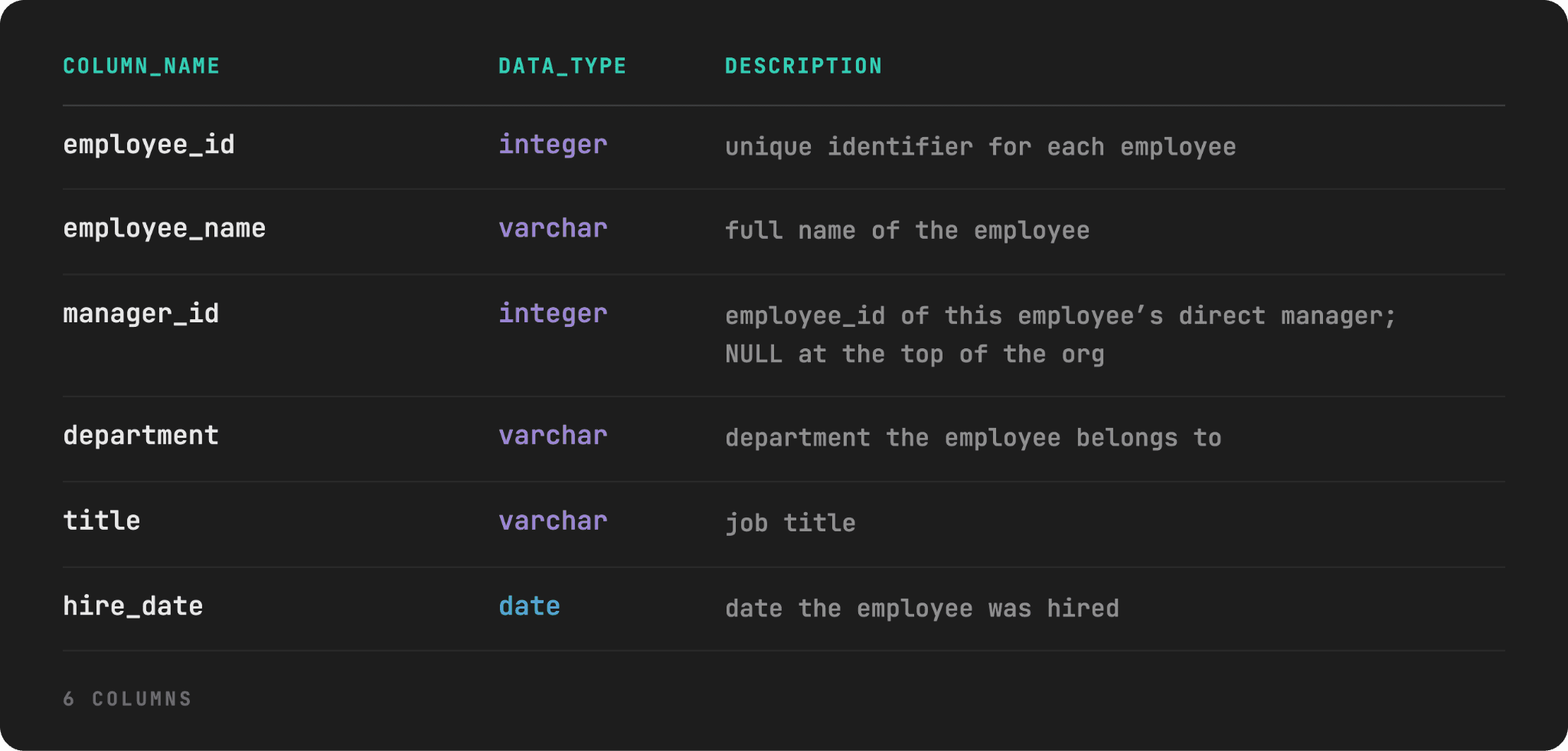
The table we’ll use is named employees, with the following schema and dictionary.
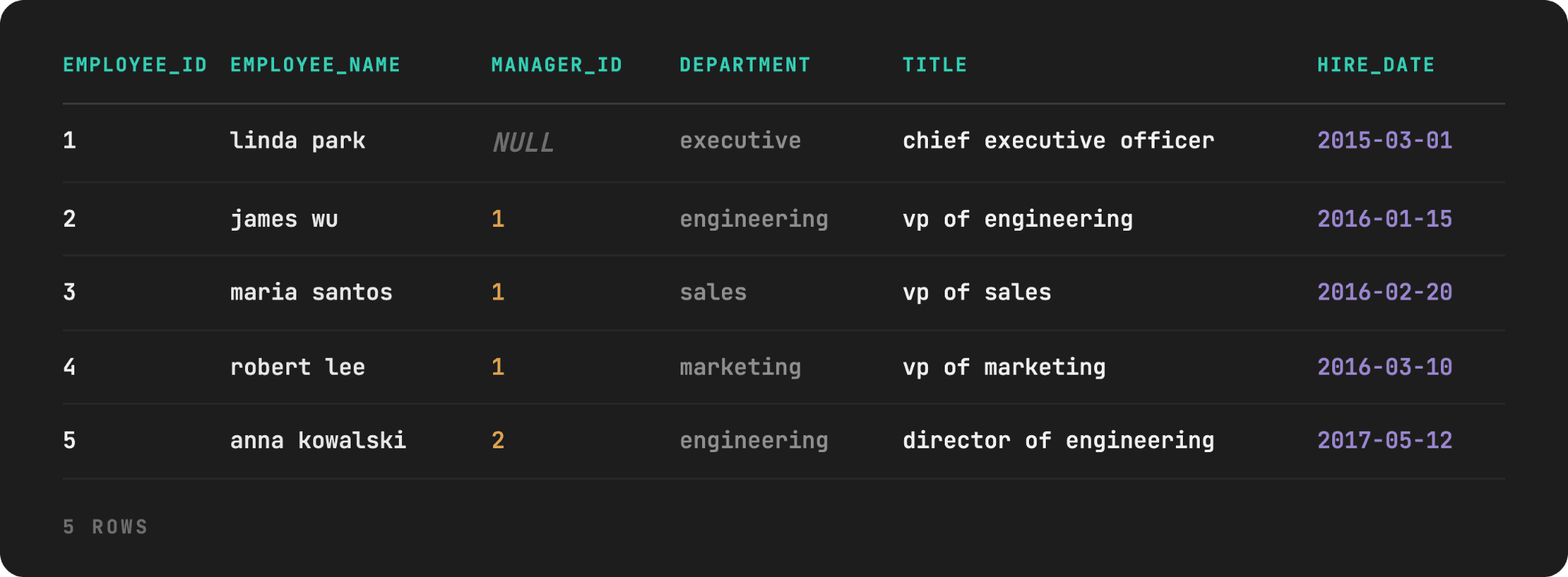
Here’s the data preview, with the SQL script for creating it linked here.
Edge Cases
We’ve built several edge cases into the dataset to make them more realistic.
- Employee 1 (CEO) has
manager_id = NULL: This is the required anchor point. Without at least one row satisfying the anchor'sWHEREcondition, the recursion has nowhere to start, and the query silently returns zero rows. - Employee 9 has
manager_id = 9: This employee is self-referencing, but no other employee reports to him. Because of that, he’s unreachable from the root rather than a live infinite loop. This tests whether you trace reachability rather than assuming that every self-reference behaves the same way. - Employee 14 has manager_id = 99: That ID doesn’t exist in the table, which simulates a manager who left without records being reassigned. This tests whether you notice a recursive CTE can silently drop rows with no error, a dangerous failure mode in production reporting.
- Two employees are named “sarah kim”: Not duplicates, but two different employees with IDs 6 and 12 in different departments. This is to test whether
JOINis matched onemployee_id. A name-based join would incorrectly merge their two separate teams together. - Employee 8’s name has trailing whitespace (
'mike torres '): This won’t break the ID-basedJOIN, but would break aWHERE employee_name = 'mike torres'filter or aGROUP BYon name.
Solution
The anchor member finds linda park, the only row where manager_id is NULL. This is now level 0. The recursive member then finds employees who report to the people already in the result, while incrementing level by 1 on each iteration.
WITH RECURSIVE employee_hierarchy AS (
    SELECT employee_id,
           employee_name,
           manager_id,
           department,
           title,
           0 AS level
    FROM employees
    WHERE manager_id IS NULL

    UNION ALL

    SELECT e.employee_id,
           e.employee_name,
           e.manager_id,
           e.department,
           e.title,
           eh.level + 1 AS level
    FROM employees e
    JOIN employee_hierarchy eh
    ON e.manager_id = eh.employee_id
    WHERE eh.level < 10
)
SELECT employee_id,
       employee_name,
       department,
       title,
       level
FROM employee_hierarchy
ORDER BY level, employee_id;
This is what it looks like in the output.
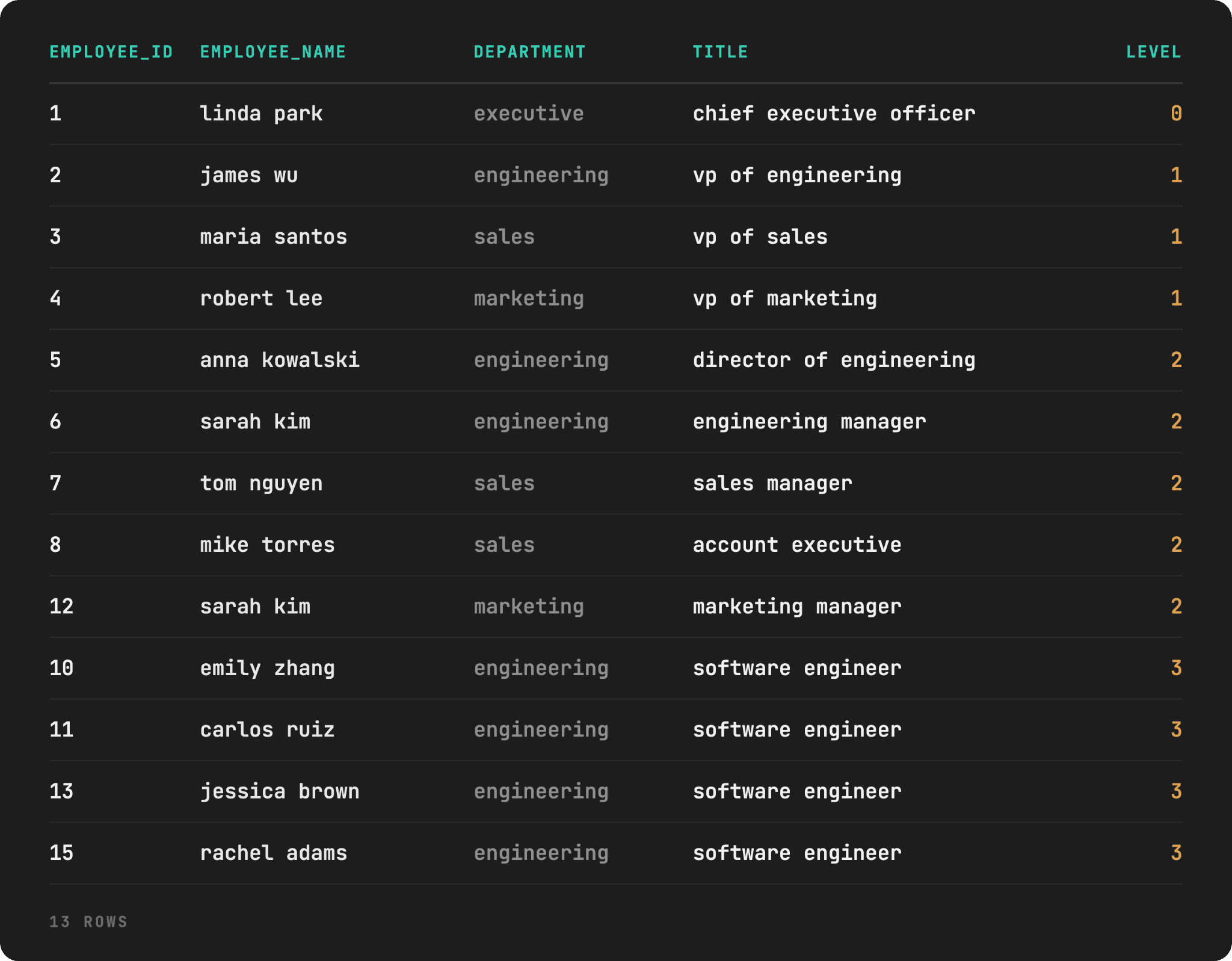
Only 13 of the 15 employees appear. The missing employees are with IDs 9 & 14, dave chen and kevin oconnor, respectively. The reason? Neither has a path back to level 0, i.e., linda park. Kevin’s manager (ID 99) simply doesn’t exist in the table. Dave references himself, with the effect being the same: no real employee reports to him, he doesn’t report to anyone real, the recursion has no way to reach employee_id = 9 from the root, so Dave doesn’t appear in the output.
Product Category Tree
Given the product_categories table, write a query that returns the full breadcrumb path for the category Smartphones – from itself up to its top-level department – along with how many levels up each ancestor sits.
Dataset
This is the product_categories table schema and dictionary.
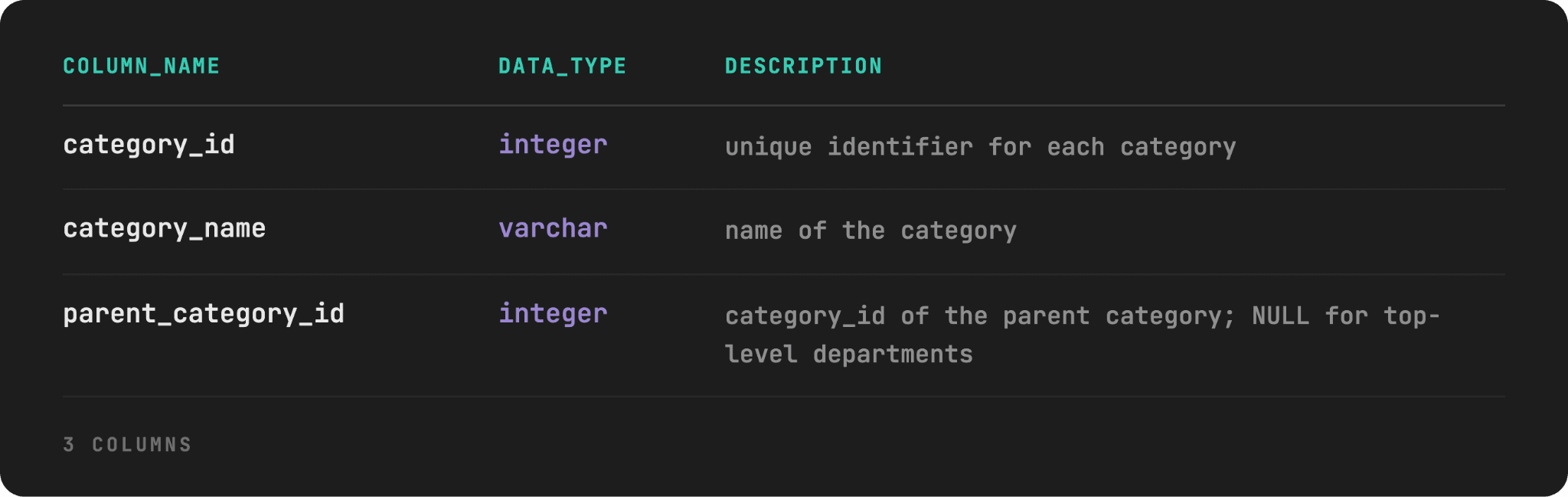
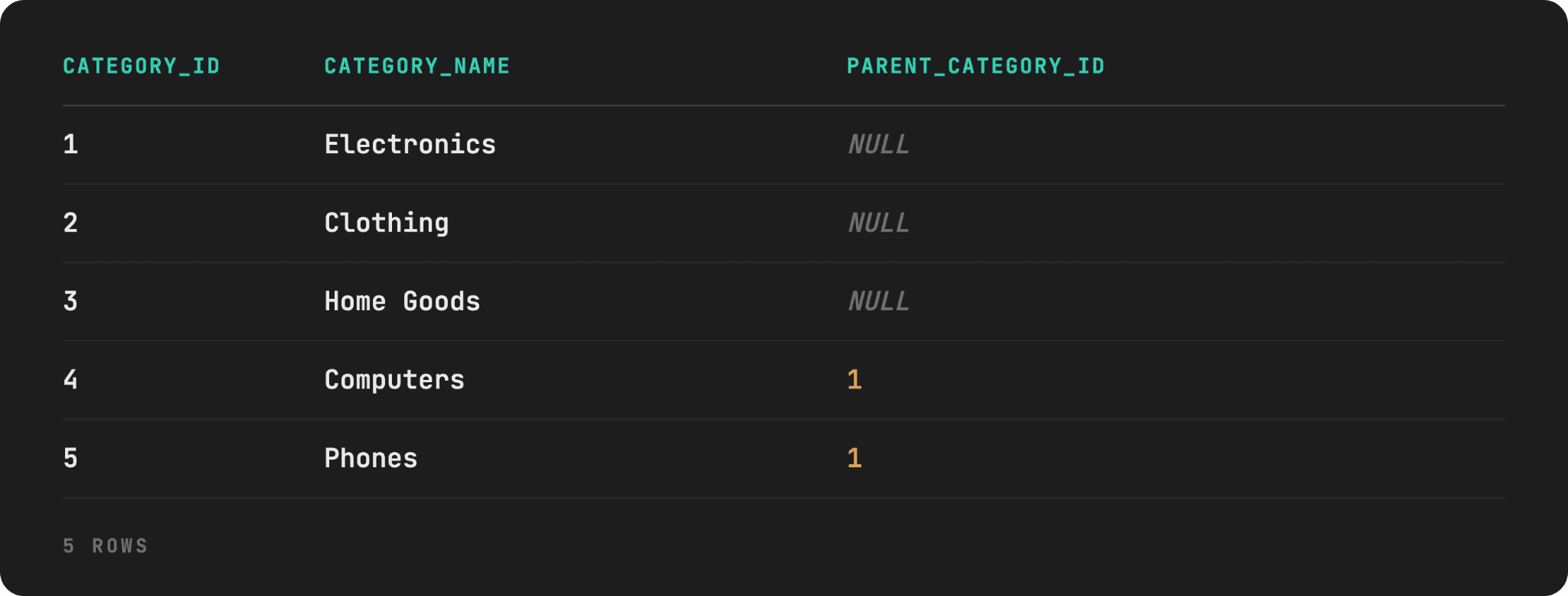
Here’s the dataset preview, with the table creation script here.
Edge Cases
We’ve incorporated two edge cases here.
- There are three separate roots: Those are
Electronics(category_id = 1),Clothing(category_id = 2), andHome Goods(category_id = 3); all three withparent_category_id = NULL. This is realistic, as a real catalog is a forest, not a single tree, unlike the previous example. Here, the anchor member needs to admit all three roots, not just one. - Data entry mistake:
Smart Watches(category_id = 11) andFitness Trackers(category_id = 12) point to each other as parent, instead ofWearables, as they should. This is a mistake that happens relatively often. Such an edge case is an infinite loop if we try to trace either one’s ancestry without a guard. This happens because traversal starts from a specific named category rather than requiring reachability from a root first.
Solution
The structural difference from the previous example is that the anchor member starts at a single named category.
The recursive member then walks upward: each pass looks up the row whose category_id matches the previous row’s parent_category_id, climbing one level toward the root with each iteration.
This mirrors a real “show category path” feature.
WITH RECURSIVE category_path AS (
    SELECT category_id,
           category_name,
           parent_category_id,
           0 AS level
    FROM product_categories
    WHERE category_id = 9

    UNION ALL

    SELECT c.category_id,
           c.category_name,
           c.parent_category_id,
           cp.level + 1 AS level
    FROM product_categories c
    JOIN category_path cp
    ON c.category_id = cp.parent_category_id
    WHERE cp.level < 10
)
SELECT category_id,
	 category_name,
	 parent_category_id,
	 level
FROM category_path
ORDER BY level;
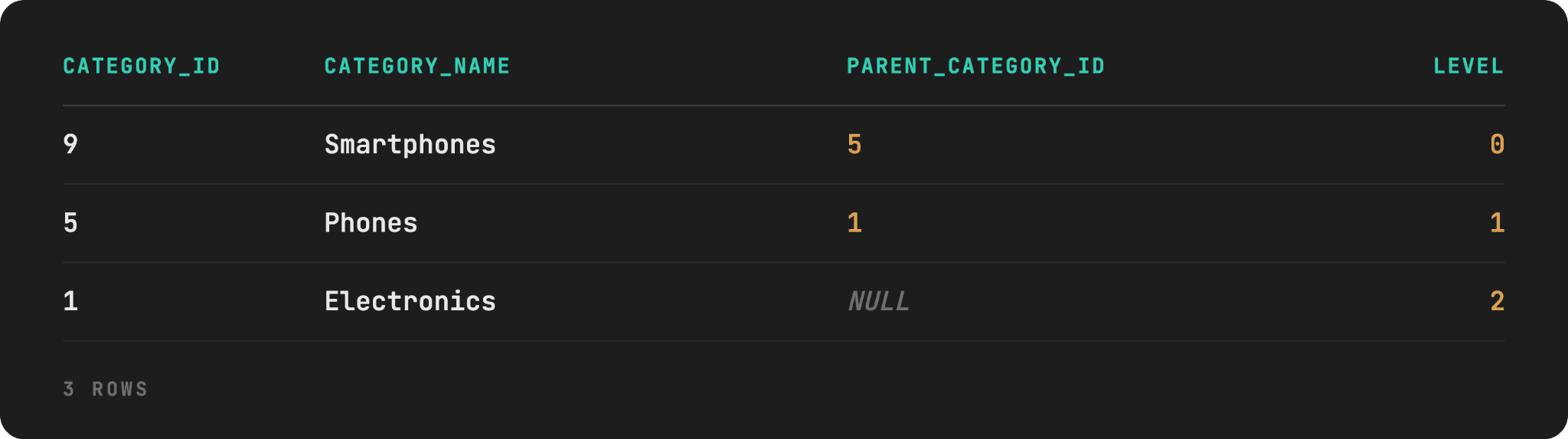
That query stops on its own even without the explicit termination line: parent_category_id hits NULL, no row’s category_id matches NULL, so the JOIN finds nothing and the recursion stops. This is the output.
What Happens When the Category Sits in a Cycle
Let’s say we want to do the same as earlier, but for the Smart Watches category. The same query above, only change to WHERE category_id = 11 in the anchor member.
WITH RECURSIVE category_path AS (
    SELECT category_id,
           category_name,
           parent_category_id,
           0 AS level
    FROM product_categories
    WHERE category_id = 11

    UNION ALL

    SELECT c.category_id,
           c.category_name,
           c.parent_category_id,
           cp.level + 1 AS level
    FROM product_categories c
    JOIN category_path cp
    ON c.category_id = cp.parent_category_id
    WHERE cp.level < 10
)
SELECT category_id,
	   category_name,
	   parent_category_id,
	   level
FROM category_path
ORDER BY level;
The depth saves you from the infinitely running query, but the query is still nonsense. You can see that it displays Smart Watches and Fitness Trackers interchangeably, as they reference each other. The output cuts off at row 11 simply because it reached level = 10.
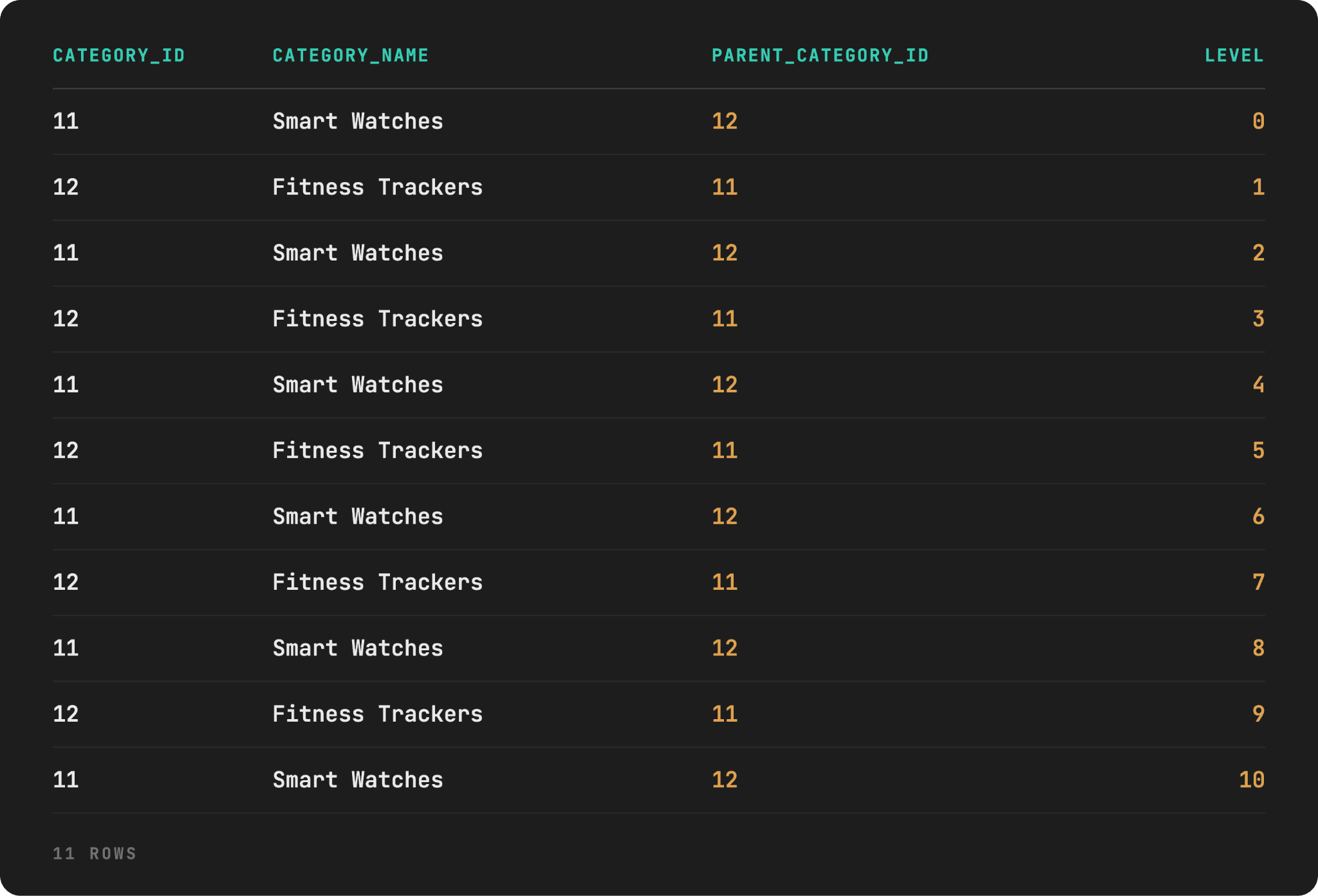
Remove WHERE cp.level < 10, and you end up with a forever-running query.
Folder Structure Traversal
For the next task, we will write a query that computes the total size of the Projects folder by summing the sizes of every file nested inside it, directly or through any number of nested subfolders.
With this example, we’re going – no pun intended – deeper than in the previous two examples as we’ll learn about recursive aggregation.
Dataset
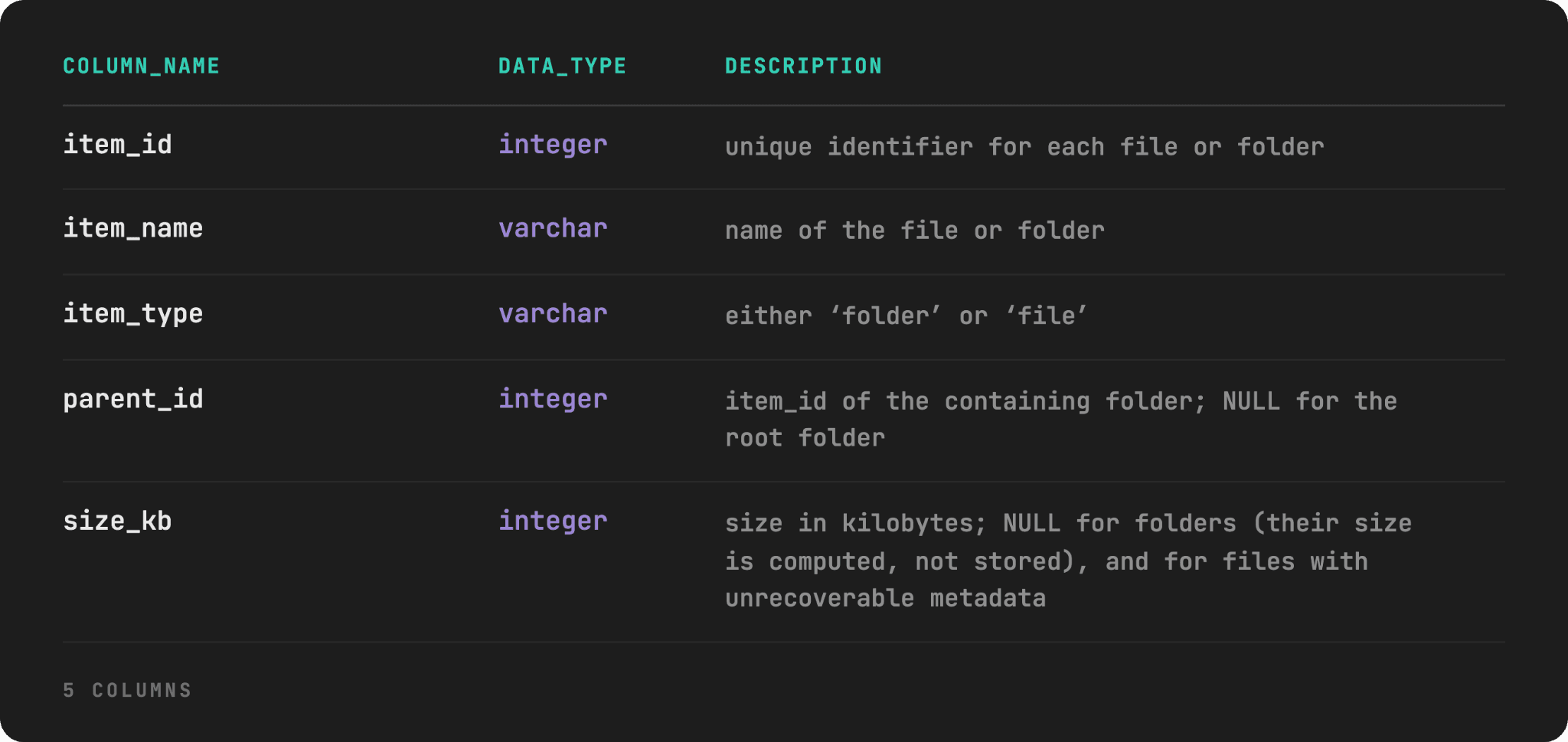
We’re given the items table that represents a file system. Here’s its data schema and dictionary.
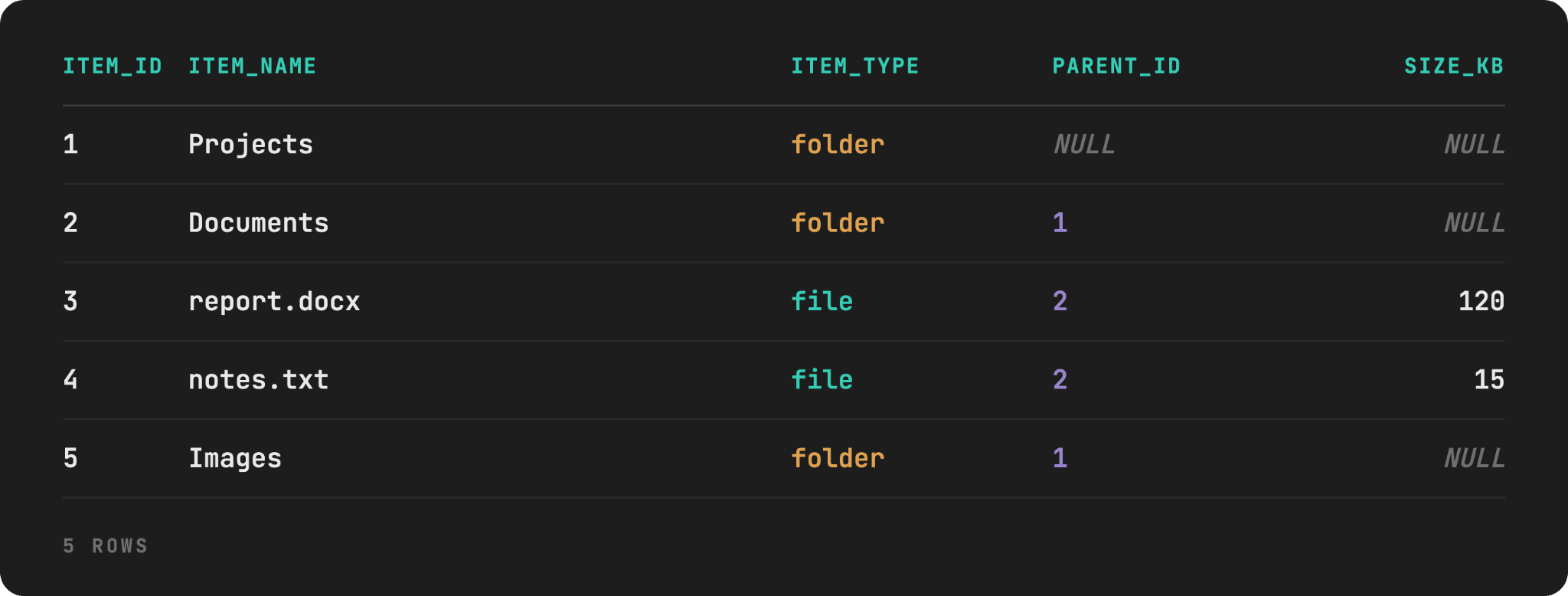
Here’s the data preview. You can create the dataset using this SQL script.
Edge Cases
There are several edge cases in this dataset, too.
photo2.jpghassize_kb = NULL: This is not zero, but genuinely unknown; for example, because of corrupted metadata. Test whether you noticeSUM()silently ignoresNULLs, so a rolled-up folder total quietly excludes this file rather than flagging that the total is incomplete.backup.ziphassize_kb = 0: This is different from the previous edge case, as it’s a real, legitimately empty file. It tests whether your “clean the data” instinct will kick in withWHERE size_kb > 0and you’ll silently drop valid files.- The
Emptyfolder has zero children of any kind: Its rolled-up total should be 0, notNULLor an error. Archivecontains no files directly, only a nested subfolder (Old) one level down: This is to test that the aggregation recurses through intermediate folders instead of only summing direct children.
When a File’s Size is Unknown
This code calculates the total size of the Projects folder. The anchor member starts with it as the target folder. The recursive member then walks down and finds every item whose parent_id matches something already collected, folders and files alike, at any depth.
In the outer SELECT, we filter down to item_type = 'file', so intermediate folder rows (which have no size of their own) never get summed, just used to find what’s nested beneath them.
WITH RECURSIVE folder_contents AS (
    SELECT item_id,
	     item_name,
	     item_type,
	     parent_id,
	     size_kb
    FROM items
    WHERE item_id = 1

    UNION ALL

    SELECT i.item_id,
	     i.item_name,
	     i.item_type,
	     i.parent_id,
	     i.size_kb
    FROM items i
    JOIN folder_contents fc
    ON i.parent_id = fc.item_id
)
SELECT SUM(size_kb) AS total_size_kb
FROM folder_contents
WHERE item_type = 'file';
Here’s the output.

It’s quietly wrong or, at least, incomplete due to the photo2.jpg with size_kb = NULL edge case. SUM() does skip it, so this 2180 really isn’t the total size of Projects, but rather the total of everything whose size we actually know.
When a Folder Has Nothing to Sum
If we scope the previous code to item_id = 13 and find the size of the Empty folder…
WITH RECURSIVE folder_contents AS (
    SELECT item_id, item_name, item_type, parent_id, size_kb
    FROM   items
    WHERE  item_id = 13

    UNION ALL

    SELECT i.item_id, i.item_name, i.item_type, i.parent_id, i.size_kb
    FROM   items i
    JOIN   folder_contents fc ON i.parent_id = fc.item_id
)
SELECT SUM(size_kb) AS total_size_kb
FROM   folder_contents
WHERE  item_type = 'file';
…we get NULL as a result. This happens because Empty has no children at all. As a result, the recursive member doesn’t add a single row beyond the anchor. The anchor itself is a folder, and it’s filtered out by WHERE item_type = 'file'. Apply SUM() to zero rows, and that’s your NULL in the output.

That reads as if we don’t know the size of the Empty folder. However, that’s not true; the size is 0 KB, and the output should show that, too. We need to fix that with COALESCE().
WITH RECURSIVE folder_contents AS (
    SELECT item_id,
	     item_name,
		item_type,
		parent_id,
		size_kb
    FROM items
    WHERE item_id = 13

    UNION ALL

    SELECT i.item_id,
	     i.item_name,
	     i.item_type,
	     i.parent_id,
	     i.size_kb
    FROM items i
    JOIN folder_contents fc
    ON i.parent_id = fc.item_id
)
SELECT COALESCE(SUM(size_kb), 0) AS total_size_kb
FROM   folder_contents
WHERE  item_type = 'file';
Here’s the output.

Bill of Materials (BOM)
Here’s another example. Given a components table, we want to write a query that returns the total quantity of every raw part needed to build one Bicycle.
This example introduces something we didn’t use so far: multiplicative accumulation.
Dataset
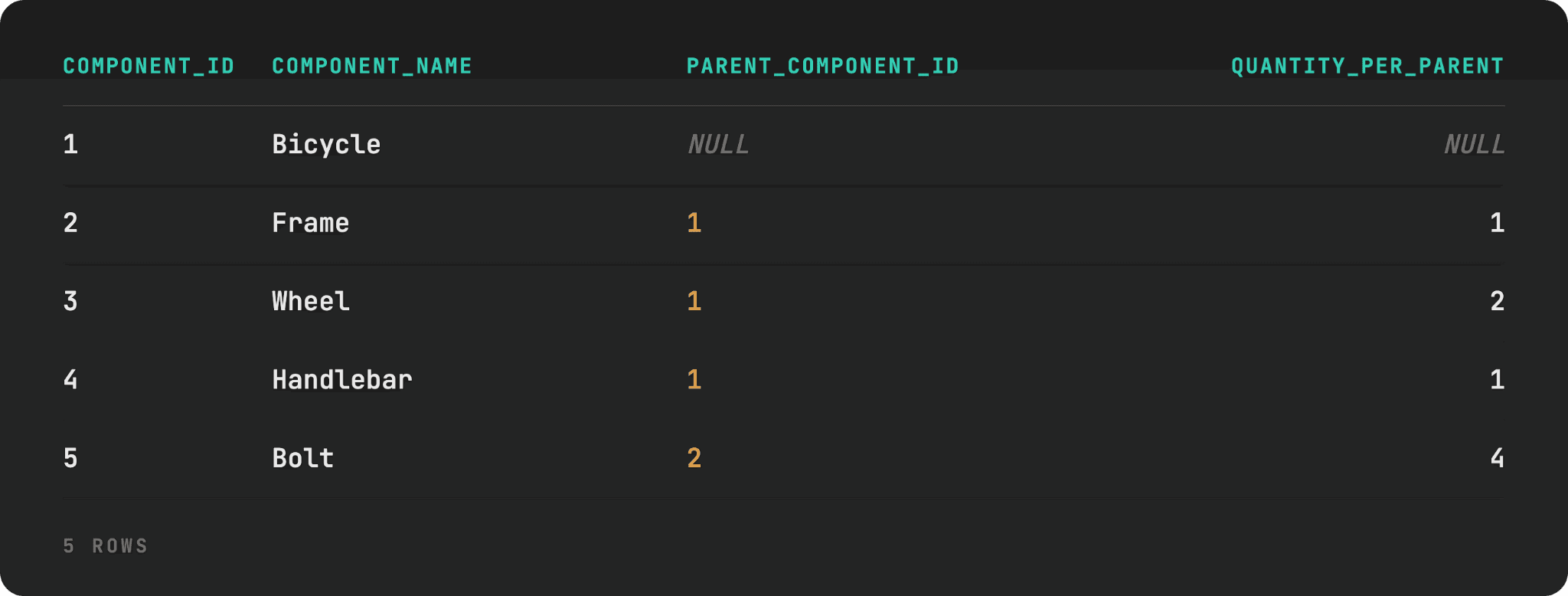
In the component table, each row represents a part, linked to its parent assembly via parent_component_id, with quantity_per_parent telling you how many units of this part go into one unit of its parent.
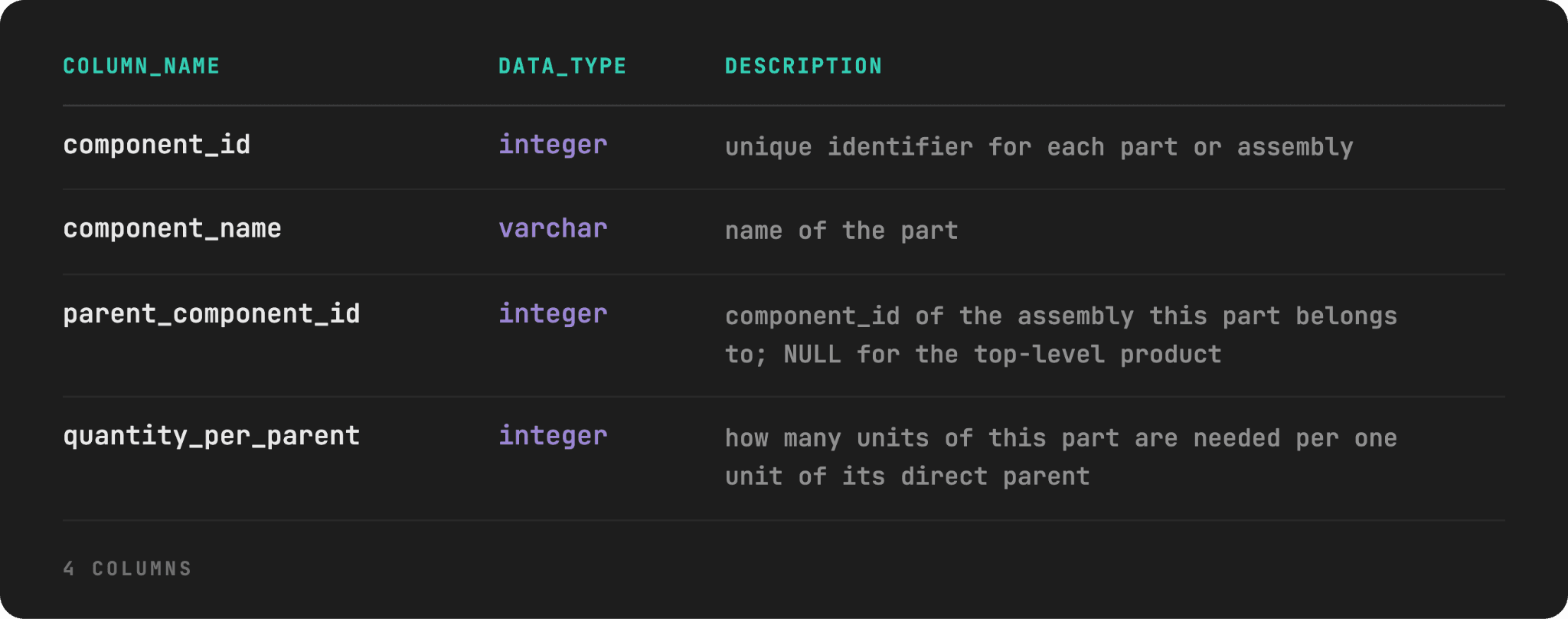
Here are the first five rows of the table; you can create the whole dataset with this script.
Edge Cases
Here are several edge cases we incorporated into the dataset.
- Multiplication required:
Spokeneeds 32 units per wheel, the bicycle needs 2 wheels, so the total number of spokes per bicycle is 64. There’s no such number in the table. It exists only if you correctly multiply quantities down through every level rather than adding them. - Two different rows are named
Bolt: They are the same part, but are cataloged separately because they’re used in different subassemblies. To get the correct number of total bolts needed, we need to aggregate bycomponent_name. Reflectorhasquantity_per_parent = 0: This is a deprecated accessory still listed in the master BOM, but no longer installed. It has its own child (Reflector Bracket), so a query that filters out zero-quantity rows before the recursion finishes will silently fail to discoverReflector Bracketat all. It won’t be reported as 0, just never found.
Solution
In this query, we multiply running_quantity by quantity_per_parent at each level, rather than simply carrying it forward or incrementing it by 1.
WITH RECURSIVE bom_expansion AS (
    SELECT component_id,
           component_name,
           parent_component_id,
           1 AS running_quantity
    FROM components
    WHERE component_id = 1

    UNION ALL

    SELECT c.component_id,
           c.component_name,
           c.parent_component_id,
           be.running_quantity * c.quantity_per_parent AS running_quantity
    FROM components c
    JOIN bom_expansion be
    ON c.parent_component_id = be.component_id
)
SELECT component_id,
	 component_name,
	 running_quantity
FROM bom_expansion
WHERE component_id != 1
ORDER BY component_id;
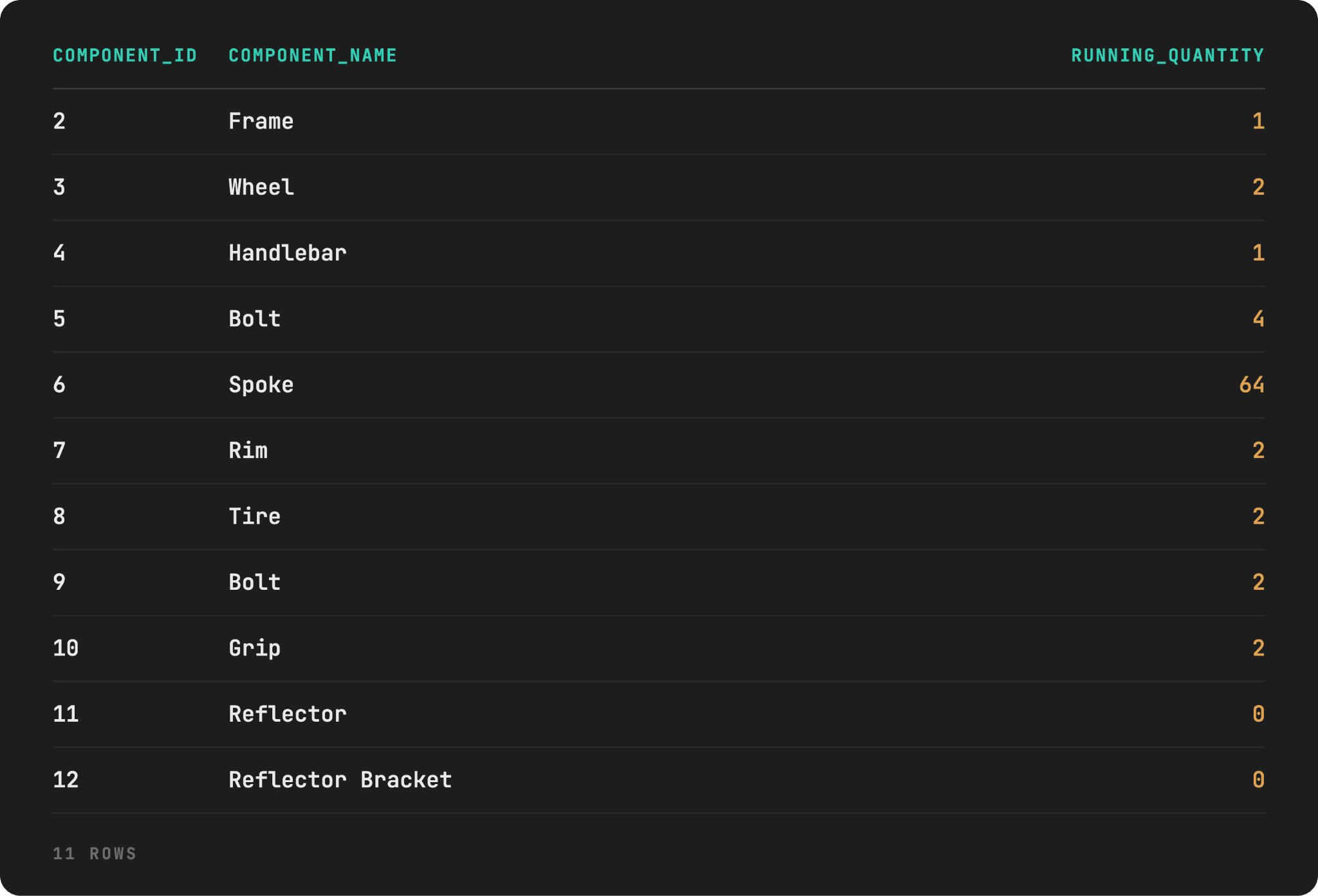
Here’s the output.
When One Part Serves Multiple Parents
You can see in the output above there are two Bolts rows. That’s not a mistake. They are shown separately because they’re consumed by two different subassemblies.
If you need to answer the “how many bolts do I need to stock for one bicycle?” question, then this is not correct.
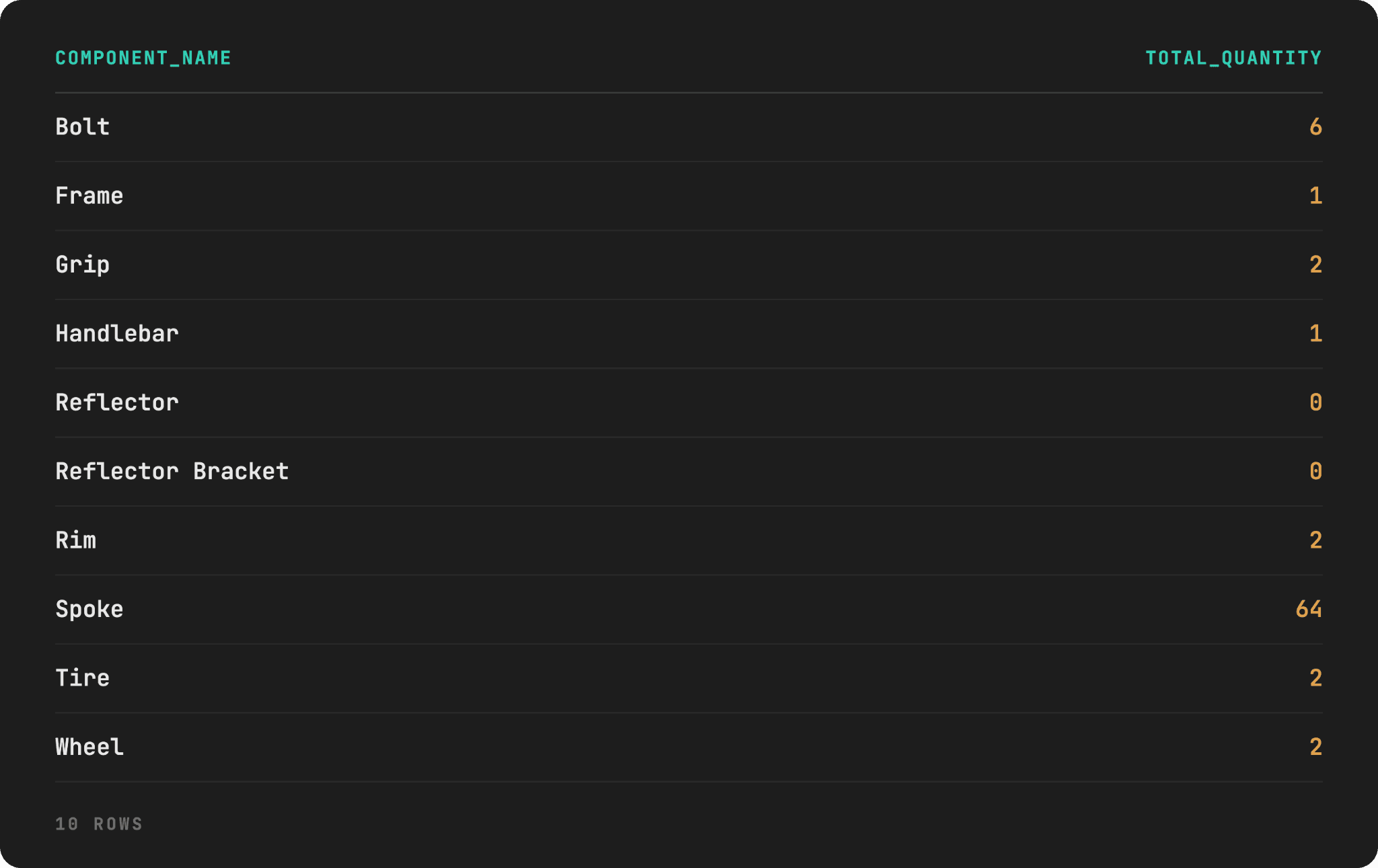
This is correct. The change is in the outer SELECT, where we use aggregation and GROUP BY to show those two Bolt rows as one.
WITH RECURSIVE bom_expansion AS (
    SELECT component_id,
           component_name,
           parent_component_id,
           1 AS running_quantity
    FROM components
    WHERE component_id = 1

    UNION ALL

    SELECT c.component_id,
           c.component_name,
           c.parent_component_id,
           be.running_quantity * c.quantity_per_parent AS running_quantity
    FROM components c
    JOIN bom_expansion be
    ON c.parent_component_id = be.component_id
)
SELECT component_name,
	 SUM(running_quantity) AS total_quantity
FROM bom_expansion
WHERE component_id != 1
GROUP BY component_name
ORDER BY component_name;
Here’s the output.
Zero Doesn’t Mean Stop
The bicycle needs 0 units of Reflector (it’s deprecated), yet both Reflector and Reflector Bracket still show up in the output. That’s the correct answer, as 0 reflectors means 0 reflector brackets, too.
The trap is that you might be tempted to write the query with WHERE c.quantity_per_parent > 0 in the recursive member, thinking why bother expanding a part we need zero of.
WITH RECURSIVE bom_expansion AS (
    SELECT component_id,
           component_name,
           parent_component_id,
           1 AS running_quantity
    FROM components
    WHERE component_id = 1

    UNION ALL

    SELECT c.component_id,
           c.component_name,
           c.parent_component_id,
           be.running_quantity * c.quantity_per_parent AS running_quantity
    FROM components c
    JOIN bom_expansion be
	ON c.parent_component_id = be.component_id
    WHERE c.quantity_per_parent > 0
)
SELECT component_id,
	   component_name,
	   running_quantity
FROM bom_expansion
WHERE component_id != 1
ORDER BY component_id;
Watch what happens. It prevents Reflector from ever entering recursion, so it doesn’t show up at all, the same as Reflector Bracket.
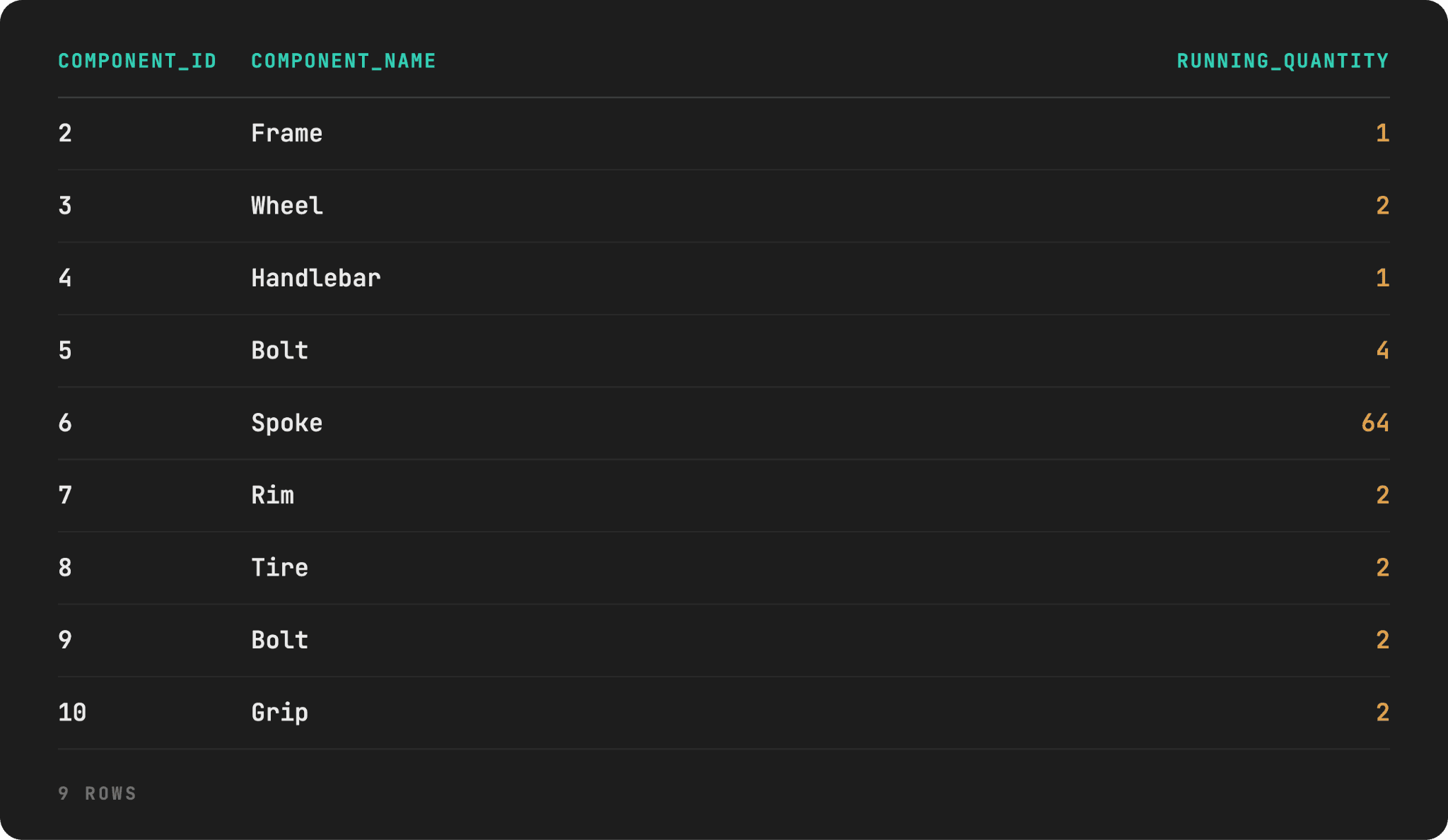
You might ask why this is wrong; if the bicycle requires zero reflectors and reflector brackets, why show them? Because this output says that the part doesn’t exist in the BOM, unlike the previous output, which says that the part exists but isn’t currently needed.
BOM is used not only for calculating build quantities but also for safety/regulatory checks (reflectors are legal requirements in some markets), engineering change orders, warranty/parts lookup, and procurement reactivating a discontinued part.
All that can still be done only if Reflector and Reflector Bracket show at 0.
Takeaway: Filter what you display, never what you traverse. (The same as with the folder structure’s Empty folder.)
Generate Numbers
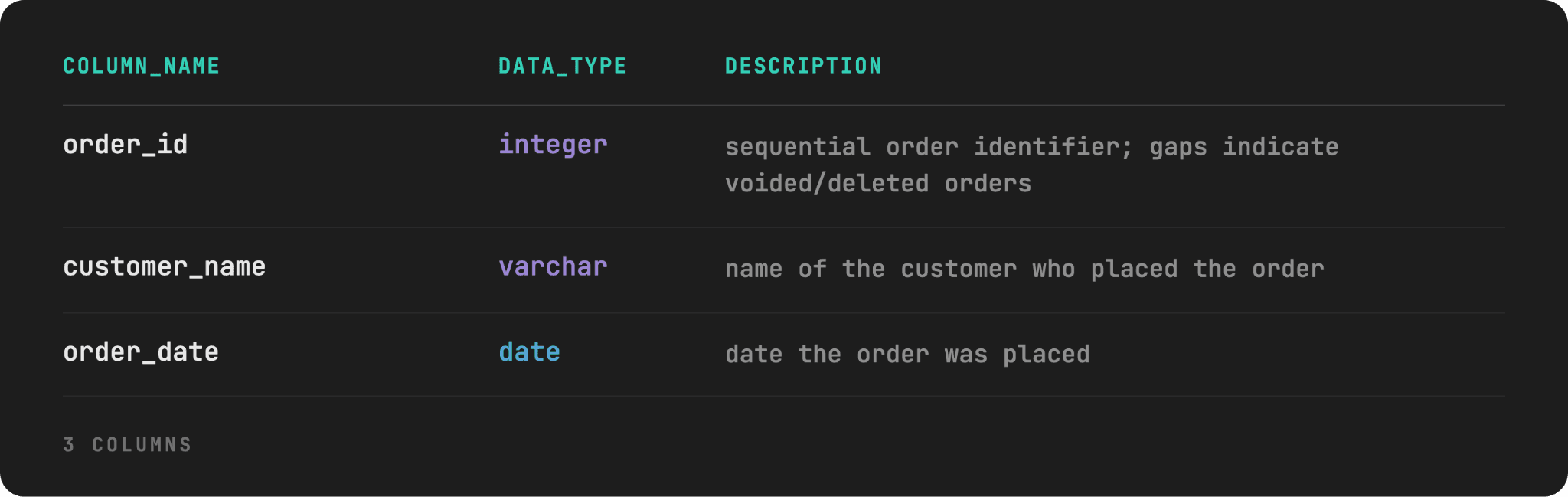
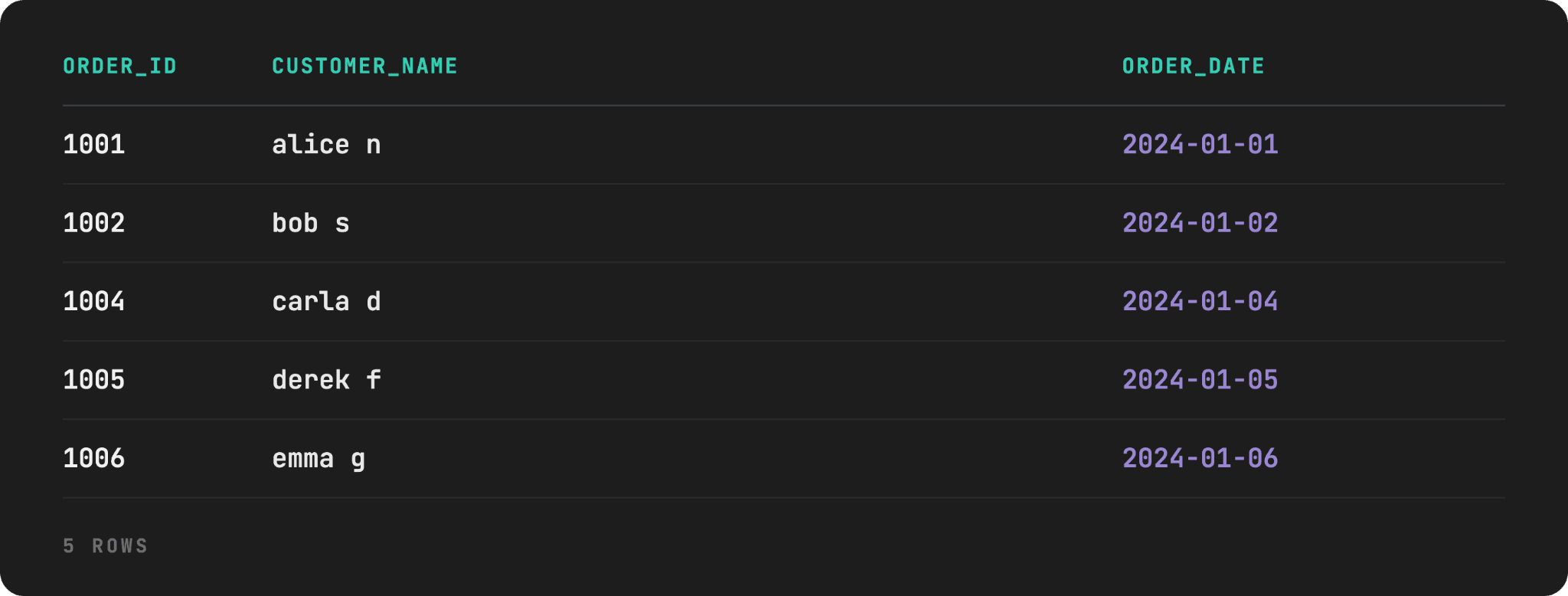
We have an orders table where order_id should be a sequential integer. However, it’s not; some IDs are missing because voided orders were deleted rather than kept as placeholders.
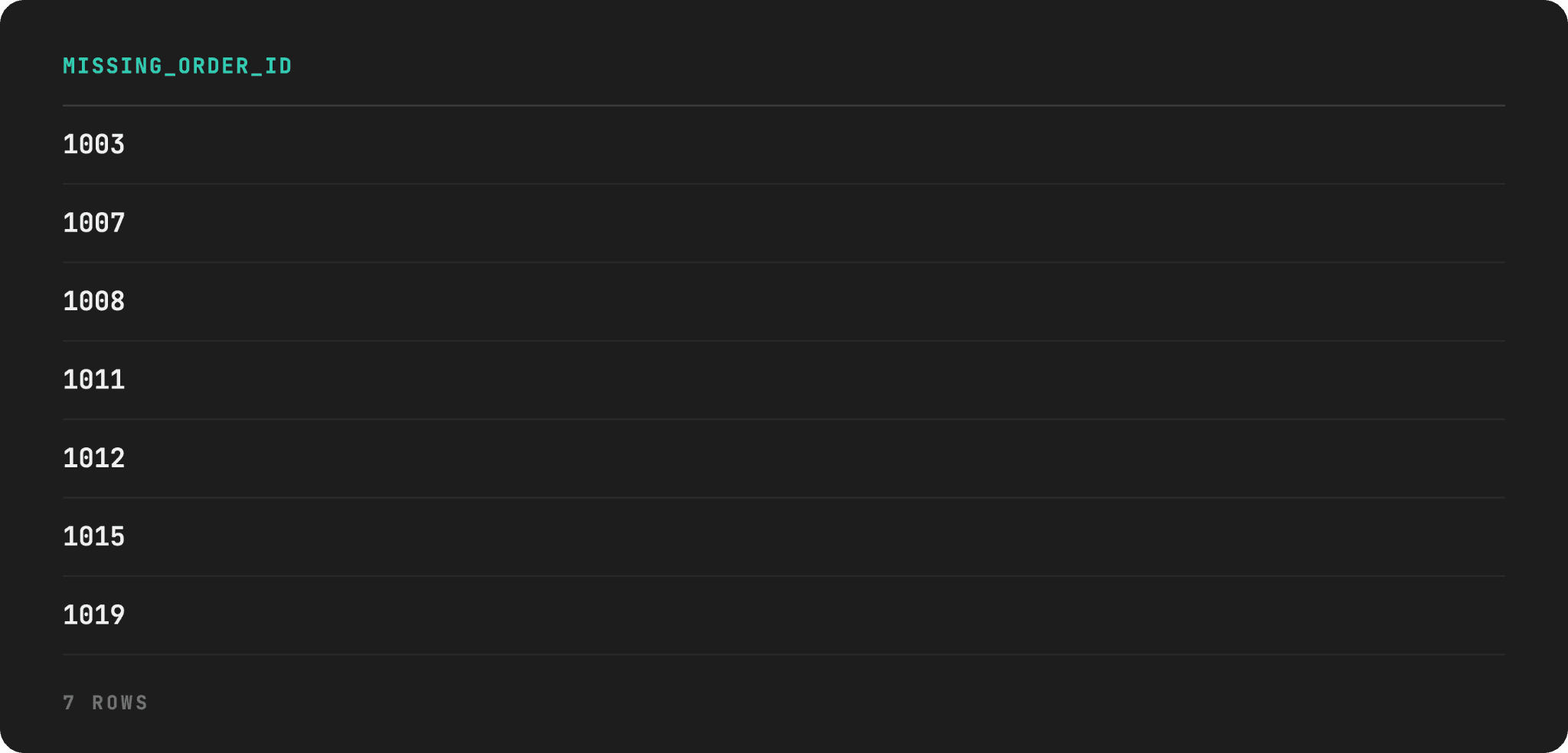
We’ll write a query that will return every missing order_id between the minimum and maximum ID currently in the table.
This is a classic example of a gaps-and-islands problem. The recursive CTE needed here is different from the previous examples, as there’s no self-referencing column to walk here. Instead, we need to manufacture a complete number sequence from scratch, then compare it against what actually exists.
Dataset
Here’s the orders table schema and dictionary.
And also the data preview with the table-creation script here.
Edge Cases
This data, too, hides several edge cases.
- The simplest gap shape:
1003and1015are each a single missing ID surrounded by real orders on both sides. - Two different multi-ID gaps:
1007and1008are missing together, and separately1011and1012are missing together. This scenario tests whether the recursive query finds every missing number in a run, not just the first one. - A gap sitting at the edge of the range:
1019is missing immediately before the maximum ID (1020). It tests whether the upper boundary is handled correctly, rather than only the middle of the sequence. - True range boundaries: The very first (
1001) and the last (1020) order IDs are present. That means that the true range boundaries have to come fromMIN()andMAX()on real data, not a value assumed in advance.
Solution
Notice how in this recursive CTE we don’t reference a starting row at all. Instead, we calculate it using MIN().
The recursive member then adds 1 with each pass. There’s no JOIN back to orders, as the query is not traversing the relationship, unlike the previous examples we’ve shown.
The query runs until the termination condition is met, which is the highest order ID, found by MAX(). This is not an optional safety net; it’s the only stopping mechanism you have, as there’s nothing else that would stop incrementing n.
WITH RECURSIVE number_sequence AS (
    SELECT MIN(order_id) AS n
    FROM orders

    UNION ALL

    SELECT n + 1
    FROM number_sequence
    WHERE n < (SELECT MAX(order_id) FROM orders)
)
SELECT n AS missing_order_id
FROM number_sequence
WHERE n NOT IN (SELECT order_id FROM orders)
ORDER BY n;
Here’s the output.
Generate Calendar Dates
This example is similar to the previous one. However, the mechanic changes from integer to date arithmetic. This also has a different practical application: it’s a standard fix for a dashboard or a chart with silently missing days.
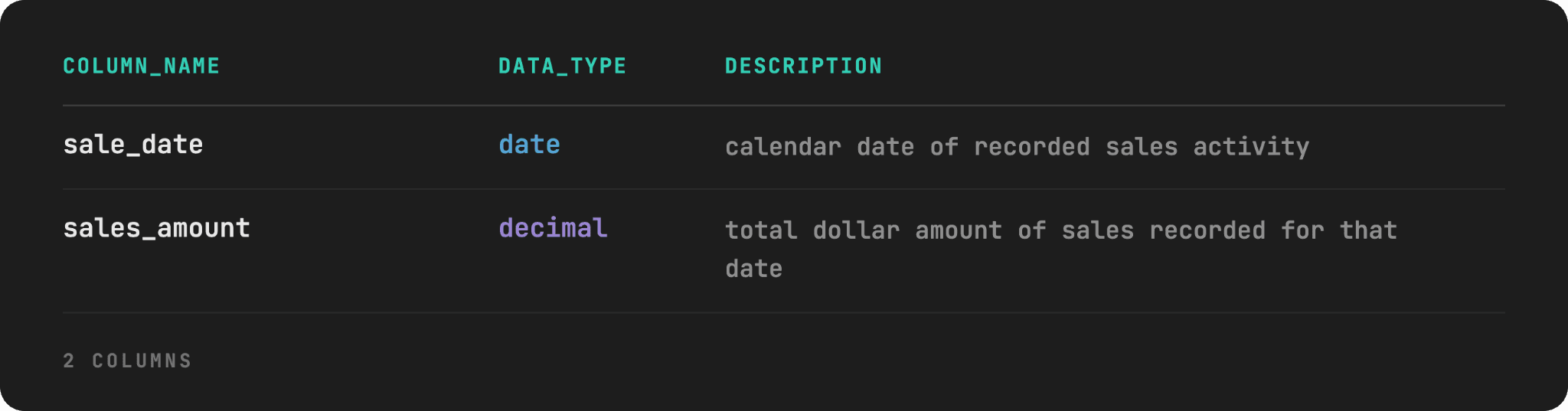
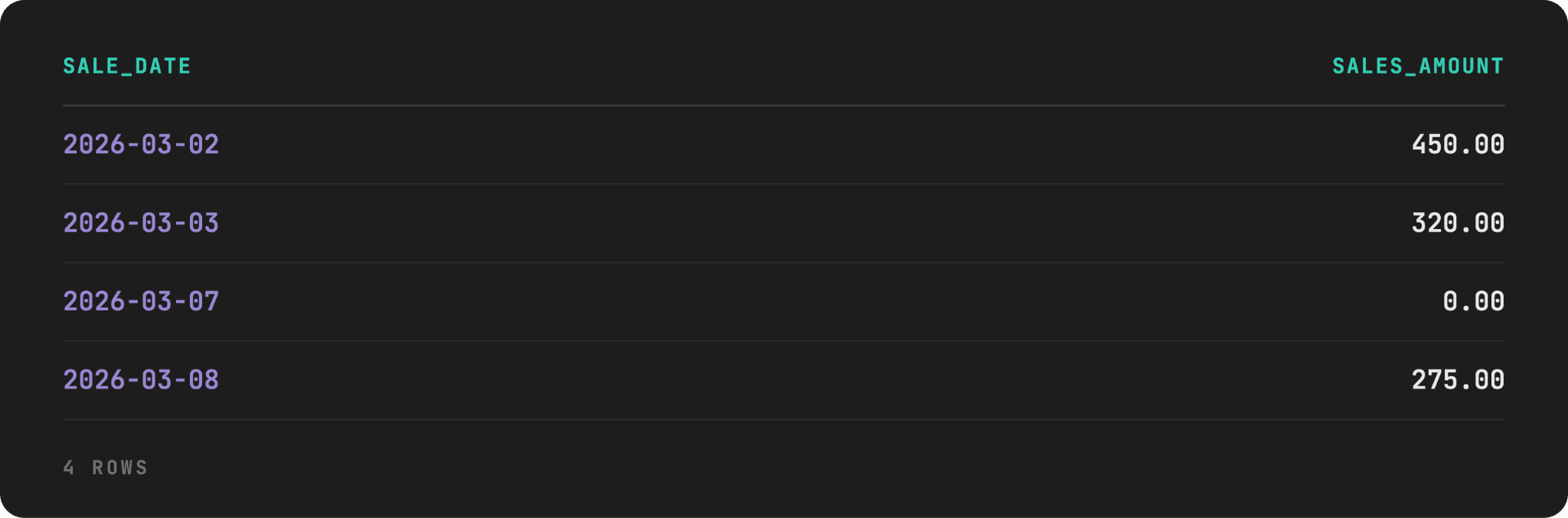
As an example, we have a table that only has rows for days when the sale occurs. The task is to write a query that returns every date in the given range (March 1 to March 10, 2026) and the total sales for that day. On days with no sales, show 0.
Data
We’ll name the table daily_sales. Here’s its schema and dictionary.
Here’s its data and the script.
Edge Cases
We’ve incorporated four edge cases into the dataset.
- The range start is not in the table: It’s March 1, 2026, and can’t be found in the table, which tests whether the anchor member starts from the requested range boundary, not from
MIN(sales_date), which is March 2. - The upper boundary also has no row: The same logic as above, only with the upper boundary, which is March 10. The recursion shouldn’t stop at the last recorded date, but the last requested date.
- A 3-day consecutive gap: March 4 through March 6 are missing together. We want to test whether every missing day gets its own
0row, not a collapsed range. sales_amount = 0.00row: This is a real transaction day (March 7) that happened to net to zero (a refund, a void), which is distinct from a day that’s missing from the table entirely. Both cases should show 0 in the final report, but for different reasons, and only one of them is a gap your query needs to manufacture.
Solution
The anchor date is 2026-03-01; the lower date range boundary is defined by the question, not anything pulled from the daily_sales table. If you’d used MIN(sale_date), the sequence would start at 2026-03-02, and you’d lose one row not even realizing it.
The recursive member adds one day in each pass, stopping when it reaches 2026-03-10.
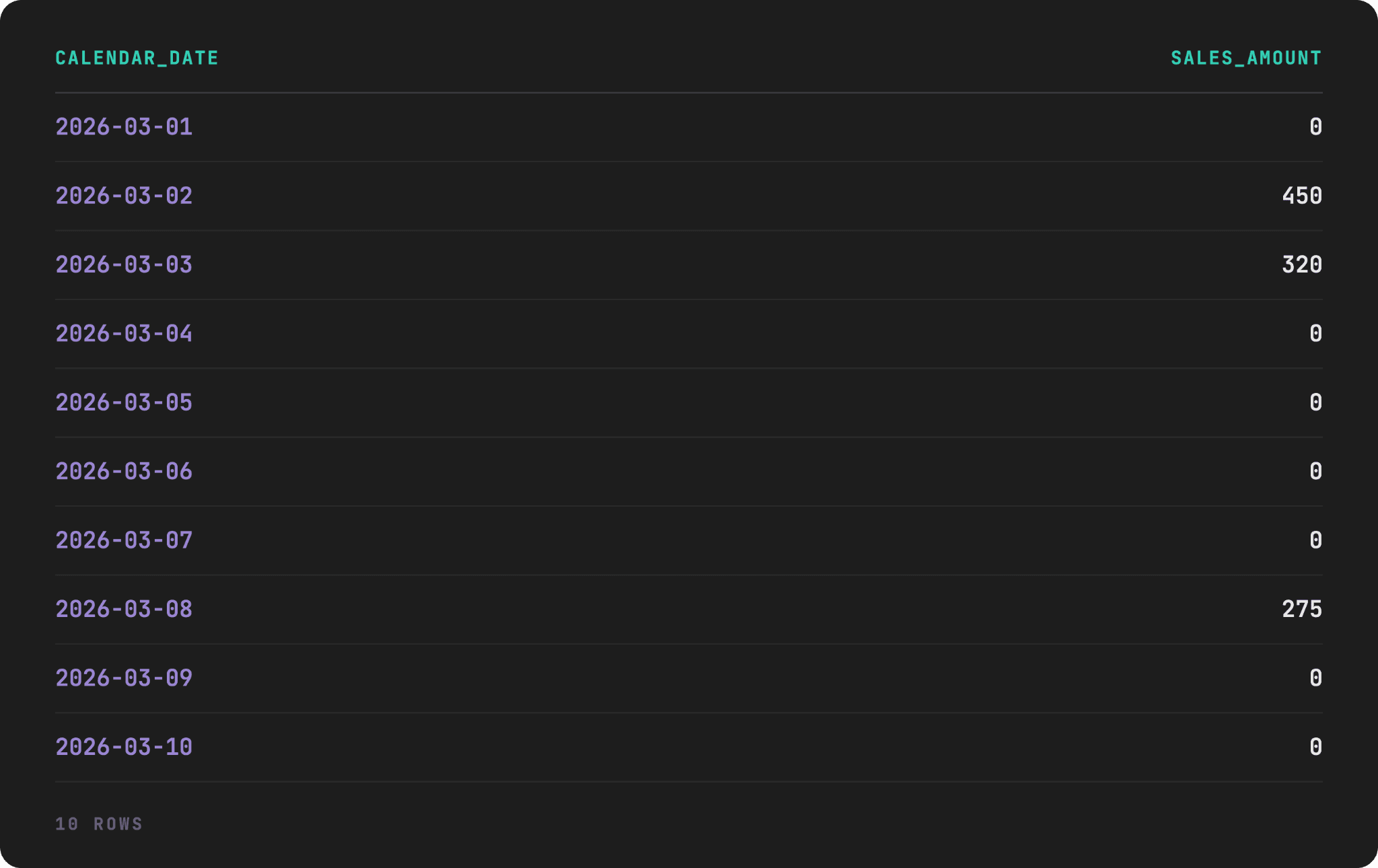
The outer SELECT uses LEFT JOIN to attach sales amounts to calendar dates, with COALESCE() filling in 0 everywhere the join found nothing, i.e., there were no sales for that date.
WITH RECURSIVE calendar AS (
    SELECT DATE '2026-03-01' AS calendar_date

    UNION ALL

    SELECT (calendar_date + INTERVAL '1 day')::DATE
    FROM calendar
    WHERE calendar_date < DATE '2026-03-10'
)
SELECT c.calendar_date,
       COALESCE(ds.sales_amount, 0) AS sales_amount
FROM calendar c
LEFT JOIN daily_sales ds
ON c.calendar_date = ds.sale_date
ORDER BY c.calendar_date;
Here’s the output.
The Cheat Code in PostgreSQL & SQL Server
If you’re using PostgreSQL, as we do, we have to let you in on a little secret: you can solve this problem even without recursion in PostgreSQL. It has a built-in generate_series() function that handles this specific task.
The non-recursive version of the code is as follows.
WITH calendar AS (
    SELECT calendar_date::DATE AS calendar_date
    FROM generate_series(DATE '2026-03-01', DATE '2026-03-10', INTERVAL '1 day') AS t(calendar_date)
)
SELECT c.calendar_date,
       COALESCE(ds.sales_amount, 0) AS sales_amount
FROM calendar c
LEFT JOIN daily_sales ds
ON c.calendar_date = ds.sale_date
ORDER BY c.calendar_date;
In SQL Server 2022 and later, the function is called GENERATE_SERIES().
WITH calendar AS (
    SELECT DATEADD(DAY, value, '2026-03-01') AS calendar_date
    FROM GENERATE_SERIES(0, DATEDIFF(day, '2026-03-01', '2026-03-10'))
)
SELECT c.calendar_date,
       COALESCE(ds.sales_amount, 0) AS sales_amount
FROM calendar c
LEFT JOIN daily_sales ds
ON c.calendar_date = ds.sale_date
ORDER BY c.calendar_date;
Despite all this cheating allowed by two popular database engines, the recursive CTE approach is still worth knowing. MySQL has no native equivalent at all, so this is the standard technique there. And even on SQL Server, GENERATE_SERIES() requires database compatibility level 160 or higher.
Referral Chains
For this example, consider a company that runs a referral program where every new customer can be credited to whoever referred them. The task is to write a query that, for every customer, returns the total size of their referral network, i.e., everyone they referred directly or indirectly, at any depth.
Dataset
The table we’re working with is named users, where referred_by points to the user_id.
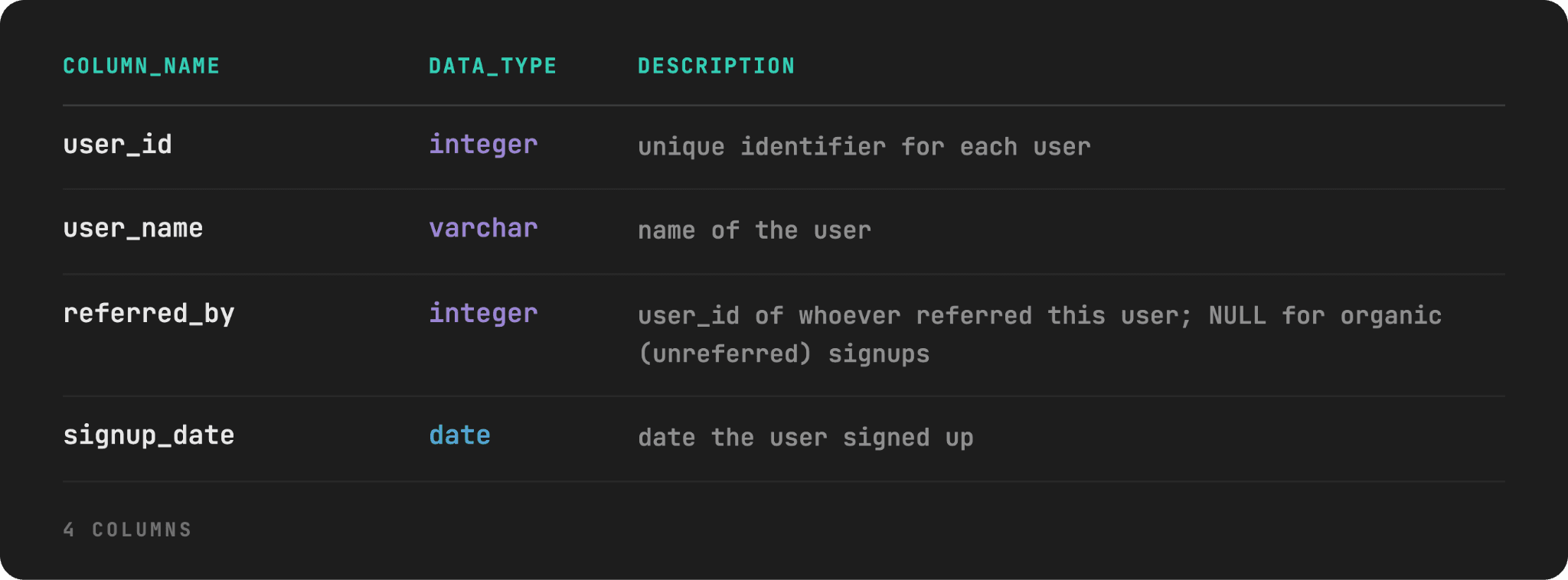
Here’s the data preview and the script.

Edge Cases
The edge cases in the dataset are as follows:
- Users who have
referred_by = NULL: Those users arealice,frank, andgrace. This means there are multiple independent trees in one table, same as forest. So, the query must compute a network size for every root, not simply assume a single starting point. alice’s chain runs 5 levels deep: It tests that a grandparent’s network size correctly includes every generation beneath them, not just direct referrals.referred_bypointing to its ownuser_id: This is the case forharry. It creates an infinite loop because the query’s anchor starts every user as their own one-person network and then expands. The self-referencing user does connect back to something already in the recursion, namely himself, so it loops infinitely without a guard.- Users with zero referrals: This tests that a user with no downline reports a network size of 0, not a missing row.
Solution
In the anchor member, we have something new: it doesn’t select one anchor row, it gives every user a one-person network of just themselves.
The recursive member then expands every root’s network in parallel. For each (root_id, member_id) pair already found, it looks for real users whose referred_by matches that member_id, and adds them under the same root_id.
In the outer SELECT, we use COUNT(*) - 1 to reduce the total number of network members by one, i.e., we’re keeping only the referred user, without the person who referred them.
WITH RECURSIVE downline AS (
    SELECT user_id AS root_id,
	     user_id AS member_id,
	     0 AS depth
    FROM users

    UNION ALL

    SELECT d.root_id,
     u.user_id,
     d.depth + 1
    FROM downline d
    JOIN users u
    ON u.referred_by = d.member_id
    WHERE d.depth < 10
)
SELECT root_id,
	 COUNT(*) - 1 AS network_size
FROM downline
GROUP BY root_id
ORDER BY root_id;
Here’s the output.

Everything looks good except for the last row: harry has no one in his network except himself, yet he shows a network of 10? As referred_by points to its own user_id, his network is not a real count, but reflects the cap where the recursion cuts off.
Fixing the Loop: Count Distinct Members, Not Rows
To fix this, you need to switch to COUNT(DISTINCT member_id) in place of COUNT(*). This fixes the harry row, without changing anything else, as every other user’s network already contained distinct members.
Keep in mind that this fixes the reported number, not the underlying infinite loop, so the cap in WHERE has to stay.
WITH RECURSIVE downline AS (
    SELECT user_id AS root_id,
	     user_id AS member_id, 0 AS depth
    FROM users

    UNION ALL

    SELECT d.root_id,
     u.user_id, d.depth + 1
    FROM downline d
    JOIN users u
    ON u.referred_by = d.member_id
    WHERE d.depth < 10
)
SELECT root_id,
	 COUNT(DISTINCT member_id) - 1 AS network_size
FROM downline
GROUP BY root_id
ORDER BY root_id;
Here’s the fixed output.

Graph and Path Traversal (Introductory)
We won’t go further than the introductory level of graph and path traversal. However, this use case is worth mentioning, as this is where recursive CTE and graph traversal fully merge. So far, we had either a tree or a flat sequence. In this example, we’ll traverse a genuine graph, where a cycle can exist in the actual structure of real edges, not just in one broken row.
Also, the path-tracking cycle-detection technique we used in the Employee Hierarchy example will now be our primary tool.
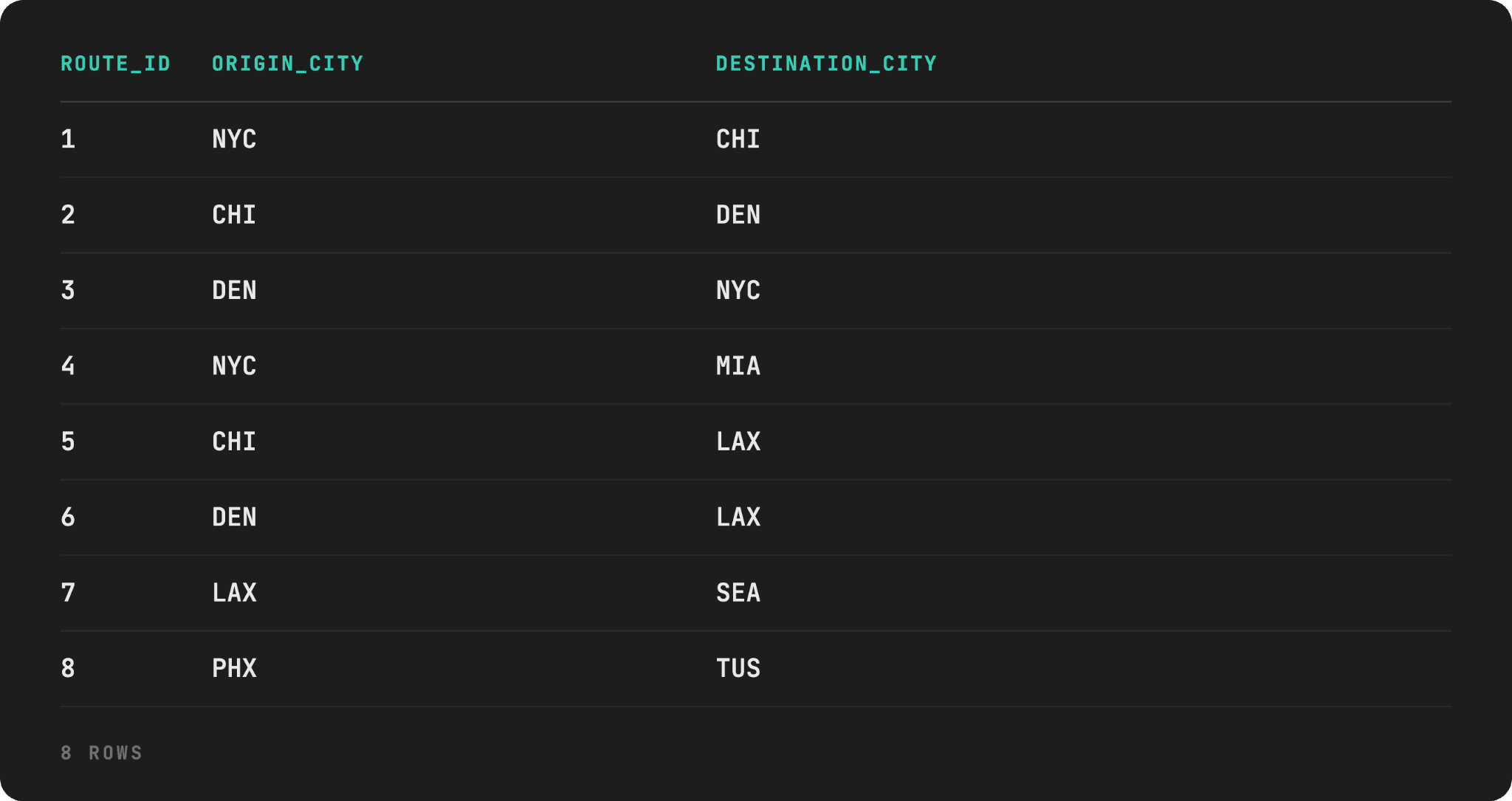
The task is this: You're given a routes table of direct flights between cities, where a route only goes one direction. Write a query that returns every distinct route from NYC to everywhere it can reach, directly or through connecting flights, showing the full sequence of cities for each route, and make sure it works even if the route network loops back on itself.
Data
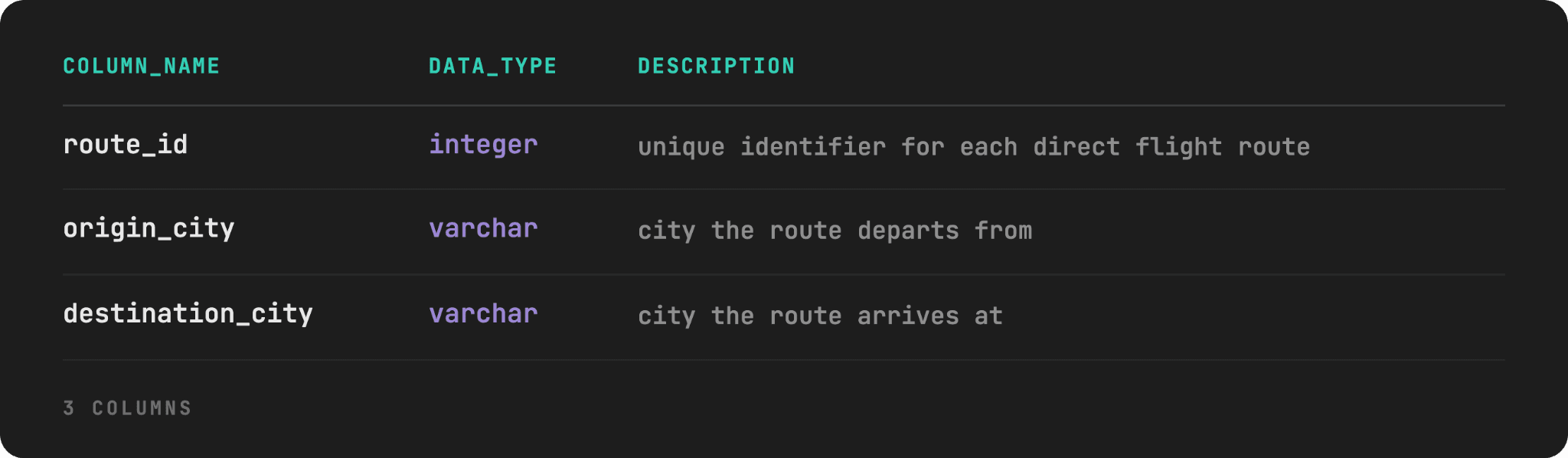
The following is the table’s schema and dictionary.
Here’s the data. You can create the whole dataset using this script.
Edge Cases
Here are the edge cases we’ve incorporated in this dataset.
- An actual cycle in the graph: There are three distinct, legitimate routes that loop back to their own starting point:
NYC → CHI → DEN → NYC. This is a structurally different problem than a self-referencing row: a depth cap would eventually stop the loop, but it would keep re-visiting the same three cities forever until it did, and it can’t tell a real 4th city from a repeat of the 1st. - A diamond shape:
CHI → LAXandDEN → LAXboth lead toLAX. This tests that a city reachable by two different routes shows up as two separate rows, once per distinct path, rather than being collapsed into one. - Disconnected from the network:
PHX → TUSis entirely disconnected from the NYC-based network. This tests that a reachability search fromNYCdoesn’t accidentally include cities that exist in the table but aren’t actually connected to the starting point. - Dead ends:
MIAandSEAappear only asdestination_city, never anorigin_city. The recursion should stop naturally here, same mechanism as a leaf node in a tree.
Solution
As expected, the anchor member starts at NYC and takes its direct routes.
The new addition is the path column: it’s a running, comma-delimited string of every city visited by the recursion on the particular route, with each city added with each recursion.
The cycle guard is in the recursive member in WHERE. Before adding a new city, it checks whether that city is already in the current path string. If it is, that branch stops; not because of a depth limit, but because revisiting a city can never produce a new reachable destination.
WITH RECURSIVE reachable_cities AS (
    SELECT origin_city AS start_city,
           destination_city AS current_city,
           ', ' || origin_city || ', ' || destination_city || ', ' AS path
    FROM routes
    WHERE origin_city = 'NYC'

    UNION ALL

    SELECT rc.start_city,
           r.destination_city,
           rc.path || r.destination_city || ', '
    FROM routes r
    JOIN reachable_cities rc
	ON r.origin_city = rc.current_city
    WHERE rc.path NOT LIKE '%, ' || r.destination_city || ', %'
)
SELECT DISTINCT path
FROM reachable_cities
ORDER BY path;
A note on DISTINCT: It doesn’t remove any rows from this particular output, since every path is already unique. However, we included it anyway as a measure against a realistic version of the dataset with duplicate edges, such as multiple airlines flying, for example, NYC → CHI shown as separate rows.
Here’s the output.

Recursive CTE vs Regular CTE
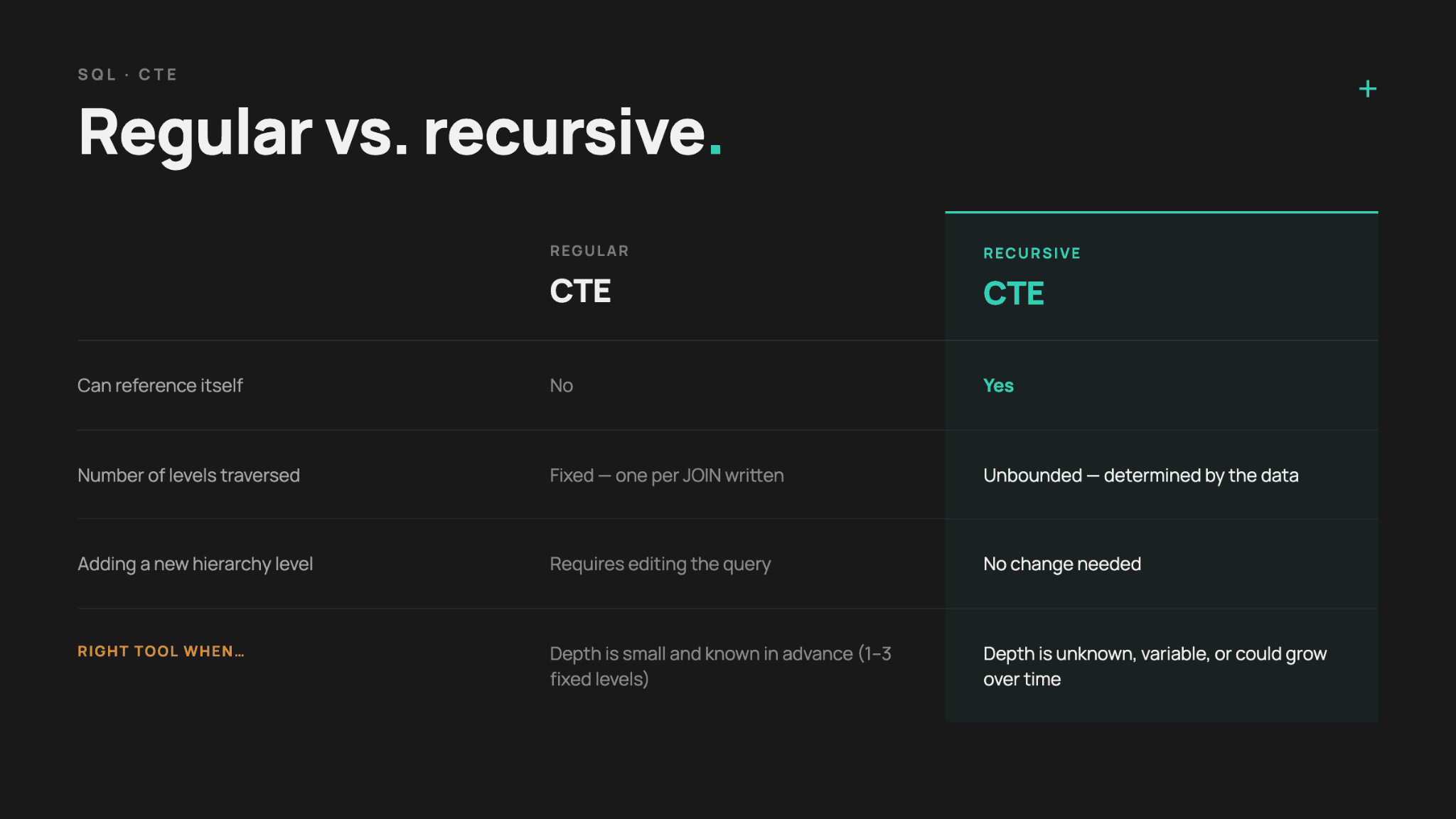
The single difference is that a regular CTE runs once and produces a result set, while the recursive CTE can reference itself as a query and keep re-running against its own growing output.
In short, recursion is the single capability that makes the entire difference.
Let’s make this tangible on a familiar example.
A Regular CTE, One Level Deep
Using the dataset from the Employee Hierarchy example, here’s a regular CTE that looks up each employee’s direct manager.
WITH manager_lookup AS (
    SELECT e.employee_id,
           e.employee_name,
           e.manager_id,
           m.employee_name AS manager_name
    FROM employees e
    LEFT JOIN employees m
	ON e.manager_id = m.employee_id
)
SELECT employee_id,
	   employee_name,
	   manager_name
FROM manager_lookup
ORDER BY employee_id;
Here’s the output.
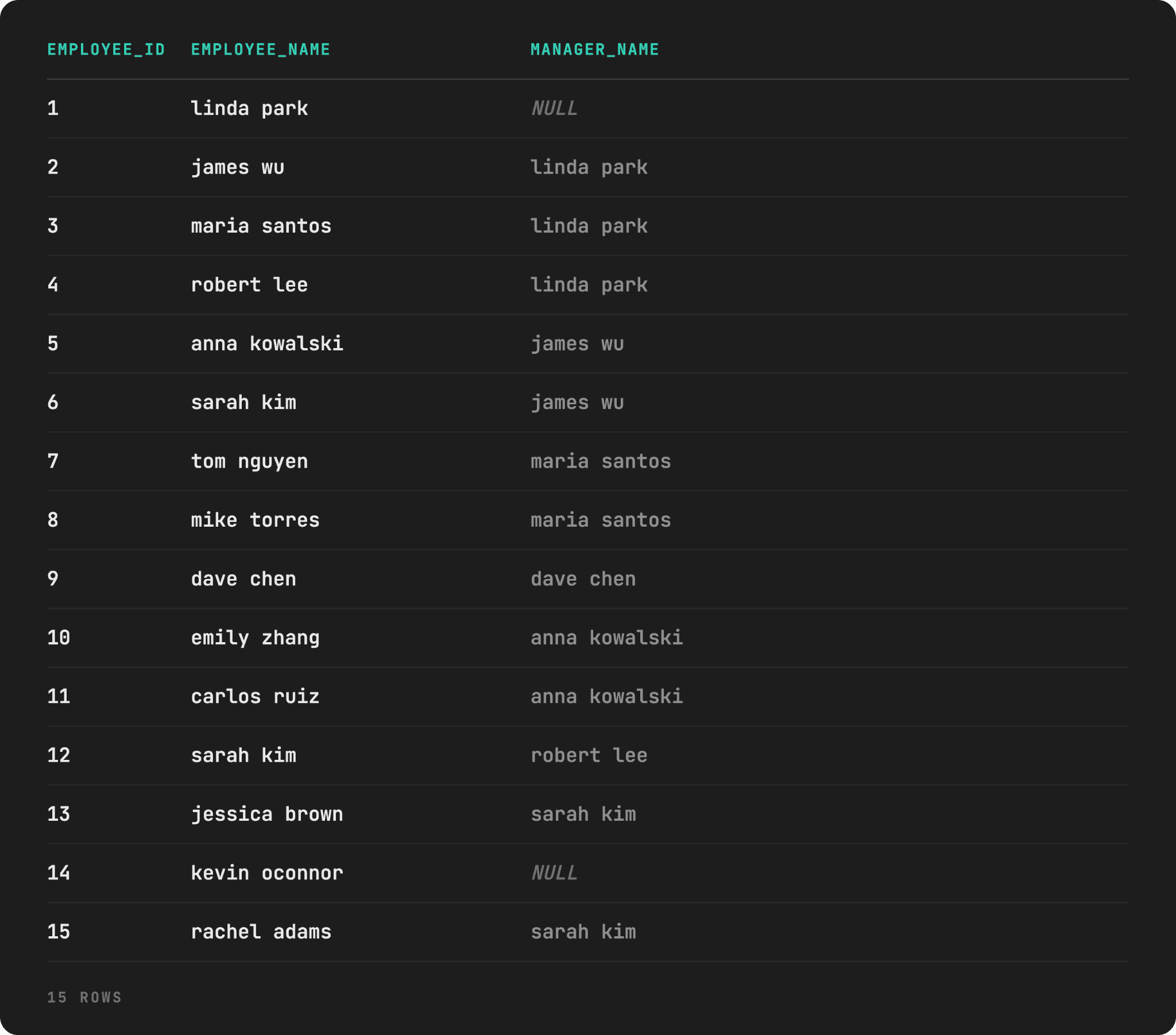
Two things to notice. One, dave chen’s manager shows as dave chen. The self-reference is fully visible in the output, since the LEFT JOIN just matches manager_id with the employee_id and no recursion is involved.
Two, kevin oconnor’s manager is not missing, but is displayed as NULL. This is, again, because of the LEFT JOIN: it keeps the row and shows the employee-manager broken link plainly.
Pushing the Regular CTE to Three Levels
Now, imagine that the actual task is “Get jessica brown's full management chain up to the CEO.” and you’re limited to using the regular CTE. It can still do it; it just needs three LEFT JOINs, since jessica brown is three levels down.
WITH manager_chain AS (
    SELECT e.employee_id,
           e.employee_name,
           m1.employee_name AS level_1_manager,
           m2.employee_name AS level_2_manager,
           m3.employee_name AS level_3_manager
    FROM employees e
    LEFT JOIN employees m1 ON e.manager_id  = m1.employee_id
    LEFT JOIN employees m2 ON m1.manager_id = m2.employee_id
    LEFT JOIN employees m3 ON m2.manager_id = m3.employee_id
)
SELECT *
FROM manager_chain
WHERE employee_id = 13;
This query works because we know the chain is exactly three levels deep.

And that exactly is the limitation I want to drive home: the query is correct only for employees whose chain is three levels or fewer. Run it for someone with a 4-level chain and level_3_manager would show their level-3 ancestor, not the CEO – the query simply has nowhere left to go, silently, with no error.
In other words, with every level you need to add another LEFT JOIN. A recursive CTE needs zero changes because it doesn’t hardcode a level count; it just keeps joining against its own growing result until nothing new is found.
Quick Overview: CTE Comparison
Recursive CTE vs Self Join vs Window Functions
These three tools are often confused because they’re lumped together whenever there’s talk of “advanced SQL”. However, they solve genuinely different problems.
We’ll use the same employees table as earlier to make the distinction between them clear.
Self Join: “Who Is Each Employee’s Direct Manager?”
A self join relates each row of a table to exactly one other row.
SELECT e.employee_id,
       e.employee_name,
       m.employee_name AS manager_name
FROM employees e
LEFT JOIN employees m
ON e.manager_id = m.employee_id
ORDER BY e.employee_id;
Here’s the dataset.
This is the right tool when the relationship is fixed at one level, e.g., “who’s your boss”, not “how far up is the CEO?”. Otherwise, with each level, you’ll have to add another self join, which is a limitation we discussed in the previous section.
Window Function: “Where Does Each Employee Rank by Seniority Within Their Department?”
There’s no traversal of any relationship with a window function. It simply calculates something across a set of rows the query already has, using PARTITION BY and ORDER BY.
SELECT employee_id,
       employee_name,
       department,
       hire_date,
       RANK() OVER (PARTITION BY department ORDER BY hire_date) AS seniority_rank
FROM employees
ORDER BY department, seniority_rank;
Here’s the output.
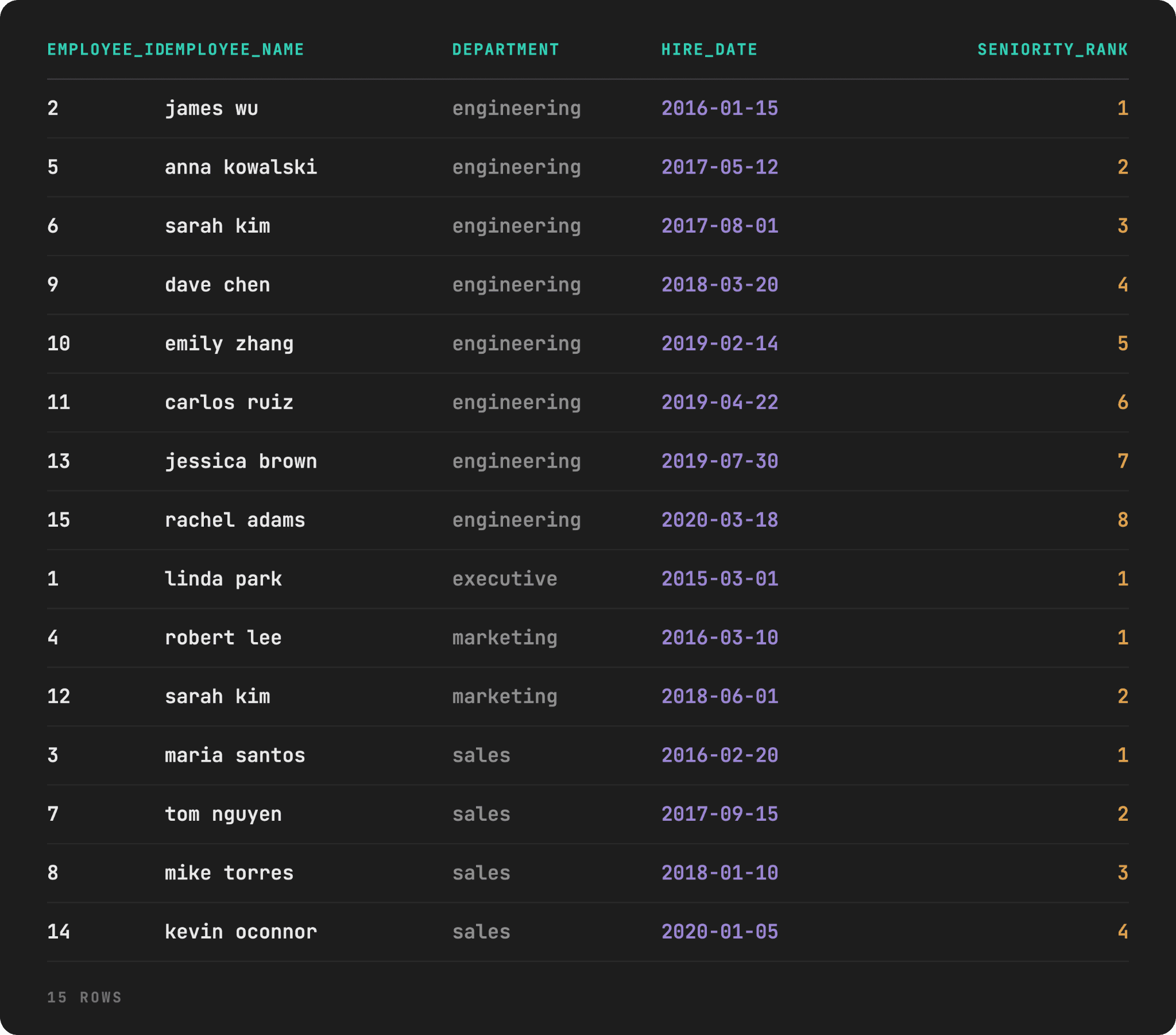
Notice how there’s no manager_id anywhere. That’s because RANK() doesn’t care who reports to whom. It’s simply ordering employees within a group (department) by a value (hire_date). That has nothing to do with the org chart shape.
Put aphoristically, window functions are for calculations within the rows you already have, not for expanding outward to find rows you don’t have yet.
Recursive CTE: “How Many Levels Deep Is Each Employee Below the CEO?”
This question implies an org chart of an unknown depth; neither self join nor window functions can answer it correctly.
So, full circle: a recursive CTE in the Employee Hierarchy example was not a stylistic preference, but the only way to solve that problem.
WITH RECURSIVE employee_hierarchy AS (
    SELECT employee_id,
           employee_name,
           manager_id,
           department,
           title,
           0 AS level
    FROM employees
    WHERE manager_id IS NULL

    UNION ALL

    SELECT e.employee_id,
           e.employee_name,
           e.manager_id,
           e.department,
           e.title,
           eh.level + 1 AS level
    FROM employees e
    JOIN employee_hierarchy eh ON e.manager_id = eh.employee_id
    WHERE eh.level < 10
)
SELECT employee_id,
       employee_name,
       department,
       title,
       level
FROM employee_hierarchy
ORDER BY level, employee_id;
This is the same query from earlier in the article. No self join, and window functions can replicate that.
Quick Reference

Performance Best Practices
Everything covered so far has been about getting a recursive CTE to return the correct answer. Correctness and performance are separate concerns, and a recursive CTE that's technically correct can still be dramatically slow if it ignores a few structural realities about how recursion actually executes.
Here are the non-negotiable best practices for working with recursive CTEs.
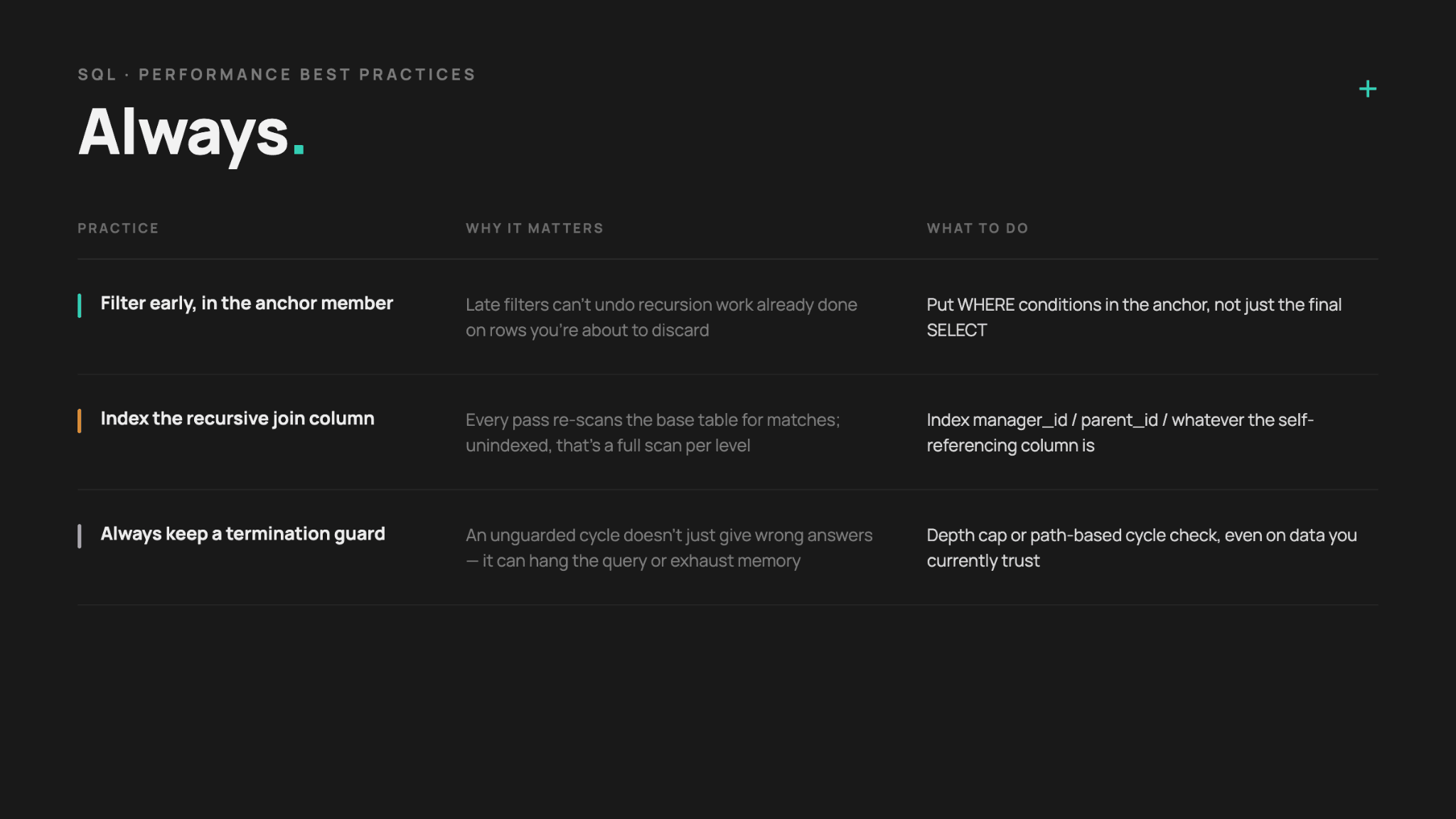
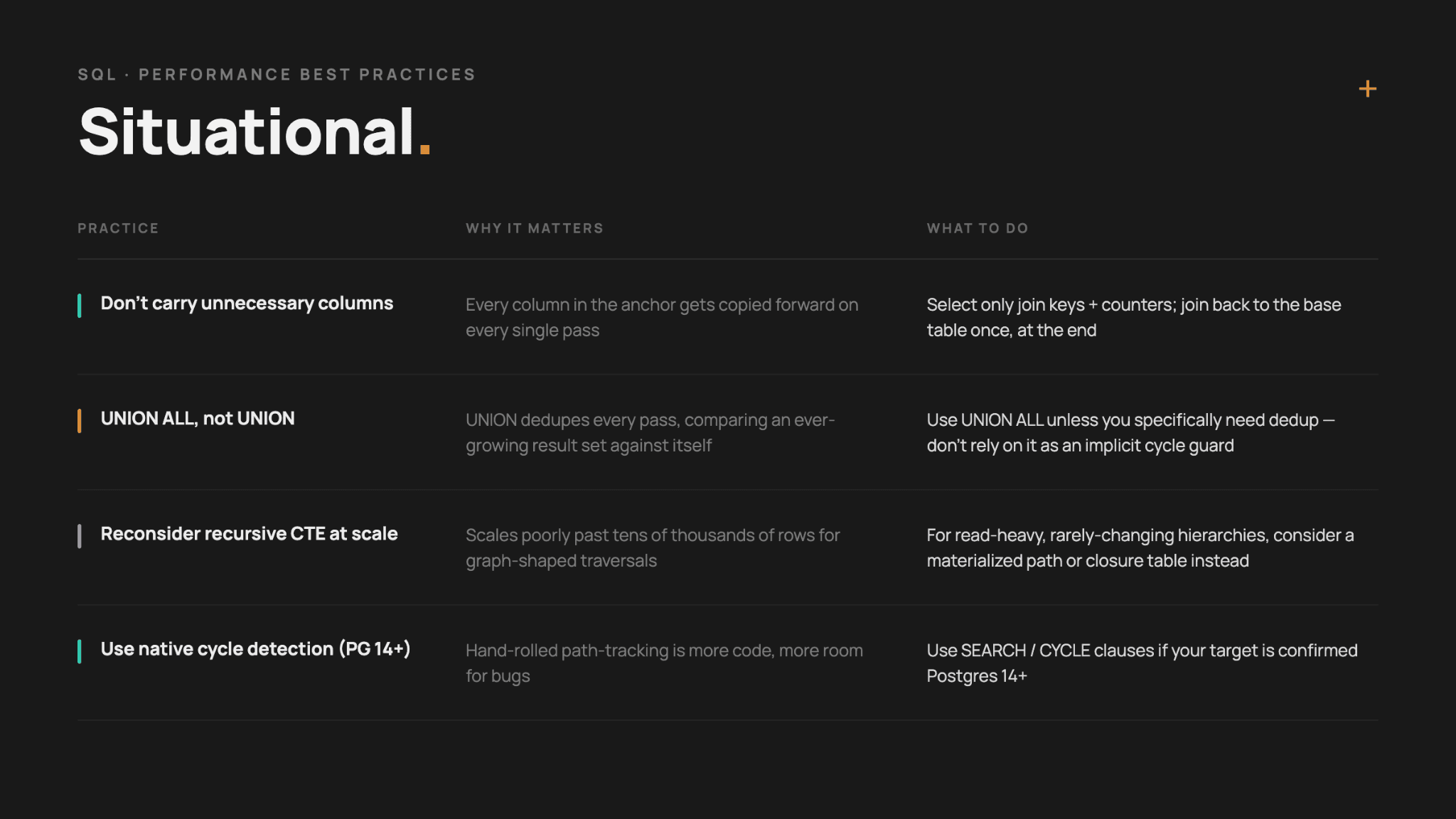
Below are also the context-dependent best practices.
Common Mistakes
Here’s an overview of common mistakes. There’s no new material here. The graphic below shows all the failure patterns we’ve already discussed throughout the article.
However, it’s good to have them all in one place for a quick reference.
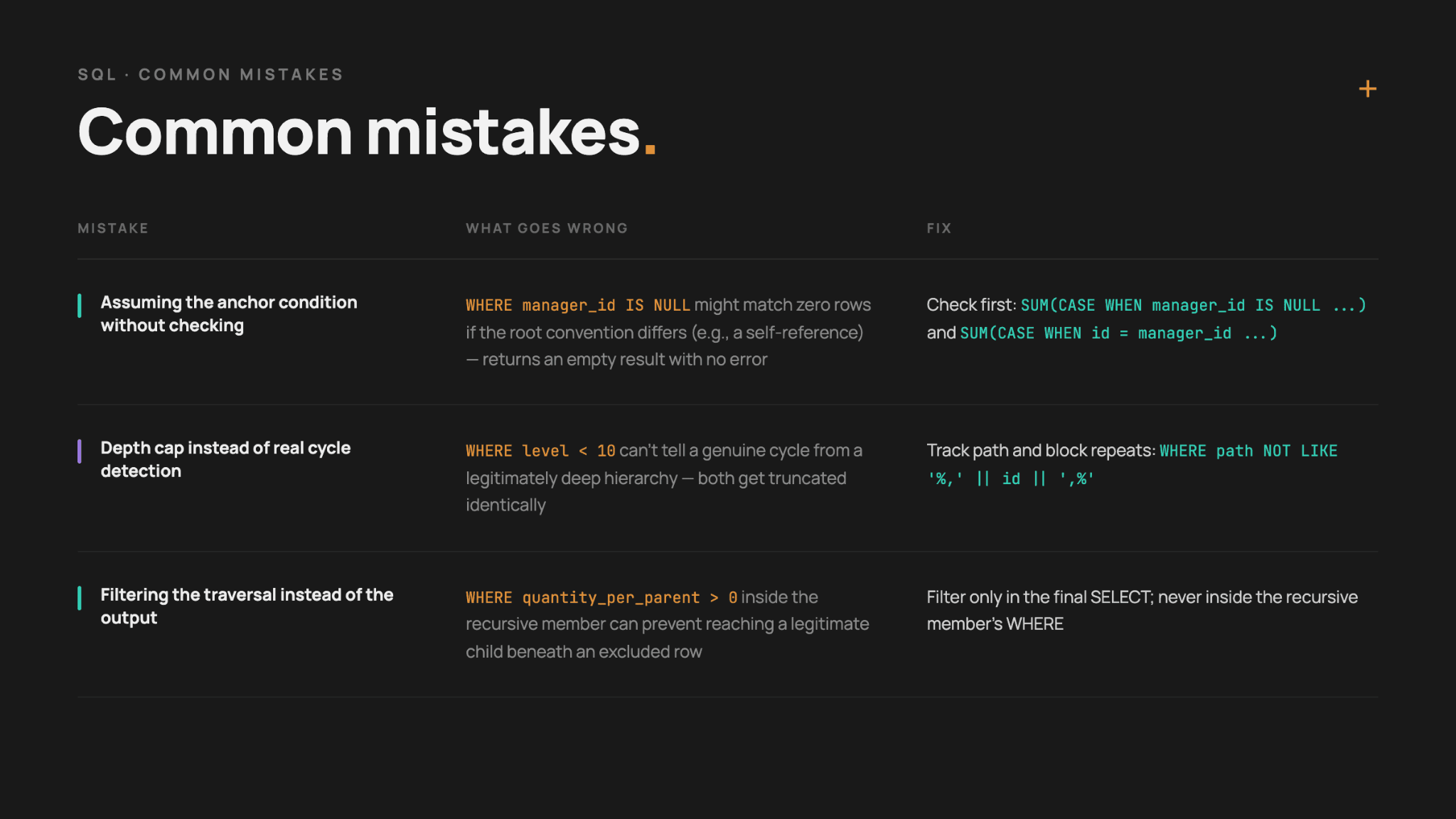
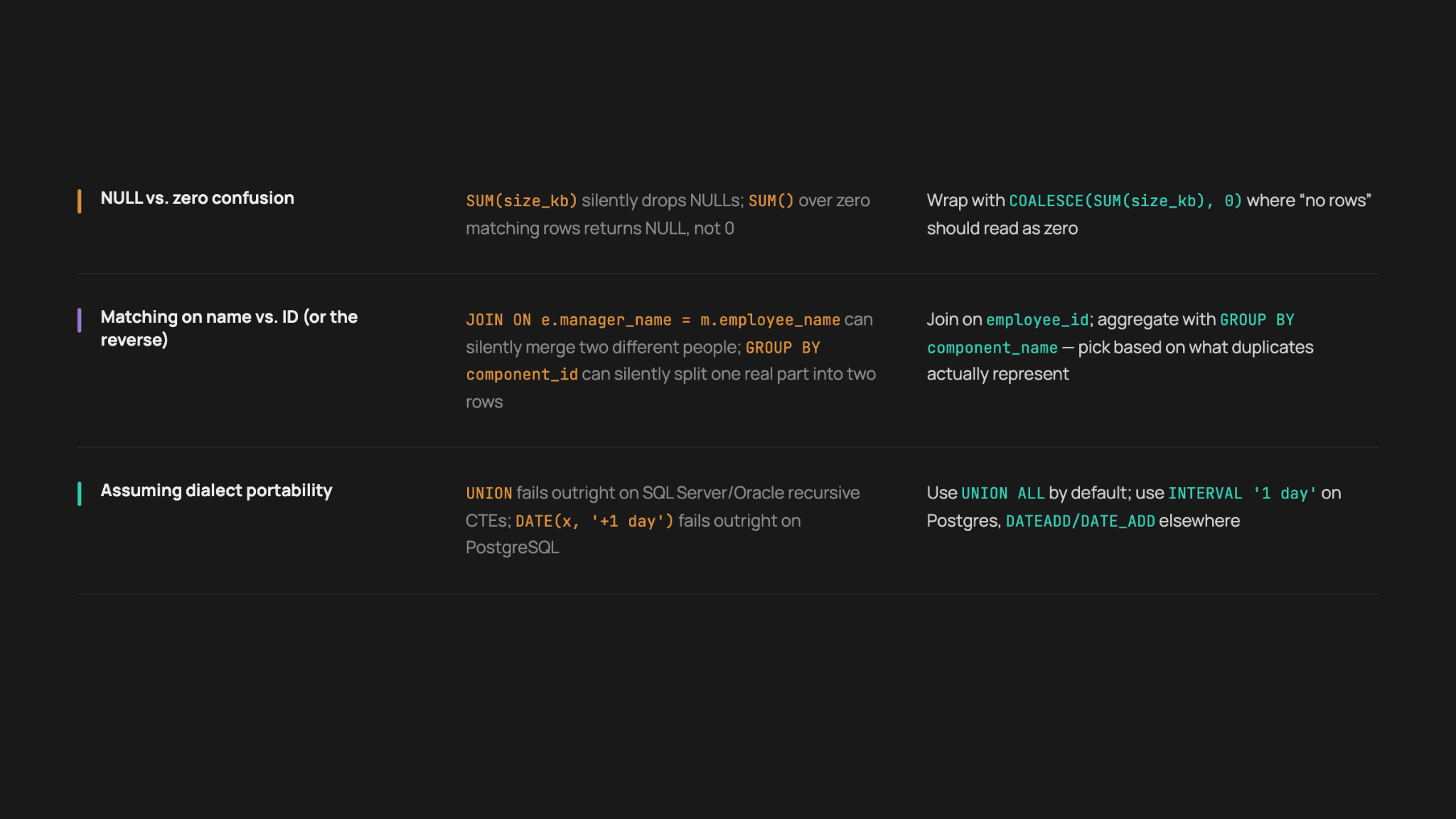
One mistake, though, is worth expanding on.
Depth Caps vs Real Cycle Detection
The guard in the Employee Hierarchy example (WHERE level < 10) and any other guard we used don’t stop runaway recursion, but they don't distinguish a genuine cycle from a legitimately deep hierarchy; both get truncated identically at the cap.
The fix for that is the guard that tracks the actual path and blocks revisiting any node already in it.
Here’s the full code.
WITH RECURSIVE employee_hierarchy AS (
    SELECT employee_id,
           employee_name,
           manager_id,
           0 AS level,
           ',' || employee_id || ',' AS path
    FROM employees
    WHERE manager_id IS NULL

    UNION ALL

    SELECT e.employee_id,
           e.employee_name,
           e.manager_id,
           eh.level + 1,
           eh.path || e.employee_id || ','
    FROM employees e
    JOIN employee_hierarchy eh
	ON e.manager_id = eh.employee_id
    WHERE eh.path NOT LIKE '%,' || e.employee_id || ',%'
)
SELECT employee_id,
	   employee_name,
	   level
FROM employee_hierarchy
ORDER BY level, employee_id;
This code returns the identical output we’ve shown in the example. This also means that dave chen and kevin oconnor are still absent from it; a different guard doesn’t change their unreachability.
Despite the path check not changing the outcome, it’s still worth having as a defense against a different, genuine cycle elsewhere in the same table.
Product Category Tree is where a genuine cycle actually exists, and where the fix demonstrably changes the outcome. The depth-capped version, run earlier against Smart Watches, produced 11 rows alternating between Smart Watches and Fitness Trackers before hitting the cap. Here's the same traversal with path tracking instead.
WITH RECURSIVE category_path AS (
    SELECT category_id,
           category_name,
           parent_category_id,
           0 AS level,
           ',' || category_id || ',' AS path
    FROM product_categories
    WHERE category_id = 11

    UNION ALL

    SELECT c.category_id,
           c.category_name,
           c.parent_category_id,
           cp.level + 1,
           cp.path || c.category_id || ','
    FROM product_categories c
    JOIN category_path cp
	ON c.category_id = cp.parent_category_id
    WHERE cp.path NOT LIKE '%,' || c.category_id || ',%'
)
SELECT category_id,
	   category_name,
	   parent_category_id,
	   level
FROM category_path
ORDER BY level;
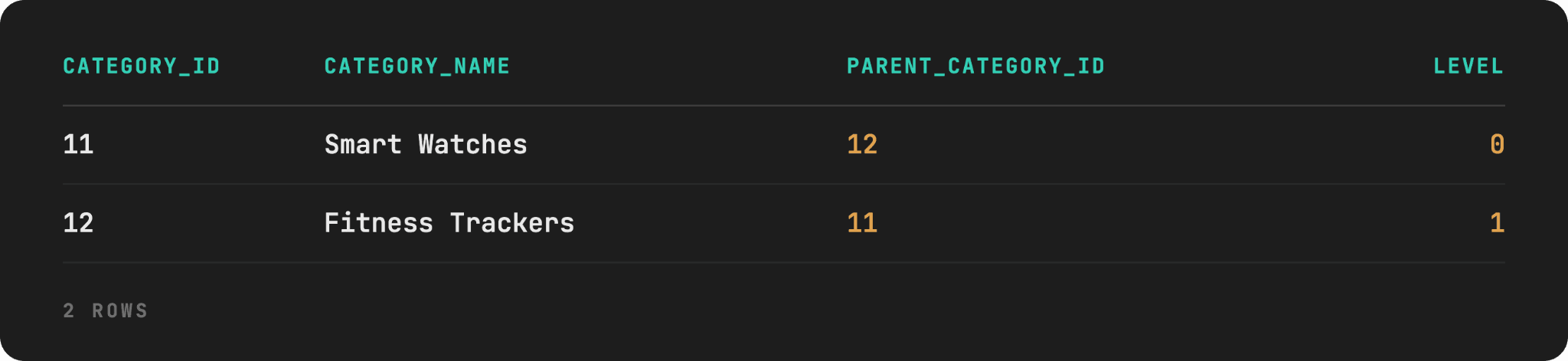
Now, the output is different: there are two rows, not eleven. Once the recursion reaches Fitness Trackers and looks for its parent (Smart Watches, category_id = 11), the path check finds 11 already present in ,11,12, and blocks that branch – the query terminates on its own, correctly, rather than being cut off wherever the depth cap happened to be set. This is the concrete difference between "delayed" and "fixed": the depth-capped version's row count depends entirely on an arbitrary number you chose; this version's row count reflects the actual shape of the cycle.
Recursive CTE Interview Questions
The sequence-generation and bounded-depth families covered by Generate Numbers, Generate Calendar Dates, and Recursive CTE vs. Regular CTE are well-documented as real interview questions. For example, LeetCode’s “All People Report to the Given Manager” matches the bounded-depth comparison. “Total Sales Amount by Year”, “Hopper Company Queries” (I, II, III), “Find the Subtasks That Did Not Execute”, and “Suspicious Bank Accounts” all use these exact patterns. Though most require LeetCode Premium to view, so won’t be useful to many of you.
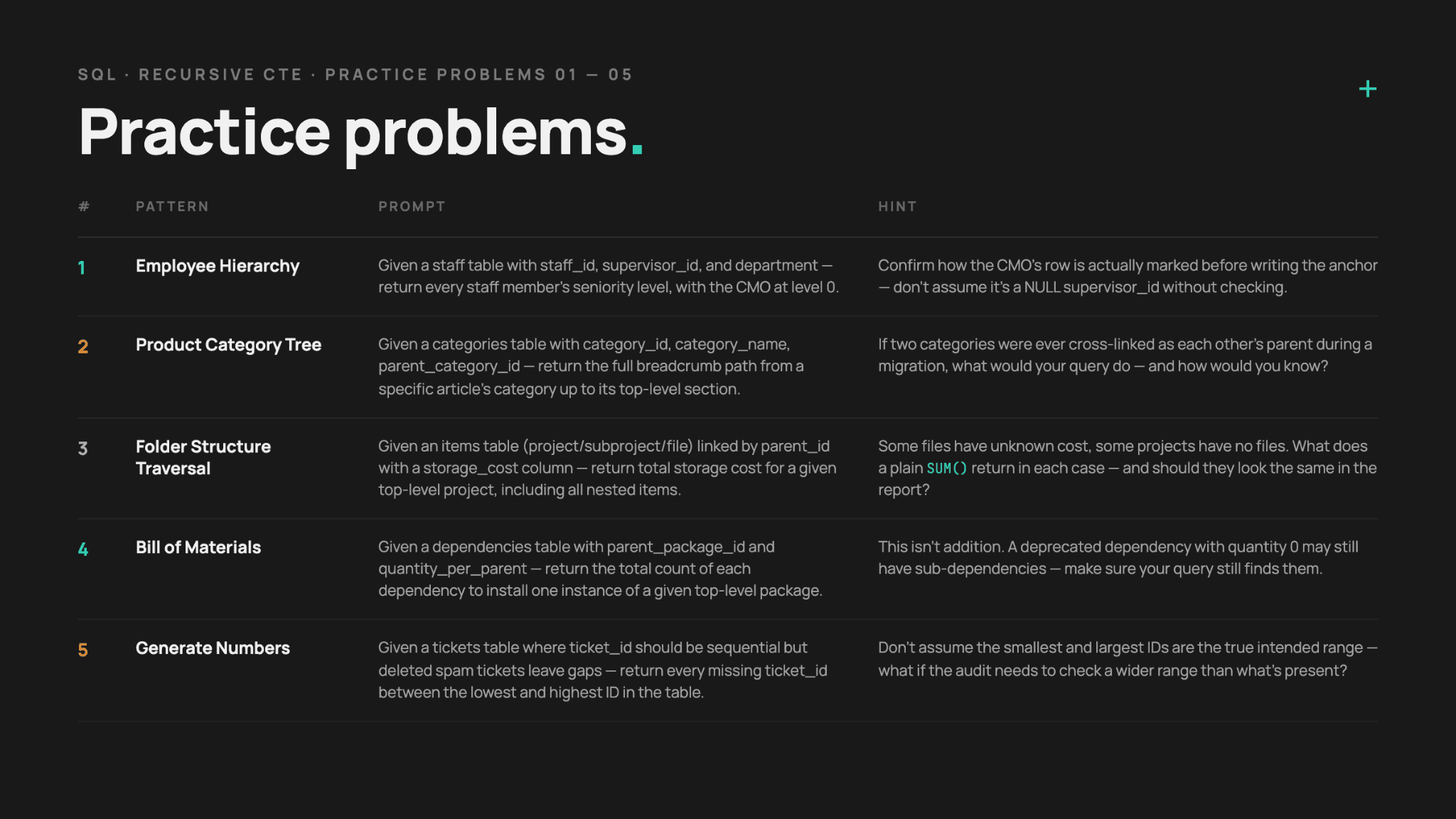
Therefore, we’ve created original interview prompts for all the patterns we showed in the article, to give you some more practice.

Conclusion
Recursive CTEs solve exactly one structural problem: walking a relationship of unknown depth without hardcoding how deep it goes. Everything else in this article branches out from that single idea – an anchor member to start, a recursive member to expand, a termination condition to stop, and UNION ALL to combine the results without paying for deduplication you don't need.
We’ve shown you eight common recursive CTE patterns, their business use cases, and how they differ from regular CTEs.
Avoid the common mistakes and performance issues we mentioned, and the interview questions we suggested for you shouldn’t be too difficult to solve.
FAQ
1. When should I use recursive CTE?
Whenever a relationship you need to traverse is of unknown or variable depth, i.e., a hierarchy, a chain, or a graph.
If the depth is capped and known, a regular self-join is a simpler and faster approach.
2. Are recursive CTEs slow?
No. But they can become slow if you make a few specific mistakes when using them:
- Filtering after the recursion instead of in the anchor member
- Missing an index on the self-referencing join column
- Carrying unnecessary columns through every pass
For graph-shaped traversals at real scale – tens of thousands of rows and up – recursive CTEs can become the bottleneck regardless of tuning. At that point, a materialized path column or closure table maintained on write is often the better choice.
3. What’s the difference between recursive and non-recursive CTEs?
The self-reference is the crucial difference between them. A regular (non-recursive) CTE is a named subquery that runs exactly once and produces one result set.
A recursive CTE references its own name inside its own definition, runs against its own output, over and over, until a pass produces no new rows.
4. Can recursive CTEs replace loops?
Yes, for set-based iteration over data that already exists in the database. A recursive CTE can compute anything an iterative loop over a table could, including running totals, sequence generation, and traversal, without shipping data out to application code and back.
However, it can’t replace a loop that needs arbitrary procedural logic between iterations: calling an external API, branching on business logic unrelated to the data itself, or maintaining state beyond what a few extra columns in the CTE can carry.
For pure data traversal or accumulation, use a recursive CTE. For procedural workflows, use an application-side loop or stored procedure.
5. Does MySQL support recursive CTEs?
Yes, since MySQL 8.0. It uses the standard WITH RECURSIVE syntax.
It’s worth noting that MySQL caps recursion at cte_max_recursion_depth iterations (1000 by default) and throws an error if a query exceeds it. This is a useful safety net, but could also mean that a query hitting that ceiling likely has a missing termination condition rather than a legitimately 1000-level-deep hierarchy.
6. Can recursive CTEs traverse graphs?
Yes. Path-based cycle detection, tracking which nodes have already been visited on the current path, is what makes graph traversal with recursive CTEs actually correct rather than just bounded.
That said, recursive CTEs scale poorly for graph-heavy workloads once a graph gets large. They aren’t optimized for that problem shape at scale; that’s why dedicated graph databases, such as Neo4j, Amazon Neptune, ArangoDB, JanusGraph, or TigerGraph, exist.
Share